
Importing the match schedule from your pool
Typing over twenty matches from the federation schedule is an evening's work and three typos. If you've linked your pool, you don't have to: the same source that delivers the standings also knows the schedule. Import once and your season is in there.
Who this is for
This runs on the open data of the Nevobo, the Dutch volleyball federation, so it's for teams playing in the Dutch competition. The option to link a pool only appears when the app language is set to Dutch; once a pool is linked, it's a team setting and the import works whatever language you personally use the app in.
Where to find it
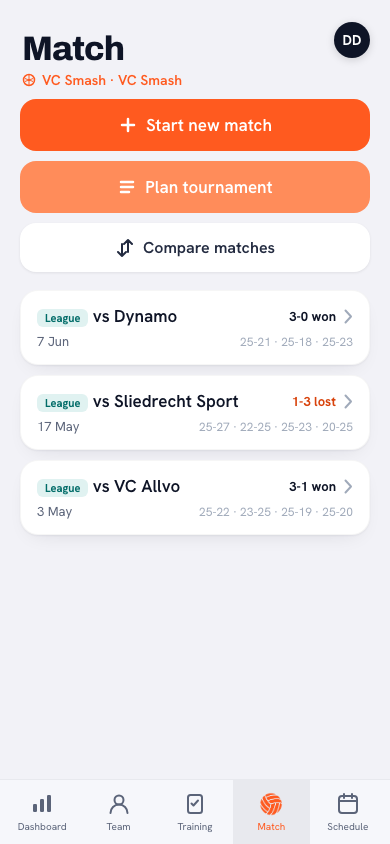
On the Match tab, every linked pool has its own card with the standings in it. Underneath those standings sits a line about the schedule, with an Import matches button next to it. That line is your signal: if there's something new or rescheduled in the pool it reads New in the schedule: 3; if everything is current it says Schedule is up to date. So on match days you see in one glance whether the federation changed anything, without chasing it yourself. Importing is done by the coach; players and parents don't see the button.
Importing in four steps
- Tap Import matches. The Schedule from the pool screen opens.
- Under Your team, pick how your team is named in this pool. The federation writes something like "Havoc HS 2" where you say "Men's 2" — which is why you choose the right name from the list yourself. Only that team's matches are imported. Koach remembers the choice per pool, so you don't have to make it again next time.
- Check what's about to happen. The counts sit at the top, the matches themselves underneath: opponent, date, time and home or away, each row labelled New or Updated.
- Tap Import. The matches land in your calendar and in your match list.
What comes along per match
From the schedule come the date, the start time, the opponent, home or away, and the venue — that last one lands on the match as its location. The venue's address does not go on the match itself: it's stored with the location, so the map link is right and the mileage for the driving rota is correct for every match in that same hall from then on. The match type comes from the pool too: import your cup pool and those matches get the cup label, not the league one.
Duplicate matches: what Koach recognises
The danger with importing is the doubled calendar: you'd already planned the first six matches yourself and after importing everything is in there twice. That doesn't happen. Koach first tries to match every match from the schedule to one you already have, in three steps:
- On the federation's match number. If the match was imported here before, that's the safest key — even if the federation rescheduled it afterwards.
- On date plus opponent. That way a match you planned yourself is simply adopted instead of duplicated. Spelling doesn't matter: "Havoc HS 2" and "HAVOC HS 2" count as the same team.
- On opponent and home/away, within three weeks of the scheduled date. This catches the case where you planned it yourself and the federation moved it afterwards. Three weeks is safe, because the home and away fixtures against the same club are months apart.
The four counts above the list
- New — matches that weren't there yet; those get added.
- Updated — matches you already had that the federation changed. If the date moved, a note Moved from … is added so you see the shift.
- Unchanged — nothing to do. This also covers your played and cancelled matches: results, statistics and sign-ups are attached to those, so the import leaves them alone.
- Skipped — only matches that were imported earlier and that you then edited yourself. They carry the label Nevobo · edited by you on the match and stay exactly as you set them. Your version always beats the federation's.
Import again after every round. Rescheduled matches are the classic reason half a team turns up on the wrong day. The schedule line under the standings tells you in one sentence whether anything changed — and one tap puts it right.
Frequently asked questions
I already planned my matches by hand — will they now appear twice?
No. Koach first matches every match from the schedule to one you already have: on the federation's match number, on date plus opponent, or on opponent and home/away within three weeks. Only when nothing fits at all is a new match added.
What happens when the federation reschedules a match?
It shows up under 'updated' the next time you import. The new date and time land on the same match — so no second one appears — and the note gets 'Moved from' with the old date, so you can see the shift.
I changed a start time myself. Will it be overwritten?
No. As soon as you edit an imported match yourself, it gets the label 'Nevobo · edited by you' and the import leaves it alone from then on. It appears under 'skipped' and stays exactly as you set it.
Can I import my cup pool's schedule too?
Yes. Importing works per pool: every linked pool card has its own schedule line, its own team choice and its own button. The matches from that pool get the match type you set for that pool.
Is there anything left to fill in after importing?
Only what the federation doesn't supply: your lineup, attendance and the driving rota if you use one. Date, time, opponent, home or away and the venue are already there.
Never type over a schedule again
Link your Nevobo pool in Koach and import your whole season in one go.
Get started with Koach