
“The schedule never creates a training on its own. That’s the most important rule”
Koach founder Dennis Boekhout on the hall schedule for the club board: the hall as a floor plan, publishing a schedule, weeks that run differently, and why the coach keeps the final say.
Every club with more than a few teams has someone who makes the schedule: which team trains when, in which hall, on which court. That schedule usually lives in a spreadsheet or a PDF, and then every coach copies it by hand into their own calendar. If the hall is out for a week, the round of emails starts.
Since October the Koach club module has had a hall schedule with the hall as a floor plan. Dennis Boekhout explains where it came from, what a board member does with it, and why the schedule gives the coach a card instead of creating trainings itself.
Where did this come from?
“From a club that already had its hall times in the club module. Back then it was just a list: day, time, team, court. What you couldn’t see was the hall itself. Which court is still free at half past seven? Where are two teams side by side?
“The first question was actually a small one: being able to put more than one team on one court. At some sessions two or more teams share a court, and that didn’t fit a schedule where every block had exactly one team. A few days later it turned into a question about the whole hall.”
Why does that matter so much, more teams on one court?
“Because hall space is scarce. A club rents a few hours an evening, and everything has to fit into that. So sometimes you train with two teams on one court, or a youth group shares a court with another team. A schedule that says only one team fits on each court just doesn’t match what happens in the hall.
“So now you pick as many teams in a block as you need, up to twelve. If a team isn’t in Koach yet, you just type the name. That’s what I call a plain name: it’s in the schedule, but there’s no team behind it.”
What does a board member see when they open a hall?
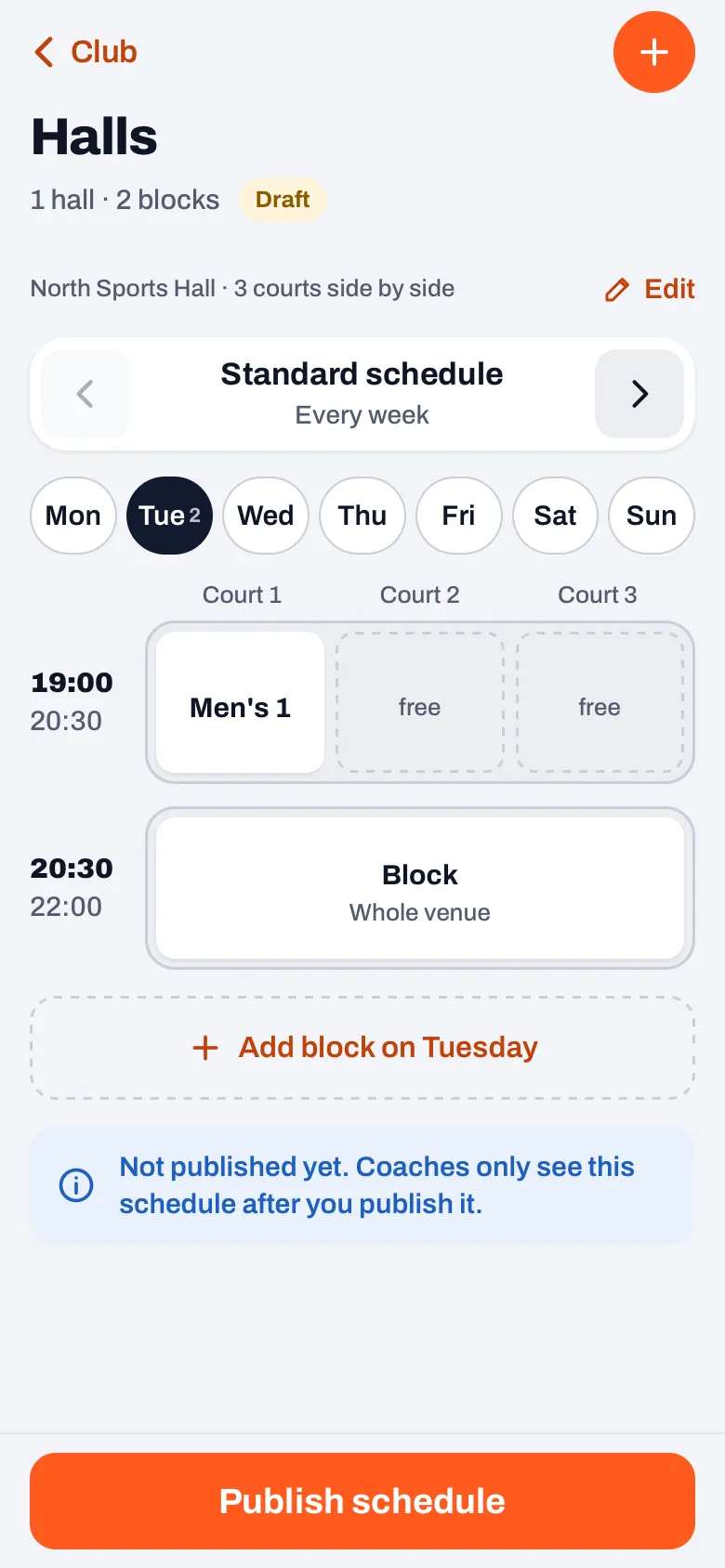
“The hall the way it really is. You enter once how many courts there are, whether they’re side by side or in two rows, and for which period you rent the hall. After that you see, for each day, a small floor plan per time block: which court is taken, by whom, and which court is still free.
“Tap a free court and you create a block right there, with the time of that time block already in it. A block can also cover several courts, or the whole hall. And on a wide screen, a tablet or a laptop, you see that hall’s whole week, one day under the other.”
What happens when you publish the schedule?
“While you’re building it, the schedule is on Draft, and only the board can see it. Only when you tap ‘Publish schedule’ does the coach of every team linked in the schedule get a card on their dashboard, with their team’s day, time, hall and court.
“After that it says Published. If you change something later, it becomes Changed, and when you publish again, only the coaches of the blocks that really changed get a new card. A different description doesn’t count as a change. I didn’t want a coach getting a card because someone fixed a typo.”
Why doesn’t the schedule just create the trainings itself?
“That’s the choice everything hinges on. It could: the schedule knows the day, the time and the period. But a team’s calendar belongs to the coach. That’s where players sign up, that’s where their reminders come from. If the board drops a whole season of trainings in there without asking, something happens in a team that the coach didn’t decide.
“Maybe a team is still training somewhere else during that period, or only starts later in the season. The coach knows that, the schedule doesn’t. So the schedule proposes and the coach decides. When you publish, it says so in so many words: no trainings are added to the calendar unless the coach chooses so.”
What does a coach do with a card like that?
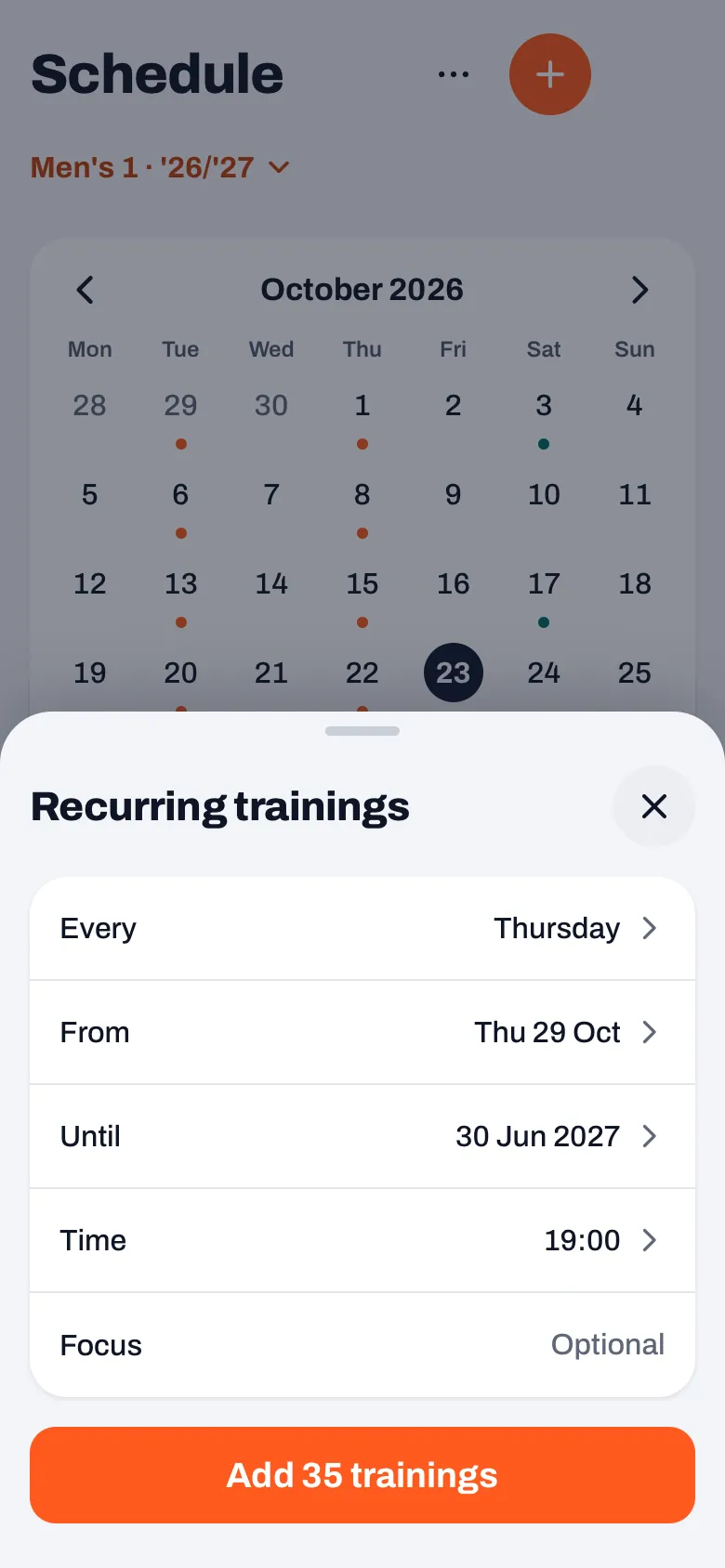
“At the top of their dashboard it then says, for example, ‘Your hall slot for Women’s 1 is set’, with the day, the time, the hall and the court. If they tap ‘Schedule as recurring training’, the same sheet they know from the Schedule tab opens, already filled in: the day, the time, from when and until when. The hall and the court go under Focus.
“They check it and tap add themselves. Existing trainings aren’t overwritten. The card only disappears once trainings have actually been added. If they don’t want to, they tap ‘Not now’. Then the card stays away until the board changes something in that block and publishes the schedule again.”
And a week where everything’s different?
“Autumn break, a tournament in the hall, a sports hall that’s closed. Then you pick that week in the schedule and tap a block: cancelled this week, or a different time or different courts. A whole day can also be cancelled in one go. You can give the week a name, for example Autumn break, so you can find it again in the schedule.
“Done? Then you tap ‘Pass on changes’. The coach gets a card like ‘No hall on’ that date, with ‘Cancel training’ or ‘Keep it’. If their training starts at a later time that week, the new time is shown, with ‘Move training’. Here too, the coach chooses. The app doesn’t cancel or move anything until they tap.”
And teams that aren’t in Koach yet?
“You put them in the schedule as a plain name, so the board has the full picture. A plain name just doesn’t get a card, because there’s no coach in Koach to send it to. When you publish, the app tells you that as well: which names are in the schedule as plain names and so won’t get a notification.
“If you do want those teams in Koach, you create them all at once in the Team log, with ‘Add teams’: the names one under the other, one per line. They’re then in the club owner’s name, still without a coach or players. A plain name in the schedule with exactly the same name is linked to the new team straight away.”
There’s also a type called Match. What’s that for?
“The same club asked for that a day later. At the weekend you often have the hall not for training but for home matches, and you want those in the schedule too. A block of the type Match reserves the hall, but never produces a coach card. Nobody needs to schedule a home match as a recurring training.
“Something small came out of the same round: a new block now starts right after the last block of that day, or at 18:00 if the day is still empty. Before, the app suggested 23:00. No training starts at eleven at night, so you had to change that time every single time.”
What does the schedule deliberately not do?
“It doesn’t create trainings and it doesn’t cancel any. It doesn’t send a push notification either: the card is on the coach’s dashboard, with the team they have open at that moment. Players and parents don’t see the hall schedule at all. For them nothing changes until their coach schedules, moves or cancels something.
“The schedule is a tool for the board and a proposal to the coach. Nothing more. It’s part of the Club plan, like the rest of the club module.”
One hall schedule for the whole club
The hall schedule is part of Koach Club: the board assigns the halls, the coaches schedule their own trainings. As a coach, you try Koach with your own team first.
Try Koach free