
Planning a tournament and tracking every match
A tournament day is the season in miniature: five matches, two courts, thirty decisions and a fairly wrecked coach by five o'clock. Those are exactly the days that evaporate administratively — unless you plan the tournament as one whole.
The tournament as a unit, not loose matches
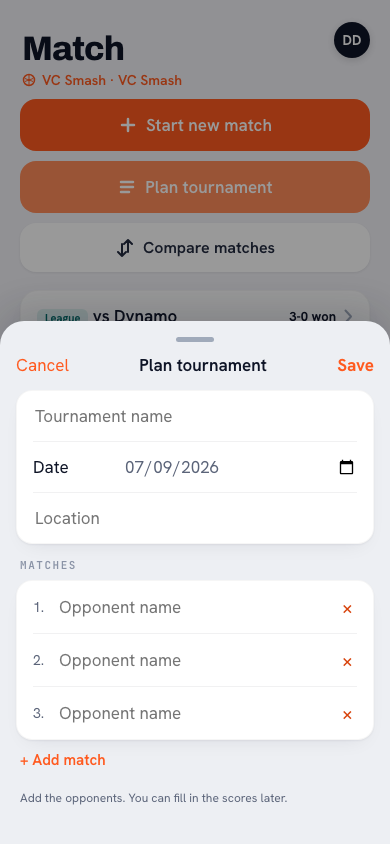
Whoever creates each tournament match as a standalone match ends up with five floating records and no connection between them. Plan the tournament as a whole: name, date and the matches underneath. In Koach you create the event via Plan tournament; the individual matches hang beneath it and the whole appears as one block in the calendar. Afterwards you read the tournament as one story: six matches, second place.
If something about the day itself changes, open the tournament and tap Edit in the top right. Two things live there. First the header: name, date and location. Second the matches themselves — per match the opponent, the start time and the set scores, plus a row at the bottom to add a match that got tacked on during the day. Statistics, lineup and attendance stay attached to the same match, so you lose nothing by correcting a time or a set score. Two things are not possible here: deleting a match that has already been saved, and giving a match its own venue — the location is set at tournament level. And the date of every match moves with the tournament date, because a tournament is by definition a single day. What else you can edit in the calendar is covered separately.
The tournament day itself: lower your ambition, raise your consistency
Keeping full statistics through five matches is elite sport for the scorekeeper. Choose your level in advance: everything (only feasible with a dedicated scorekeeper), scores and set results only (fine for the overview), or full tracking only for the matches that matter — the pool decider and the final rounds. A deliberate choice beforehand beats half-finished data afterwards.
What tournament data tells you extra
Tournaments are stress tests: short matches, little rest, straight back on court. That's exactly what makes the data interesting — who still performs in the fourth match (conditioning), who thrives in the short format (mentality)? Compare tournament performances with league numbers and you learn things about your squad a regular Saturday never shows. And for distributing playing time, a tournament is the ideal day: many matches means real minutes for everyone.
Rotate generously on tournament days. Five matches with the same six players wrecks your core and frustrates your bench. Agree a rotation plan in advance — the tournament is also the moment to give your bench match rhythm.
Frequently asked questions
Do I create a separate match for each tournament game?
Yes, but under the tournament: that keeps the games grouped, and the short matches don't pollute your league statistics. The type label does the filtering.
How do I keep statistics on a day with two courts at once?
Not by yourself — assign a scorekeeper per court (a parent, a substitute) and limit it to scores if you have to. The coach who wants to tap everything personally on tournament days is coaching nobody by five o'clock.
Do tournament matches count towards player statistics?
They're recorded and can be found per tournament; the label lets you separate them from league matches in season analyses. That way you keep both truths.
Can I still change a tournament's date or location afterwards?
Yes. Open the tournament and tap Edit in the top right. That screen holds not only the name, the date and the location, but the matches themselves as well: per match the opponent, the time and the set scores. Results and statistics stay attached to the same match; only the date moves with the new tournament date.
Can I add a match to a tournament that's already under way?
Yes. Open the tournament, tap Edit and add the extra match at the bottom — handy when you reach a crossover final that wasn't in the schedule beforehand. A match that has already been saved can't be removed here; it stays, along with everything attached to it.
Try it yourself in Koach
Less admin, more coaching — starting at your next practice.
Get started with Koach