
Creating a friendly or tournament match
Friendlies are the dress rehearsals of your season — and administratively they are usually ghost matches: played, won, forgotten. A shame, because that is exactly where you test lineups and players. Creating one takes a minute.
Why you record friendlies too
In a friendly you try what you dare not try in league play: the young setter for a whole match, the new starting rotation, the outside hitter at opposite. Those are precisely the experiments you want to look back on — otherwise you are testing without learning. A recorded friendly gives your experiments numbers.
Creating one in a single form
- Open the schedule, tap + and choose Match at the top.
- Fill in the opponent and date/time. From two typed letters onwards the app suggests clubs you have played before — "Did you mean …?" — so you don't end up collecting three spellings of the same club every season.
- Choose the match type. There are four, as chips that each have their own colour: Competition, Cup, Tournament and Practice match. For a friendly you pick Practice match: a type of its own with its own colour, so you no longer need a note to recognise it later. The same choice appears under Edit as well, in case a match changes category after all.
- Set home or away and tap Add match. Your starting lineup is set when you start the match, or in advance with Plan lineup in the match detail.
The match now sits in the calendar and on match day it starts with one tap in live mode. If something shifts along the way — a different hall, a different time — open the match and tap the pencil (Edit) at the top right; starting and editing are two separate buttons.
Do you play in the Dutch league and use Koach in Dutch? Then you do not have to enter your league and cup matches by hand: link your pool and import the schedule in one go. Matches you had already planned yourself are recognised and never added twice. Everything outside your linked pool — a friendly against the neighbours, a one-off tournament — you create as described above.
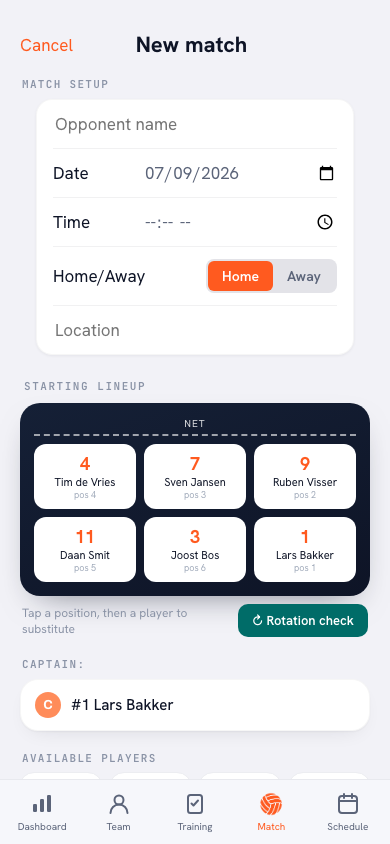
The second route: starting right away
Not every friendly is in the calendar in advance. For a game against another team that comes up spontaneously, tap + at the top right of the Match tab and choose Practice match (Start now). That begins a match at this very moment, it does not plan one: the start screen has no date picker, the date is today. League and cup matches you plan ahead in Schedule. If you play a game with your own players in two teams after practice, start a practice game from the training plan instead: those numbers are kept separately and do not count as a match.
A match started that way automatically gets the Friendly type. That saves a choice, and it keeps a league label off a knockabout that counted for nothing.
The type is the label, the note is the thinking
The label does the recognising. In the calendar and in your match list the date block of a friendly turns green, and in the match itself the type Friendly sits below the opponent. So you see at a glance which numbers came from a friendly.
What that label does not do is strike numbers out: the points, blocks and serves from a friendly count towards your players' season statistics just like those from a league match. The label is there so you can read those numbers properly — 'that 3-0 was against the fourth team' — not to filter them away.
The thinking goes into the match note under Summary after the match, which is only visible to coaches: that is where you record what you were testing, so three months later you still know why Lars set the whole match that evening. Playing a tournament with several short matches in one day? See planning tournaments.
Decide in advance what you are testing. A friendly without a question is just a practice with an audience. Write one line with the match — 'test: Lars setting the whole match' — and that evening's statistics have a purpose.
Frequently asked questions
Do friendlies count towards players' season statistics?
Yes, the numbers from a friendly count just as much as those from a league match. The 'Friendly' label and the green colour in the calendar show you at a glance which matches they were, so you can weigh them properly in your analysis.
What is the difference between starting a practice match via + and planning a match in the calendar?
Practice match under + on the Match tab begins a match immediately: the date is today and the type is set to friendly. Through the calendar you plan ahead and choose yourself whether it becomes a league, cup, tournament or friendly match.
Should I keep the same lineup discipline for a friendly?
Especially then — it is your chance to test an unusual lineup under match conditions. Prepare it in advance as always; only then is the comparison with your regular lineup fair.
How do I plan a series of friendlies in pre-season?
Create them all in one session in the schedule and note the test goal per match; after the match you record in the match note what the test showed. Three to five matches before the league starts is a common build-up.


Try it yourself in Koach
Less admin, more coaching — starting at your next practice.
Get started with KoachOr read first what the volleyball coaching app does.