
Volleyball scrimmage: an A vs B game that teaches your team
The short answer
A volleyball scrimmage, in its intrasquad form, is a game with your own players, team A against team B, at practice. It pays off when the teams are even, you score in short rounds and you pick one thing to measure beforehand. In Koach you start it from your practice plan, and the stats stay separate from your matches.
A volleyball scrimmage is the block your players wait for all evening, and also the block where nothing happens fastest: ten minutes of playing with a score nobody keeps. Here's how to set up A against B so the game pays off, and how to track it in Koach.
What is a scrimmage, and what isn't it?
In an intrasquad scrimmage your squad plays against itself: team A against team B, at your own practice. You decide the teams, the scoring, when players swap and when you stop. In Koach this is called a Practice game. In the US, "scrimmage" can also mean an unofficial match against another school; this article is about the version within your own team.
A friendly against another team is something else. There you play an opponent, usually with a referee and on another evening, and you want to know how your team does against that opponent. In an intrasquad scrimmage both teams are yours. A round won says nothing about your team, only something about the format you chose. The question isn't who wins, but whether the thing you're working on this week holds up in a real rally.
When do you use a scrimmage?
Usually as the closing block, after a technique and tactics block on the same theme. That's its fixed place in practice blocks: first in isolation, then with decisions, then in a game with a score. How those blocks fit into your whole practice is in running a volleyball practice. On top of that, there are three moments when a scrimmage gives you more than a separate drill:
- A new lineup or a new system. In twenty minutes your setter sees every rotation with real serves from the other side, without points at stake.
- Players who don't play much. Whoever sits on the bench on Saturday gets the rallies here that they miss in the match.
- Just before an important match. Rehearse the situation you expect: the serve of a strong server, or the end of a set from 20-22.
When not to: when the technique of the theme isn't there yet. A player who is just learning the overhead pass won't learn it in six against six. Why that is, and how to make a drill more game-like step by step, is in game-like drills.
How do you split team A and team B?
One rule: the teams have to be even. A game that's 12-3 after five minutes only teaches one side how to lose. So first divide the key positions (a setter on each team, the middles and the best passers spread out) and only then the rest. Look at the score after the first round and move one player if it's lopsided. Four ways to split, with their pros and cons, are in splitting teams fairly at practice.
Which scoring and rules work?
- Rounds instead of sets. Play to 15, or eight to ten minutes on the clock, and then start again at 0-0. Short rounds give you more starts and more endings, and a score that never becomes hopeless.
- Rotation on or off. With rotation you serve and rotate as in a match, so everyone plays every position in the order of your lineup. Without rotation you play a free format, for example with fixed positions or smaller teams.
- How the rally starts. A real serve is the most realistic. A free ball that you toss in gives more rallies per minute, and with young or less experienced groups that's often the better choice.
- Scoring with a purpose. Let the scoring reward what you're working on: a bonus point for a side-out on the first attack, or a point that only counts after three contacts. Eight of these formats are in volleyball scrimmage games.
- Smaller is fine. With ten players, play five against five. Fewer players per team means more contacts per player.
What do you measure in a scrimmage?
Measure one thing, and say out loud beforehand what it is. After a serving block you count serve errors per team; after a passing block you watch the passes. Whoever wants to see everything at once sees nothing in practice, because you're also coaching.
There are two levels. The simple one: per rally, who won the point, who scored and who made the error. You can manage that alongside coaching. The detailed one: a rating for every contact, but only for the skill that matters. That's a job for an assistant or a player who is resting. What you do with the number matters most. If it's disappointing while it went well in the drill, your drill isn't transferring. If it goes well at practice and not on Saturday, that's a familiar pattern with its own approach.
How to track a scrimmage in Koach
In Koach the scrimmage is a Practice game: a block in your practice plan, with its own start button. This is what it looks like in the plan of a practice:
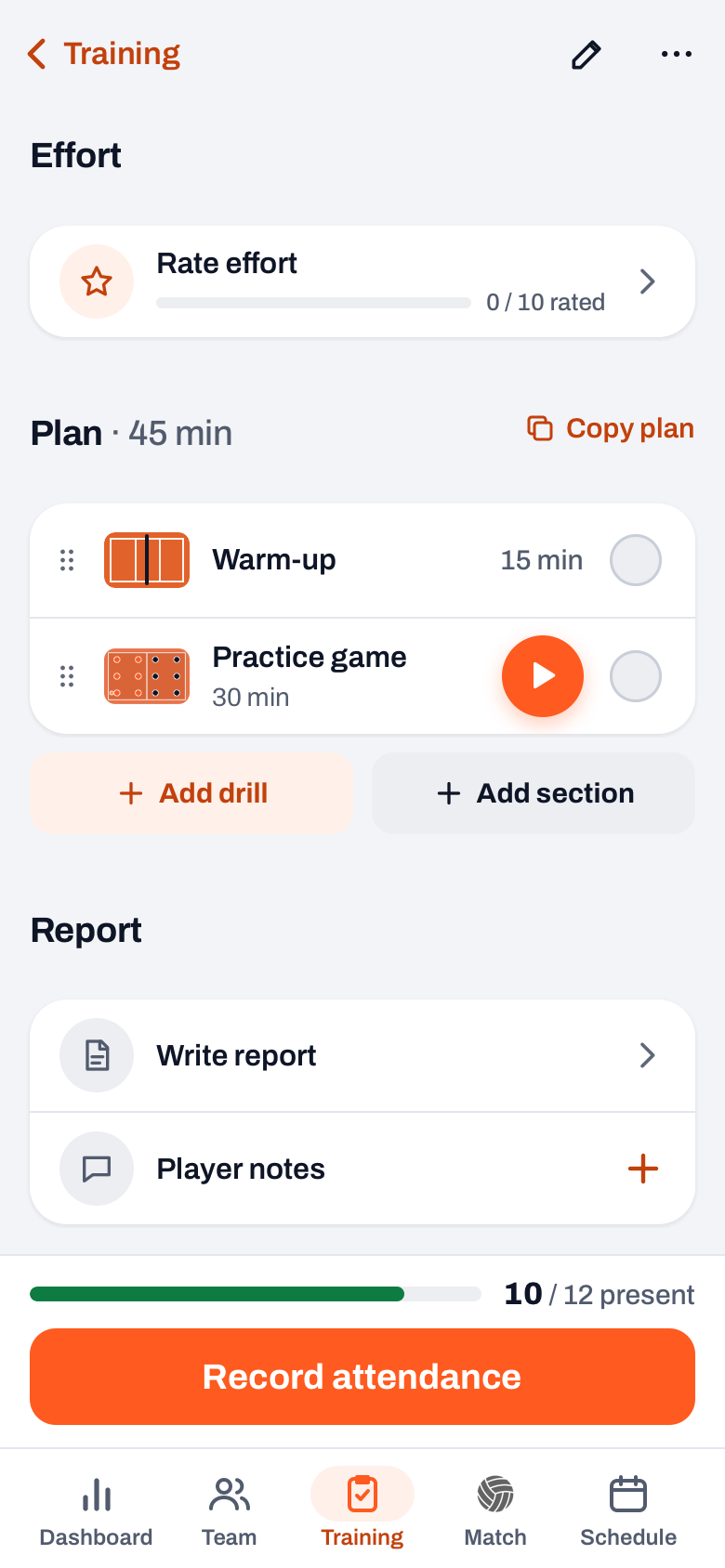
- Put it in your plan. The Practice game is a fixed drill in Koach. You add it to the plan of a practice via Training > Drills > Practice game > Add to training, or in the plan itself with + Add drill. That block gets a play button on the right.
- Start it from the practice. Open the practice and tap the play button on the block. Only coaches have that button, and you can't start it from the drill list or the Match tab.
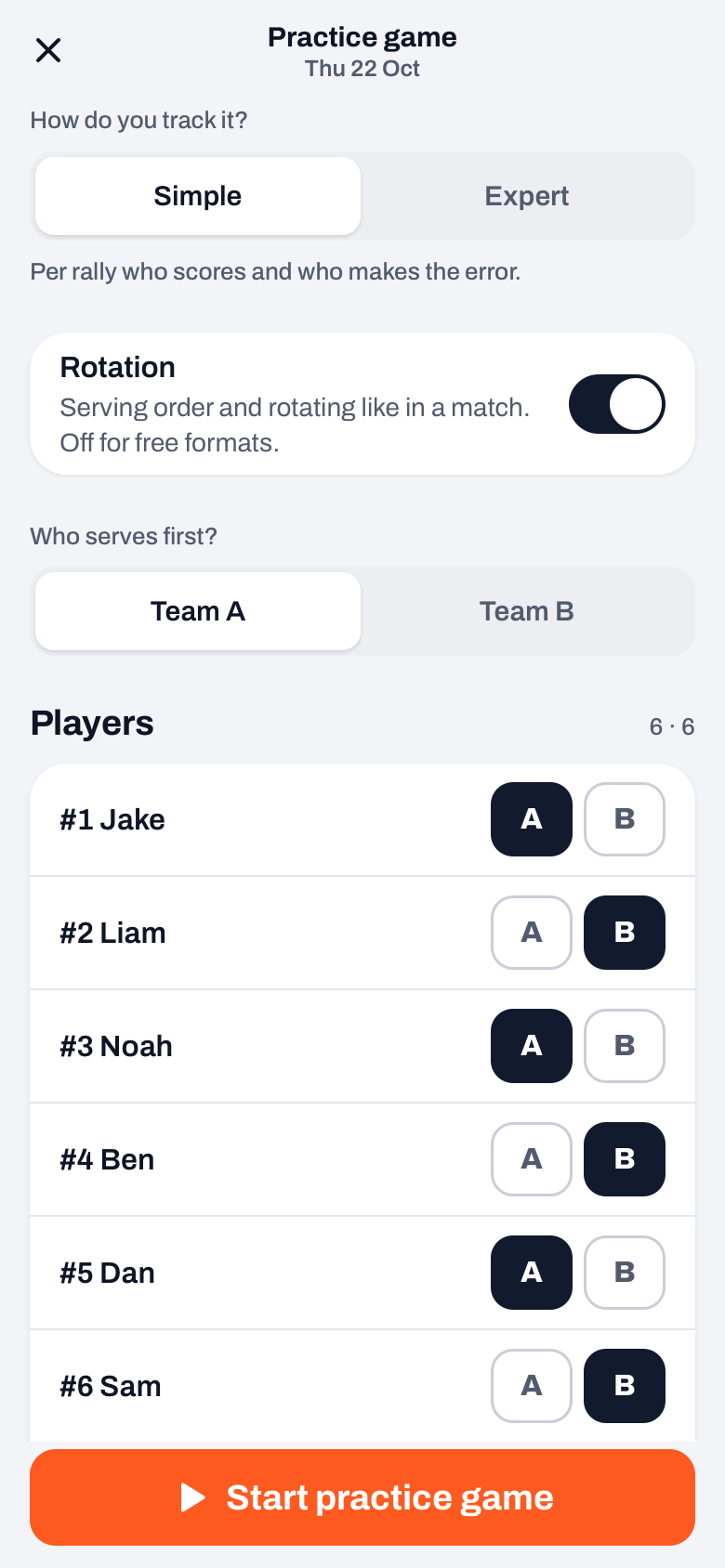
- Choose how you track it. Under How do you track it? choose Simple (per rally who scores and who makes the error) or Expert (every touch rated from 0 to 5, for both teams). With Expert, under Focus you choose which skills you rate; for the rest of the rally you only tap who wins it. Switch Rotation on or off and choose Who serves first?
- Split the teams. Tap A or B for each player. Whoever signed up for the practice is at the top, and that evening's guest players are there too. With rotation, the players of each team are listed in serving order: the first six on court, the rest on the bench, and with the arrow you move someone up. Fewer than six per team is fine too.
- Play and score. In Simple, tap + Team A or + Team B. Then you can indicate how the point was won and by whom, or skip that. New round keeps the score and starts again at 0-0. If it's lopsided, tap a player and choose Move to team B.
- Finish. In the three-dots menu, choose Finish and save. The stats per player are saved under Practice games.
14 days free, no credit card. Put a scrimmage in your plan on Tuesday and see per player afterwards what the game produced.
Try Koach at your practiceWhere do you find the scrimmage afterwards, and who sees it?
After saving, the overview opens right away. After that you find all practice games at the bottom of the Match tab, under Practice games. For each team you see the players with their points and errors, and with Expert their average rating per skill. With Share as PDF you send the overview on. In a player's profile, under Stats, are their points and errors from practice games. If you tracked in Expert, their average rating per skill is there too, next to the one from matches. That way you see whether a player passes differently at practice than on Saturday.
It stays within the coaching staff. Players and parents don't see practice games anywhere. They don't count in the match stats or towards Player of the Match, and they don't change anything about the attendance of the practice. There are no sets and no winner either, only the score per round. If your team belongs to a club on the Club plan, the club manager, the board and the technical manager see a summary per player in the team log.
One thing to know: a running practice game lives on the device you track it on until you save it. If you close the screen, the game keeps running, and you carry on with Resume on the block in your plan. A fellow coach only sees it once it's saved.
Scrimmage or friendly: which do you choose?
| What you want to know | Practice game (scrimmage) | Practice match (friendly) |
|---|---|---|
| Against whom | Your own players, team A against B | Another team |
| Where you start it | A block in your practice plan | Match tab, + and then Practice match |
| Score | Per round, without a winner | Sets and a result |
| Counts in the match stats | No | Yes |
| Who sees it | Coaches only | The team, like any match |
If you play a game against a team from the next court after practice, that's a friendly. How to create one is in creating a friendly match. Both are included in Coach and Club; what those cost after the 14 free days is on the pricing page.
Measure one thing and say it out loud. Start the scrimmage with one sentence, for example: today I'm counting serve errors. Players play differently when they know where you're looking, and that's exactly the point of the block.
Frequently asked questions
How long does a volleyball scrimmage last?
There's no fixed rule. In a practice of an hour and a half, 15 to 25 minutes is enough, preferably in short rounds to 15 points or of eight to ten minutes. Short rounds give you more starts and endings, and the weaker team keeps getting a new chance. A full set to 25 works too, but then there's often little time left for the rest of your plan.
What is the difference between an intrasquad scrimmage and a friendly?
In an intrasquad scrimmage your own squad plays against itself, team A against team B, as part of practice. A friendly is played against another team, with sets and a result. In Koach you start a scrimmage, the Practice game, from your practice plan and its stats are kept separately; a friendly is a Practice match that you create in the Match tab, and it counts as a match.
How do you make the weaker team more competitive?
Move one player to the other team after the first round, instead of reshuffling everything. Let the weaker team start with a lead, for example 5-0, or let the stronger team only score after three contacts. When you split the teams, divide the setters and the best passers first, because that's usually where the difference between the teams lies.
Do players see their stats from scrimmages?
No. In Koach, practice games are for coaches only. Players and parents don't see them anywhere, and they don't count in the match stats. As a coach you do see the practice game stats in the player profile, with Expert ratings next to those from matches. If you want to share an overview, Share as PDF creates a file that you send on yourself.
Does the practice game cost extra in Koach?
No. The Practice game is included in Coach and in Club, for every coach on the team. You can try Koach free for 14 days, with no credit card and every feature. What the plans cost after that is on the pricing page; the player account stays free.
Put your next scrimmage in Koach
14 days free, no credit card. After one practice you'll see per player what the game produced.
Get started with KoachOr read first what the volleyball coaching app does.