
Opponents the app remembers: never three spellings of one club again
“VC Smash”, “vc smash” and “Smash” are one club to you and three to any overview. Your head-to-head record stops adding up, your history is scattered and the driving rota works out kilometres to two different venues. So Koach suggests what you typed before — without filling in anything you didn't ask for.
“Did you mean …?” while planning
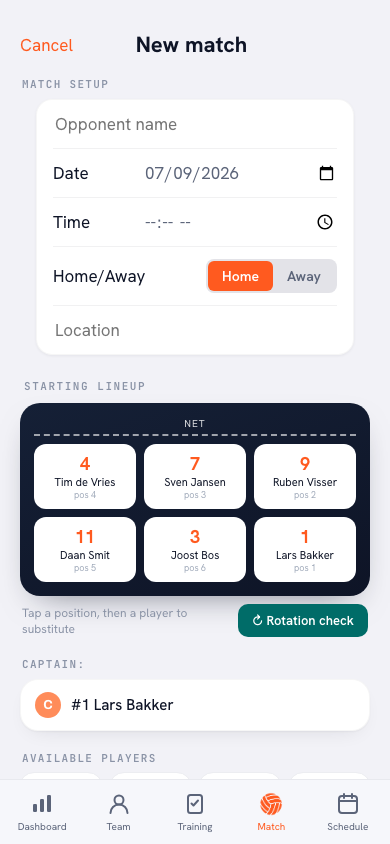
Type an opponent into a new match and a soft suggestion line appears under the field, headed Did you mean …?, with at most three club names as chips. They only show from two typed letters onwards — at one letter half the list would match. Names starting with what you typed come first.
If nothing matches your input, nothing appears: no “no results” line, no empty bar. Simply typing on is enough to ignore the suggestion. The same line shows up when editing a scheduled match and when adding the matches inside a tournament.
What a tap fills in — and what it leaves alone
Tap a chip and the name is always filled in; that is the suggestion, after all. The rest is only touched if the field is still empty:
- The venue is filled in if the location field is still empty and the app knows that club's venue. Typed something yourself already? Then it stays.
- Home/away is only set to away if you haven't touched that choice yourself. The moment you've tapped home or away, that's your call and the suggestion leaves it alone.
So the suggestion works like a helping hand, not like an autocorrect that overrules what you typed.
Where the list comes from
The suggestions come from your own match history: every season, including matches inside tournaments. Whoever you meet most often sits at the top, then the most recent encounter. The last spelling you used is the spelling the app suggests.
Near-duplicates are deliberately not merged: “Voleero HS 1” and “Voleero HS 2” really are two teams, and an app that pulled those together automatically would ruin your history instead of tidying it. That tidying is yours to do — and it costs two minutes, once.
The venue is only remembered for an away match outside a tournament. For a home match the location is your own hall and for a tournament it's the tournament venue; either of those would have the driving rota working out kilometres to the wrong place.
Tidying up in the management screen
Go to Profile → Your teams and tap 🏐 Opponents on your team's card (“Rename or remove remembered clubs”). Per club you see the name, the venue and how often you've scheduled them. There you can:
- Rename — put the spelling right. That only changes the suggestion; your played matches stay exactly as they are. And a name you've corrected here won't be overwritten again by a later typo.
- Update the venue — or fill it in at last if it says “Venue not known yet”.
- Remove — that name is no longer suggested. Did it by accident? Put it straight back. And if you schedule a removed club again later, it returns to the list by itself.
This screen is for the team owner; players and parents don't get there.
Clean club names are the foundation under your kilometres. The distances in the driving rota hang off the venue's name, so two spellings means entering the same distance twice. Tidying up once in the management screen saves you that all season.
Frequently asked questions
Does renaming change my played matches?
No. Renaming only changes what the app suggests when you plan a new match. Your played matches, results and statistics stay exactly as they are.
Why doesn't a suggestion appear?
The suggestion starts from two typed letters, shows at most three hits, and stays away if no club resembles your input or if the name is already in the list exactly as typed. With zero hits the app deliberately shows nothing.
Why doesn't the app remember the venue of a home match?
For a home match the location is your own hall, and for a tournament it's the tournament venue. Remembering either as 'that club's venue' would have the driving rota measuring kilometres to the wrong place, so only away matches outside a tournament count.
Can I bring back a club I removed?
Yes. Straight after removing it you can put it back, and if you simply schedule that club again later it reappears in the suggestions by itself.
Try it yourself in Koach
Less admin, more coaching.
Get started with KoachOr read first what the volleyball coaching app does.