
Stack Team App alternative for volleyball: club app or coach app?
The short answer
Stack Team App is a free platform that lets a club build its own app and website, with news, events, chat and payments. If you coach a volleyball team and want an app for that team, Koach is the alternative: schedule, attendance, lineups and live scoring per player in one app. Koach does not build websites.
You're looking for a Stack Team App alternative for your volleyball team. Maybe your club runs its news and website on Stack, while what you need as a coach is a way to handle your lineup, attendance and matches. Here's an honest look at what Stack does well, what Koach does differently, and when you're better off staying with Stack.
What is Stack Team App, and what does it do well?
Stack Team App, made by Team Mates Pty Ltd, describes itself in the App Store as a free platform that lets any sports team or club create its own app, along with a free website that stays in sync with it. It has been in the App Store since 2013 and has more than a million downloads on Google Play (checked in October 2026). According to the App Store description, this is what you get:
- News and push notifications. Posts, events, photos and videos go straight to your members' phones, and you can send newsletters and documents.
- Events with RSVPs. Members say for each event whether they're coming, they get reminders, and you keep track of attendance.
- Members, groups and chat. You invite members through the app or import your whole member list at once from the website dashboard. There are separate access groups for players, parents and coaches, plus private messages and group chats.
- Payments and sales. Collect payments in the app with Team Payments, and sell tickets, merchandise and memberships through a store in the app or on the website.
- Polls, calendar and results. Surveys and voting in the app, events in your phone calendar, and links to standings, fixtures, results and live scores across multiple teams.
That's a lot, and for a club that wants one place for news, members and its website, it's a strong package. The app itself is free. It does show ads, which you can remove in the US App Store with the Remove Ads yearly subscription for $2.99. The App Store lists English as its only language.
When do you need a Stack Team App alternative?
Stack is built for every sport and for the whole club. That's its strength, and it's also why volleyball coaches keep looking. The App Store description mentions no lineups, no rotations and no points per player. For you as a coach, that's exactly where the work starts. So a real alternative for your volleyball team needs to do four things:
- A schedule for practices and matches, where you set up your regular practice night in one go and get a feed for your phone calendar.
- Attendance for every practice and match, where players and parents RSVP themselves and you see who actually showed up.
- Lineups and live scoring that understand volleyball: 5-1, 4-2 or 6-2, the serving order, the libero and who won the point.
- Languages that fit your team, including for players and parents who would rather read in their own language.
For a general way to judge apps like this, see the checklist for choosing the best volleyball app for coaches.
14 days free, no credit card. Add your team tonight, schedule the next few weeks of practice and see after one match whether it saves you work.
Try Koach with your volleyball teamWhat Koach does differently from Stack Team App
We make Koach, so read this as the maker's explanation and check it yourself during the trial. Koach isn't a kit for building your own club app and website. It's an app for the volleyball coach and their team. You work in five tabs: Dashboard, Team, Training, Match and Schedule.
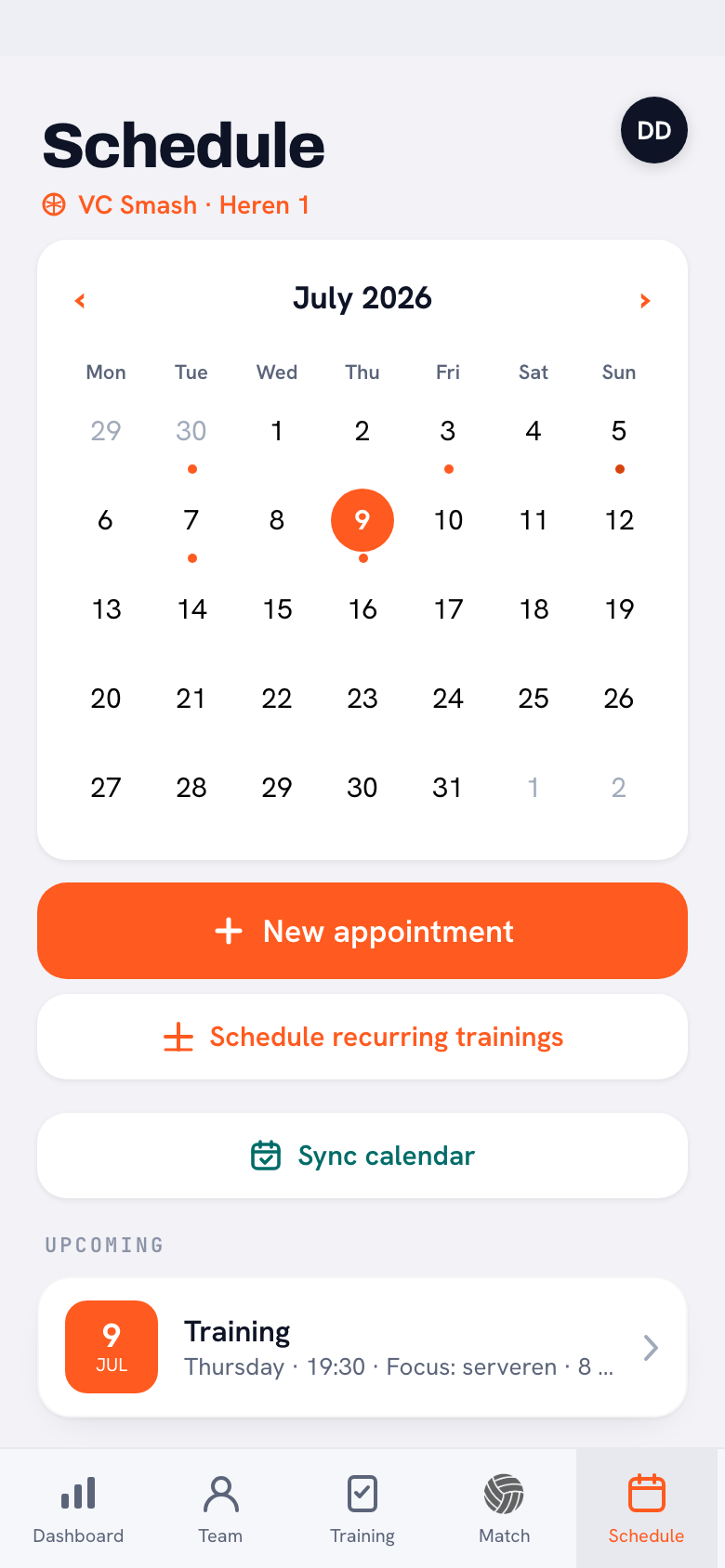
Schedule and attendance
Under Schedule you plan practices, matches and one-off events. With Schedule recurring trainings you set up your regular practice night in one go for whatever period you choose, the whole season if you like. With Sync calendar, you, your players and their parents add the team schedule to your own phone calendars, and from then on everything shows up automatically. Players say yes or no to each practice and match, with a reason if they can't make it, or tap Sign up for all sessions once. Parents do it for their kids. At practice you mark who was present, late or absent, and for matches you also see per player whether they were there. Each player's attendance adds itself up over the season.
Live scoring with your lineup
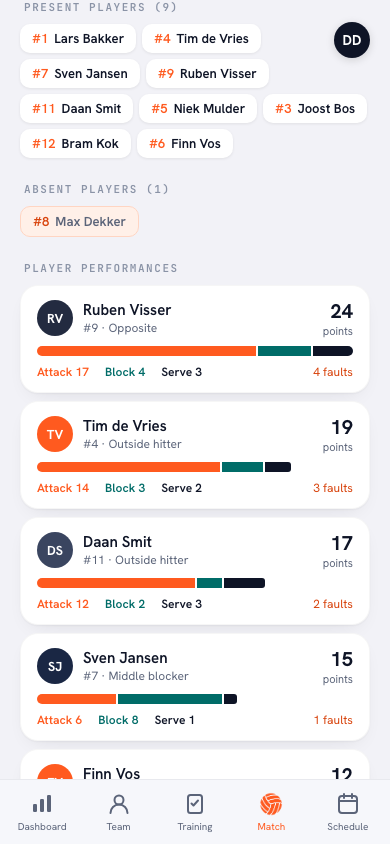
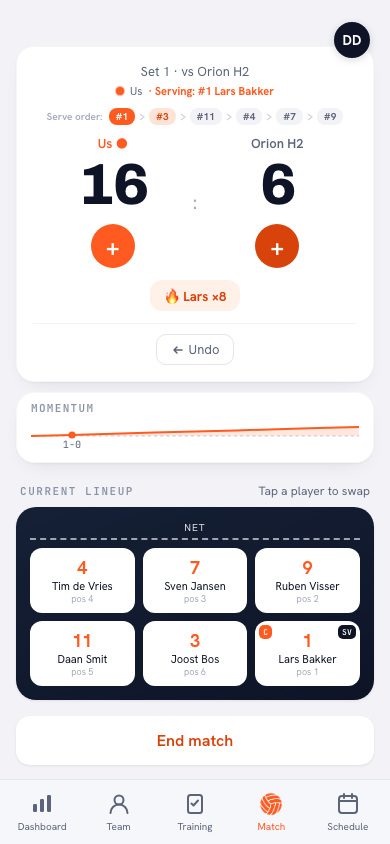
This is the biggest difference. In Koach you set up your lineup in a 5-1, 4-2 or 6-2, assign your setter and libero, and tap View all 6 rotations to see how your team rotates through. On match day you answer Who scored the point? after every rally, then how: Attack, Block, Serve / Ace or Opponent error. The serving order sits at the top, you sub by tapping a player, and with Swap libero automatically the libero goes in and out on their own. After the match, points and errors per player are ready. Stack links your app to results and live scores; Koach records what happened in your match, player by player.
Announcements instead of chat
Koach has Announcements in three types: an announcement, a poll and a task that someone answers with I’ll do it. In the iPhone and Android app, players and parents get a push notification when the schedule changes and a reminder the day before. There's no chat or private messaging, so your team's group chat stays where it is.
Players and parents join for free
Players and parents get their own free account. You send them an invite link, and from then on they see the schedule, RSVP and read the announcements. A second coach works in the same team with you. And it's volleyball and nothing else: Koach is built only for indoor volleyball. There's more on the team side in the volleyball team app.
Stack Team App vs Koach, side by side
Checked in October 2026 in the App Store and on Google Play. "Not listed" means Stack's App Store description doesn't mention it.
| What you want | Stack Team App | Koach |
|---|---|---|
| Build your own club app and website | Yes | No |
| Messages with push notifications | Yes | Yes, in the iPhone and Android app |
| RSVPs | Yes, per event | Yes, per practice and match |
| Events in your phone calendar | Yes | Yes |
| Chat and private messages | Yes | No |
| Payments, tickets and merchandise | Yes | No |
| Lineup with rotations and libero | Not listed | Yes |
| Live points per player | Not listed | Yes |
| Languages | English, according to the App Store | Six: English, Dutch, German, Spanish, Italian and Polish |
| Sport | Any sport | Volleyball only |
| Price | Free, with ads | 14 days free, then €2.99 per month (Coach) |
What Koach doesn't do
Koach doesn't build a website or an app under your club's name. There's no chat, and Koach doesn't process payments: you can't sell tickets, merchandise or memberships through it. You can't upload a member list either: you add players yourself, or they join through their invite. If that's exactly what your club is after, Stack Team App is the better choice, or another club app.
What the Club plan does include: a club dashboard with every team, club announcements to all members, and under Contributions an overview of who owes what, with your own payment link attached. If your club already has a website, you'll find the Add Koach to your club website card on the club dashboard. It holds a short text for players and parents with download buttons, and with Copy text or Copy HTML you paste it onto an existing page, such as the one for new members. That's a block on your own site, not a website from Koach. How a club grows from one team to every team is covered in the app for your volleyball club, and what Club includes is on the page for clubs.
Who is Stack right for, and who is Koach right for?
- Stay with Stack Team App if your club mainly wants one app and website for news, members, events and payments, covering several sports at once.
- Choose Koach if you're the coach and want to run and coach your volleyball team: the schedule and attendance, your lineup and the match point by point, with stats per player afterwards, in English or one of five other languages.
- Use both if your club keeps Stack for its website and club news and you use Koach for your own team. They aren't connected: what's in Koach doesn't automatically show up in Stack.
Still weighing up different kinds of team apps? Have a look at the overview of sports team apps for volleyball, which puts the general team organizers and the volleyball apps side by side.
What does Koach cost next to a free club app?
You can try Koach free for 14 days, with no credit card and every feature. After that you choose Coach for €2.99 per month (one team, two coaches) or Club for €9.99 per month (unlimited teams and coaches). With a yearly plan you pay €2.49 or €8.33 per month. Players and parents pay nothing. Club has no trial; to get started, get in touch through the page for clubs. The prices are on the pricing page, and in the App Store and Google Play you pay the store price in your own currency. What each plan includes is explained in what Koach costs.
Switching mid-season? Put your own team in Koach first and leave the club news on Stack for a while. After a few practices and a match you'll know whether your players are on board. How to do it without the hassle is explained in switching to another team app.
Sources: Stack Team App in the App Store and on Google Play, checked in October 2026. Prices and features can change; check them yourself before you choose.
Frequently asked questions
Is Stack Team App free?
Yes, Stack Team App is free to download and use. According to Google Play it does contain ads. In the US App Store you can remove them with the Remove Ads yearly subscription for $2.99 (checked in October 2026). You can try Koach free for 14 days, then choose Coach for €2.99 or Club for €9.99 per month. Players and parents use Koach for free.
Can Koach build a website for my club?
No. Koach doesn't build websites or a club app under your own name. With the Club plan, the club dashboard does have the Add Koach to your club website card: a short text for players and parents with download buttons, which you paste onto your existing website with Copy text or Copy HTML. If you want a website included, Stack Team App is the better fit.
Can players and parents use Koach in their own language?
Yes. Koach works in six languages: English, Dutch, German, Spanish, Italian and Polish. Everyone picks their own language when they sign up or later in their profile. Stack Team App lists only English in the App Store (checked in October 2026). On a team where some players or parents prefer to read in another language, that saves a lot of explaining.
Can I use Stack Team App and Koach together?
Yes. Your club can keep Stack for club news and its website while you run and coach your volleyball team in Koach. The two apps aren't connected, so you add your practices and matches to the schedule in Koach yourself. Players and parents then subscribe their phone calendars to the team schedule with Sync calendar.
Is Stack Team App good for volleyball?
For the club side, yes: news, events, RSVPs and payments work for any sport. But Stack isn't built specifically for volleyball. Its App Store description mentions no lineups, no rotations and no points per player (checked in October 2026). If you want those as a coach, you'll need a volleyball app alongside it, such as Koach, which you can try free for 14 days with no credit card.
Put your volleyball team in Koach tonight
14 days free, no credit card. After a week of practice and one match, you'll know if it fits.
Get started with KoachOr read first what the volleyball coaching app does.