
“Two kids on the same team. Then you want to say for each child whether they’re coming”
Founder Dennis Boekhout on a family with two children on the same team: one parent account, signing up per child, a reminder that opens the right sheet straight away, and when the evening reminder stays away.
Brothers, sisters, twins: a youth team sometimes has children from the same family. For the parent that is one calendar, one group chat and one drive. For Koach, until mid-October, it was something else: a parent account belonged to one child per team, and a second parent invitation in the same team was refused.
Dennis Boekhout, founder of Koach, explains how a family shows up in the app now, where you land as a parent when a reminder comes in, and why the evening notification only stays away when none of the children are coming.
Where did this start?
“With a club that sent me a list of wishes. One of them: one parent account for two children on the same team. That sounds like a detail, but it touches everything a parent does in the app. Signing up, reminders, the schedule, it’s all about a child.
“I had it built the same day, and the change to the database went through that day as well. Since then a parent can get a second child added in the same team.”
What used to happen when a parent accepted a second invitation?
“The app refused. You were told you were already linked to another child in this team, and that was the end of it. One account hung on one player per team. For a player or a coach that’s right, for a parent of two children it isn’t.
“Now the second child is added to your account, and the app says so too, with the child’s name. On the coach’s side that parent then shows up with both children.”
How does a family with two children show up in the app now?
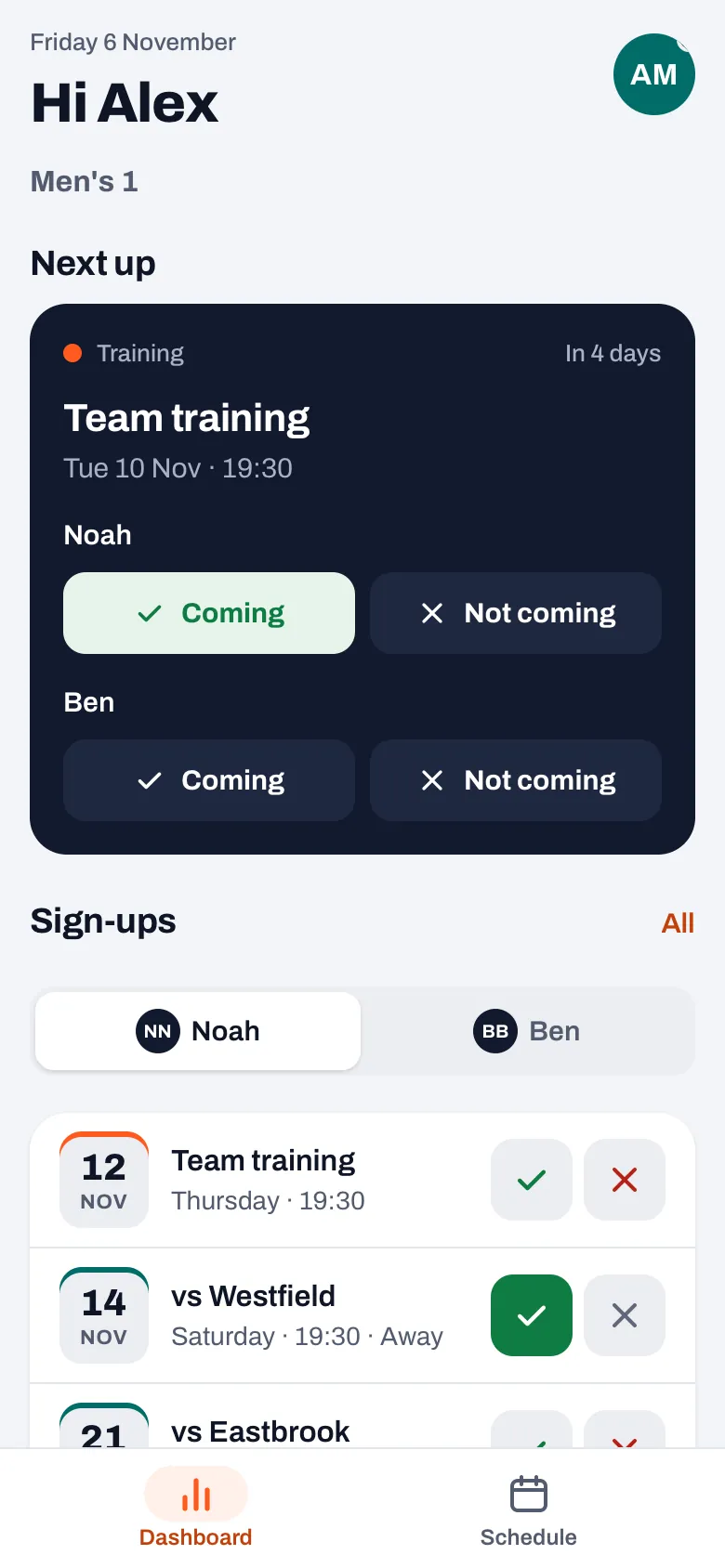
“On the dashboard, under the next event, you see the children one below the other, each with Coming and Not coming. So you say per child whether they’re coming, even for the same training session. It’s quite possible one child has a test that Tuesday and the other doesn’t.
“Below that is the list of sign-ups, and that’s where the child picker is. That list is about one child, just like the button to sign up for all sessions in one go. So there you pick who it’s about first. The app remembers per team which child you picked last.”
With two children the app also has to say who it’s about. How does it do that?
“By using the name, wherever it can. If you say a child can’t come, the app asks: ‘Why can’t Noah make it?’ Before, there was a question that addressed the parent as if they were playing themselves. And the button for all sessions is now called ‘Sign Noah up for all sessions’.
“With that reason it also says who reads it: the coaches, for a match the team parent too, not other parents or players. With one child a name is polite. With two children it’s the difference between saying no for the right child and for the wrong one.”
A reminder comes in. Where do you land as a parent?
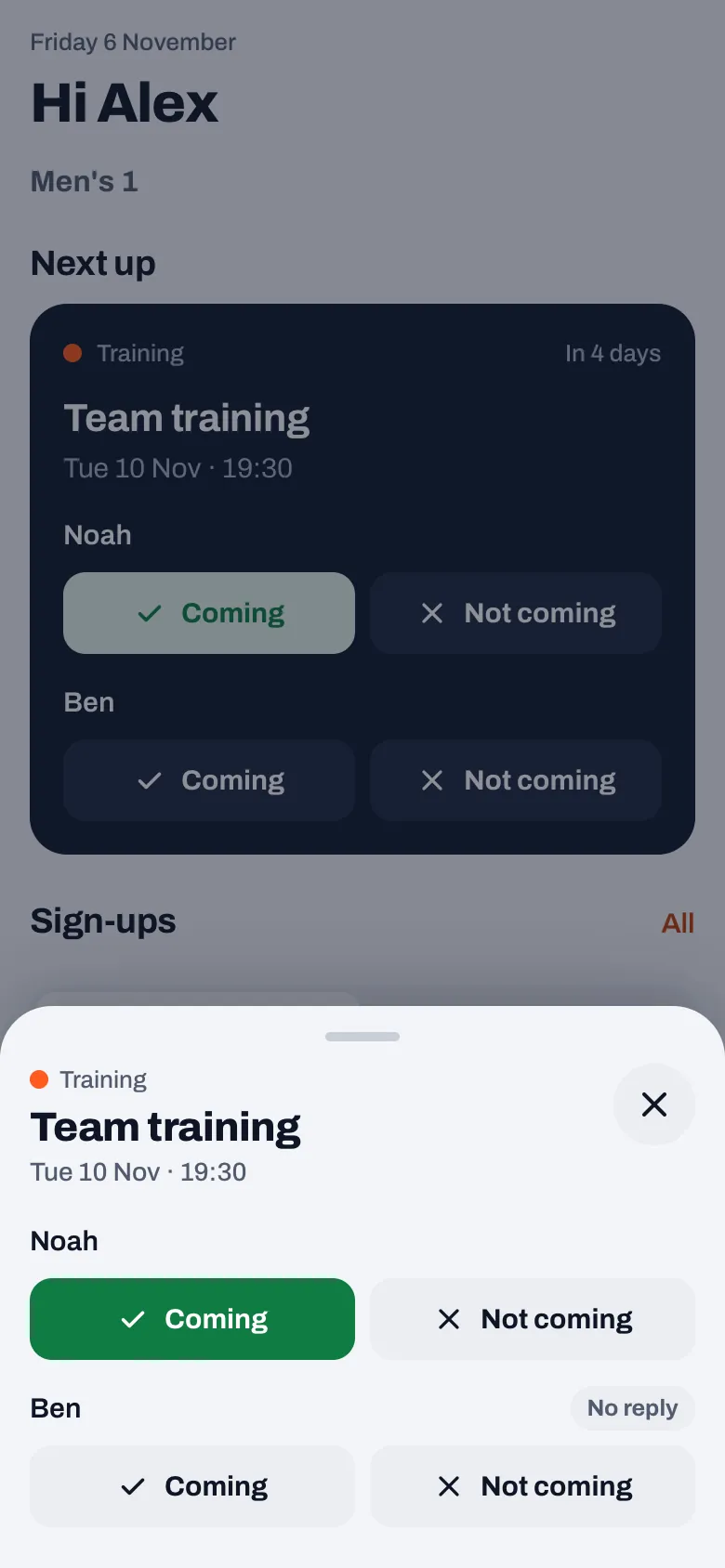
“Since version 3.1, straight on a sheet with that one event, and per child Coming and Not coming, with whatever was already set. So you don’t have to go looking for the training session or match the notification was about, and you sort out both children in one place.
“The same sheet opens when the coach sends a nudge. And if the event has been cancelled in the meantime or is already over, you still see how things stood, but the sheet tells you that you can’t change anything anymore. A notification asks you to do something, so you should be able to act on it right away.”
And if the children are in different teams?
“Then your dashboard has a row with the coming week across all your teams, and as a parent you can tap it. Each event has a small icon per child with their first name: coming or not. Also for the team you don’t have open at that moment.
“Tap an event from the other team and the same sign-up sheet opens. Close it and you’re back in your own team, at the same spot on the screen. You didn’t ask for another team, so the app doesn’t leave you there either.”
One child can’t make it, the other can. Do you still get a reminder?
“Yes. The evening before, Koach sends one message with everything you have on tomorrow, across all your teams. Since 3.1, anyone who has said they’re not coming to an event no longer gets that message for that event. But for a parent the app looks at all their children in that team. If one of them is still coming, you get it as usual.
“Only when none of the children are coming does it stay away. Otherwise a parent who says no for one child would also lose the reminder for the other child. And that’s exactly the child who is going.”
What does the coach of a family like that see?
“Each child has the same parent. Under My teams the coach sees the children under that parent as separate names, each with its own button to unlink. If one child moves to another team, they unlink just that child. If it’s the last child, the parent disappears from the team.
“And if the coach invites all the parents of their team in one go, the parent of a second child simply counts as linked. In the first version that went wrong: the second child showed up in that sheet as having no parent. I spotted that the same day, while going through everything in all six languages.”
Something else went wrong with unlinking while it was being built. What?
“With two children on the same team, unlinking one child also unlinked the other. The parent then disappeared from both, while the coach had only tapped one. That came up in a big check on the day itself.
“It was in the order. First the link with that one child has to go, and only when there’s no child left, the parent. The other way round, the parent was taken out completely in one go. It’s fixed. I mention it because it’s exactly the kind of bug you only find if you test with two children.”
What does the app deliberately not do here?
“It doesn’t sign two children up at once with one tap. Each child has their own buttons, even for the same session. It costs one extra tap, but that way you never sign up a child who has something else on that evening.
“And for a parent with one child nothing changes. The dashboard looks exactly the way it did. The child picker only appears once a second child is added.”
Sign up per child, with one account
In Koach a parent signs each child up separately, from the dashboard or straight from the reminder, and the coach sees per child who is coming. Try Koach free for fourteen days with your own team.
Try Koach free