
Attendance history: who tapped which button, and when
Quarter to nine on a Saturday morning, in the car on the way to the hall, and there are nine players on your list where you expected twelve. One of them swears on Monday that he never cancelled. You are inclined to believe him, because you cannot remember what was on your screen on Thursday evening either. Since recently you no longer have to reconstruct it: behind a small clock icon sits who tapped which button, and when.
The problem is not the list, it is the change
An attendance list shows one thing: the state of this moment. Who is signed up right now, who is not coming, who has not filled anything in. That is usually enough. Twelve are coming, you pick your line-up, done.
But a sign-up gets overwritten. A player signs up, has doubts, cancels, and on Sunday evening he is back on the list because the match has been moved. His mother marks him absent while he does not know about it. You put the whole training on present with one tap because everybody is there anyway. Of all those steps nothing remains in the list — only the last value, without your seeing how often and by whom it was changed.
That is where the awkward conversations live. Not in the question of who was there on Saturday, because you still know that; match attendance answers that one. It is the question that comes after: had he cancelled or not, and when, and who did it. Until recently you had no answer to that which was harder than your memory against that of a fifteen-year-old.
The attendance history is that answer. It is not an overview and not a report; it is a log. One line per change, in order, with the time and the author next to it.
Where the clock icon sits
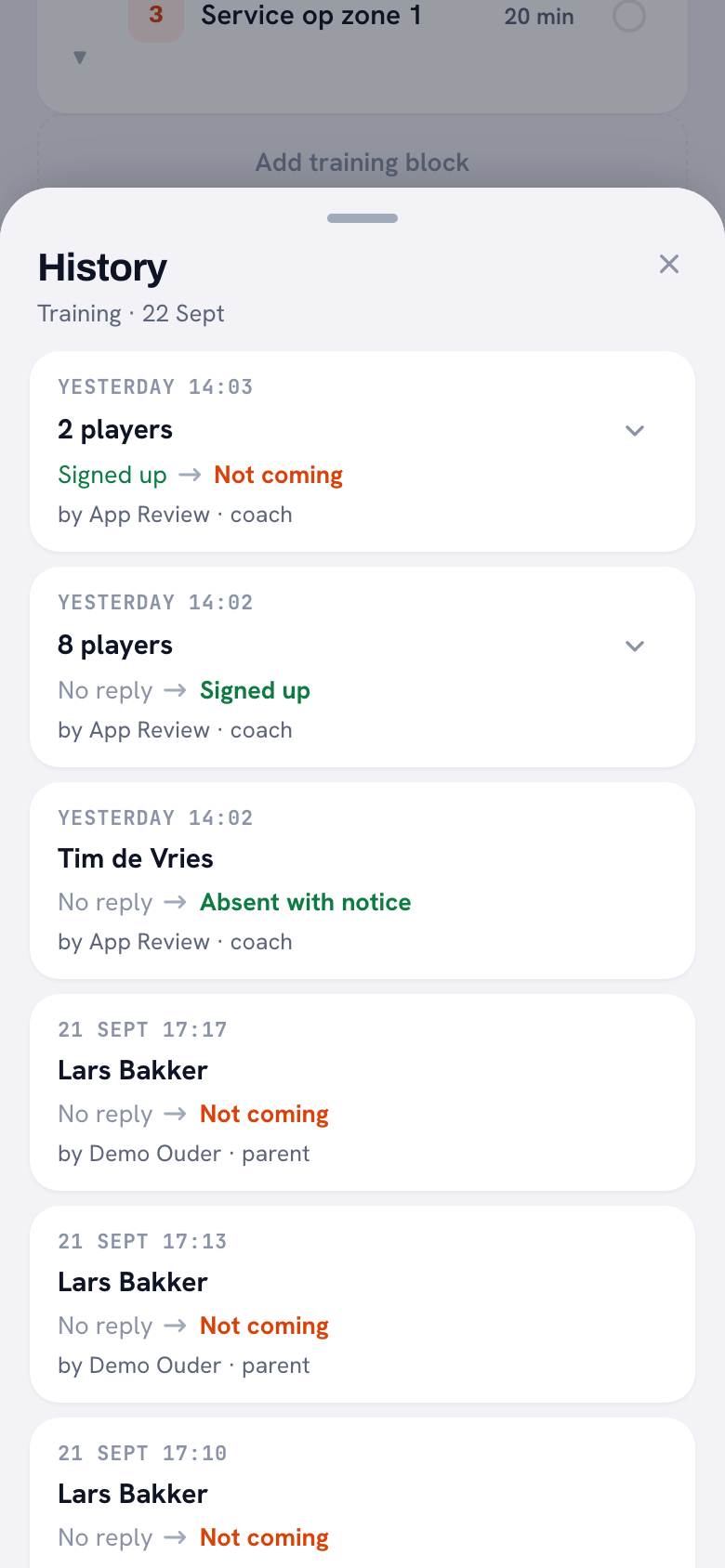
You recognise it by a small clock. Tap it and a sheet slides up headed History. It sits in six places, and it pays to know which, because people usually go looking for it on the wrong screen.
At a training it sits in two places: in the header of the training detail, where it opens the history of the whole training, and behind each player row, where it is only about that one player. At a match there are three: at your own attendance card, behind each player row, and next to the heading Who is coming? — that last clock gives you the whole course of that match in one sheet. At a tournament it works the same as at a match.
The sixth place is the parent dashboard. A parent sees the status of their own child there, and behind that status the same clock. They then open the course of that child, and nothing else. For a family with two parents who are both in the app that is often the end of a misunderstanding; how that link works is in two parents per player.
What sits in one line
Every event is a card with four things on it, and together they answer the question without anything having to be interpreted.
The time is there in everyday language: Today 20:14, Yesterday 21:47, and further back simply 18 Sep 19:30. Then who it is about. Then the transition, with an arrow between the old and the new status: from signed up to not coming, from nothing at all to signed up. And finally who filled it in, with their role next to it: by {name} · player, or parent, or coach, or system.
That role is the part that settles the argument. Not coming · by Sanne · parent is a different story from Not coming · by Sanne · player, and you no longer have to phone anybody about it. The statuses have colour as well: signed up and absent with notice in green, coming to watch in grey-blue, not coming in orange-red, and no reply in grey. That makes a sheet quicker to read than to say out loud — a row of green lines with one orange-red among them you see at a glance.
If somebody withdraws their answer entirely, that does not disappear. A line is added that goes to No reply. So an overwritten sign-up survives as a step too: the old value sits to the left of the arrow, the new one to the right.
Bulk actions, and why the sheet does not silt up
As a coach you often set attendance in one movement. Eleven players on present, one tap, done. Without an intervention that would produce eleven lines in the log, all in the same second, and the history of a team would be unreadable after three weeks.
Those lines are therefore folded together. Eleven players you put on present at the same time become one card reading 11 players with a button to unfold the names. Folding only happens if three things match: the same author, the same minute, the same transition. So two players who happen to sign themselves up in the same minute stay two lines, because those are two different people taking two separate decisions.
The sheet loads sixty lines at a time. If there are more, Load more appears at the bottom. For a player's sheet you rarely get that far; for a whole team across a whole season you do.
At the bottom there is always the same sentence: Time of processing. With a poor connection this can be later than the moment of tapping. That is not a hedge but an honest limit. Somebody who taps cancel in a basement hall with no signal lands in the log at the moment their phone could send it. A minute or two of difference is fine; in an argument about who exactly was in before the deadline, you need to know it.
Who may see it
Three kinds of people can open a history: the coach of that team, the player themselves for their own lines, and the parent of that player. Nobody else.
So a team-mate sees nothing. That is a deliberate boundary and not an oversight: otherwise every player in the team could see who cancels whose child, at what time, and how often. That does not belong in a volleyball team. A team parent too — the parent who arranges the transport — only gets the clock at their own child; they do see who is travelling on Saturday, but not the course that led there.
That a player sees their own history does two things. It makes the conversation "I never cancelled at all" unnecessary, because he can check it himself before he says it. And he sees from it that his parent marked him absent — which happens more often than coaches think, and leads to a conversation at home sooner than in the hall. How a player passes on their own attendance is in passing on your attendance as a player.
Nobody can write in the log, you included. The lines are kept by the database itself at the moment a sign-up changes. That is not only a matter of security but above all of completeness: that way every author comes along. The app on the phone, the web version, a parent tapping on their own device, and the coach's bulk button all end up in the same list, without any route being forgotten somewhere.
The log is evidence, not a conversation. That somebody changed their mind three times before your away match is a fact; what you do with it is coaching work. What you say to somebody who repeats the pattern is covered in turning up late to practice.
Three limits you need to know
The history is deliberately kept narrow, and at three points that shows.
It starts on the day it was switched on. There is nothing to fill in retrospectively — what was not recorded does not exist. Open an old log and you get what the app says about it itself: No changes yet. The history only starts from the day we began recording it. That is not a fault. So for an argument about the first half of last season it is of no use, and there is no point looking for it.
The reason for a cancellation is not in it. You see that somebody went from signed up to not coming, not why. That is on purpose: a reason is often health information, usually about a minor, and that does not belong in a list that stays around for months. The reason stays where it was, with the sign-up itself, where it is in view for as long as it is relevant. How players and parents sign up and what they fill in there is in signing up for a match.
Team-mates cannot read it. That was mentioned above, but it is also the answer to the question parents ask when you tell them you use this. No, the rest of the team does not see it. Only you, the player themselves and their parents.
One thing works more broadly than you would expect: the log stays in place if the match or the training itself is deleted. A match that is called off does not take the history of the sign-ups with it. That is exactly right, because a cancelled away match is often precisely the moment you want to look back at who had still responded.
What you actually use it for
The honest answer is: rarely, and that is good news. A log you need every week points to a different problem.
You reach for it when somebody claims something you cannot check. "I did pass it on" — open the clock at that player and you see whether there is a line. You reach for it when there is a misunderstanding at home: father thought mother would do it, and the history says which of the two actually did. And you reach for it when you suspect a pattern and do not want to raise it on a hunch: three times signed up and cancelled again the evening before is something other than three times ill.
What it is not is an instrument for applying pressure. The log supplies only the fact; it says nothing about why somebody changed their mind, and it does not turn a hesitant player into an unwilling one. Use it the way you use a match sheet: to agree on what happened, before you talk about the rest.
Frequently asked questions
Why is my history empty for a training from last season?
Because the log only runs from the day it was switched on, and cannot be filled in retrospectively. The app says so itself, with the message that there are no changes yet and that the history only starts from that day. For older trainings and matches the information therefore does not exist; that is not a fault and there is nothing to restore.
Can my players see from each other who cancelled and when?
No. A history can only be opened by the coach of the team, by the player themselves for their own lines, and by the parent of that player. A team-mate does not get to see the clock at all. That was built deliberately: otherwise everybody in the team could follow who cancels whose child and how often, and that does not belong in a volleyball team.
Is the reason for a cancellation in the history as well?
No. You see that somebody went from signed up to not coming, with the time and the author, but not why. A reason for cancelling is often health information and usually about a minor, and that does not belong in a list that stays around for months. The reason stays with the sign-up itself, where it is visible for as long as the training or match is live.
Why are eleven players on one line together?
Because bulk actions are folded together. If you put eleven players on present with one tap, that is one card with eleven players on it and a button to unfold the names. Folding only happens with the same author, the same minute and the same transition. So two players who sign themselves up in the same minute stay two separate lines, because those are two decisions.
Try it yourself in Koach
Less admin, more coaching.
Get started with KoachOr read first what the volleyball coaching app does.