
Two parents per player: an account each
The parents of one of your players no longer live together. She travels between two homes, and both of them want to know when training is. You send the second parent an invitation — and suddenly the first one cannot get in. That was a real bug, and it is gone.
What went wrong
A parent account in Koach is attached to a player. If you invited a second parent for the same child, that invitation quietly replaced the first: the parent who was already linked lost their place. No warning appeared, and the coach had no reason to suspect anything had happened at all.
That is fixed. A child can now have two parent accounts, both fully fledged and both with the same access.
Inviting the second parent
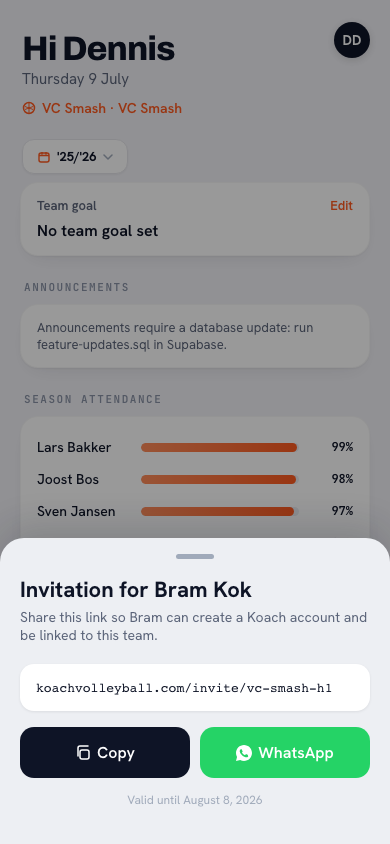
- Go to Team and open the player's profile.
- In the Account block, tap Invite next to Another parent.
- Send the link to the second parent.
That is all. The first parent notices nothing and keeps exactly what they had. One thing matters: always invite through the child's name, not through a general team invitation. Only then does Koach know which player belongs to this parent account — and without that link a parent cannot mark their child in or out.
What both parents see
Both accounts are equal by default. Koach has no primary parent and no second tier: the invitation itself carries no ranking. Both of them see:
- the team schedule, with sessions, matches and tournaments;
- the From your child block on the dashboard, with homework and tasks assigned to their child;
- whether their child is signed up for Saturday's match — and the button to change it themselves;
- the driving rota and whether it is their turn;
- the bar duties they can sign up for.
If one parent marks the child as absent, the other sees it straight away. There is one truth about who is there on Saturday, and it does not live in two group chats.
There is one way in which the two can still differ, and only because the coach chooses it: they can appoint one of the two as team parent. That parent arranges the transport for the whole team — they build and adjust the driving rota and see who is coming to matches and tournaments. For the child nothing changes: both parents remain equally fully fledged parents and sign them in and out exactly as before.
More than one child. Two children in different teams works fine: you see both and switch teams at the top. If they are in the same team, you choose at the top of the dashboard and the schedule which child you see. More on that in one parent account for several children.
Why this is more than a technical detail
Roughly one child in three grows up across more than one household. A team app that only handles one parent per child forces those families to forward each other what the coach had already sent. In practice that means the parent without access misses a cancelled session, or turns up at the wrong hall on Saturday.
The same goes for a foster family, a grandad who is the regular driver, or an older brother who handles the lifts. Whoever sorts it out in practice ought to be able to see the schedule.
Unlinking a parent
If the situation changes, you unlink a parent from the player: open the player's profile and tap Unlink next to that parent in the Account block. Their account stays — they only lose access to this team. The other parent notices nothing.
Frequently asked questions
Can both parents of the same child have a Koach account?
Yes. A child can have two parent accounts, both fully fledged and with the same access. Previously the second invitation quietly invalidated the first; that is fixed.
How do I invite the second parent?
Open the player under Team and, in the Account block, tap Invite next to Another parent. Send the link to the second parent. The first parent keeps exactly what they had.
Is there a difference between the first and second parent?
Not by default: there is no primary parent. Both accounts see the same schedule, the same driving rota and the same bar duties, and both can mark their child in or out. The coach can appoint one of the two as team parent; that parent then builds the team's driving rota and sees who is coming to matches and tournaments. It changes nothing about signing their own child in and out.
What if both parents mark the child in and out?
The most recent change counts, and the other parent sees it immediately. There is one truth about who is there on Saturday.
Can one parent be linked to two children?
Yes. If they are in different teams, you see both and switch teams at the top. If they are in the same team, you choose at the top of the dashboard and the schedule which child you see.
Can a grandparent or foster parent have a parent account?
Yes. The account is called 'parent', but it is meant for whoever sorts things out in practice: a guardian, a foster parent, a grandparent who drives.
How do I remove a parent again?
Open the player's profile and tap Unlink next to that parent in the Account block. Their account stays; they only lose access to this team. The other parent notices nothing.
 Adding parents to your team: how parent accounts work in Koach
 Who drives on Saturday? The driving rota for players and parents
 Bar duty roster for your whole club: one tap, a year sorted
 Match availability: who is coming on Saturday, and who is not?
 One parent account for siblings, even in the same team
Try it yourself in Koach
Less admin, more coaching.
Get started with KoachOr read first what the volleyball coaching app does.