
Appointing a team parent to arrange the transport
Three away matches on Saturday, two of them well outside town, and at half past ten in the evening you are still on your phone working out who drives and whose car the bags fit in. Arranging the transport is real work, and in a youth team there is almost always a parent who would rather do it, and do it better, than you. Until now you could hand that parent nothing: the driving rota sat behind the coach permissions. Since September 2026 you can make them a team parent.
Arranging the transport is work, and it does not have to sit with the coach
Anyone who coaches a youth team takes on a slice of logistics as standard. Dividing fourteen players over seven cars, allowing for the ones who come by bus, remembering that one parent has to be somewhere else after the match and so cannot drive back. It is not volleyball work, it costs an evening a month, and it is exactly the kind of job a parent on the sideline takes over without complaint the moment you ask.
Asking was never the problem. Handing it over was. In Koach the driving rota hung on the coach role, and so did the sign-ups for a match. A parent who arranged the transport got a message from you with a list of names, or a screenshot of who was coming on Saturday. They worked from a copy of something that was changing elsewhere, and the first cancellation on Friday evening made that copy worthless.
The team parent solves that. A parent you appoint gets two things on top of what they already had: they may create and edit the driving rota for their team, and they may see who is coming to matches and tournaments. Nothing else about what they can do changes. That is deliberately kept short — the less you open up, the easier it is to hand over.
Those two things belong together as well. Making a driving rota without knowing who is coming is mopping the floor with the tap still running: you divide seven players over three cars, and on Friday evening it turns out four are not coming and two guest players have been added. Whoever arranges the transport has to look at the same list you do, at the same moment, without a go-between to forward it.
What a team parent gets on top
The first right is the driving rota. They manage the pool of drivers: switching drivers on and off, entering the number of seats per car, and assigning who drives to which match. That is the same screen you use as a coach, with the same buttons; how the screen works and what is in it is explained in setting up the driving rota for away matches. You do not have to repeat that explanation yourself when you appoint someone — you can simply point them there.
The second right is reading who is coming. The team parent sees the sign-ups for matches and tournaments for the whole team, including the reason someone gave when they signed off. That sounds heavier than it is, but it is precisely what they need: a player who signs off because they are already riding with the neighbours is a different case from a player who is ill. How players and parents sign up and off is covered in signing up for a match.
For practices they do not see that list. That is not an oversight: everyone gets themselves to a session, so there is nothing to arrange, and practice attendance is a good deal more sensitive — that is where the story sits of who is quietly dropping out.
For those two things they get a third tab in the app. An ordinary parent has two, Dashboard and Schedule; a team parent gets Match as well. That tab holds the coming matches, the sign-up list per match, and the button Open the driving rota.
What they pointedly do not get
The temptation with rights like these is to turn them into half a coach role. That has not happened here, and it is worth knowing before you appoint someone — then you can say it honestly to the rest of the parents too.
A team parent signs nobody up and nobody off. Not the player who forgot to respond, not the neighbours' child. That stays with the player themselves or with their own parent. The app says so literally underneath the list: “You see this list as team parent, so you can arrange transport. Signing up or off is done by the player or their parent.”
They also see no statistics, no player notes, no team communication and no practice attendance. On the match tab they cannot start, plan or edit a match: the buttons to start a friendly match, plan a tournament or compare matches are simply not there for them. They are looking at a reading list with one working button beside it, and that is exactly the intention.
One detail that gets asked about a lot: the sign-up history, the little clock that lets you look back at who changed their mind and when, is only visible to them for their own child. Next to the other players that clock is missing. So they do see that someone signed off and why, but not that the player first signed up, then signed off and signed up again the next evening. That pattern is between the player, their parents and you.
That boundary is also the answer to the question parents ask themselves when you appoint a team parent: does that person now get to see everything about my child? No — they see one thing about every team member, namely whether they are coming on Saturday and possibly why not. That is less than has been going round in many a group chat until now.
Giving somebody rights is not the same as handing over the job. Switching a button on is not yet an agreement about who does what, by when, and what happens if it goes wrong. How you make that agreement without it staying non-committal is covered in handing over team tasks.
Appointing a team parent in the app
A coach of the team or the team owner does the appointing. Another parent cannot, and neither can a team parent — otherwise someone could give themselves company without you knowing.
First the parent has to be in the team. If they are not there yet, you invite them like any other parent; that is set out step by step in adding parents to your team. In Koach a parent is always linked to a player, so this only works for someone who has a child in the team themselves.
After that, in four steps:
- Open Profile and expand the card of the team in question.
- Scroll to the Parents list. Behind every name there is a button with a little car on it.
- Tap that button next to the parent who is going to arrange the transport. A confirmation appears that explains in one sentence what you are giving away: this parent will see who is coming to matches and tournaments, and can create and edit the driving rota — they cannot change anyone's sign-up.
- Confirm. The parent gets an orange Team parent label behind their name, and you get a short message that it worked.
Read that confirmation through calmly once before you tap it away. It is not there to slow you down, but because you are handing someone access to the sign-ups of other people's children. That is no disaster — it is the list that used to end up as a screenshot in the group chat — but it is something you say yes to on purpose.
Removing it works with exactly the same button. Tap it again next to someone who is already a team parent and the flag comes off; the label disappears and so does their third tab. It changes nothing about the driving rota they made: that simply stays, and you can keep it up to date yourself as coach.
What the team parent sees on their own screen
As soon as the flag is on, their welcome line on the dashboard changes. Where an ordinary parent reads that they follow the schedule and the bar duties, theirs says: you are the team parent for this team, besides the schedule you see who is coming to matches and tournaments, and you make the driving rota. That is the only place in the app that says what the role involves, so it pays to point them to it.
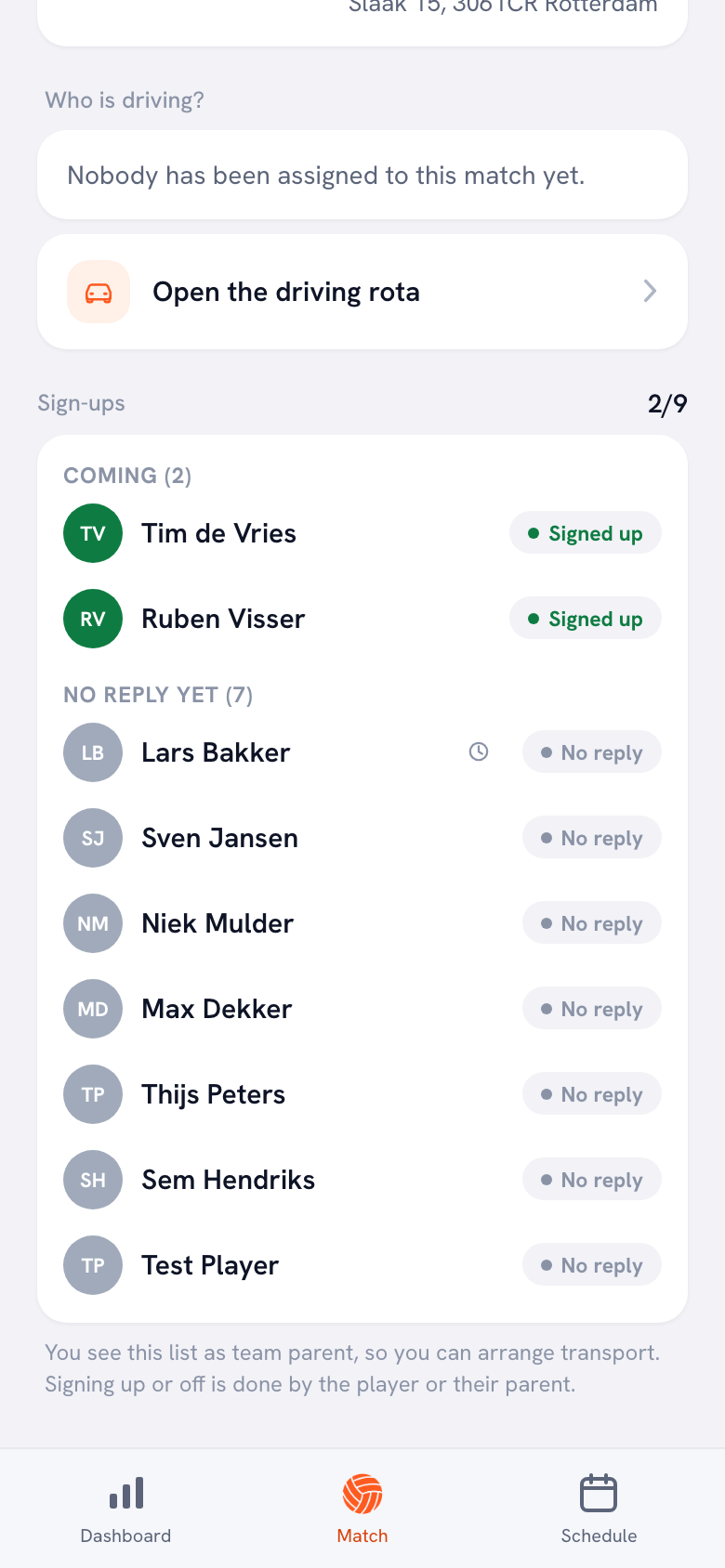
They can open the driving rota in two ways. One route runs through the match detail: they tap a match and use the button Open the driving rota there. The other runs through their own profile, at the bottom of the team card, under the heading Team parent — there is a row with a little car that opens the same screen. That second route is handy if they want to fill in the rota for the whole season in one go instead of match by match.
What players and the other parents see does not change. They still see only their own lift, in the place where it has always been; that is described in who drives to the away match. In that sense a team parent is invisible: they fill in the rota, everyone else reads it.
They stay the parent of their own child
This is why the team parent did not become a separate role but a flag on top of the parent role, and it is a difference you notice in practice. A parent may sign their own child up and off. If team parent had become a role of its own, the app would no longer recognise them as a parent and they would lose exactly that — they would be arranging transport for fourteen players but unable to sign off their own son.
As it is, everything they had as a parent simply stays in place: signing their child up and off, the schedule, the notifications, the sign-up history of that one child. Something is only added. For you that also means there is nothing to repair when you take the flag off again.
It has another pleasant side effect: you do not have to choose between “parent” and “team parent” when you invite people. Everyone comes in as a parent, and only later, when it is clear who is picking up the transport, do you switch the flag on for that person.
Per team, and therefore for one team only
The flag applies per team. Someone with children in two teams can be a team parent in one and an ordinary parent in the other. That happens more often than you would think in a club where a brother and sister both play, and it is exactly right: the transport for the girls' C team does not have to sit with the same person as the transport for the boys' B team.
There is no limit stopping you from appointing two team parents in the same team, but in practice one is the better choice. Two people both working on the same driving rota overwrite each other's work and nobody knows who changed something last. If you do want to work in a pair, agree who fills in the rota and who only looks over their shoulder.
Finally, a practical order of play that works well at the start of a season. Invite all the parents first. Then ask at the first parents' evening who wants to do the transport — not in the group chat, where everyone can wait for somebody else to answer. Appoint that person the same evening, while they are standing next to you, and have them fill in the driving rota for the first two away matches straight away. Then you know for certain they have found the screen, and for the rest of the season you only have volleyball to deal with.
Frequently asked questions
Can a team parent sign my players off if they do not respond?
No. They read the sign-ups, nothing more. Signing up and off stays with the player themselves or with their own parent, and the app says so underneath the list they see. That is deliberate: arranging transport means you need to know who is coming, not that you decide for someone else whether they turn up. If somebody does not respond, that is a conversation between you and that player.
Does a team parent see the team's practice attendance?
No, only matches and tournaments. Everyone gets themselves to a session, so there is nothing to arrange, and practice attendance says far more about a player than a single match sign-up does. They do see the sessions of their own child, just like any other parent, including the sign-up history for that child.
Can I appoint two team parents in the same team?
Technically yes, but it is usually awkward. Both may edit the same driving rota, so they overwrite each other's work without it being visible who changed something last. If you do want to work in a pair, agree that one person fills in the rota and the other only looks along and reports what is missing.
What happens to the driving rota if I remove the team parent?
Nothing. The rota they made stays exactly as it is, with all the drivers, seats and trips in it, and you can keep it up to date yourself as coach. What disappears is their access: the label goes, the third tab goes, and they no longer see the team's sign-ups. You can switch the flag back on whenever you want.

Try it yourself in Koach
Less admin, more coaching.
Get started with KoachOr read first what the volleyball coaching app does.