
Volleyball parent app: what parents see and do in Koach
The short answer
A good volleyball parent app lets parents tell you whether their child is coming, puts the team schedule on their phone and keeps the coach's messages in one place. In Koach, the app for volleyball teams, every parent gets a free account of their own, linked to their child. Parents pay nothing; the coach pays only after a 14-day free trial.
You are looking for a volleyball parent app because the group chat can no longer keep up: who is coming, what time does the match start, and who is driving? Below you'll find what parents see and do in Koach, what the team parent (the team mom or team dad) gets on top of that, what it costs parents, and what Koach does not do.
What should a volleyball parent app do?
With a youth team, a coach deals with two groups: the players who come to practice, and the parents who drive, cancel and ask what time things start. A volleyball parent app only works if it makes the parents' job easier without handing you a second set of admin. Look for five things:
- A separate account for each parent, linked to the child. That way the app knows who a parent is replying for, and two parents of the same child can both take part.
- Saying whether the child is coming. A parent marks a sick child as not coming on the practice itself, not in a message that gets lost under everything else.
- The schedule on their own phone. Practices and matches belong in the calendar parents already use.
- Coach messages in one fixed place. A note about a changed start time should not get buried under a string of replies.
- Transportation. Who is driving to the away match, and are there enough seats?
And for the parent there is one more thing: it should cost nothing. If every parent has to pay for an app, you will never get it onto every phone on your team.
14 days free, no credit card. Add your team tonight, invite the parents and check after a week whether anyone still cancels in the group chat.
Try Koach with your teamWhat a parent sees and does in Koach
A parent has two tabs in Koach: Dashboard and Schedule. That is deliberate, because a parent does not need to build a lineup or plan a practice. Everything they handle for their child happens on those two screens.
A parent account of their own, linked to the child
Next to every player, the coach has an Invite a parent button. It creates a link for the parent of that specific child, which you copy or share via WhatsApp. The parent uses it to create their own account, without a password: they sign in with a code sent by email, or with Google or Apple. The player profile stays the child's own. If the parents live apart, they each get their own account with the same access. The steps for the coach are in adding parents to your team.
Coming or not coming, on one card
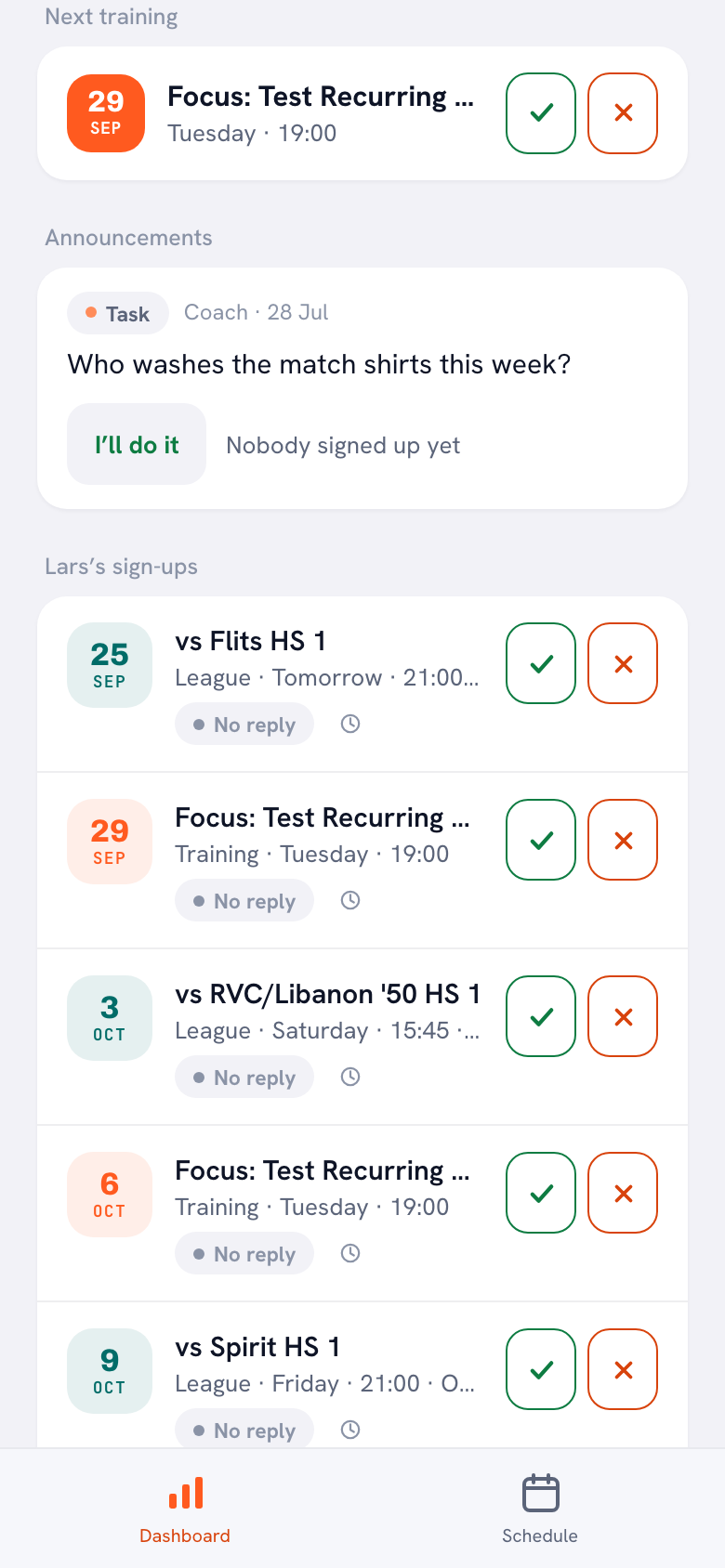
The parent's dashboard has a card with the child's name on it, for example Lars’s sign-ups. It lists the next five practices, matches and tournaments, each with its status in words: Signed up, Not coming, Coming to watch or No reply. The green check signs the child up and the red cross marks them as not coming, with a reason if needed. The coach sees the status right away in the sign-up list for that practice or match.
Next to the status is a small clock icon. Behind it is the history of that event: who set the status and when, whether that was the player, a parent or the coach. If two parents both change something, you can see who made the last change.
If nothing has been entered two days before an event, the parent gets one notification in the iPhone or Android app saying it is not yet known whether their child is coming, as long as notifications are turned on. These notifications do not arrive in the browser; for those you need the app.
The team schedule in your phone calendar
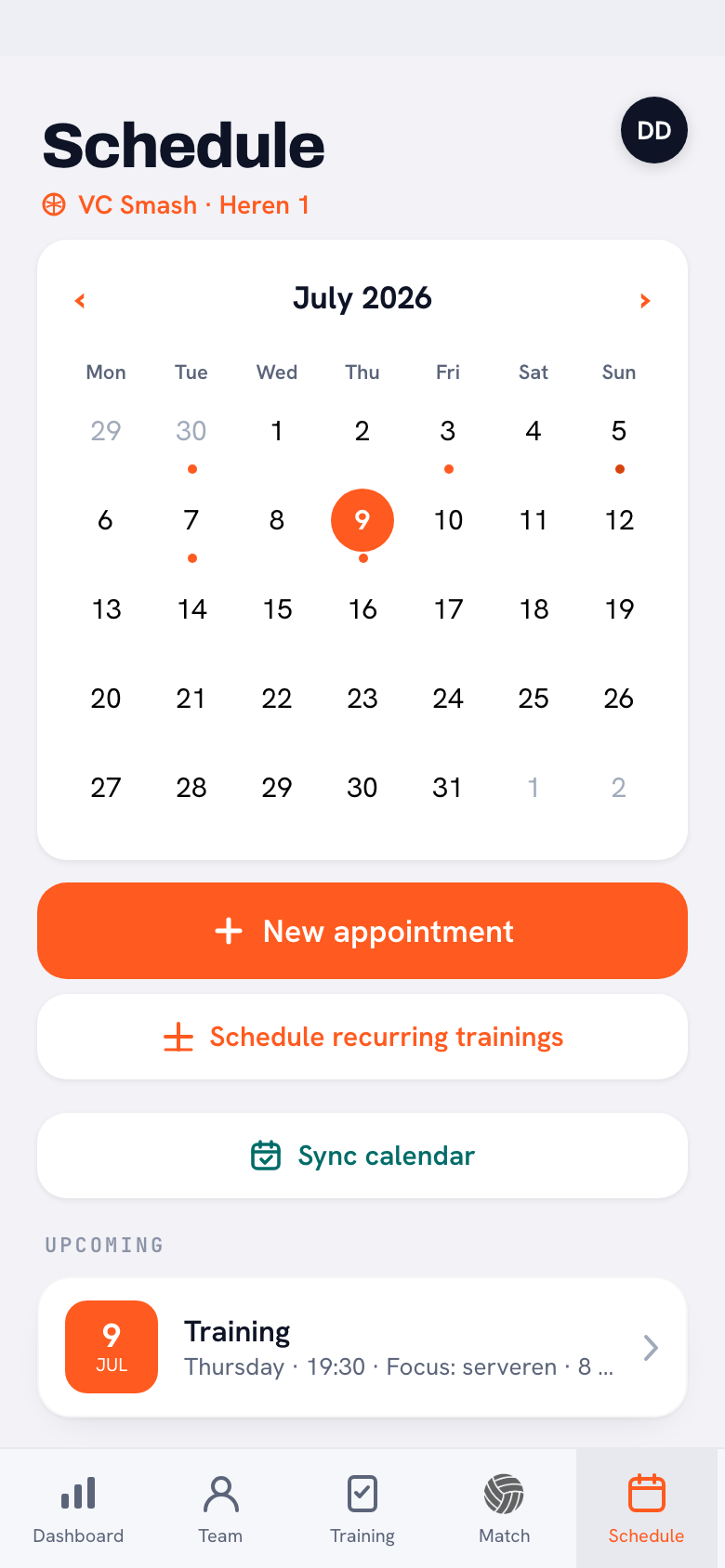
The Schedule tab lists the team's practices, matches and events. The Sync calendar button gives a parent the link to that team calendar. They copy it with Copy feed link and add it to their phone calendar as a subscribed calendar: practices, matches and events then appear among their own appointments. If something changes, the phone calendar picks it up as soon as it refreshes the feed. If the coach moves a match, the team also gets a notification in the app.
Coach announcements, not a chat
Under Announcements on the dashboard are the coach's posts, in three types: an Announcement, a Poll and a Task. A parent votes in a poll with one tap, and for a task, such as washing the match shirts, they tap I’ll do it. Only the coach can post, so parents cannot chat with each other in Koach. The upside: a message from the coach does not get buried under replies, and anyone who checks later can still see who is washing the shirts.
The driving rota: your own ride
If the team uses a driving rota (a carpool schedule) for away matches, a parent who has been assigned a ride sees the Your next ride card on their dashboard, and that match gets the You drive label in the schedule. For a regular parent the rota is read-only; swaps go through the coach or the team parent. Exactly what a parent sees is in who drives to the away match.
The team parent: one parent who runs the carpool
On a youth team there is often one parent who is happy to take transportation off the coach's hands, the person many teams call the team mom or team dad. In Koach you can make that parent the team parent. They remain a regular parent of their own child and get two extra things:
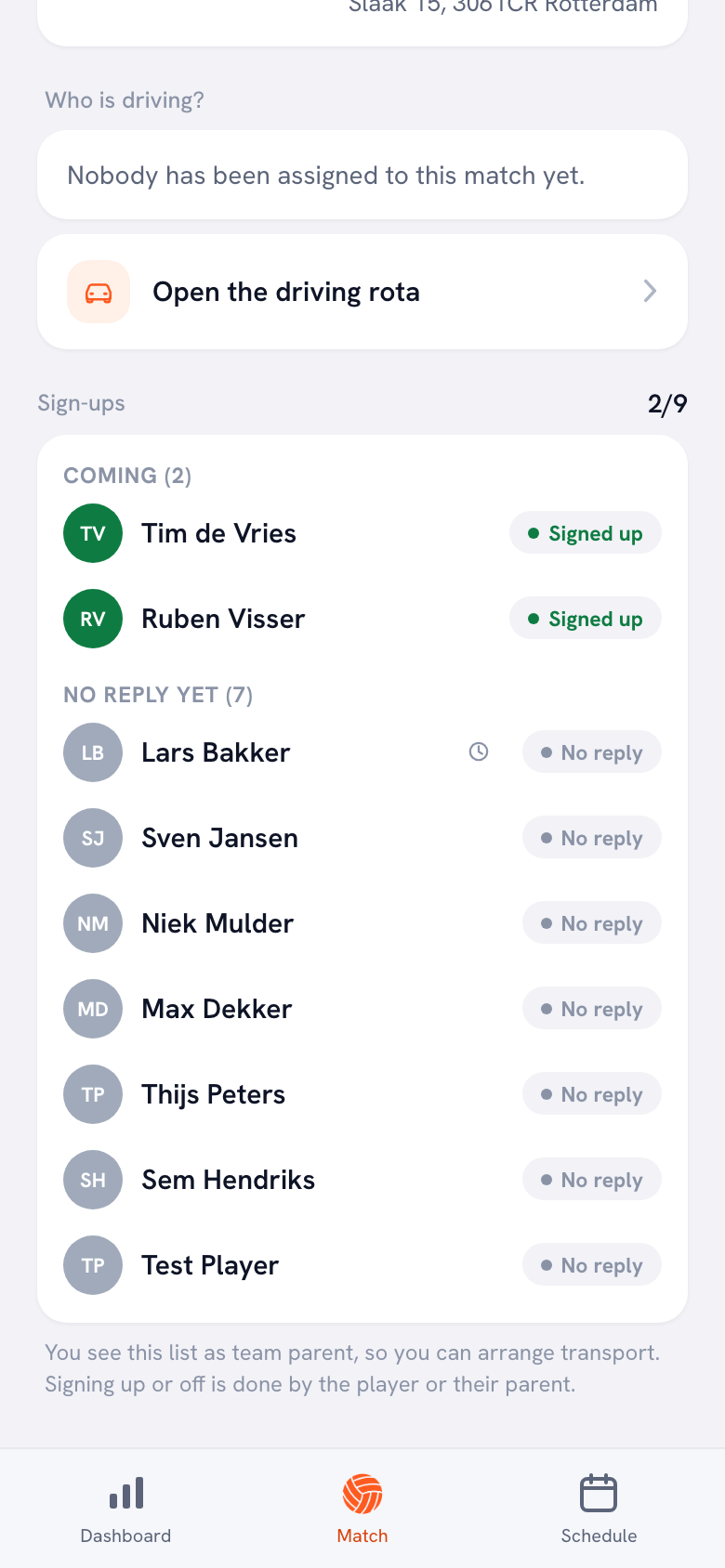
- Attendance for matches and tournaments, with the reason when someone drops out. That way they know how many players need a ride. They do not see the team's practice attendance, because everyone gets to practice on their own.
- The driving rota. They manage the driver pool, assign the rides and adjust them, on the same screen the coach uses. The rota shares out the rides by the kilometres each driver has already driven: whoever has the lowest balance goes first.
For this they get a third tab, Match, with the sign-ups for each match and, for an away match, the Open the driving rota button. They cannot reply for anyone else's child, and they cannot post messages to the team: that stays with the coach. They do not see the team stats or the player notes either; from a played match they only see their own child's numbers. Tournaments are not part of the driving rota; a tournament day is one trip for the whole day, and you arrange that transportation separately.
One thing to know if you play outside the Netherlands and Belgium: the app can only look up the distance to an away gym for gyms in those two countries. Everywhere else, including the US and the UK, you enter the kilometres per gym yourself under Away match distances; after that the rota shares out the rides exactly the same way. Only the coach can have a distance looked up; the team parent can enter distances too. How to make someone team parent, step by step, is in assigning a team parent.
Group chat, general team app or Koach?
We make Koach. So read this as a comparison by an interested party, and take a look at the other apps yourself as well. Many teams use nothing but a group chat. There are also team apps that are not built for one sport, such as Spond, Heja and TeamSnap.
Checked in October 2026 on the App Store pages of Spond, Heja and TeamSnap.
| What you want | Group chat | Spond, Heja, TeamSnap | Koach |
|---|---|---|---|
| Share availability | By message | Yes (Heja, TeamSnap) | Yes, parents too |
| Chat or group messages | Yes | Yes (Heja, TeamSnap) | No |
| Payments | No | Yes (Spond) | No |
| Lineup with rotations, live scoring | No | Not listed | Yes |
| Driving rota by kilometres | No | Not listed | Yes |
| For parents | Free | Free to download | Free |
| Built for | Anything | Sports in general | Volleyball |
What the other apps do better: Heja lists group messaging and TeamSnap lists chat. If you want the conversation to happen inside the team app itself, you are better off there. Spond handles payments as well as practices and matches, and is available in 24 languages on the App Store. For a multi-sport club, or a team that wants to collect money through the app, an app like that is the better choice.
Where Koach is different: the parent account sits in the same app in which the coach builds the lineup, scores live and plans practices. When a parent says their child is not coming, it shows up straight away in the sign-up list the coach opens for that match, with no retyping. Which other points matter when you choose an app is covered in the checklist for the best volleyball app, and more team apps side by side are in the overview of sports team apps for volleyball.
Source: App Store pages of Spond, Heja and TeamSnap, checked in October 2026. Prices and features can change; check them yourself before you choose.
What Koach does not do for parents
- No chat. No group conversation and no private messages; there are announcements, polls and tasks from the coach.
- No live following. The live scoring screen is for the coach and for anyone they authorize to keep score. Parents do not follow the score on their own phone.
- No payments. Koach does not collect dues and does not send or receive money.
- No player development in the parent account. You look at your child's development and badges together with your child, in their player account; that is what Koach for parents is about.
- Indoor volleyball only. If your child also plays soccer or beach volleyball, you will need a different app for that sport.
What does it cost parents and coaches?
Nothing for parents. Player and parent accounts are free, and a team can have as many parents as it likes. Only the person who runs the team pays. A coach tries Koach free for 14 days, with no credit card and every feature included. After that you choose Coach for €2.99 per month (one team, two coaches) or Club for €9.99 per month (unlimited teams and coaches). With a yearly plan you pay €2.49 or €8.33 per month. The prices are on the pricing page; in the App Store and on Google Play you see the price in your own currency.
For the coach, that is also the pitch to the parents: nobody has to buy or subscribe to anything to take part. They tap their invite, create an account in the app or in the browser, and they are on the team.
Who it fits, and who it does not
Koach fits a volleyball coach, often of a youth team, who wants to get absences, the schedule and the carpool out of the group chat and is looking for an app for lineups, live scoring and practices anyway. It fits less well for a team that mainly wants a place where parents talk to each other, or for a club that wants to collect dues through an app. In that case a general team app is the more honest choice, or you keep the group chat for the conversation alongside Koach.
Open the calendar link yourself first. As the coach, tap Sync calendar once before you ask the parents to connect their phone calendar. Until the feed has been opened, a parent only gets the message that the calendar feed is not switched on yet, and has to try again later.
Frequently asked questions
Is the app free for parents?
Yes. A parent account in Koach is free, just like the player account, and a team can have as many parents as it likes. Only the person who runs the team pays: a coach tries Koach free for 14 days and then chooses Coach for €2.99 per month (one team, two coaches) or Club for €9.99 per month (unlimited teams). Parents install the app or use the browser and never have to subscribe to anything.
Can I mark my child as not coming in the app?
Yes. Your dashboard has a card with your child's name on it, for example Lars’s sign-ups, listing the next five practices, matches and tournaments. Tap the green check to sign your child up or the red cross to say they are not coming, with a reason if you like. The coach sees it right away, and the small clock icon shows who last changed the status.
Can parents chat with each other in Koach?
No. Koach has no chat and no private messages. The coach posts announcements, polls and tasks; parents read them, vote in a poll and volunteer for a task with I’ll do it. If you want parents to talk among themselves, keep the group chat alongside it or choose a team app with chat.
How do I add the team schedule to my phone calendar?
In Koach, open the Schedule tab, tap Sync calendar and copy the link with Copy feed link. Add that link to your phone calendar as a subscribed calendar. Practices, matches and events then appear on their own, and changes come through as soon as your calendar refreshes the feed. If you get a message that the calendar feed is not switched on yet, ask your coach to open it once.
What is the difference between a parent and a team parent?
A parent replies for their own child, sees the schedule and the announcements, and sees their own rides. A team parent, often called the team mom or team dad, is a parent the coach has also put in charge of transportation: they see who is coming to matches and tournaments, with the reason for dropping out, and they build the driving rota. Even a team parent cannot reply for other players or post messages.

Invite your team's parents this week
14 days free, no credit card; parents pay nothing. After a week you'll know whether you still need the group chat.
Get started with KoachOr read first what the volleyball coaching app does.