
Inviting players to your team with a link
Entering ten players is quickly done — but that alone does not give your team access. On one sheet you tick your whole roster and get a single message with a personal link behind every name, ready to paste into the team chat: error-free, and instantly their first contact with the app where they will watch their own growth.
Why inviting pays off
As a coach you enter the roster yourself, but without an invite those profiles have no owner. A personal invite per player has two big advantages: players keep their own details up to date, and — most importantly — they get access to their own profile. Whoever can look at their own statistics and achievements is more engaged with their own development.
How it works in Koach: your whole squad in one go
- In the Team tab, tap the orange + and choose Invite players in the Add to team sheet. At the top of the sheet you switch between Players and Parents.
- You see your roster, with a tick box for everyone who does not have an account yet. Select all and Select none switch the whole list on or off in a single tap; ticking names individually works too.
- Tap Create … links. Koach creates a separate link for every player you ticked.
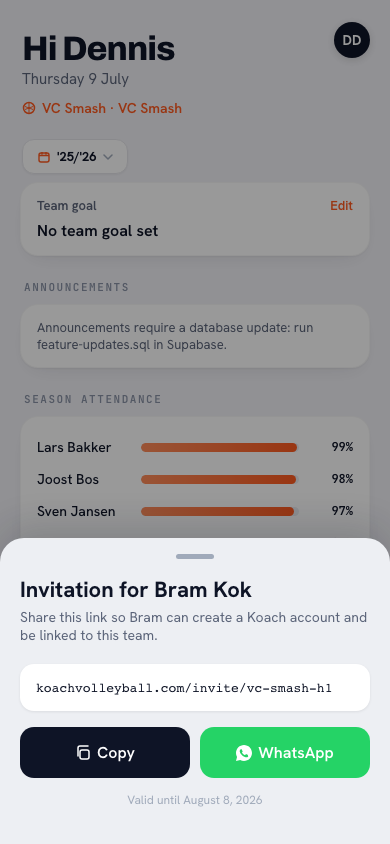
- You get one message with each player's own link behind their name. Tap Share to drop it into your group chat, or copy it and paste it yourself. Everyone taps their own name.
- The player opens their link and connects their own account to the profile. You see the status per player: Link created until they are linked.
The message itself explains that every link belongs to one name, works only once and stays valid for thirty days — so you do not have to type that out. Training players and players set to Inactive stay off the list. Anyone already linked is shown greyed out with Has account and cannot be ticked. If a name already shows Link created, that player is on the list but not pre-ticked: creating a new link invalidates their previous one, which they may have only just received.
One player at a time: the alternative
If a single player joins in March, there is no need to open the whole sheet. Open the player's profile and tap Invite in the Account block: you get their personal link with the Copy link and Share link buttons. If an invite is already open, you will see Link created there with the date until which it is valid, and a New link button: that creates a fresh link, which invalidates the old one. Koach sends nothing itself; the player only gets the link once you share it.
Speeding up your team's onboarding
The message Koach prepares is deliberately bare: one sentence and the links. In your group chat, add a few lines above it yourself about why you are using the app ("so playing time and development are fair and visible"), what players get in return (their own statistics, match overview) and a deadline before the first practice. Anyone still on Link created after a week gets a personal nudge and simply a fresh invite — usually it is forgetfulness, not unwillingness. Send the step-by-step guide to accepting the invite along with it, so everyone knows exactly what to do.
Tip: invite your assistant coach too. That does not go through this sheet — the invite sheet is for players and parents — but through your team settings; multiple coaches in one team means shared attendance, notes and drills, see working with multiple coaches. If you run a whole club, fellow administrators follow yet another route: adding club admins and the five roles.
Frequently asked questions
What if a player has no smartphone or email?
Then you simply create their profile yourself. The player counts fully in all statistics and overviews — they just do not have their own login to view them.
Can the wrong person join my team through the link?
Every link stays personal: it belongs to one player profile, works only once and expires after thirty days. Even in the shared message there is no general team link that anyone could use. Post that message in your own team chat rather than in a public channel — and as the coach you always stay in control of the roster.
Do players see each other's details?
Players see the team overview and their own full profile. Coach notes are yours; what you share in a conversation is up to you.
Try it yourself in Koach
Less admin, more coaching — starting at your next practice.
Get started with KoachOr read first what the volleyball coaching app does.