
Got a Koach invite? How to link your player account
A message from your coach with a Koach link? That means they want to connect you to your player profile in the team app. Accepting the Koach invite takes just a few minutes — here's the step-by-step, including what to do if you already have an account or the link has expired.
What exactly is that invite link?
Your coach creates a personal invite for each player in Koach, tied to your player profile on the team (that happens through inviting players). The link you receive is yours alone: valid for 30 days and usable once. Use it, and your login gets connected to your profile — including the statistics and attendance your coach was already tracking for you. Everything you'll see and do afterwards is covered in the player account explained.
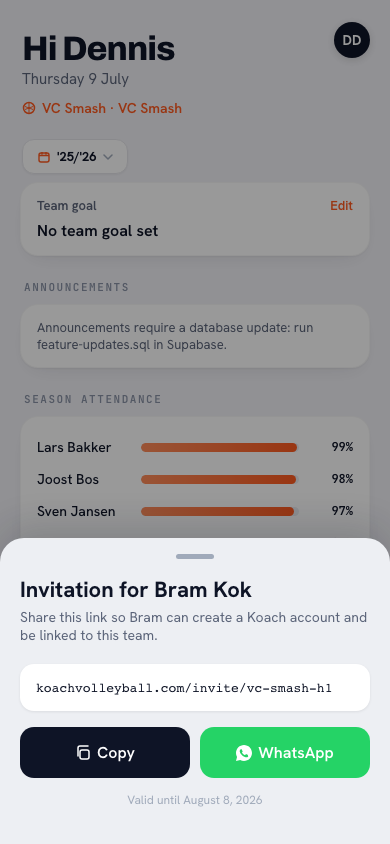
How do you accept the Koach invite with a new account?
- Open the link your coach sent you — your phone is the handiest, so Koach is right there on the device you bring to the gym.
- Create your account: your name and email address, then Create account. That's all there is to it: you do not need a password.
- Done: your account is connected to your player profile. From now on your coach sees under Account in your player profile that your Koach account is Linked, so they instantly know it worked.
Do this in the browser and one more screen follows: “You're in” followed by your team's name, with a download button. On an iPhone that is the App Store button, on an Android device the Google Play one, and on a laptop both. The reason is spelled out alongside: notifications only work in the app. Would you rather stay in the browser? Then tap Continue in browser. Open the link in the app that's already on your device and you won't see this screen at all — the app confirms straight away that you're connected.
Already have a Koach account?
Then don't create a new one: open the link, tap I have an account and log in with your existing account. Koach then connects your login to the player profile on the new team by itself. If you enter your existing email address anyway, the main button becomes Log in and join and it works the same way. Already logged in to the app? Then you see Join with the team name and your role; tap Accept. One account can be tied to multiple teams — and the roles can differ. Coaching the youth squad while joining Men's 3 as a player yourself? With the same login you stay coach of one team and become a player on the other. (Playing on the team you coach yourself works slightly differently — see the playing coach.)
This route ends the same way in the browser: the same screen with the download button and Continue in browser. Inside the app itself it stays a short confirmation.
Invited as a coach or as a parent?
Then the route is the same: open the link, create an account or log in with the one you already have. Only the role on that team differs. As a coach you get coach rights in the team — what that collaboration looks like is covered in working with multiple coaches. As a parent you're linked as the parent of your child, not to the player profile itself: you see the calendar and sign your child up or out. Exactly what a parent account shows is in Koach for parents.
What do you see once you're connected?
After logging in you land on your dashboard: your next practice or match at the top, and under Your season and Your stats your attendance and your points for attack, serve and block. From there you can sign up or out for practices, check the team calendar and follow your own statistics and badges. Good to know: you only see your own numbers — coaching notes and teammates' statistics stay private, as explained in privacy and data. Exactly how it should be in a good volleyball app.
What if the link has expired?
A link older than 30 days — or one that's already been used — no longer works. No disaster and nothing lost: your player profile with all its data is still right there. What you get to see depends on where you are.
If you don't have an account yet (the ordinary route above), you first fill in your name and email address, and after sending you get a message in your own language: “This invitation has expired”, “This invitation has already been used” or “This invitation link is not valid”. Ask your coach for a new link in that case; they create one in a few taps via your player in the team overview. New link, same steps, and you're connected after all.
If you're already logged in to Koach, you see the outcome straight away on a whole screen: for an expired link “Invite expired” with “Ask your coach for a new link”, for one that's already been used “You're already in the team” (nothing left to do), and for a link that isn't right, the question whether you opened the whole of it. At the bottom sits the Open Koach button: on your phone it opens the Koach app (or the store, if you don't have it yet), on a laptop you continue in the web version.
Tip: the link is personal and works only once. So only use the invite that was created for you and don't forward it — your teammates get their own link from the coach.
Frequently asked questions
How long is a Koach invite valid?
An invite link is valid for 30 days and can be used once. If it has expired, ask your coach for a new one; your player profile and data are kept safe throughout. If the app says the invitation has already been used, you're already in the team and there's nothing left to do.
Do I have to download the app after accepting?
You don't have to, but the screen after accepting does recommend it: in the browser it shows the App Store or Google Play button for your device. Notifications only arrive in the app; if you'd rather go without, choose Continue in browser.
Do I need to create a new account if I already have one?
No. Open the invite link, tap I have an account and log in with your existing account; it then gets connected to the player profile on the new team by itself. One account can span multiple teams — even as coach of one and player on another.
How does my coach know the connection worked?
In your player profile the coach sees under Account that your Koach account is linked. And if you can see your dashboard with Your season and Your stats, everything is set.


Got your link? Five minutes and you're in
Creating an account is free — your coach has already set up the rest.
Get started with KoachOr read first what the volleyball coaching app does.