
What does a player see in Koach? The player account explained
Your coach runs the team in Koach — and you get your own login as a player. But what's actually in it for you? This is the full tour of the Koach player account: what you see on every screen, what you manage yourself and what stays private. Coaches reading along: this is exactly what your players will be getting.
How do you get a player account in Koach?
A player account always starts with your coach: they create a personal invite for each player. You receive a link — valid for 30 days, usable once — and use it to create a new account or connect your existing Koach login. From that moment your login is tied to your player profile, with everything already in it. The step-by-step guide is in accepting your invite as a player; how your coach sends those invites is covered in inviting players. And the cost? Zero: player accounts are free — the subscription runs through the coach or the club.
One account can also be connected to multiple teams — and roles can mix: coach of one team, player on another. It even works within a single team, via the playing coach.
Coach, still on the fence about rolling out player accounts? In practice, players who see their own numbers and badges show up more often — see improving practice attendance — and you're rid of the attendance puzzle in the group chat. It's one of the things you pick a volleyball app for; no team in the app yet, then begin with getting started with Koach.
What do you see on your dashboard and in the team calendar?
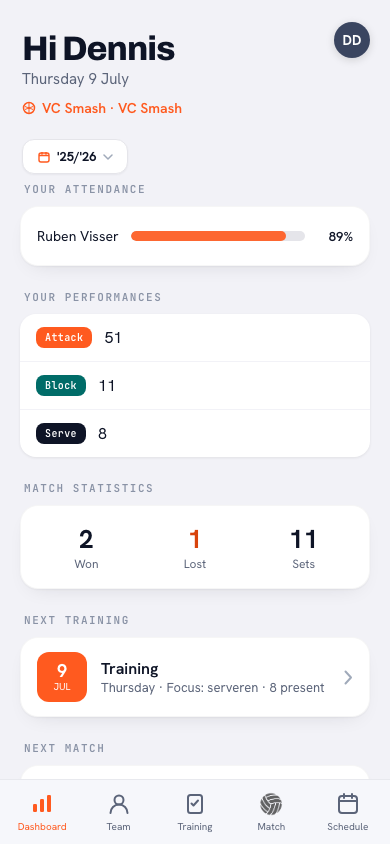
After logging in you land on your dashboard. At the top, under Next up, sits your next practice or match, with the buttons to sign up or drop out. Below that come Your season, with your attendance this season, and Your stats, with your points broken down into attack, serve and block. Under Matches you see how many your team won and the result of the last one. No wall of numbers: just the two things you control as a player, showing up and scoring.
Under Team you'll find the roster with names, jersey numbers and positions — you see the list, but only your own profile opens. The Schedule tab shows the full team schedule: practices, matches and other events. Want all of that in your phone's calendar automatically? Tap the Sync calendar icon in the schedule, copy the link and subscribe to it in your phone's calendar. If the feed isn't switched on yet, ask your coach to open it once. How that works is in the team calendar on your phone.
Does your coach run a driving rota for away matches? Then one more block joins the list: Ride, showing the match you have been assigned to, with the label You drive. If you are not down for anything, the block simply isn't there; what you see of the rota as a player is explained separately.
How do you report your attendance?
The Training tab lists the practices under Upcoming and Past. Open a practice and you see the plan for that evening: the parts with their name and duration, and one tap on a drill shows you how it goes. So you know in advance what's on the menu.
More importantly: you sign yourself up or out. At the top of every upcoming practice sit the I'm in and Can't make it buttons. Tap Can't make it and you can pick a reason straight away (Sick, Injured, Work or School) and type something with it; only your coach sees that. With I'm in for all, in the Upcoming header, you sign up in one go for every upcoming practice you hadn't answered yet; an earlier drop-out simply stays. Matches work the same way: a scheduled match carries I'm in, I'll watch and Can't make it, and there too the app asks for a reason when you drop out. Signing out is possible up to the day of practice itself; only 'late' is recorded by the coach. The app works out your attendance percentage automatically: every time you were there (being late still counts as present) divided by all the practices you were registered for. All the details are in reporting your attendance as a player.
Tip: do you normally train every week anyway? Then tap 'I'm in for all' once and only sign out when you genuinely can't make it. If more practices are added later, the button simply shows up again. Nothing left for you to remember, and your coach knows exactly how many players to plan for.
Which statistics, badges and goals do you see?
Your own player profile is the heart of the account. You open it through Team or with All next to Your stats, and it has three tabs: Overview with your season, Stats with your points, your attacks and your errors (unless your coach hides those from players) and History with your seasons, matches and practices. Those numbers come straight from your coach's live scoring during matches; how to read them without driving yourself crazy is covered in understanding your own statistics and tracking your own growth.
On top of that you collect badges in four levels — bronze, silver, gold and diamond — from Iron Will (bronze from 80% attendance) and On a Roll (bronze from five practices in a row) to MVP (bronze from 8 points in a single match) and Never Late; the full overview with every badge and its thresholds is in all the badges in Koach. Your top three are highlighted on your profile, with rare badges — the ones few teammates have — carrying extra weight. And you see the personal goal you set and adjust yourself whenever you like — your coach sees the same goal, so you're both working on the same thing.
For matches you can browse the overview with results and set scores, plus your own statistics per match — handy for the conversation on the ride home. See reviewing your match statistics.
What does a player NOT see in Koach?
Just as important as what you see: what you don't. Coaching notes are visible to coaches only — never to players. You don't see your teammates' detailed statistics or ratings either: only your own numbers; teammates appear with name, number and position. The effort rating your coach gives after a practice isn't shown to you. And you can't break anything by accident: you don't set anyone else's attendance, change lineups or touch team settings. You only score a match live if your coach makes you the score keeper for that match. How Koach handles data more broadly is in privacy and data; for youth teams — where parents get their own account, linked to their child — there's Koach for parents.
What you do manage yourself lives under your profile and settings: name, language (six languages, from Dutch to Polish), phone number and emergency contact — see managing your own details. Leaving the team? You can leave it yourself; your statistics and history simply stay with the team.
Frequently asked questions
Does a player account in Koach cost anything?
No — player accounts are free. The Koach subscription runs through the coach or the club; as a player you just create an account through your coach's invite link.
Can I see my teammates' statistics?
No: you see the roster with names, jersey numbers and positions, but detailed statistics and ratings are only visible for yourself. Coaching notes are never visible to any player — they're for the coaching staff only.
Can I use one account for multiple teams?
Yes, one Koach account can be connected to several teams. You can even be the coach of one team and a player on another — you simply switch teams within the same account.
Can I sign up or drop out for matches as a player as well?
Yes. A scheduled match carries the I'm in, I'll watch and Can't make it buttons, and if you drop out the app asks for a reason you may skip. Your dashboard also shows the next match with buttons to sign up or drop out, so you can reply without clicking through.



Ready to see your own season?
Ask your coach for an invite — a player account costs nothing.
Get started with KoachOr read first what the volleyball coaching app does.