
Volleyball interest form: free template and what comes next
The short answer
A volleyball interest form only asks what you need to know who wants to play: name, age, experience, availability and a way to reach them. You build it in Google Forms. Once you pick your players, you add them to your roster in Koach and send each one a personal invite link. Koach does not import form responses.
You need a volleyball interest form because a new season, a tryout or a new group is coming up and you want to know who is interested. Below are eleven questions you can drop straight into Google Forms, plus what to do with the responses once the first names come in.
What should a volleyball interest form do?
An interest form at the start of a season has one job: telling you who wants to play and how to reach them. It is not a membership form, and it is not a roster yet. Forget that and you end up with a three-page form nobody finishes. So keep five things in mind:
- Short. Around ten questions, easy to fill in on a phone. Anything you only need once someone joins, you ask later, on the club's full registration form. How that registration then moves past the membership admin, the treasurer and the coach is covered in the club registration form.
- One link you can share anywhere. In the school newsletter, on the club website, in a message to parents or under a social media post.
- All responses in one place. Not half in your inbox and half on a scrap of paper, but one list you can share with an assistant coach.
- A contact that works. For youth players that means a parent or guardian, not the email address of a ten-year-old who never checks it.
- A clear next step. Whoever submits the form wants to know what happens now: a trial practice, a tryout or a message before the first practice.
The template: eleven questions for your volleyball interest form
Here is the question list. After each question you see the question type as Google Forms calls it, and whether it is required. Copy it, cut what you do not need and add your own practice times to question 8.
- Full name (Short answer, required). The name the player wants to go by on the team.
- Age in years (Short answer, required). Enough to see which group someone fits. Ask for the date of birth only once they join.
- Email address (Short answer, required). For players under 18, a parent's or guardian's.
- Phone number (Short answer, optional). Handy if you would rather send the invite by text message than by email later on.
- Parent or guardian name (Short answer, required for youth players). Leave this one out for an adult team.
- Volleyball experience (Multiple choice, required): never played, at school or recreationally, one or two seasons on a competitive team, three seasons or more on a competitive team.
- Preferred position (Checkboxes, optional): setter, outside hitter, middle blocker, opposite, libero, not sure yet.
- Which practice times can you make? (Checkboxes, required). Put your real days and times here, and you instantly see who cannot make Tuesdays.
- What are you looking for? (Multiple choice, required): playing competitively, playing recreationally, practicing with the team a few times first.
- How did you hear about us? (Short answer, optional). One line that tells you after a season which channels work; why that matters is explained in recruiting new members.
- Consent (Checkboxes, required): "You may email or call me about practices and team placement for this season."
What is deliberately missing: home address, bank details, health questions and a signature. Those belong with someone who joins, not with someone who is interested. Ask for them now and you end up storing data on people who may never show up.
How to build your interest form in Google Forms
Google Forms works with a Google account. You create a blank form, add the questions, pick the type for each one and turn on the Required toggle for every question nobody should skip. Three settings make the difference:
- Link a spreadsheet. On the Responses tab, choose a Google Sheets spreadsheet as the destination. Every submission then becomes a row in a sheet you can share with an assistant coach.
- Leave Limit to 1 response off. With that setting on, everyone has to sign in with a Google account to open and fill in the form. A parent without a Google account drops off right there.
- Share one link. Once the form is published, copy the link to it. Google can shorten that link, and with the embed HTML you put the form on your club website.
Google moves the buttons in Forms around now and then. Google's help pages on question types (which also explain how to make a question required), saving responses to a spreadsheet and publishing and sharing your form walk you through it step by step; we checked them in October 2026.
From interest form to player on your team: how it works in Koach
The responses are in your spreadsheet. Who gets a spot is your call, after a trial practice or a tryout. Using an app for tryouts? Read what a volleyball tryout app should do first. Then comes the part a form cannot do: getting the new names onto your team, so they see the schedule and can RSVP for practices. In Koach it works like this:
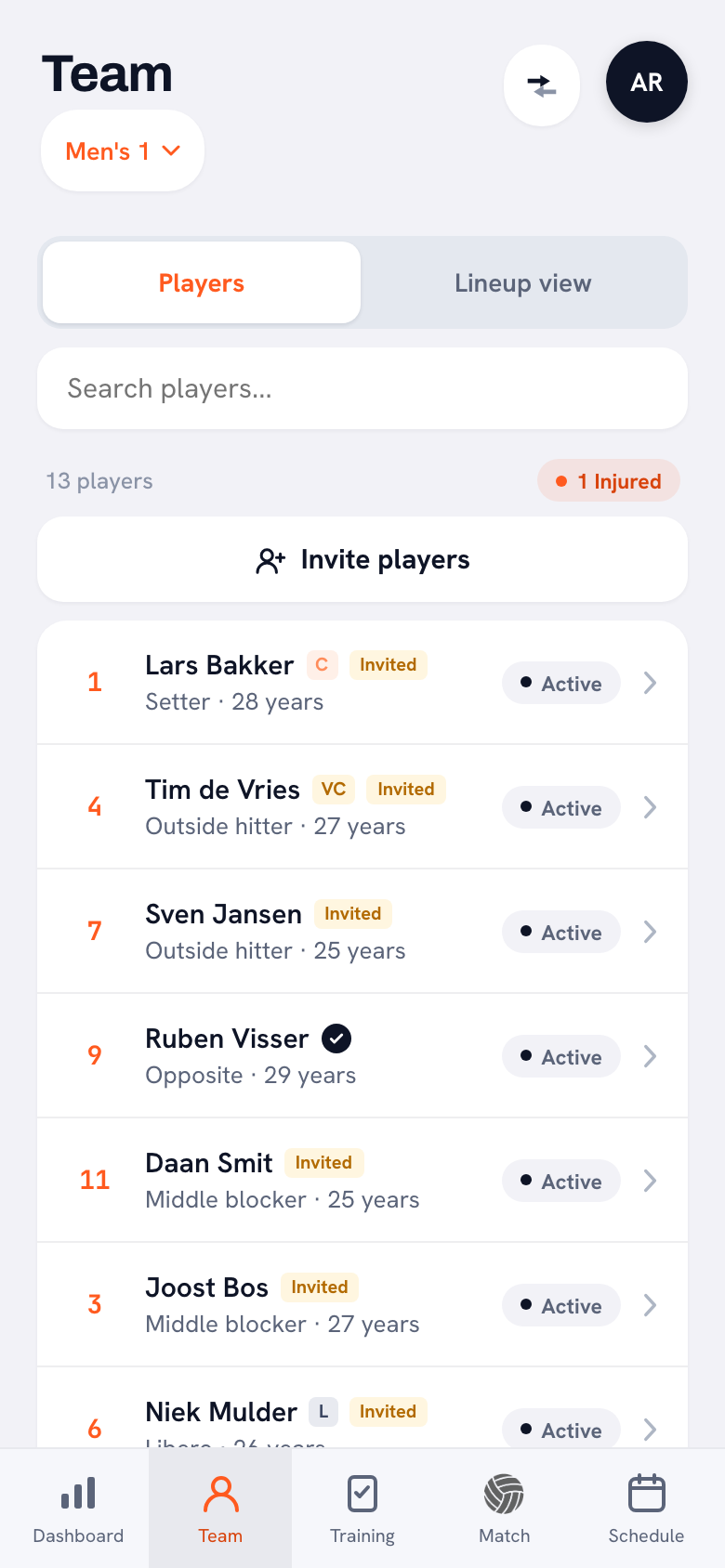
- Add the names to your roster. On the Team tab, tap Add player. Only the first name is required; fill in the last name and the position from the form right away, while jersey number and date of birth can wait. There is no import from Google Sheets, Excel or a CSV file: you type the names in. For a new group of ten or twelve players, that is quickly done.
- Mark who is practicing with you first. If someone picked practicing with the team a few times first at question 9, set them to Training-only player. The app describes it like this: "Trains along but is not part of the regular squad." If they earn a regular spot, you switch that toggle off later.
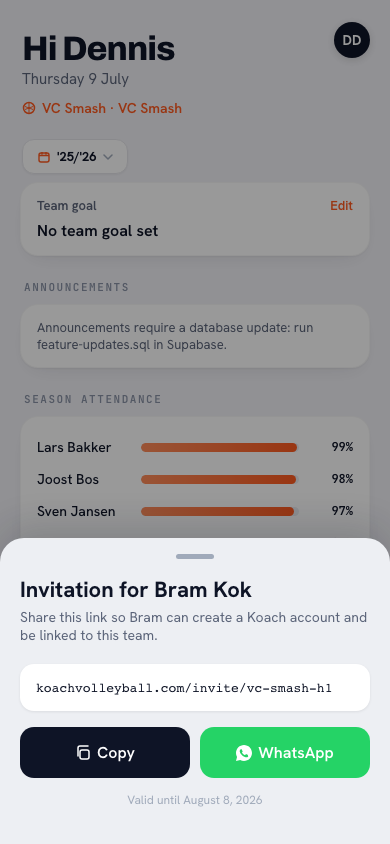
- Create the invite links. Above your roster, tap Invite players. Everyone who does not have a link yet is already checked; review the names and tap Create … links. You get one message with a personal link after each name. For a single player, open their profile and tap Invite to Koach; the window that opens has Copy and WhatsApp buttons. A training-only player is not on the sheet with all players; you invite them this second way.
- Send each link to the contact from the form. By email or by text message. Whoever opens their link creates an account and is then on the team. What the player sees along the way is in accepting an invite to Koach. For youth players, the player link goes to the child through the parent. If the parent wants to be involved too, tap Invite a parent in the same profile: with that separate link the parent gets their own account, linked to their child.
- See who is linked. Your roster shows for each player whether their link is still open or they have linked their account. After linking, players add their own phone number and emergency contact under Edit profile; you then see them in their profile under Contact & emergency. So there is no need to copy them over from the spreadsheet.
14 days free, no credit card. Add your new group tonight and send the links before the first practice.
Put your team in KoachKoach has no general team link for players that you could paste into your form's confirmation message. Each invite link belongs to one name, works once and is valid for 30 days. That means nobody can add themselves to your team, even if someone forwards the form: you create every spot on the roster yourself. If another response comes in after the first practice, that is one Add player and one link. How the sheet with all the links works, and who is and is not checked in advance, is explained in inviting players with a link.
Interest form or team app: which does what?
We make Koach, so read this table with that in mind. The point is not that one replaces the other: the form captures the interest, and the app takes over once someone is on your team. The Google Forms column was checked in October 2026 against the Google help pages above.
| What you want | Google Forms | Koach |
|---|---|---|
| Sign-ups from people you do not know yet | Yes, with one link | No, there is no public form |
| Your own questions, required or not | Yes | No |
| All responses in a spreadsheet | Yes, in Google Sheets | No |
| Names on your roster, with position and jersey number | No | Yes, you type them in (no import) |
| A personal link for each player to join the team | No | Yes |
| See who has linked their account | No | Yes |
| Schedule, practice RSVPs, attendance | No | Yes |
Who this is for, and who it is not for
It fits if you get new players every season and want them in one app fast: a school team with a new group every year, a youth coach after a bring-a-friend session, a rec team filling open spots. The form stays yours; Koach starts with the names you pick.
It does not fit if you are looking for membership management software. Koach does not replace it, does not import member lists and does not collect dues. On the Club plan, Contributions only tracks who still owes what, with your own payment link. If all you need is a list of interested players and no team app, Google Forms with a spreadsheet is enough. And if a whole club has to add dozens of new names at once, expect every one of those names to go into the teams by hand. How to plan the season around all this is covered in organizing the volleyball season.
What does an interest form with a team app cost?
The question list in this article costs nothing: just copy it. For Google Forms you need a Google account. You can try Koach free for 14 days, with no credit card and every feature. After that you choose Coach for €2.99 per month (one team, two coaches) or Club for €9.99 per month (unlimited teams and coaches); with a yearly plan you pay €2.49 or €8.33 per month. In the App Store and Google Play you see the price in your own currency. Players and parents pay nothing: their account is free. The prices are on the pricing page.
Send the links once your roster is set. An invite link is valid for 30 days. A player who gets it six weeks before the first practice and only opens it when the season starts will find an expired link. If that happens, their profile shows Invite to Koach again and you send them a new one.
Source: Google's help page on sending a form and the other help pages above, checked in October 2026. Features can change; check them yourself before you choose.
Frequently asked questions
Is there a free volleyball interest form template?
Yes. You can copy the question list in this article into Google Forms at no cost; all you need is a Google account. You can try Koach itself free for 14 days, with no credit card and every feature. After that Coach costs €2.99 per month for one team with two coaches. Players and parents pay nothing: their account is free, even if they signed up through your form.
Can I import Google Forms responses into Koach?
No. Koach has no import from Google Sheets, Excel or a CSV file. You add the players who get a spot to your roster yourself with Add player; only the first name is required. You do not need to copy phone numbers and emergency contacts: players add those themselves once they have linked their account to their name.
Can I put one team link in my form's confirmation message?
Not for players. In Koach every invite link belongs to one name, works once and is valid for 30 days. You first add the player to your roster and then send their own link to the email address or phone number from the form. That way nobody can add themselves to your team: you create every spot on the roster yourself.
What is the difference between an interest form and a registration form?
The difference is timing. The form at the start of the season asks who wants to play and how to reach them: name, age, experience, availability and a contact. The membership registration form asks for more, such as an address, payment details and consents. Only send that second form when someone actually joins, so you do not store data on people who never show up.
Do parents need to install an app to sign their child up?
No. They fill in the Google Forms form in their browser, without an app and without a Google account, as long as Limit to 1 response is off. If their child gets a spot and you invite the parent with Invite a parent, the parent gets an account linked to their child. That works in the app and in the browser; only the app sends notifications. The parent uses it to tell you whether their child is coming to practices and matches.


Get your new players onto your team tonight
14 days free, no credit card. After the first practice you see who has linked their account.
Get started with KoachOr read first what the volleyball coaching app does.