
Best way to track volleyball stats: paper, spreadsheet or app?
The short answer
The best way to track volleyball stats depends on how often you measure and whether someone sits next to you. Paper is enough to check one skill now and then, a spreadsheet if you want to run the numbers yourself. If you want stats per player for every match without retyping anything, an app like Koach is the better fit.
There are three ways to track volleyball stats: pen and paper, a spreadsheet or an app. All three work, but each one eats your time at a different moment. Below you'll see which method fits which situation, what each one asks of you and where to find a full walkthrough of each.
The best way to track volleyball stats: what it depends on
Behind the question of how best to keep stats there's usually another one: which method can I actually keep up for a whole season? The answer depends less on the method than on your situation. Four questions decide it:
- How often do you want to measure? Checking one skill a few times a season is a different job from recording everything for every player in every match.
- Are you on your own? If you coach and keep stats at the same time, you miss part of what happens on the court. A sub, an injured player or a parent next to you changes the whole equation.
- What do you want to do with the numbers afterwards? One number for next week's practice, or comparing players across an entire season?
- How much time do you have after the match? With paper and with a spreadsheet, part of the work only starts once the last point is over: adding up, retyping, calculating.
Which numbers are worth tracking is a question that comes before this choice. For that, read understanding and using volleyball stats as a coach. This article is about the tools.
Paper, spreadsheet and app side by side
All three methods give you usable numbers. The main difference is when they cost you time: during the match or after it. The last row shows what Koach does, the app we make.
| Method | During the match | After the match |
|---|---|---|
| Paper | Tally marks with a pen and a clipboard | Add up the tally marks and do the math |
| Spreadsheet | Tally marks on paper, because your laptop is rarely on the sideline | Retype everything; then your own formulas do the math |
| App (Koach) | Tap on your phone; with no signal, the app saves the points | Nothing: the stats per player are ready, across the season too |
Only the app costs money. Paper is free, so is a spreadsheet if you already have a spreadsheet program, and after 14 free days Koach costs €2.99 per month for one team. With all three, someone else can do the tracking. Comparing players over a season works with all three as well; the difference is how much manual work it takes.
Paper: strong when you measure one skill now and then
A clipboard has real advantages. It's free, it never crashes, it works in every gym and nobody has to install anything. You decide which marks to use and what counts as an error. If you want to know a few times a season whether your serving is improving, paper is simply the right choice.
The cost of paper comes after the match. You add up tally marks, work out averages and hang on to the sheets. As long as you track one skill per match, that's manageable. If you want to know everything for every player in every match, the pile grows faster than you can process it, and that's when sheets stay unread in your bag.
How to keep tallies without falling behind, which marks to use and how to turn tally marks into a number is covered in tracking volleyball stats on paper. Don't want to draw your own sheet? Use the free printable volleyball stat sheet.
Spreadsheet: when you want to run and compare the numbers yourself
A spreadsheet is the next step for anyone who wants more than loose sheets. You choose the columns, you decide whether a blocked attack counts as an error, and with a few formulas you see a season total for every player. For a coach who enjoys working with numbers, that's a real strength: an app gives you a fixed layout, while in your own sheet you decide what you measure and how you calculate it.
The weak spot isn't the sheet but the road to it. Your laptop usually isn't on the sideline, so you still tally on paper and retype it at home. Retyping is the first thing to slip when life gets busy, and a record full of gaps says little about progress. Add a second coach and you also have to agree on who does the typing and which version is the right one.
Which sheets coaches build and where each one breaks down: read tracking volleyball stats in Excel.
An app: when you want to record every match per player
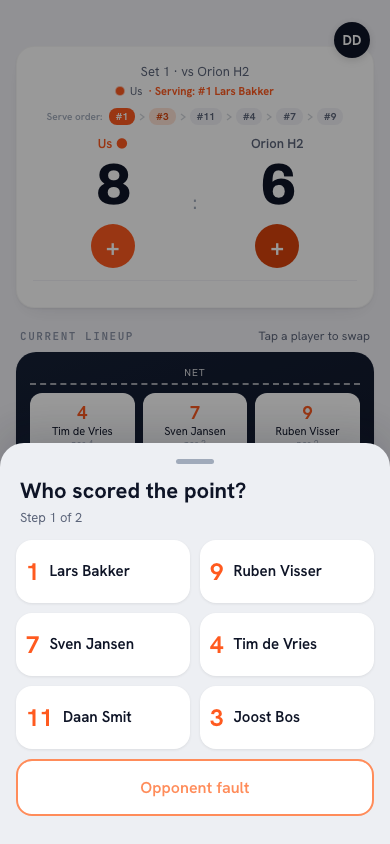
With an app, the work moves to the moment itself. In Koach you tap the plus for the team that wins the rally. If your own team scored, you pick from the six players on court at that moment under Who scored the point?, and then how: Attack, Block or Serve / Ace. If your team's point came from a mistake by the other side, tap Opponent error on the same screen. If the opponent scores, tap Good ball by opponent, or choose which of your players made the error and then, under What went wrong?, which error it was. When the opponent serves, you can rate the serve receive from 0 to 3.
14 days free, no credit card. Track your next match in Koach and compare it with your clipboard.
Try Koach at your next matchAfter the last point there's nothing to add up. For every player you see the points from attack, block and serve plus their number of errors, and because every match belongs to your team, the stats carry over across the season. Still want to run your own numbers? Export season (CSV) on the dashboard puts the stats per player and per match into a file you can open in any spreadsheet. So you don't have to choose between an app and your own formulas.
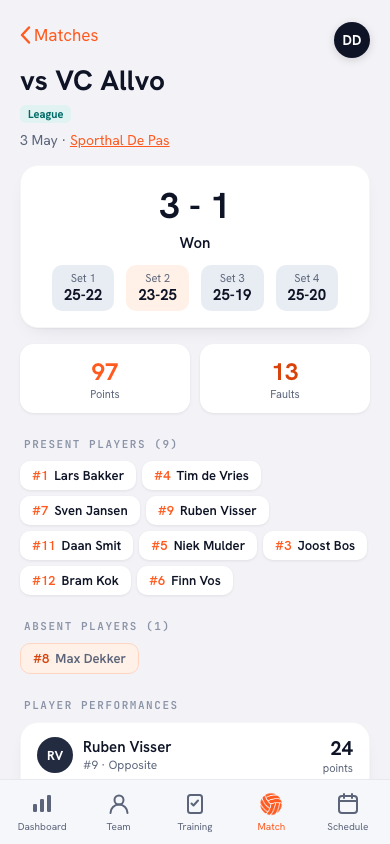
How scoring works step by step and which stats you get: see tracking volleyball stats with an app.
On your own on the sideline, or with a helper?
The biggest factor isn't the method but whether someone sits next to you. A coach who tallies or taps is only half watching the match. That's as true for paper as it is for an app.
- You're on your own. Keep it small: on paper, only the last action of each rally; in the app, only who scored and how. If even that doesn't work, don't track live. In Koach you can enter the set scores afterwards, even days later, with Enter the result manually; then a sheet opens where you fill in each player's points from attack, block and serve and their number of errors. You won't have the flow of the match or the error types, but you will have the totals per player.
- Someone sits next to you. A sub, an injured player or a parent can keep a sheet or tap on your phone. If a player on your team has their own account, choose Authorize a player to keep score for that match. That player then tracks the score and the stats on their own phone, and your hands stay free.
- You also want to track the opponent per player. Koach doesn't do that: the app only tracks your own players. For the opponent, the most you record is that a point came from their error or from a good ball. For that you need a second sheet and a second person, or an app built purely for scouting.
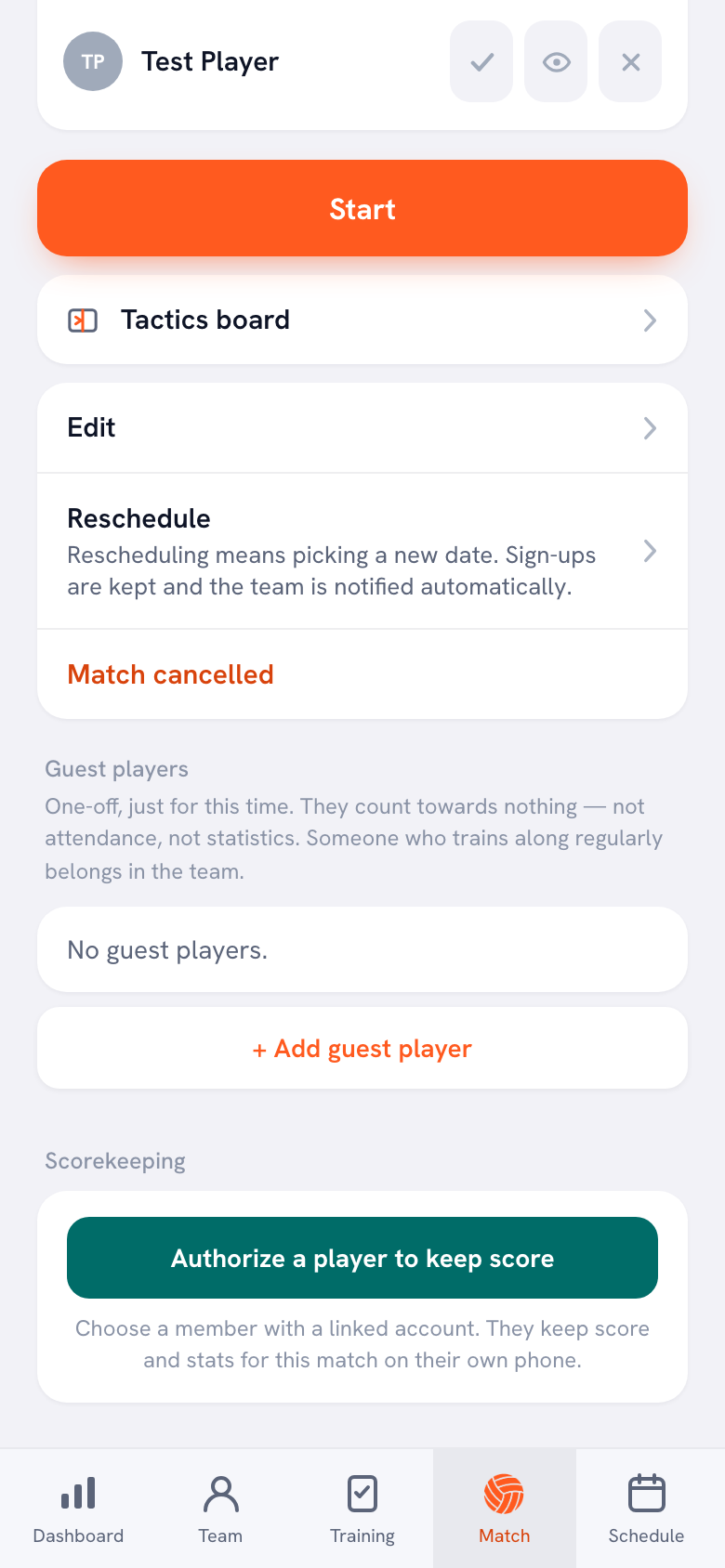
How to train a regular scorekeeper and what to explain in one minute: read handing off live scoring to parents and subs.
Which method fits you? A quick decision guide
- You measure one skill a few times a season, for example serving or serve receive, to test a practice goal. Choose paper.
- You want to decide for yourself what you count and how you calculate it, and you don't mind typing after the match. Choose a spreadsheet, filled from paper.
- You want to know, for every match and every player, where the points and errors come from, and compare those numbers over a season. Choose an app.
- You coach a youth team, say 12-year-olds, and mainly want to see who plays and who scores. Start with points and errors per player; that works on paper and in an app. If you track live in Koach, the app also counts the rallies played per player, so you can see whether playing time is shared fairly.
- You're not sure. Start on paper with one skill. Once you notice you want to know more than you can add up, you'll know exactly why you're switching.
What Koach doesn't do, and what it costs
We make Koach, so read this as the maker's side of the story. An app imposes a layout on you. In Koach that means: points per player from attack, block and serve, errors by type, serve receive rated 0 to 3 and the flow of the match. The app doesn't count attack attempts, so you can't get a hitting percentage out of it; you work that out on paper or in a spreadsheet. You don't track the opponent per player, and there's no video in the app.
You can try Koach free for 14 days, with no credit card and every feature. After that you choose Coach for €2.99 per month (one team, two coaches) or Club for €9.99 per month (unlimited teams). With a yearly plan you pay €2.49 or €8.33 per month. The prices are on the pricing page; in the App Store and on Google Play you see the price in your own currency. Paper and your own spreadsheet stay free; the only question is whether you'd rather spend the time after a match on math or on your next practice.
Decide after two or three matches, not after one. Track the same skill for two or three matches in a row with the method you chose. If that works without gaps, the method fits you. If a sheet gets left behind or a match stays empty, that's your signal to change something: measure less, let someone else keep the stats or pick a different method.
Frequently asked questions
Can you export volleyball stats from an app to Excel?
In Koach, yes. On the dashboard, Export season (CSV) puts the stats for the selected season into one file: per player the points from attack, block and serve, total errors and attendance; per match the result; and per match each player's points. You open that file in Excel, Google Sheets or any other spreadsheet program. So you tap on the sideline and keep calculating at home with your own formulas, without retyping a thing.
Can I enter stats from paper into a volleyball app later?
Yes, if you kept your tallies per player. In Koach, open Enter stats afterwards on a match that has been played; if there's no result yet, start with Enter the result manually. Then type in each player's points from attack, block and serve and their total errors. Those numbers count toward the season totals and each player's development. What you don't get back is the flow of the match, serve receive and the error types: errors go under Other.
What volleyball stats should a beginner coach track?
Start with points and errors per player, split into attack, block and serve. That's easy to track on paper and in an app, and it already shows who makes the difference. Add a serve receive rating or a separate count of service errors only once that first count has worked for a few matches without gaps. What each number tells you and which ones you can skip is in understanding volleyball stats.
Is there a free volleyball stats app?
That varies from app to app, so check the website or the store before you start to see what you'll pay after downloading. You can try Koach free for 14 days, with no credit card and every feature. After that Coach costs €2.99 per month for one team and two coaches, and Club €9.99 per month for unlimited teams. Players and parents use the app for free. Paper and your own spreadsheet cost nothing. What you get for free and when you'll want more: see the free volleyball stats app.
Can a parent keep volleyball stats?
Yes. A parent can keep a paper sheet or tap on your phone; in Koach each point only shows the six players on court, so the explanation is short. A player on your team with their own account can track the match on their own phone via Authorize a player to keep score. Agree with every scorekeeper that when in doubt they make the call and keep going, so you can stay focused on the match.




Track your next match in Koach
14 days free, no credit card. After three matches you'll know whether tapping suits you better than tallying.
Get started with KoachOr read first what the volleyball coaching app does.