
Printable volleyball stat sheets: free PDF, example included
The short answer
A volleyball stat sheet is a page with one row per player where you tally serves, serve receive (rated 0 to 3), attacks, blocks and errors during the match. Download a free printable PDF below, with a serve tracker and a filled-in example. Koach tracks most of those numbers live, with no adding up afterwards.
Looking for printable volleyball stat sheets you can take to the bench at your next match? Below is a free one to print: three A4 landscape pages, with boxes for serve, reception, attack and block for every player. You will also see how to fill it out, and when an app can take the adding up off your hands.
Download the printable volleyball stat sheets
First, what you came for. The sheet is free, you do not need an account or an email address, and you are welcome to print, copy and adapt it.
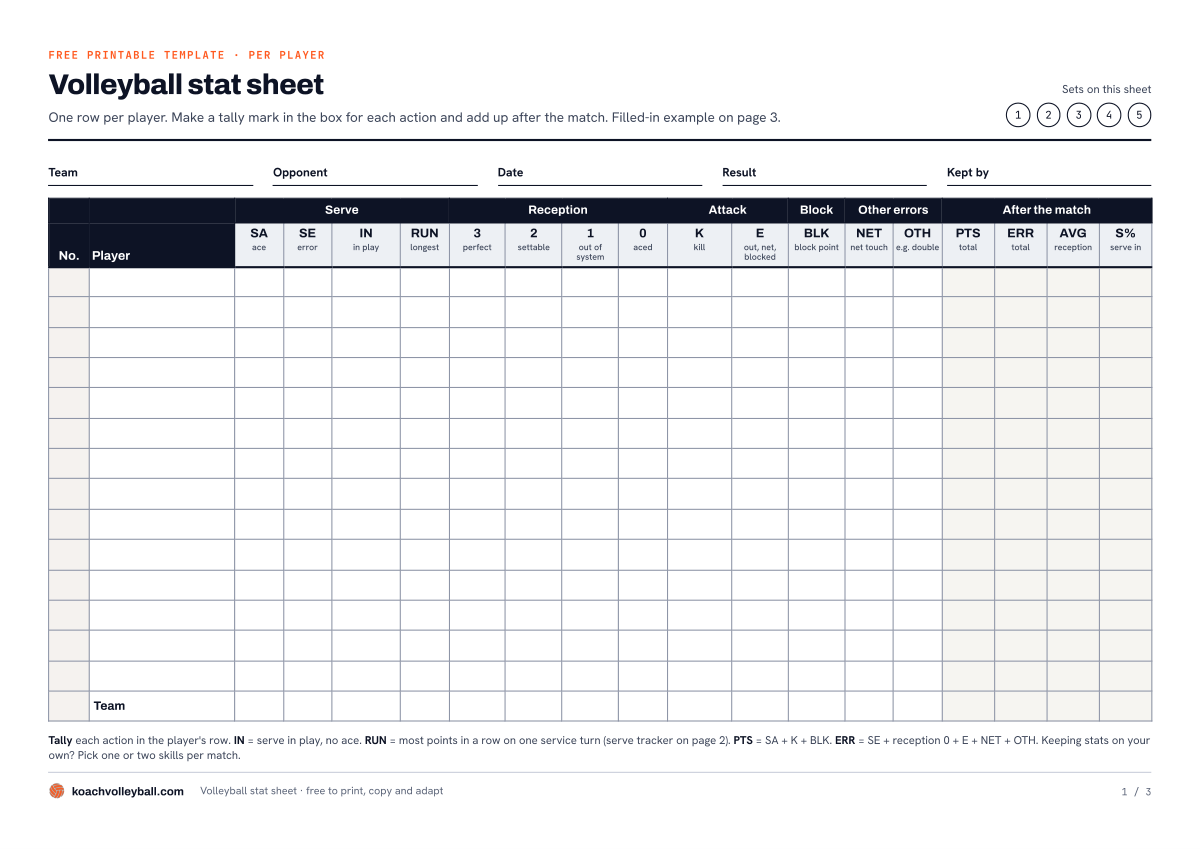
- Volleyball stat sheet (PDF): printable, A4 landscape, 3 pages: a sheet for 14 players, a serve tracker for 5 sets and a filled-in example.
It is a plain PDF without fillable fields: print it, put it on a clipboard and fill it out by hand. Printing on US Letter paper? Choose Fit to page in the print dialog.
What is on the volleyball stat sheet?
Three pages, each with its own job.
Page 1: one row per player
At the top you fill in your team, the opponent, the date, the result and who is keeping the sheet, and you circle which sets (1 to 5) it covers. Below that are 14 blank player rows and a team row, with these columns:
- Serve: SA (ace), SE (error: net or out), IN (in play, no ace) and RUN (the longest run of points on that player's serve).
- Reception: one box per rating, from 3 (a perfect pass to the setter) to 0 (aced). Why that scale works is explained in tracking passing quality.
- Attack: K (kill: the ball goes down) and E (error: out, into the net or blocked).
- Block: BLK, the block points.
- Other errors: NET (net touch) and OTH, for example a double contact.
- After the match: four blank boxes for PTS (points), ERR (errors), AVG (the average reception rating) and S% (the share of serves that went in).
Page 2: the serve tracker
Each set has 24 boxes for service turns. When your team wins the serve, you start a new box: the server's jersey number on top, a tally mark below for every point you win on that serve. After the match, find each player's box with the most marks. That number goes into the RUN column on page 1. The same page lists the formulas and the abbreviations.
Page 3: a filled-in example
A made-up four-set match with nine players, every column filled in, plus part of the serve tracker for set 1. Look at it once before you start: you will see how the tally marks, the totals and the team row fit together.
The abbreviations, box score style
The sheet uses the same abbreviations you see in a volleyball box score, so your numbers read just like the stats from any other match. Page 2 also explains the ones that are not on the sheet. How to read a complete box score with these columns is covered in volleyball stats abbreviations.
| Abbreviation | Meaning |
|---|---|
| K | Kill: an attack that wins the point |
| E | Attack error |
| TA | Total attacks (attempts) |
| A | Assist: the set before a kill |
| SA / SE | Service ace / service error |
| RE | Reception error (a 0 on this sheet) |
| DIG | Dig: a defended attack |
| BS / BA | Block solo / block assist with a teammate |
Attack attempts and digs are left off the sheet on purpose: every extra column costs you attention on the sideline.
How to fill out a volleyball stat sheet
- Before the match. Fill in the header, write jersey numbers and names in the rows and circle the sets this sheet covers. If you use two sheets for one match, you can see at a glance which sets are on which sheet.
- During the match. Make a tally mark in the player's row for every action. Keeping stats on your own? Pick one or two skills and leave the rest blank; which numbers tell you the most is covered in understanding and using volleyball stats. The full sheet at once is a job for someone who is not also coaching, like a bench player, a parent or an assistant coach.
- After the match. Add up each row and fill in the four boxes on the right. The formulas are on page 2:
- PTS = SA + K + BLK
- ERR = SE + reception 0 + E + NET + OTH
- AVG (reception) = (3 × number of 3s + 2 × number of 2s + number of 1s) ÷ all receptions
- S% = (SA + IN) ÷ (SA + SE + IN) × 100
A worked example from page 3: number 4 has eight 3s, nine 2s, four 1s and two 0s. That gives (24 + 18 + 4) ÷ 23 = 2.0. Then check the team row: the SA, K and BLK totals together should equal the PTS column added up. In the example that is 6 + 41 + 8 = 55. If it matches, you have not skipped anything.
How to keep up with your tally marks in a fast rally, which marks to use and how to get from tally marks to percentages is explained in keeping volleyball stats on paper. We will not repeat it here.
Where a paper stat sheet falls short
The sheet does what it promises: after the match you know what each player did. Use it for a few weeks, though, and you will run into three things.
- Adding up is the real work. Tallying during the match comes naturally. The counting, dividing and copying comes afterwards, every single week.
- A sheet remembers nothing. To see how your outside hitter's passing develops over ten matches, you lay ten sheets side by side or copy everything into a spreadsheet. How far that gets you is covered in tracking volleyball stats in Excel.
- The order is gone. A tally mark tells you how many, not when. To look back at what happened in a rally, you need a scouting sheet with one line per rally.
Almost the same columns in Koach, without the adding up
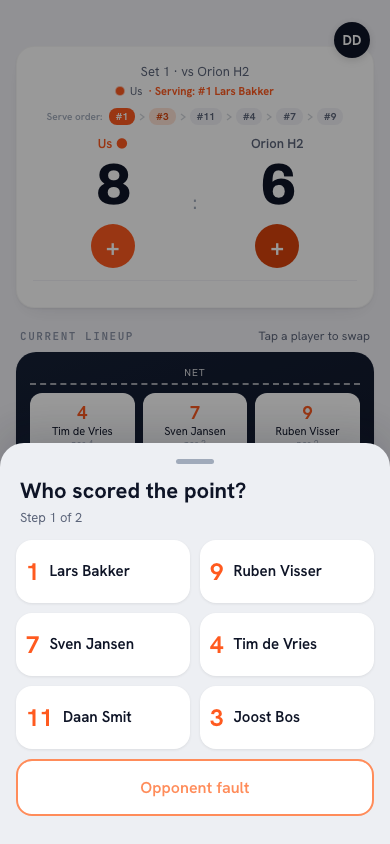
We make Koach, an app for volleyball coaches, so read this as the makers' side of the story. Most of the sheet's columns are in the app too; you just tap them instead of tallying them. When your team wins a rally, you pick the player under Who scored the point? and then how: Attack, Block or Serve / Ace. If the point came from an opponent's mistake, tap Opponent error. When your team loses the rally, you pick the player under Fault by whom? (or Unknown / unassigned), then the kind of error under What went wrong?, such as Service fault, Attack fault, Bad pass or Net fault. If the opponent simply won the point, tap Good ball by opponent. When the opponent serves, you rate the reception from 0 to 3, with the same meaning as on the sheet.
14 days free, no credit card. Score your next match in Koach, then put the numbers per player next to your stat sheet.
Try Koach at your next matchAfter the last rally, this is ready without you adding anything up:
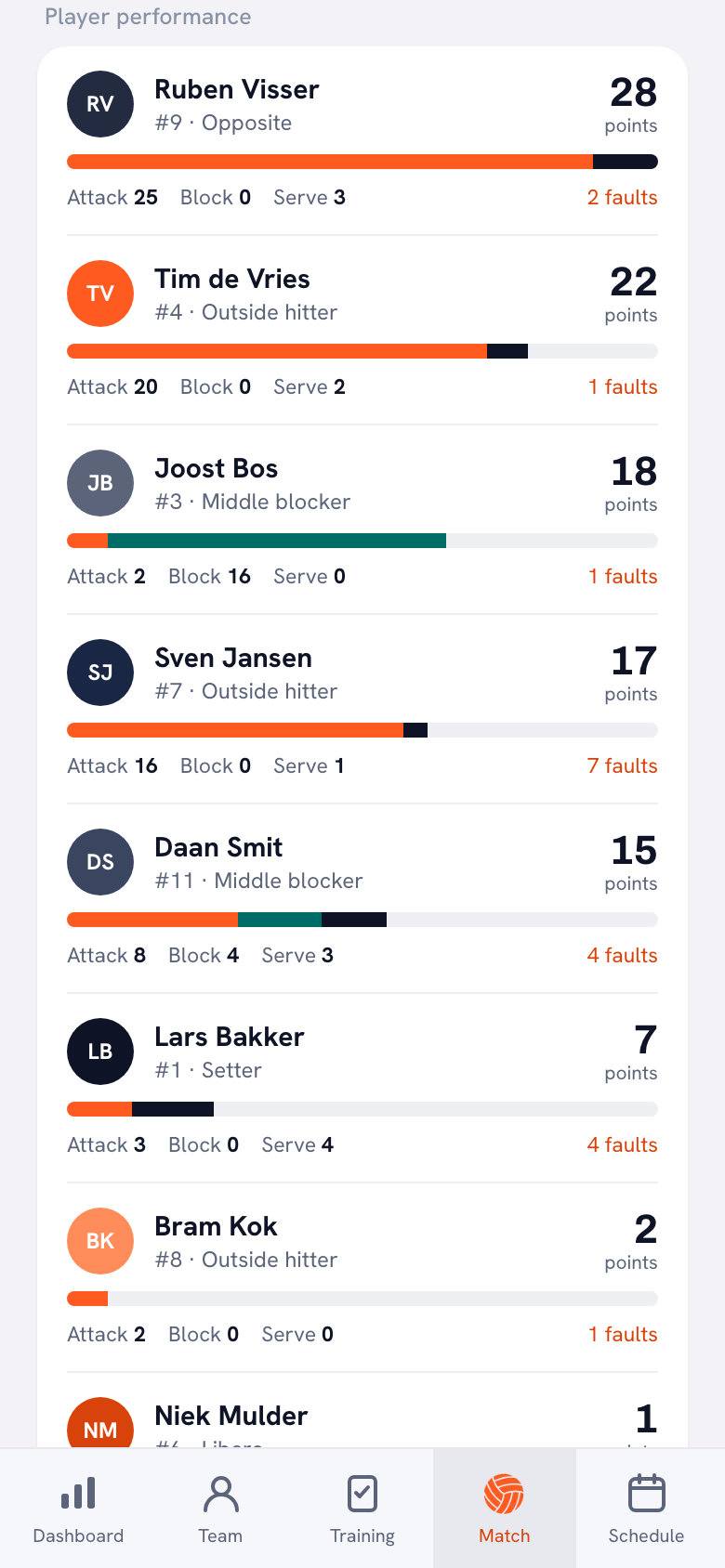
- Player performance: each player's points from attack, block and serve, plus their number of errors. How to read those numbers is covered in reading player stats after a match.
- Reception: the average reception rating for the team and for each player, with the number of receptions.
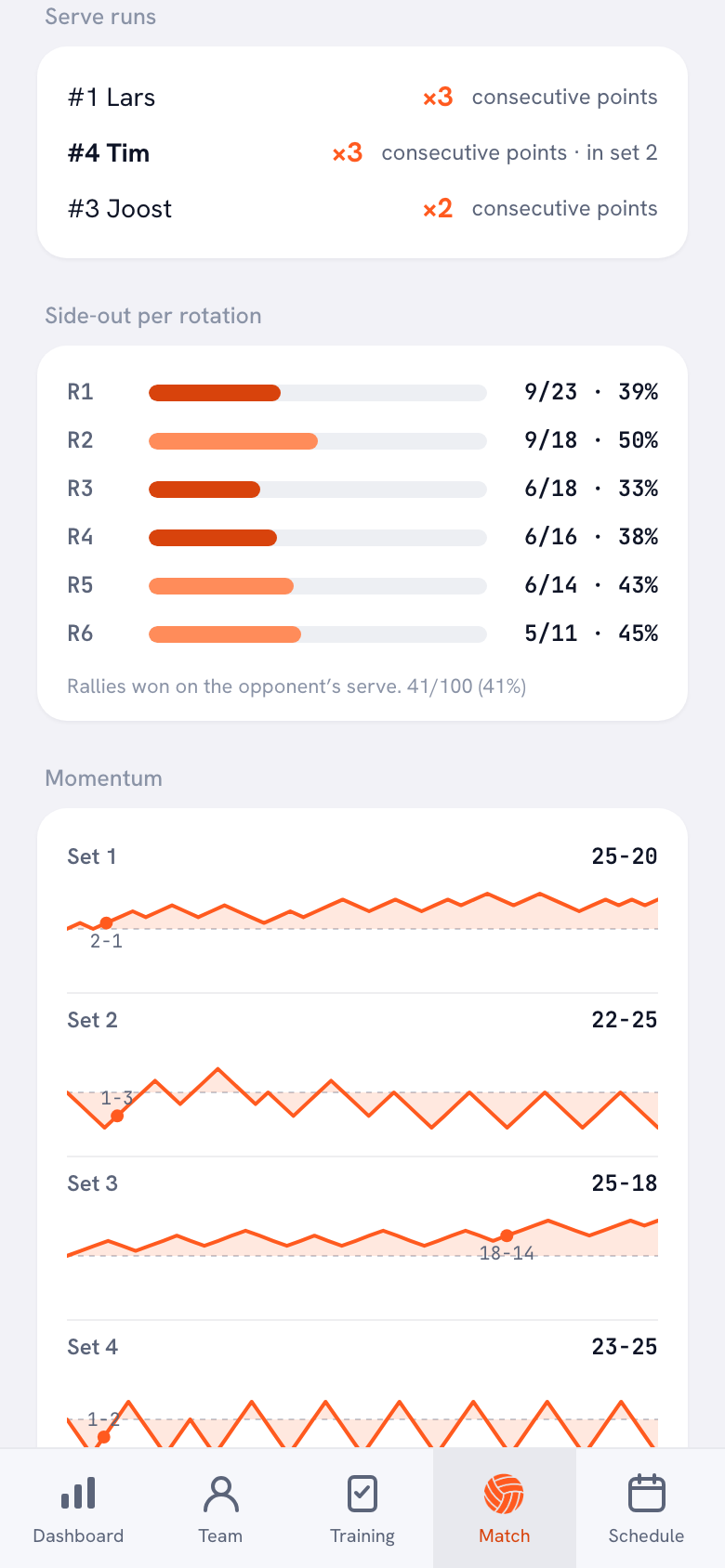
- Serve runs: the three longest runs of points in a row on your own serve, with who was serving. If you want the run for every player, the serve tracker on page 2 is still handy.
- What this sheet does not have: Side-out per rotation, how each set unfolded rally by rally (Momentum) and Season stats that keep adding up after every match. Still want the numbers in a spreadsheet? Use Export season (CSV).
Rather not keep score yourself? Choose Authorize a player to keep score: a team member with a linked account then keeps the score and the stats on their own phone. And if you did tally on paper after all, you can add the totals later with Enter stats afterwards, even days after the match.
Stat sheet or app: what each one tracks
A fair comparison: paper does things the app does not, and the other way around.
| What you track | This sheet | Koach |
|---|---|---|
| Aces and serve errors | Yes, tally | Yes, tap |
| Serves that land in play | Yes | No |
| Serve percentage | Yes, work it out yourself | No |
| Longest run on your own serve | Yes, per player via page 2 | Yes, the three longest, automatically |
| Reception 0 to 3 and the average | Yes, work it out yourself | Yes, calculated |
| Points from attack and block, errors | Yes | Yes |
| Hitting percentage | No | No |
| Totals per player | Add up yourself | Right after the match |
| Side-out per rotation | No | Yes |
| Stats for the whole season | No, keep the sheets | Yes, plus CSV |
| Works without a device or battery | Yes | No |
| Cost | Free | 14 days free, then €2.99 per month (Coach) |
Where the sheet wins: it costs nothing, anyone can fill it out without an account, and it also counts the serves that simply go in, so you get a serve percentage. Where Koach wins: you add nothing up, the numbers build up over the season, you see in which rotation your points leak away, and players can check their own numbers with a free player account.
Who should use the stat sheet, and who should use Koach?
Go with the sheet if you first want to find out whether stats add anything, if you want to follow one skill for a few matches, or if a parent or bench player next to you is happy to keep tally. If you want your serve percentage, paper is also the better choice.
Go with Koach if you want numbers every week without spending an evening on them, if you want to see how a player develops over the season, or if you already keep your lineup, subs and score on your phone. What else the app does with stats is covered in tracking volleyball stats with an app.
Neither one fits if you want to record attack attempts, digs or the opponent's players. Tracking that much takes someone who does nothing else during the match.
You can try Koach free for 14 days, with no credit card and every feature included. After that you choose Coach for €2.99 per month (one team, two coaches) or Club for €9.99 per month (unlimited teams); with a yearly plan you pay €2.49 or €8.33 per month. All prices are on the pricing page. In the App Store and on Google Play you see the price in your own currency.
Try both at one match. Have someone fill out the sheet while you score in Koach, then put the totals next to Player performance afterwards. You will see for yourself how much work the adding up is, and whether you want to keep doing it.
Frequently asked questions
Is this volleyball stat sheet free, and can I edit it?
Yes. The PDF is free, with no account or email address needed, and you are welcome to print, copy and adapt it, for example by crossing out columns you do not use. It is only a PDF, though: there is no editable spreadsheet version. If you want to build columns that add themselves up, read where a spreadsheet falls short.
How do you calculate serve percentage in volleyball?
Add the aces and the serves that landed in play, divide by all serves (aces, errors and in play) and multiply by 100. On the sheet that is (SA + IN) ÷ (SA + SE + IN) × 100. For example, 2 aces, 3 errors and 9 serves in play gives 11 ÷ 14 × 100 = 78.6, rounded to 79. Koach does not count serves that simply land in play, so you only get this number from paper.
What do 0, 1, 2 and 3 mean in volleyball passing stats?
It is a rating for every serve received. A 3 is a perfect pass to the setter, a 2 is a ball that can still be set, a 1 is a pass that leaves your team out of system and a 0 is an ace against you. To get the average, add up all the ratings and divide by the number of receptions. Koach uses the same scale and works out the average for you.
Can I add my paper stats to Koach later?
Partly, yes. For a match you did not score live, choose Enter the result manually and fill in the set scores; the sheet then opens where you enter Attack, Block, Serve and Faults per player, even days later. Those faults appear under Other in the fault distribution. Reception ratings and serve runs do not carry over this way: you only get those when you score live.
How much does Koach cost if I want to stop adding up stats?
You can try Koach free for 14 days, with no credit card and every feature included. After that Coach costs €2.99 per month for one team with two coaches, or €2.49 per month on a yearly plan. Club costs €9.99 per month for unlimited teams. Players and parents use the app for free, and the stat sheet on this page stays free too.



Let Koach do the adding up
14 days free, no credit card. After your first match, the numbers per player are ready.
Get started with KoachOr read first what the volleyball coaching app does.