
Data Volley alternative: what a club coach actually needs
The short answer
Data Volley 4 is Windows scouting software with an annual licence of $299 (Lite) or $799 (Professional), built to scout both teams and work with video. Without a dedicated scout next to your bench, live scoring on your phone is often enough: in Koach you track points per player, pass ratings and side-out per rotation.
If you are looking for a Data Volley alternative, you are probably not an analyst at a top club but a coach who wants to know where the points come from and where they leak. We make Koach, so this comparison comes from an interested party. That is why it also covers what Data Volley does better, and for whom.
What Data Volley 4 is, and what it costs
Data Volley 4 is made by Data Project; its companion apps are listed in the app stores under Genius Sports Italy. It is software for scouting a match while it is being played: every skill, for both teams. You import video into the program and sync it with the scouted data.
There are two versions, both sold as an annual licence. On the US product page for Data Volley 4, Lite costs $299 a year and is aimed at clubs at an intermediate level, while Professional costs $799 a year and is aimed at professional teams. The European product page lists the same amounts in euros. Among other things, Professional adds the Web Client, which shares live data with the bench and the media. A free trial version can be downloaded from the maker's website (all checked in October 2026).
The same maker also offers Click&Scout, for scouting from the bench on an iPad, a Windows computer or an Android tablet. What it costs and how it works on the iPad is covered in our article on Click&Scout.
What does a club coach need from a Data Volley alternative?
Data Volley is built to scout every skill of both teams, and in practice that takes someone who sits next to the bench and does nothing else. Most club and school teams do not have that person. You coach, make substitutions and call time-outs, and at best a sub or a parent keeps the score. What you do want to know fits in a shorter list:
- Who scored, and how. Attack, block or serve, per player. After the match you see who won your points, and who went quiet in the third set.
- Where the opponent's points came from. Your own team's service errors, attack errors and bad passes, or simply a good ball from the other side. That difference decides what you work on at Tuesday's practice.
- How good your passing was. A rating from 0 to 3 for every reception is enough to see who is under pressure. How to build that up is explained in tracking pass ratings per player.
- Which rotation leaks. The share of rallies won on the opponent's serve, per rotation, tells you more than the final score. Why that is the most important team stat is explained in what side-out means in volleyball.
- Something you can keep up. A few taps per rally is doable while you coach. A full code for every ball contact is not, when you also have to make substitutions.
What a club coach usually does not need: coding every opposing player, syncing footage with the data, and a laptop on a table next to the bench.
14 days free, no credit card. Score your next match with it and see afterwards whether side-out per rotation tells you something you did not know yet.
Try live scoring at your next matchHow live scoring works in Koach
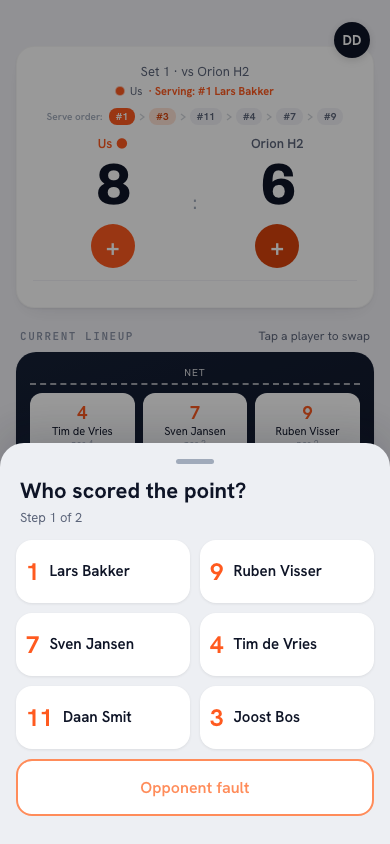
In Koach you score the match on your phone, point by point. When your team wins the rally, you pick the player under Who scored the point?, and under How was the point scored? you choose Attack, Block or Serve / Ace. Was it a gift from the other side? Then tap Opponent error. When the point goes to the opponent, the app asks What went wrong?: Service fault, Attack fault, Bad pass, Too late, Net fault or Other, and if you like, who made the error. If the other side simply played it well, choose Good ball by opponent. A wrong tap is reversed with Undo.
When the opponent serves, you rate the reception on the scale shown in the app: 0 = aced · 1 = out of system · 2 = settable · 3 = perfect to the setter. Under Who received the ball? you tap the passer. That builds pass ratings per player without a paper stat sheet. If you prefer scouting on paper, the symbols are in a scouting sheet that puts each rally on one line.
Coaching on your own? Then you do not have to do the tapping yourself. With Authorize a player to keep score you choose a member with a linked account, and they keep score and stats for that match on their own phone. If live scoring did not work out, you fill in the match afterwards, even days later: with Enter the result manually the set scores, and with Enter stats afterwards the points and faults per player.
What you see after the match
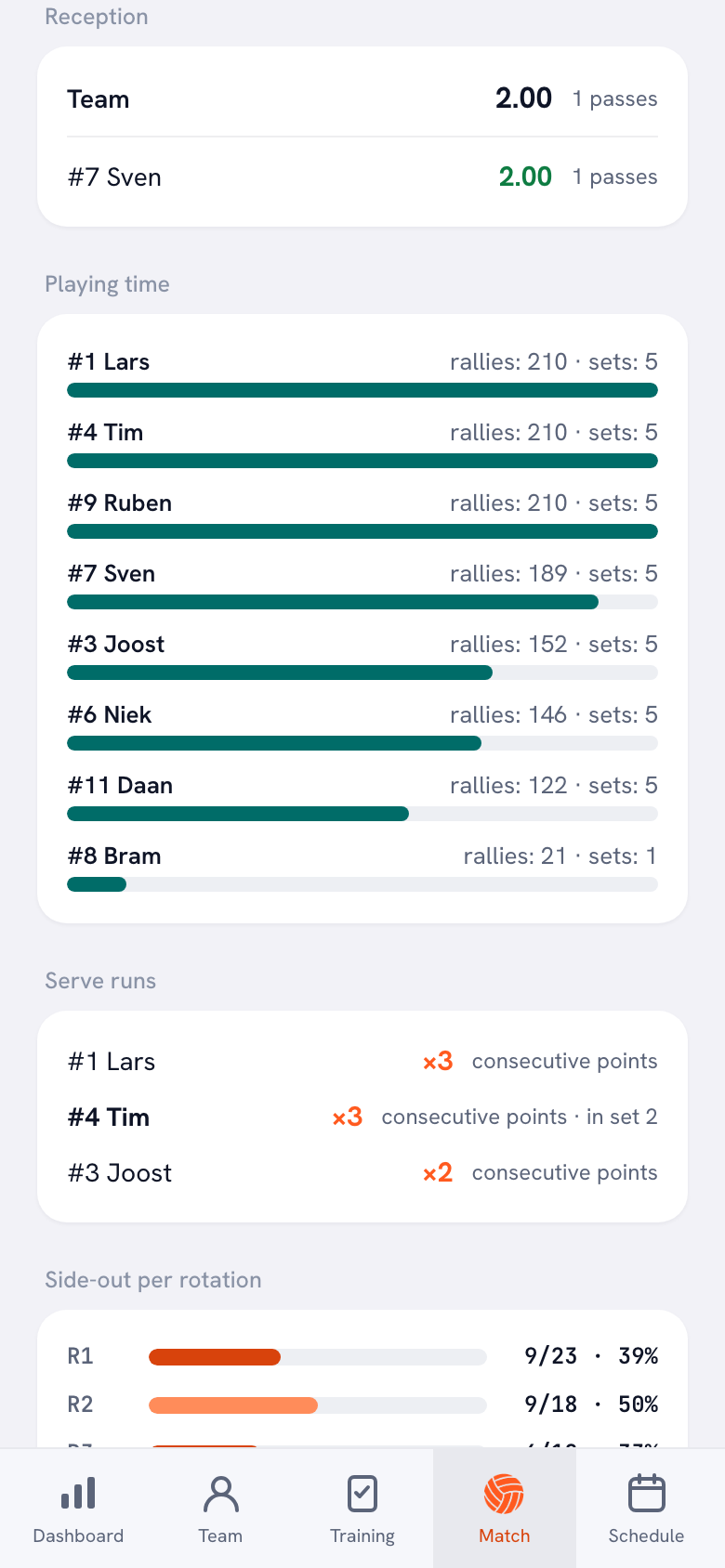
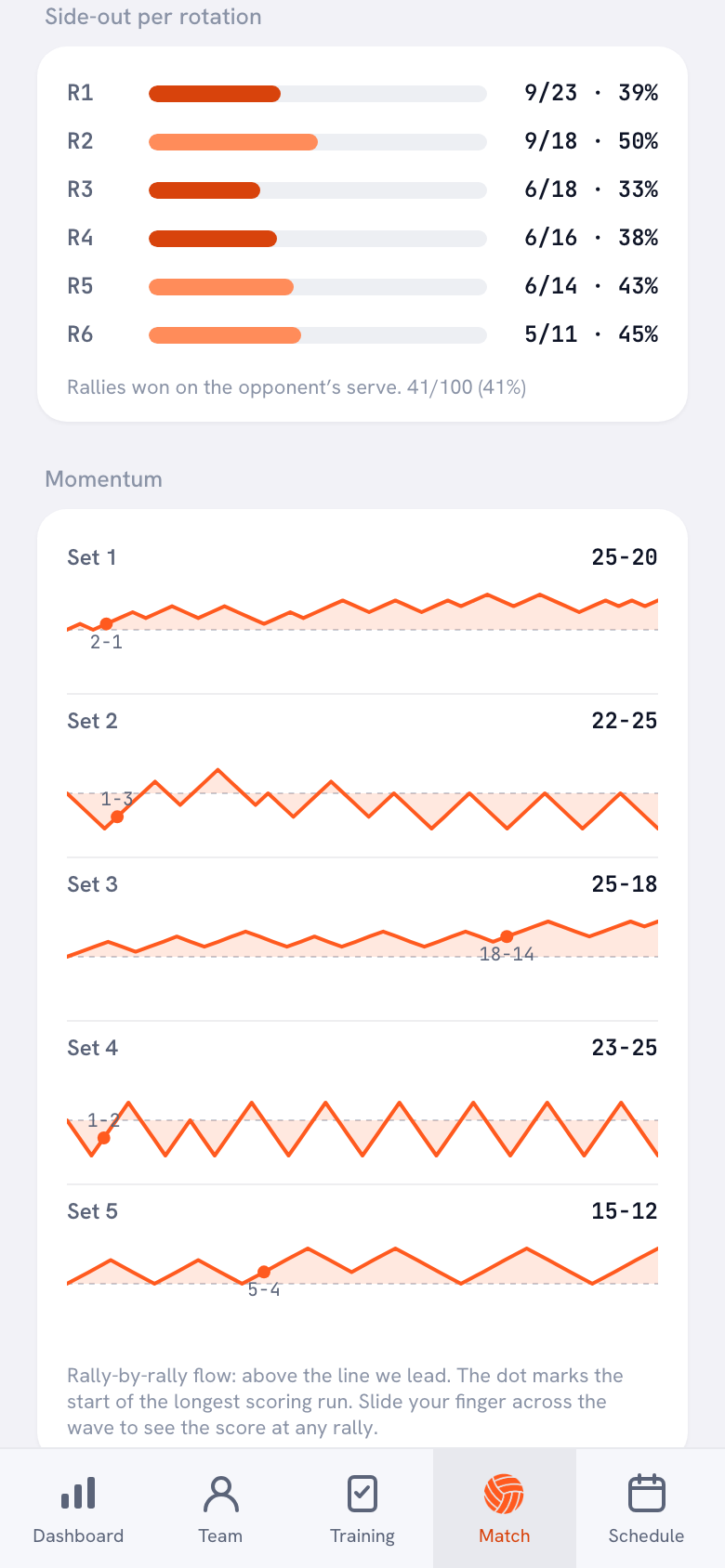
After the last point, the match stats are ready. You see the points per type and the fault distribution, the points from attack, block and serve per player, and the average reception. Under Side-out per rotation you see, for every rotation, how many rallies you won on the opponent's serve. The wave under Momentum shows for each set when you were ahead and where the longest scoring run started.
Across several matches you use Compare matches. Playing the same team again? Under Previously vs, followed by the opponent's name, you see how the earlier matches went. Which numbers there are and how to read them is explained in tracking volleyball stats with an app.
Data Volley vs Koach, side by side
Checked in October 2026 on dataproject.com; for Koach in the app itself.
| What you want | Data Volley 4 | Koach |
|---|---|---|
| Scout both teams, every skill | Yes | No, only your own players |
| Import video and sync it with the data | Yes | No |
| Points and errors per player | Yes | Yes |
| Pass rating per player | Yes | Yes, 0 to 3 |
| Ball direction and zones | Yes | No |
| Practices and attendance in the same app | Not listed | Yes |
| Where it runs | Windows 8.1 or later | iPhone, iPad, Android and browser |
| Price | $299 (Lite) or $799 (Professional) a year | €2.99 a month (Coach) or €9.99 a month (Club) |
| Trying it out | Free trial version to download | 14 days free, no credit card |
The table shows that these are two different kinds of tool. Data Volley measures more, and in more depth, and needs someone who does nothing but scout. Koach measures less, but the numbers come from the same app you use for your roster, your practices and your lineup.
Does Data Volley run on a Mac or iPad?
According to dataproject.com, Data Volley 4 runs only on Windows: Windows 8.1 or later, at least 4 GB of RAM, a free USB-A port, and not on computers with an ARM processor. Activating the licence requires an internet connection. A Mac or iPad version of the main program is not listed.
There are separate apps around the program. According to the same page, the Player app runs on Android, iOS, Windows and macOS. The App Store has a free Data Volley 4 Web Client app for iPhone and iPad. That is the Web Client that comes with Professional, and its last update in the App Store dates from February 2017 (checked in October 2026). The scouting itself, then, happens on a Windows computer. If you want to scout on an iPad, Click&Scout from the same maker is the route dataproject.com itself offers.
Koach is one app for iPhone, iPad and Android, with the same account everywhere; what that means on a bigger screen is explained in Koach on the iPad. On a Mac or a Windows laptop you work in the browser, without installing anything.
Who is Data Volley the better choice for?
- You coach at a high level, or an analyst, intern or dedicated scout sits next to you and does not also have to coach.
- You want to scout both teams in full, including the opposing players.
- You want to record the direction of the ball and the zone for every action.
- You want to import footage and sync it with what was scouted.
- You want to share live data with the bench and the media, as with the Web Client in Professional.
We will be honest about what Koach does not do. Koach does nothing with video. From the opponent, Koach only records whether a point came from an error on the other side, or whether you lost it to a good ball from the other side; there are no stats per opposing player. Koach counts attack points and attack errors but not attack attempts, so you do not get a hitting percentage. Attack directions and heat maps are not included either.
Choose Koach if you coach one or a few teams at a club, stand on the sideline yourself, and want to know where your points come from and which rotation leaks, in the same app as your practices and attendance. The same trade-off between pro software and a coaching app comes up in the VolleyStation alternative, and what else to look for is in the checklist for choosing a coaching app.
What does Koach cost compared with Data Volley?
You can try Koach free for 14 days, with no credit card. After that you choose Coach for €2.99 per month (one team, two coaches) or Club for €9.99 per month (unlimited teams and coaches). Paid yearly, that is €2.49 or €8.33 per month. In the App Store and on Google Play you pay the store price in your own currency. Players and parents use the app for free. All amounts are on the pricing page.
That is not a verdict on the quality of Data Volley. These are two products for two different situations: an analyst with a laptop, or a coach with a phone in hand.
The test question. Who scouts for your team while you coach? If the answer is nobody, scouting software stays on the shelf, however good it is. In that case use Authorize a player to keep score to hand the scoring to a sub with their own account, and after three matches look at which rotation keeps leaking.
Sources: Data Volley 4 on dataproject.com (US), Data Volley 4 on dataproject.com (Europe), Click&Scout on dataproject.com and Data Volley 4 Web Client in the App Store, checked in October 2026. Prices and features can change; check them yourself before you choose.
Frequently asked questions
Is Data Volley 4 free to download?
Only as a trial. On dataproject.com you can download a free trial version, but after that you work with an annual licence. According to the US product page, Data Volley 4 Lite costs $299 a year and Data Volley 4 Professional $799 a year; the European page lists the same amounts in euros. Prices checked in October 2026; see dataproject.com for the current amounts.
Can Koach link video to my volleyball stats?
No. Koach does nothing with video: you score point by point on your phone, and the stats are saved with the match. If you want to import footage and sync it with what was scouted, software such as Data Volley is built for exactly that.
Can I use Data Volley and Koach together?
Yes. Then you use scouting software for the in-depth match analysis, and a coaching app for everything around it: practices, attendance, lineups and player development. Data does not move from one program to the other on its own, so you decide per match where you scout.
Can Koach open or import Data Volley files?
No. Koach does not read or create Data Volley files, and you cannot import scouting files either. You score in the app itself, live or afterwards, and you can export your players and your season as a CSV file that you open in a spreadsheet.
How long is the Koach free trial?
You can try Koach free for 14 days, with no credit card. After that Coach costs €2.99 per month for one team with two coaches, and Club €9.99 per month for unlimited teams and coaches. With a yearly plan you pay €2.49 or €8.33 per month. Players and parents use the app for free.

Score your next match in Koach
14 days free, no credit card. After one match you will know whether it is enough.
Get started with KoachOr read first what the volleyball coaching app does.