
Koach on the iPad: what a bigger screen changes
There is often a tablet on the scorer's table already: for the digital match sheet, for the bar duty list, for the club. Your own phone lies next to it, with the score, the rotation and your substitutions on it. Two screens side by side, and always that one screen too small for what you have to tap during a rally. From version 2.1.6 that is no longer necessary: Koach runs full screen on the iPad.
What has changed
The Koach app was already in the App Store and could always be installed on an iPad too. It just ran there in an iPhone window: a narrow column in the middle with black bars to the left and right. Usable, but not pleasant, and certainly not if you put it on a stand at the side of the court.
From version 2.1.6 that is over. The app fills the whole screen of the iPad, in width and in height. On Android that was already the case: there the app runs on phone and tablet.
That is the whole change. It is not a different version and not a stripped-down edition: everything you can do on your phone, you can do on the iPad. The same screens, the same buttons, the same data. What is different is how much of it fits on screen at once — and in the hall that turns out to matter more than it sounds.
One app, one account, no second purchase
This is the question that gets asked most often, so the answer first: there is no separate iPad app. You do not search for a different name in the App Store and you do not buy anything a second time. It is the same app as on your phone, and on the iPad you log in with the same account.
That makes it the same data as well. The attendance you filled in at home on your phone is there on the iPad on Saturday; the match you played on the iPad on Saturday is on your phone on Sunday. You do not have to transfer anything and you do not have to choose. For many coaches that is the practical gain: the iPad in the bag for the hall, the phone in your pocket for everywhere else.
One thing deliberately does not work that way, and it is good to know before you try it: a match you are tracking live, you track on one device. Start on the iPad and you finish that match on the iPad. If you want somebody else to score, you authorise that person for that one match — that is a separate setting and not a matter of opening the same screen on a second device. That way a score from one device can never land on top of the score from the other halfway through a set.
If you use a club iPad, that changes nothing about the arrangement: everybody logs in with their own account, and whoever logs in determines which teams appear. A second coach who takes over from you logs you out and himself in. There is no separate iPad account and no access that hangs on the device instead of on the person.
Installing and logging in work exactly as on a phone. Those steps — getting the app, logging in, opening your team — are written out in Koach on your iPhone; on an iPad nothing about that route is different. Above all, do not repeat it with two accounts: one coach, one account, on as many devices as you like.
The web version at koachvolleyball.com/app simply stays and works in every browser. For a long time that was the detour for coaches who wanted to work on a tablet. From version 2.1.6 that is no longer needed — you can just install the app — but if you prefer working in the browser, nothing changes for you.
What a wide screen does to the layout
The app adapts to the width. That is not a separate iPad layout, but the same principle a website uses: if there is room, more things sit side by side instead of underneath each other.
On a phone you scroll. You see the score, you scroll to the line-up, you scroll back to the buttons. On an iPad most of that is on screen at the same time. That looks like a luxury until the moment during a rally when you want to tap something that is hanging just above the edge and you first have to scroll with a hand that is really busy with something else.
You do not have to set anything for it. There is no switch for a tablet view and no choice between two layouts: the app looks at the width it is given and arranges itself accordingly. Put the iPad down the other way round and that width changes and the layout moves with it. The only thing you notice is that more is on screen at once than you are used to from your phone.
For three screens that really makes a difference: the scoreboard, the line-up and the tactics board. The rest of this article is about those, because they are also exactly the three moments when you are standing in the hall and not sitting at your desk.
Scoring live with the scorer's table next to you
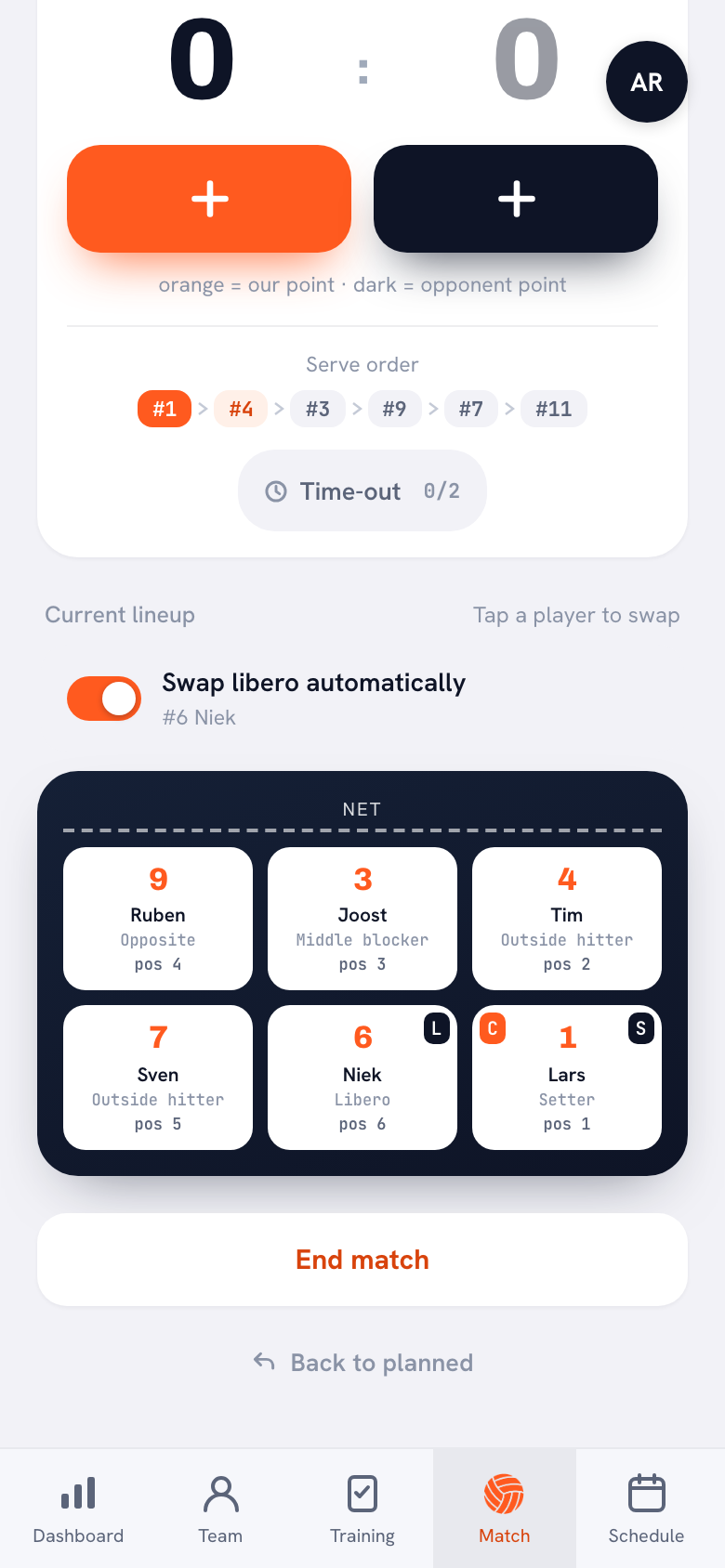
Tracking a match is above all a question of not missing anything. A point, a rotation, a substitution, a time-out — all short, all while you are also watching the court. How to keep track of a match from start to finish is in tracking a volleyball match live; what a bigger screen adds to that is mainly calm.
The buttons are bigger. That sounds like a detail and it is the most important of the three. A point button you hit with half an eye instead of having to hunt for it with your thumb saves you dozens of moments per set when you look away from the court. And the mistake you avoid with it is not "a point missed" but "a point put on the wrong side", because that is the correction that costs you what you wanted to spend on watching.
What else fits on screen with it are the set scores and the line-ups of both teams. On a phone you keep choosing between them: you look at the score, or you look at who is standing where. Side by side you do not have to choose, and that helps most at the moments when things are going against you — at 18-21 you want to know which rotation is coming without losing sight of the score.
On top of that you can put the iPad down. A phone you hold; a tablet on a stand or propped against your bag stands still on the bench beside you, and you tap it the way you tap a scoreboard. That is closer to how it works at the scorer's table than to how a phone works, and it also makes it easier to let somebody else score along: your assistant can follow without hanging over your shoulder.
What a tablet screen lends itself to further is being watched from the bench. Substitutes who can see what the score is doing and who is going on next stop asking you. What belongs on a board like that and how it relates to the official sheet is in a digital scoreboard in volleyball.
The tactics board in a time-out
This is where a big screen goes from convenience to genuine use. In a time-out you have thirty seconds and six players around you. What you say has to be capturable in one image, and on a phone that image is too small for seven people to look at. So you pass it round, or you point with your finger in the air.
A tablet you can turn round. The tactics board is on it large, everybody sees the same arrow, and you do not have to repeat anything for the one who was standing at the back. For youth teams that is the difference between an explanation that sticks and one that a single player heard. What you can put on a board like that and how to prepare it is in the tactics board for volleyball.
Two things that help in practice. Set the board up before the match, not during the time-out: thirty seconds is too short to still be drawing something. And keep it to one thing. A bigger screen tempts you into more arrows, while a time-out still only has room for one instruction.
A bigger screen does not make your explanation shorter. That stays your job: one message per time-out, and you save the rest for the break between sets. How to divide up those thirty seconds is covered in the time-out in volleyball.
Showing the line-up instead of explaining it
On a tablet the line-up board has a bigger court, and that changes what you do with it. On a phone it is a form to fill in: you put the six in their places and then read out who is standing where. On an iPad it is something to turn towards people.
That is useful above all at the start of a set and with a player who has just come in. "You are in four, behind Lieke" is a sentence a fifteen-year-old interprets at the wrong moment differently from how you meant it. The same court with his name on it, shown once, costs three seconds and leaves no room for interpretation.
The same goes for the serving order and the rotation. Those two remain the hardest part of the match for youth players, and they get easier when the court on the table has the same shape as the court in the hall. A small court in a phone screen has that shape too, but you all have to come in close for it; a big court you only have to put down.
What goes in the bag
The honest summary is that an iPad makes nothing possible that could not be done before. Everything in this article can be done on a phone, and that stays the case. What changes is the effort it costs at the moments when you do not have that effort to spare: during a rally, in a time-out, with six players around you.
If you already have an iPad, there is no reason to leave it at home. Install the app, log in with the same account, and take it to the hall. If you are thinking of buying one especially, the trade-off is a different one and depends above all on how often you score yourself and whether you work with youth.
What you also do not have to do is decide which device is the real one. There is no main device and no copy you have to update afterwards. Start a match on the iPad and pick it up again on your phone and it is the same match, not two that you have to merge later.
One last practical note: just take your phone along. An iPad can fail, be left in the changing room or be used by somebody else, and because it is the same app with the same account, you pick the match up on your phone where you left off. That is not an emergency measure but simply how it works.
Frequently asked questions
Is there a separate Koach app for the iPad?
No. It is one app for iPhone and iPad, with one account. So you do not look for a different name in the App Store and you do not pay anything a second time. On the iPad you log in with the same account as on your phone and see the same data: the same teams, the same matches, the same attendance. What you do on one device is there on the other.
Can I do less on the iPad than on my phone?
No, it is the same app and not a stripped-down version. Everything that works on the phone works on the iPad: live scoring, line-ups, the tactics board, attendance and every other screen. The difference is only in the layout. Because there is more width, more sits side by side instead of underneath, so you scroll less during a match.
Do I still have to use the web version on a tablet?
You no longer need to. The web version at koachvolleyball.com/app stays and works in every browser, but it was mainly the detour for anyone who wanted to work on a tablet while the app still ran there in an iPhone window. From version 2.1.6 the app runs full screen on the iPad, so you can simply install it. If you prefer the browser, nothing changes.
Does this work on an Android tablet as well?
Yes. On Android the app runs on phone and tablet, and the same starting point applies there: one app, one account, the same data on every device you log in on. There too the layout adapts to the width of the screen, so a tablet gives you bigger scoring buttons, a bigger court for the line-up and a tactics board you can show to the team.

Try it yourself in Koach
Less admin, more coaching.
Get started with KoachOr read first what the volleyball coaching app does.