
Best volleyball stats app for iPad: six apps compared
The short answer
If you only need match stats on an iPad, iStatVball 3 and SoloStats 123 are the obvious picks: both also run on iPhone and Android and were updated in September 2026. If you want the numbers in one app with your lineup, practices and attendance, Koach fits, in the app and in the browser.
Looking for the best volleyball stats app for iPad? Often that is because a phone screen on the sideline is just too small to keep up with every rally. The App Store gives you separate listings, not a comparison. Here are six apps side by side: what they cost, how you enter stats, where the numbers go and who else can keep score.
What makes the best volleyball stats app for iPad?
An iPad gives you room, but whether you have usable numbers after the match depends on the app. Look at seven things:
- Entry per rally. How many taps does one point take, and can you manage it on your own? An app you can no longer keep up with in the third set gives you half the numbers.
- What gets measured. Points and errors per player, or also serve receive, rotations and where the serve or the attack lands?
- Export. Do the numbers need to go to a spreadsheet, a league or stats website, or a video platform?
- Alone or together. Does one person score on one device, or can several people enter stats or follow along at the same time?
- Price and model. One-time, per team per season, per year or per month, and which features sit behind a separate in-app purchase?
- Without Wi-Fi. Many iPads are Wi-Fi only, and not every gym has a network that works.
- What comes with the stats. With a dedicated stats app, your lineup and your practices live somewhere else.
14 days free, no credit card. Add your team, open Koach on your iPad and track your next match.
Try Koach on your iPadSix volleyball stats apps for iPad side by side
We make Koach. So read this as a comparison by the maker of one of these apps; that is why we also say where each of the other apps is stronger. Prices, platforms and features were checked on October 3, 2026 in the US App Store and on Google Play, in the makers' own descriptions. The prices there are in US dollars; in the App Store of your country the amount may differ.
| App | Price | Runs on | App language |
|---|---|---|---|
| Volleyball Ace Stats | $19.99 one-time, modules extra | iPad, iPhone | English |
| iStatVball 3 | Free download, 14-day trial, then from $39.99 per team-season | iPad, iPhone, Android | English |
| SoloStats 123 | Free, yearly in-app subscriptions from $4.99 | iPad, iPhone, Android | English |
| VBStats | $29.99 one-time | iPad only | English |
| Stat Together | Free download, $24.99 per season in the app | iPad, iPhone, Android | English |
| Koach | 14 days free, then €2.99 per month | iPad, iPhone, Android, browser | Six languages |
They differ more on features than on price. This is what the makers mention in their App Store descriptions, next to what Koach does:
| What you are looking for | Which other apps mention it | Koach |
|---|---|---|
| Chart of where serves or attacks land | Volleyball Ace Stats, iStatVball 3, Stat Together | No |
| Hitting percentage | Volleyball Ace Stats | No |
| Link with video | Volleyball Ace Stats, iStatVball 3, VBStats | No |
| Export to MaxPreps | Volleyball Ace Stats, iStatVball 3, SoloStats 123, Stat Together | No |
| Export to a spreadsheet | iStatVball 3, SoloStats 123, Stat Together | Yes, as a CSV file |
| Several people entering stats at once | Stat Together | No, but an authorized scorer |
| Following the stats live on another device | VBStats, Stat Together | No |
| Practice planning | VBStats; SoloStats through the separate SoloCoach app | Yes |
Volleyball Ace Stats: pay once, add modules
Volleyball Ace Stats from Dimensional Software is the oldest in this lineup: the first version came out in June 2010. You record with one tap on the player, and the app keeps track of position and rotation. According to the description you get box scores per player with hitting percentage, points per rotation with side-out, and passing and serving stats, and the output goes to Hudl, MaxPreps and DakStats. The app costs $19.99 and runs on iPad and iPhone.
Do the math, though, because part of it is sold separately: serve and attack charting $9.99, time code recording for Hudl video $14.99, Stat Consolidation $9.99, saving multiple team rosters $4.99 and Opponent Insight Reporting $4.99. The app with all five modules comes to $64.94, still as a one-time purchase. The last App Store update is from October 16, 2023. Strong for anyone who wants to pay once and enter stats quickly.
iStatVball 3 and SoloStats 123: actively updated
iStatVball 3 from DemiVision is a free download that you try for 14 days first. After that you buy a season per team: $39.99 for one team-season, $69.99 for two, $89.99 for three and $99.99 for four, with no auto-renewal. The maker lists two entry screens (RallyFlow and the classic screen), opponent stats, shot charts, heat maps, video sync and export to PDF, Excel, MaxPreps and Bound. Once you have bought a team-season, players, statisticians and coaches join for free. It runs on iPad, iPhone and Android and was updated as recently as September 2026. See also the iStatVball alternative: stats depth or the whole team.
SoloStats 123 from Rotate 123 is built for keeping stats without a spotter: one person does it all. Unlimited teams and matches are free, and you export to MaxPreps, Hudl and Excel. The app also offers yearly subscriptions of $4.99 and $12.99 (Pro). This one also runs on iPad, iPhone and Android and was updated in September 2026. For practices the maker has a separate app, SoloCoach. More in the SoloStats alternative.
Where these two are stronger than Koach: they are built entirely around stats, they export to MaxPreps (SoloStats 123 also to Hudl, iStatVball 3 also to Bound), which Koach does not do, and iStatVball 3 clearly goes deeper with shot charts, heat maps and opponent stats.
VBStats: iPad only
VBStats from Perana Sports is the only app in this lineup made just for the iPad: it does not run on an iPhone or an Android phone. You buy it once for $29.99. According to the maker it is recommended by clubs, high schools and coaches from the NCAA and the FIVB. The description mentions video sync, export to Hudl, linking several iPads over Wi-Fi or Bluetooth so that several coaches see the stats live, and practice planning. The last App Store update is from August 19, 2025. Strong if you work with video or look at the numbers with a few coaches at once. Because it does not run on a phone, you do not have it at hand as a backup.
Stat Together: several people scoring at once
Stat Together: Volleyball is built around scoring together: everyone keeps stats at the same time on their own device, and the numbers are ready right away, down to shot charts and side-out percentage. Parents and fans follow scores and stats for free, and the app builds a team website with your schedule and results. With a separate partner app you can livestream the match, with a scoreboard that updates while you score. You export to MaxPreps or Excel. According to the description you do need an active internet connection. The download is free; in the app a trial costs $7.99 and a full season $24.99. The last App Store update is from March 18, 2024, and on Google Play from December 2021.
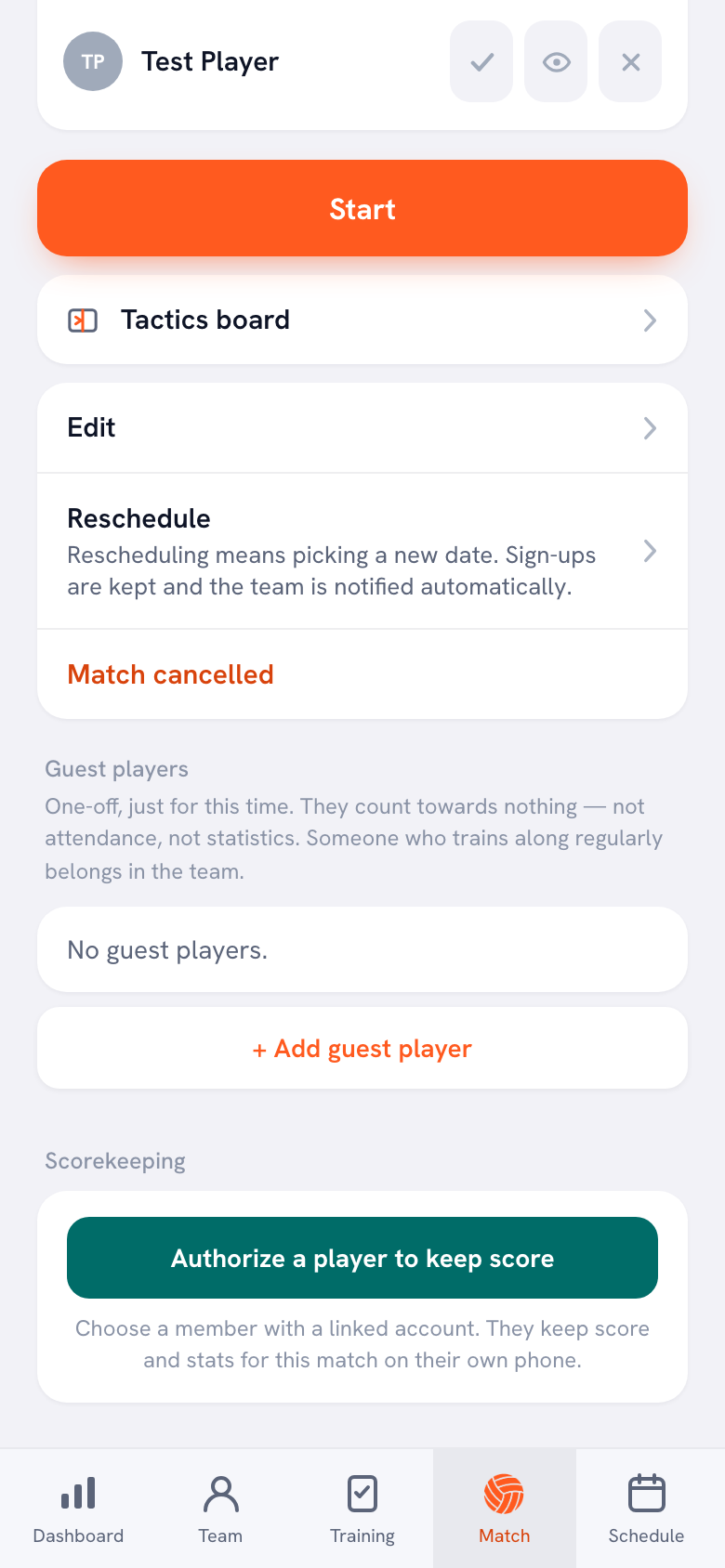
Koach works differently here: you score a match on one device. If someone is also scoring on a second device, even with the same account, the app warns that the match is also being scored on another device. If you do not want to score yourself, tap Authorize a player to keep score at the match and choose a member with a linked account. They keep the score and the stats on their own phone; see authorizing a player as scorer. If you want to split data entry across several people, Stat Together is the better choice.
What Koach does on the iPad, and what it does not
Koach is not a standalone stats app but an app for your whole team, with live scoring as one part of it. On the iPad you use the same App Store app as on your phone, or you open Koach in the browser, with the same account. There is no separate iPad version to buy. What a bigger screen changes in the gym is covered in Koach on the iPad.
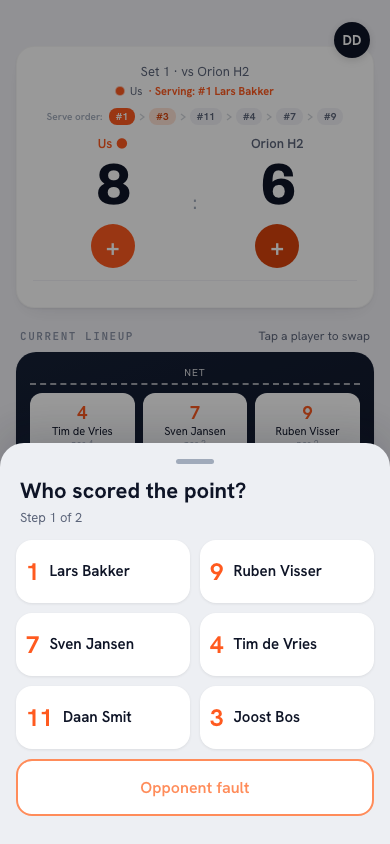
After each point your team wins, you tap the player under Who scored the point? and then how: Attack, Block, Serve / Ace or Opponent error. For a point to the opponent you choose what went wrong. When the opponent serves, you give the Reception a rating from 0 to 3. The serve order and the rotation update as you go, and with Swap libero automatically so does the libero. The whole flow is in tracking a volleyball match live. If the connection drops, the app shows Offline mode: your changes are stored on the device and synced once you are back online.
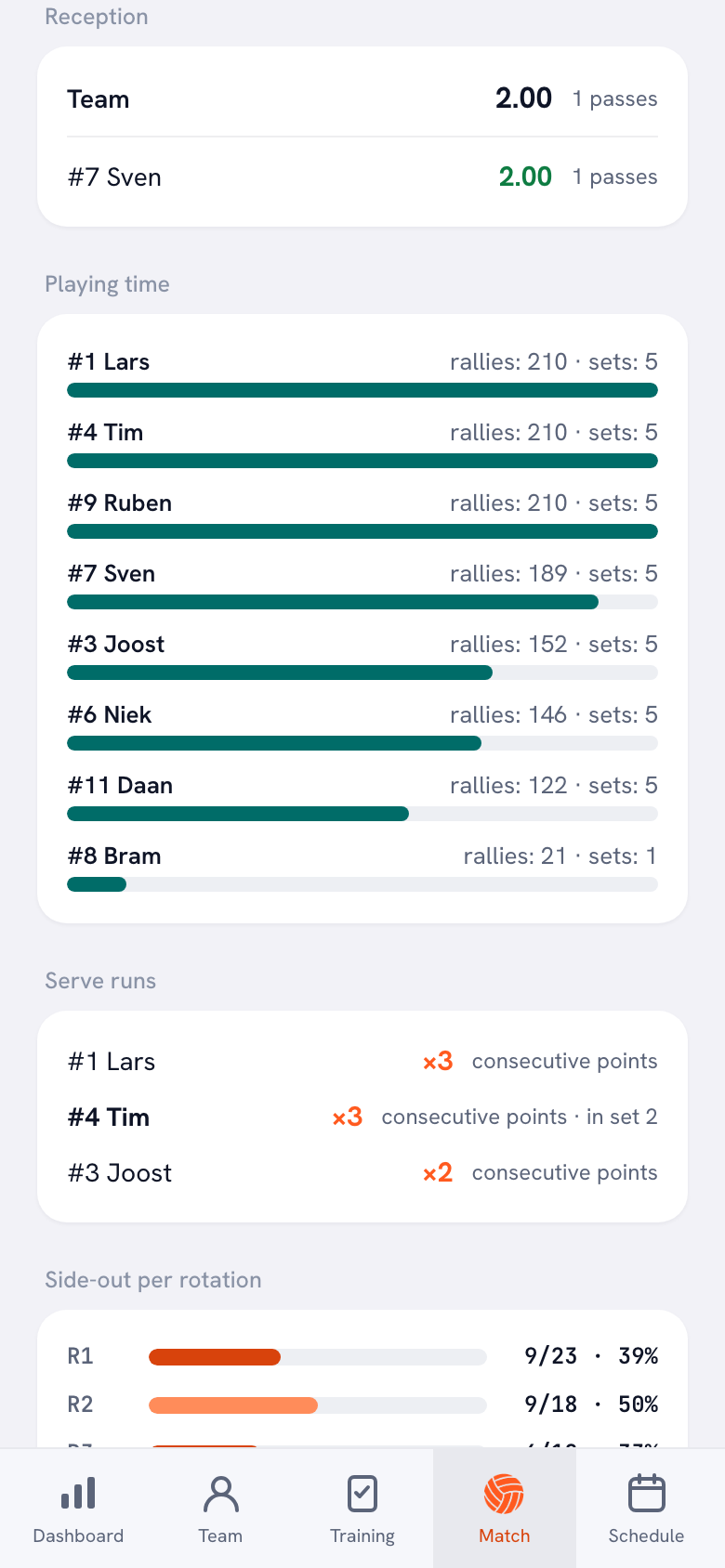
After the match the numbers are ready: points per type, the fault distribution, the momentum, side-out per rotation, the average reception per player and playing time in rallies played. You export your season and your players as a CSV file for a spreadsheet. Exactly which numbers you get is explained in tracking volleyball stats with an app.
What Koach does not do, and when you are better off with one of the other apps: Koach has no serve or attack charts, no link with video and no export to MaxPreps or Hudl. Koach does not calculate hitting percentage, because the app does not count attack attempts, only attack points and attack errors. For the opponent you only record the type of error, or that it was a good ball. Players and parents do not follow the match live on their own phones, and there is no viewer screen that updates the score for a second coach by itself.
Which volleyball stats app for iPad fits you?
- You want to go as deep as possible into match stats, in an app that is actively maintained: iStatVball 3 or SoloStats 123.
- Your stats have to go to MaxPreps: Volleyball Ace Stats, iStatVball 3, SoloStats 123 or Stat Together.
- You want to pay once: Volleyball Ace Stats or VBStats.
- You score with a few parents or team managers at once: Stat Together, if the gym has internet.
- You want the stats next to your lineup, your practices and your attendance: Koach. The stats go less deep than in a dedicated stats app, but you never move anything between two apps.
Looking beyond stats alone? Then use the checklist for choosing a volleyball app for coaches.
How much does a volleyball stats app for iPad cost?
Volleyball Ace Stats and VBStats are one-time purchases, iStatVball 3 is paid per team per season, SoloStats 123 has a yearly subscription on top of a free base, and Stat Together is paid per season. You can try Koach free for 14 days, with no credit card and with every feature. After that you choose Coach for €2.99 per month (one team, two coaches) or Club for €9.99 per month (unlimited teams). With a yearly plan you pay €2.49 or €8.33 per month. In the App Store and on Google Play you see the price in your own currency; the amounts on the website are on the pricing page.
Test it where you sit. Score one scrimmage from the bench on the iPad you will take to the gym. Then you find out whether you keep up with every rally, whether you can read the screen under the gym lights and what happens when the Wi-Fi drops.
Sources: Volleyball Ace Stats, iStatVball 3, SoloStats 123, VBStats and Stat Together in the US App Store, and iStatVball 3 and SoloStats 123 on Google Play, checked in October 2026. Prices and features can change; check them yourself before you choose.
Frequently asked questions
Is there a free volleyball stats app for iPad?
SoloStats 123 is a free download, and according to the App Store you can track unlimited teams and matches with it for free; there are also yearly in-app subscriptions. Stat Together is a free download too, but for a full season you pay in the app. You can try both iStatVball 3 and Koach free for 14 days. After that Koach costs €2.99 per month for one team, and you need no credit card to start. More on free options in our guide to a free volleyball stats app.
Does Koach work on iPad?
Yes. You install the same app from the App Store as on your iPhone, or you open Koach in the browser at koachvolleyball.com/app. You log in with the same account, so your team, your lineups and your matches are there right away. There is no separate iPad version to buy. What you set up on your phone at home, you have on the iPad in the gym.
Can two people keep volleyball stats at the same time on two iPads?
With Stat Together, yes: that app is built for several people entering stats at the same time, each on their own device. According to the maker, VBStats links several iPads so that several coaches see the stats live. In Koach you score a match on one device; if someone is also scoring on a second device, the app warns you. If you want someone else to score, you authorize a member with a linked account, and they score on their own phone.
Can I export volleyball stats from an iPad to Excel?
With some of the apps, yes. iStatVball 3, SoloStats 123 and Stat Together mention an export to Excel in the App Store, and four of the five other apps also mention an export to MaxPreps. In Koach you export your season and your players as a CSV file, which you open in Excel or another spreadsheet program. Koach has no export to MaxPreps or Hudl, and no PDF export from the app either.
Does a volleyball stats app work on iPad without Wi-Fi in the gym?
That differs per app, so check it before you bring a Wi-Fi-only iPad. According to the App Store, Stat Together needs an active internet connection. In the Koach app you see Offline mode when the connection drops: your points are stored on the device and synced once you are back online. Do open the match beforehand, while you still have a signal. More in live scoring without wifi in the gym.


Score your next match on the iPad
14 days free, no credit card. After one match you know whether the numbers tell you something.
Get started with KoachOr read first what the volleyball coaching app does.