
Scorer authorization: a player keeps score on their own phone
Handing your phone to the scorekeeper works, but has one downside: it is yóur phone, with your whole app on it. Scorer authorization solves that: you authorize one team member per match, and they track the score and stats on their ówn phone — with exactly enough rights for that one match, and nothing more.
What is scorer authorization?
An authorization you grant as a coach, per match, to one team member with a linked account. That member then sees the task in their own app and tracks the match there: point by point, including who scored and how. The tracking uses the same point model as when you score live yourself, so points per player, point types and errors count in full. Only the rally analysis, with break point per rotation and plus/minus among other things, is missing from a match the score keeper finishes: they do not track the lineup, substitutions or time-outs.
How to set it up
- Open the scheduled match and tap the Score keeper row under Preparation.
- Pick a player in the Score keeper sheet instead of You and tap Save. You can only choose players with a linked account; the chosen player shows "On their own phone". Players without an account can be invited from the same sheet with Invite.
- Done. On match day the player sees the "You keep score" card on their dashboard and opens the scoring screen with one tap on Keep score. Change of plans? Pick You again in the sheet and tap Save.
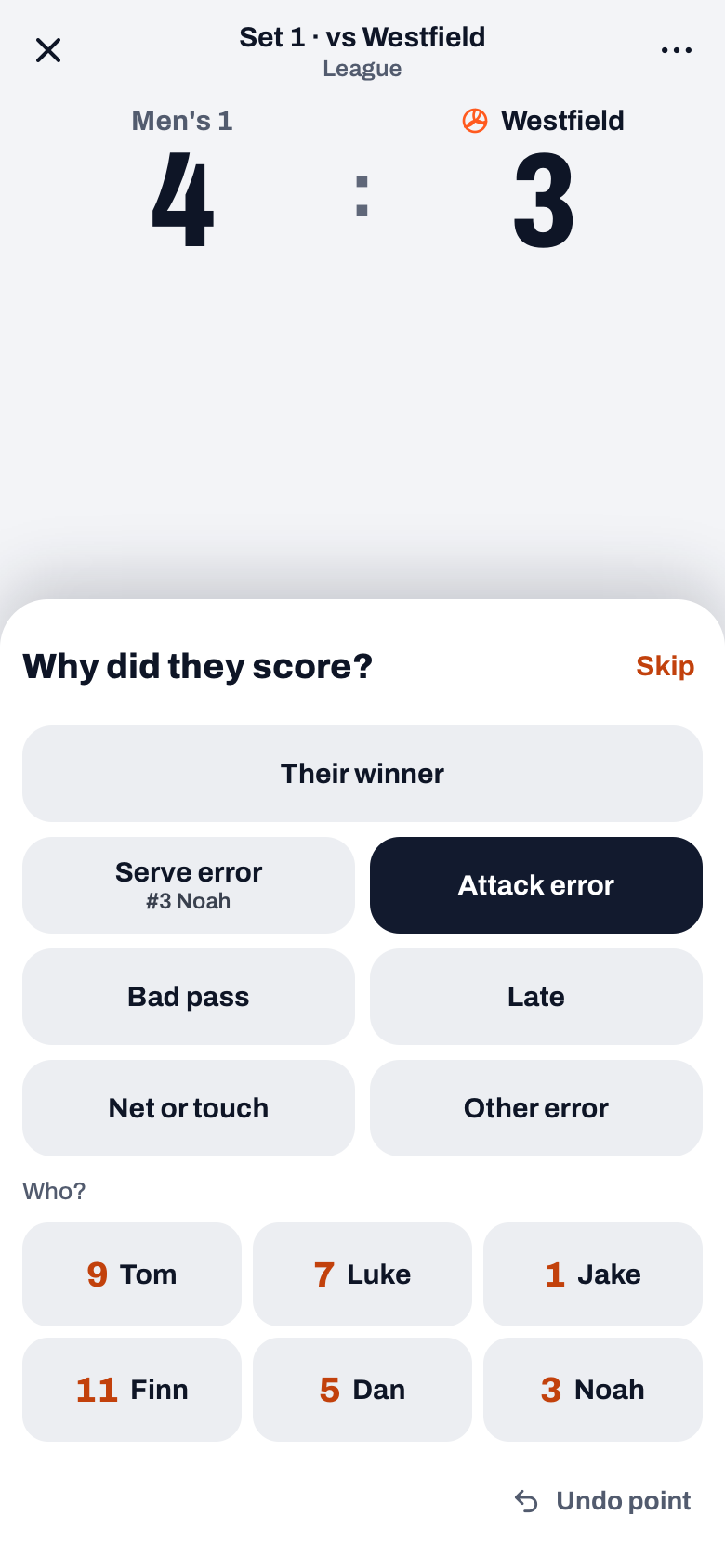
What the scorer sees — and what they don't
The scoring screen is deliberately simple: no court and no rotation, just two big buttons with the team names. After a point for your team a drawer asks How did we score?: Attack, Block or Ace and then the player, or one tap on Their error. After a point for the opponent the drawer asks Why did they score?: Their winner, or the error and optionally who made it; there the score keeper can also Skip. Made a mistake? Undo point in the drawer and Undo at the bottom reverse it. With End set the score keeper closes a set and with End match the match, after which the result and the statistics are in Koach right away; as a coach you review the complete match report afterwards. Substitutions, time-outs and the libero are not tracked by the score keeper. The authorization applies to that one match only: the scorer cannot change anything about your team, lineups or other matches.
When to choose this over handing your phone over
Classic delegating — giving your device to a parent or substitute — remains fine for the occasional match. Authorization wins as soon as you do it more often: the scorer works on a familiar device of their own, you keep your phone (and your notes, calendar and messages) with you, and after the match the result and all statistics are in your own app automatically. For teams with a regular scorekeeper this is the sustainable route.
Authorize your scorekeeper as soon as the match is scheduled. They see the task in their own app well in advance, and the match does not start with the fuss of handing over a phone.
Frequently asked questions
Can the authorized player change anything else on my team?
No. The authorization only grants access to scoring that one match. Team, players, lineups and other matches remain exclusively the coach's.
What if the scorer makes a mistake during the match?
The scoring screen has Undo at the bottom, which reverses the last point, and Undo point in the drawer, exactly like live scoring by the coach. Play on and correct at the next stoppage.
Do stats tracked by an authorized scorer fully count?
For the points, yes: top scorers, point types and errors per player count just as they do when the coach scores live. The score keeper does not track the lineup, substitutions or time-outs, so a match they finish has no rally analysis with break point per rotation and plus/minus.
Hand over the tallying, keep the data
Authorize a player and coach with your head in the game — the statistics come in by themselves.
Get started with KoachOr read first what the volleyball coaching app does.