
Resume live scoring after the app closed or your battery died
The short answer
In Koach you resume live scoring after the app closed without doing anything: after a restart, the app reopens the live screen at the score where you were. If your phone is dead, another device with a coach account carries on via Back to live, or via Start live and Take over.
When you need to resume live scoring after the app closed, you don't want to miss a rally. The app shuts down, your phone dies or your assistant has to take over: below you'll read, per situation, where to tap, what is kept and what isn't.
The app closed or your phone restarted
A point is saved on your first tap on one of the two point buttons. If the app drops out after that, you haven't lost that point. Open Koach again:
- The live screen opens again on the Match tab, with the score, the lineup and the serve order from the moment the app dropped out.
- If the app opens on the dashboard, it jumps to the Match tab by itself once, within the first few seconds.
- If the drawer was still open, the last point is there without a type. Leave it, or reverse it with Undo and record it again; see undoing a wrong point.
What you chose for this match comes back too: Simple or Expert, the roles and the libero, sets to 25 or 15 and the maximum number of serves in a row. How live scoring works in general is in the pillar article on tracking a volleyball match live.
Looking something up: parking the live screen and going back to live
Want to open the schedule or a player profile during the match? Tap the X at the top left of the live screen. The match keeps running. The Match tab then shows a card with the Live label, the set, the opponent and the score, and the Back to live button. You only see the list of matches again once the live match is finished. The screen stays on as long as you're scoring live.
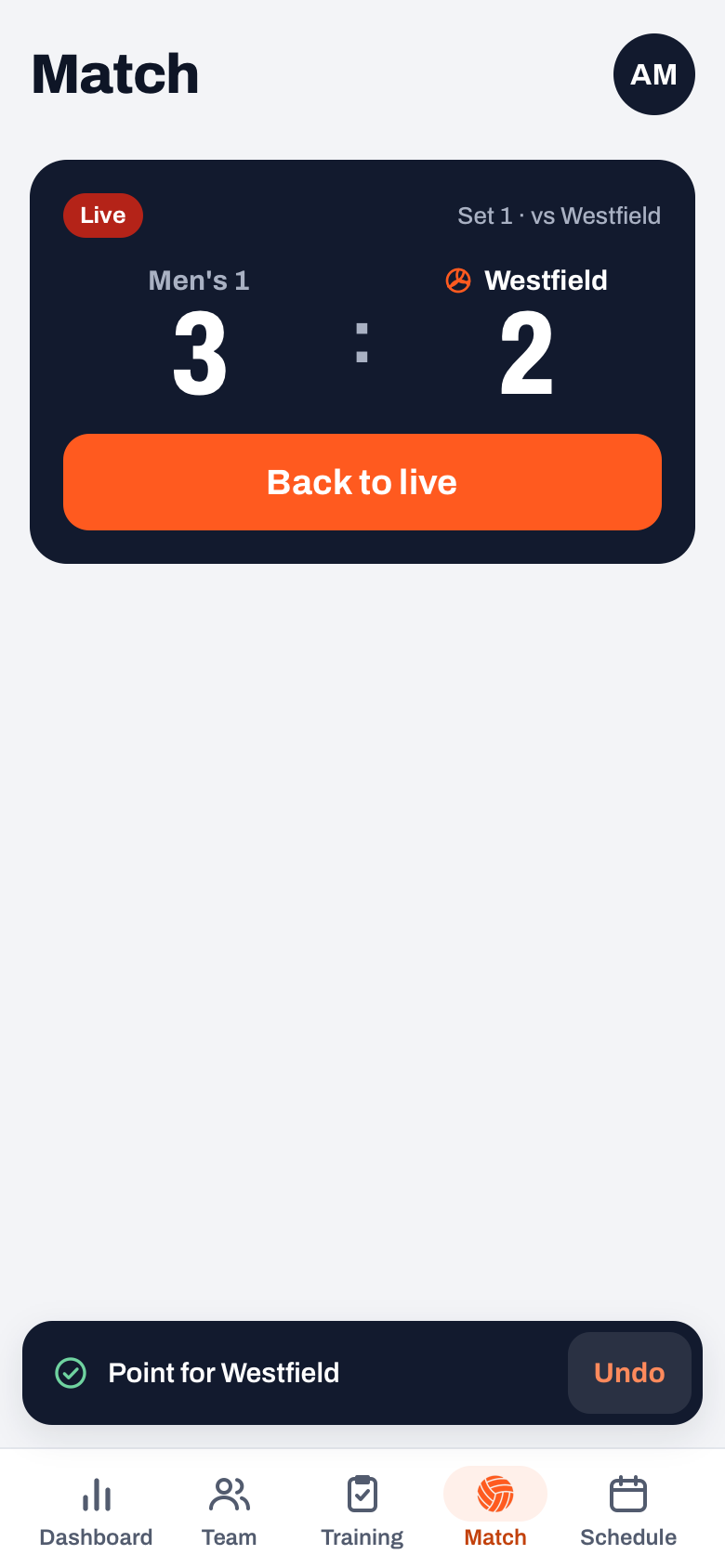
Phone dead: carrying on with another device
Koach sends the running match to the server after every change, as soon as there is a connection. That's what lets another device carry on. It does have to be a device where someone with a coach account on your team is logged in: your assistant coach, or you on a borrowed phone or tablet.
- Open Koach on the other device and go to the Match tab.
- If the Live card is there, tap Back to live and keep scoring.
- If the match is still in the list, tap Start live on the match. Koach sees that it's already being scored and shows Already being scored, with the score and the set. Choose Take over: you carry on scoring on this device from that score.
Anything the dead phone hadn't sent yet, for example because there was no signal in the gym, doesn't come along. So compare the score with the scoreboard in the gym before you tap on. What to do beforehand about a gym without signal is in live scoring without wifi.
After that, let only one device score. If two devices tap at the same time, they overwrite each other's points. Koach warns you about this: "Careful: this match is also being scored on another device. Keep scoring on one device, otherwise you will overwrite each other's points."
14 days free, no credit card. Add your assistant today, so they can take over on Saturday if your phone gives up.
Try Koach with your teamA player is already scoring: taking over from a score keeper
Did you pick a player as score keeper beforehand, scoring on their own phone, and do you want to take over halfway? For example because you want to track subs and the libero, which a score keeper can't do. Start the match on your own device with Start live and at Already being scored choose Take over.
- The score keeper's score and points come along. Koach fills in the court, the roles and the libero from your plan, because the score keeper doesn't track a lineup.
- If Koach doesn't know who started serving in the set, the app first asks "Who served first in set 2?", with the number of the current set.
- The score keeper gets a notification that they are no longer scoring the match, and their screen closes.
How to pick a score keeper beforehand and what they can and can't do is explained in scorer authorisation.
What is kept, and what is lost?
- Kept: the score, the sets, every point with its type and player, subs and timeouts, the lineup, the roles and the libero, and the settings for this match.
- Per device: your preference for Simple or Expert and for the maximum number of serves in a row in your next match. If you later start on another device, that device's choice applies.
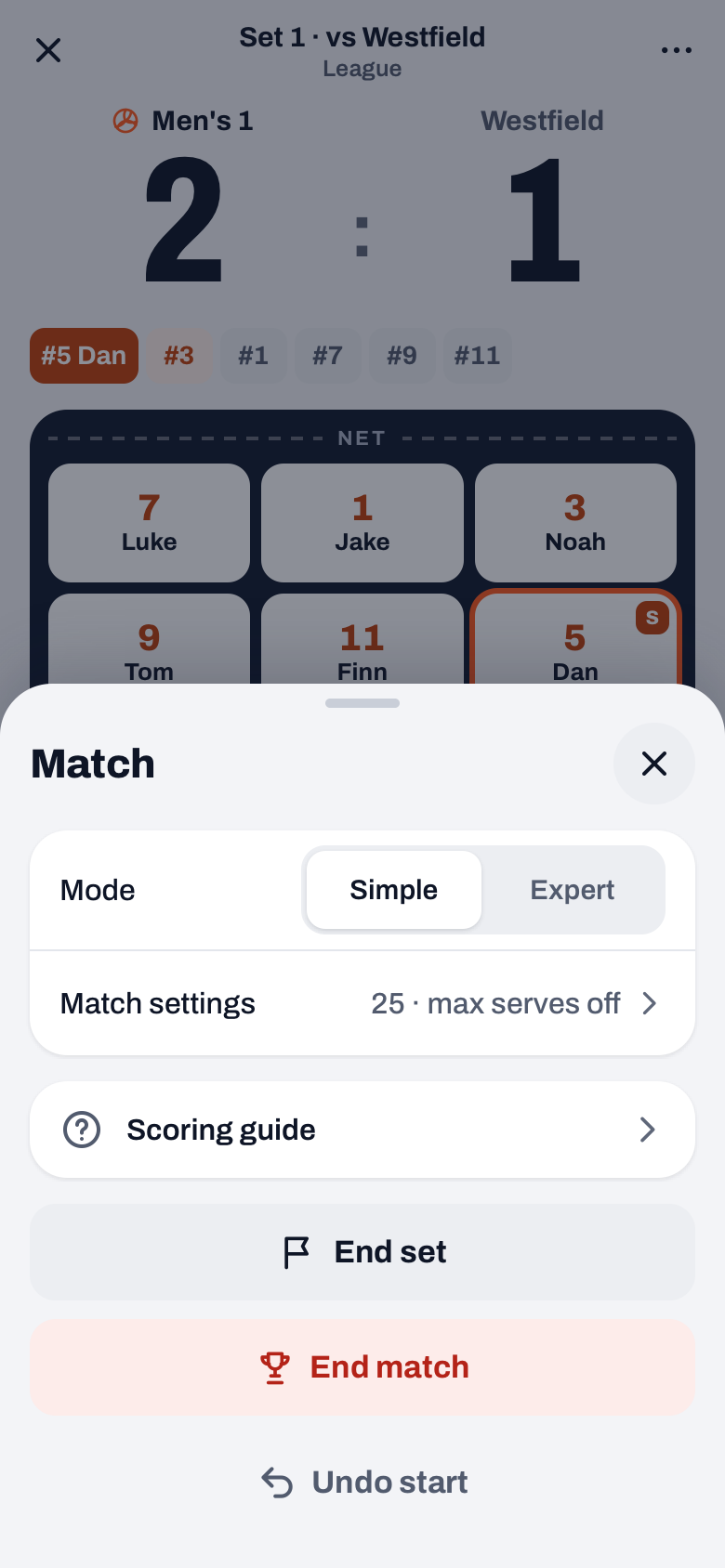
- Gone with Undo start: this button in the More sheet sets the match back to planned and keeps nothing. If you've already scored points, the question says so: "Note: the points you already scored will be lost."
- Gone with Start anyway: if you start another match while one is still being scored, Koach says "Another match is already live". With Start anyway, that earlier scoring is lost.
If you work with an assistant, have them log in to your team before the match. How to run one team together is in assistant coach duties. With Coach, two coaches work on one team, with Club as many as you like; see the pricing page.
Agree beforehand who the backup is. Have your assistant or a second coach already logged in on their own phone. If your device dies, they open the Match tab, tap Back to live and keep scoring, while you just keep coaching.
Frequently asked questions
Is my match gone if the app crashes?
No. A point is saved on your first tap. When you open the app again, the live screen is back on the Match tab with the score, the lineup and the serve order from that moment. Only a choice you hadn't made yet in the drawer is missing: that point is then there without a type.
Can two phones score the same match at the same time?
Not at the same time. Koach keeps one live match per team, and if two devices tap, they overwrite each other's points. The app warns you when that happens. A second device can take over, though: it carries on from the score the server knows, and after that you tap nothing more on the first device.
Can I finish the match on a tablet if I started on my phone?
Yes. Log in on the tablet with your own account, or with your fellow coach's, and open the Match tab. Tap Back to live, or Start live on the match and then Take over. After that, tap nothing more on the phone, so only one device is scoring.
Do I need a second coach to be able to take over?
Not necessarily: you can also log in yourself on another device. If you want your assistant to take over, they have to be a coach on your team. With Coach, two coaches work on one team, with Club as many as you like. You can try Koach free for 14 days, with no credit card and every feature.
Put your team and your assistant in Koach
14 days free, no credit card. If one phone dies, the other one carries on.
Get started with KoachOr read first what the volleyball coaching app does.