
Undo a wrong point in a volleyball app during a live match
The short answer
To undo a point in the Koach volleyball app takes one tap: Undo point in the drawer, Undo in the notification after the point, or Undo in the row below the court. In Expert mode the button is called Back. The score, the serve, the rotation and the libero all go back with it.
You need to undo a point within a few seconds, because the next serve is coming. Below are the four buttons that reverse a point, exactly what goes back with them, and which steps you can no longer undo afterwards.
Four ways to undo a wrong point
Which button you use depends on how quickly you spot the mistake. How live scoring works in general is covered in the pillar article on tracking a volleyball match live.
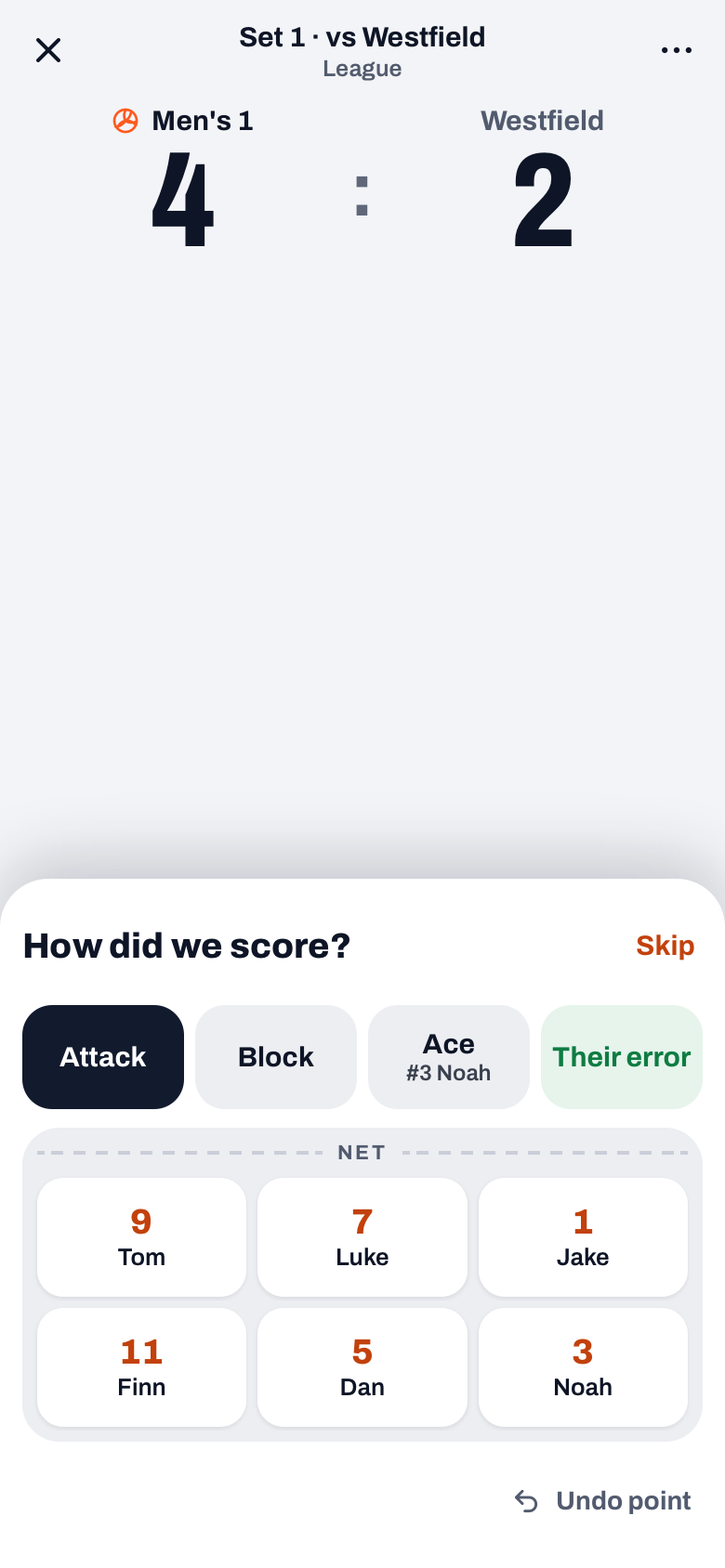
- Undo point, in the drawer. After your first tap on a point button, the How did we score? or Why did they score? drawer slides up. If you see right away that you tapped the wrong team, tap Undo point at the bottom right. The point disappears and the app says "Point for ... removed".
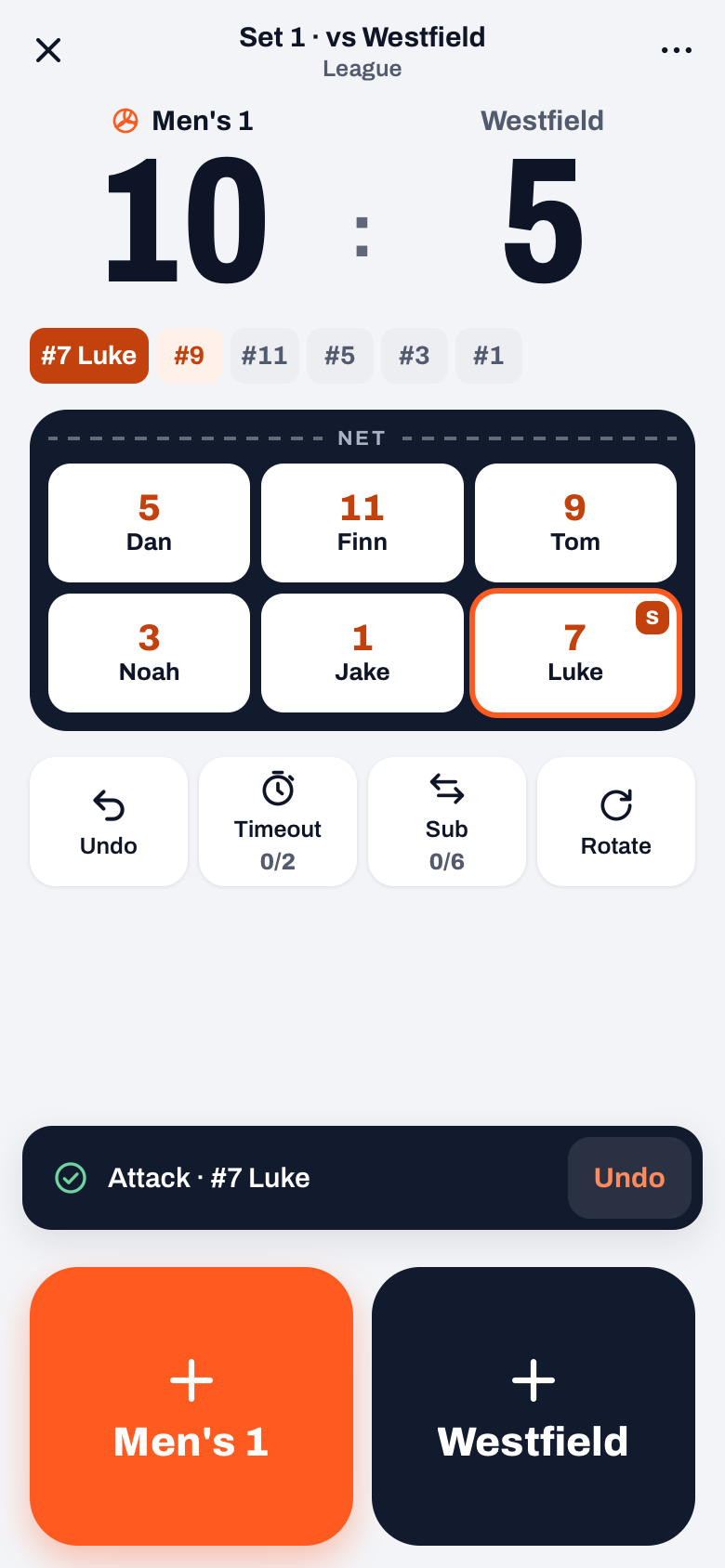
- Undo, in the notification. After every point you record, a notification shows what was logged, for example "Attack · #7 Luke", with an Undo button. One tap reverses the last action.
- Undo, in the row below the court. If the notification is already gone, tap Undo there: the first button in the row with Timeout, Sub and Rotate. It reverses the last action and briefly tells you what was undone.
- Back, in Expert mode. In Expert, that row with Undo is not on screen. There you tap Back, at the bottom left below the ratings. Back reverses the last action and takes you to the question where it went wrong: a rating, the rating that decided the point, or a step you skipped.
In the drawer itself you don't need to undo anything while you're still choosing: first you pick the type (Attack is preselected), and only the tap on a player completes the point. Until then you can still change the type. Which type to pick for which point is explained in recording point types.
14 days free, no credit card. Start a practice match and try the buttons before it counts on Saturday.
Try Koach with your teamWhat goes back when you undo a point?
Reversing a point is more than taking a number off the scoreboard. Koach puts the match back the way it was before that rally:
- the score and who is serving;
- the rotation: if your team rotated after a side-out, it rotates back;
- the libero, if they came on or off automatically with that point;
- the point or error credited to the player, so their stats are right.
Undo works for more than points. A timeout, a sub, a position swap and Rotate go back too, always the most recent action first. Tap again and the action before that goes back, all the way to the start of the set. The order in which the points fell is something you read back after the match in the score progression.
Why doesn't the app ask "are you sure?"
During a rally there's no time for a question after every tap. So Koach records right away and then gives you a way back. A mistake costs you one extra tap, instead of a confirmation on every point that was right.
Only steps you can't reverse ask for confirmation first. End set, for a set you want to close early, asks for example "End set 2 at 18-15?" with the line "This can't be undone." End match and Undo start in the More sheet also ask first.
What you can no longer undo
- A previous set. As soon as you tap Start set 3 in the set break, set 2 is closed. Undo stays greyed out until something happens in the new set, and it never crosses the set boundary.
- A wrong set point can still be saved. The set break opens by itself when a set is over. Close it with the X; that does nothing to the set. In Simple mode, Undo is then still below the court, so you can remove the set point before you start the next set. In Expert, first switch to Simple via ⋯ (More), in the Scoring row. The Undo changes button in the set break itself only resets your changes to the lineup.
- A finished match. After End match, undoing live is over. You correct a wrong set score in the played match via ⋯ and Edit match. Be careful with Edit stats on a match you scored live: after the question "Replace live stats?" you replace the live numbers, and then the momentum, the playing time and the rotations, among other things, disappear. How to do it by hand is explained in entering match stats afterwards.
If the app dropped out in the middle of a rally, your point isn't lost; how to carry on is in resuming live scoring. You can try Koach free for 14 days, and after that you pick a plan on the pricing page.
Practise it once at home. In the Match tab, tap + and start a Practice match, tap a few points and reverse them with Undo point, the Undo in the notification and the Undo below the court. Done? Choose Undo start in the More sheet: a match that wasn't scheduled is then not saved.
Frequently asked questions
Can I still undo a point from a few rallies ago?
Yes, but only by going back in order. Undo always reverses the last action: tap three times and the last three actions are gone, including the points that were right. You then record those again. If the score is right and only the player was wrong, weigh whether entering three points again is worth it in the middle of a set.
I tapped the wrong player. Do I have to undo the whole point?
Yes. If the drawer is already closed, tap Undo in the notification or below the court, and then tap the team that won the point again. Pick the right type and the right player in the drawer. The score ends up in the same place, and the point is now credited to the right player.
Can an authorised score keeper undo a point too?
Yes. The score keeper's screen has the same Undo button at the bottom, and Undo point in the drawer. For a score keeper, a point only goes to the server once they make a choice in the drawer; Undo point cancels the point before it is sent. What else a score keeper can and cannot do is explained in the article on scorer authorisation.
Can I try this without a subscription?
Yes. You can try Koach free for 14 days, with no credit card and every feature. Start a practice match, tap a few points and reverse them with Undo point and Undo. Then choose Undo start in the More sheet, so the test doesn't end up among your real matches.
Try live scoring without the risk
14 days free, no credit card. A wrong tap is one tap back.
Get started with KoachOr read first what the volleyball coaching app does.