
Who scored the point? Point tracking per player
The score tells you whether you are winning; who made the point tells you why. Point tracking per player is the smallest administrative act with the biggest payoff — as long as it is fast enough for the bench.
Why track per player?
Everything you want to know after the match — who was on fire, who could not break through, does the role division hold up — starts with this single data point. From the sum of these entries grow the per-player statistics, the top scorer list and ultimately the season picture per player. Skip this, and all you are left with is the bare result.
How it works in Koach
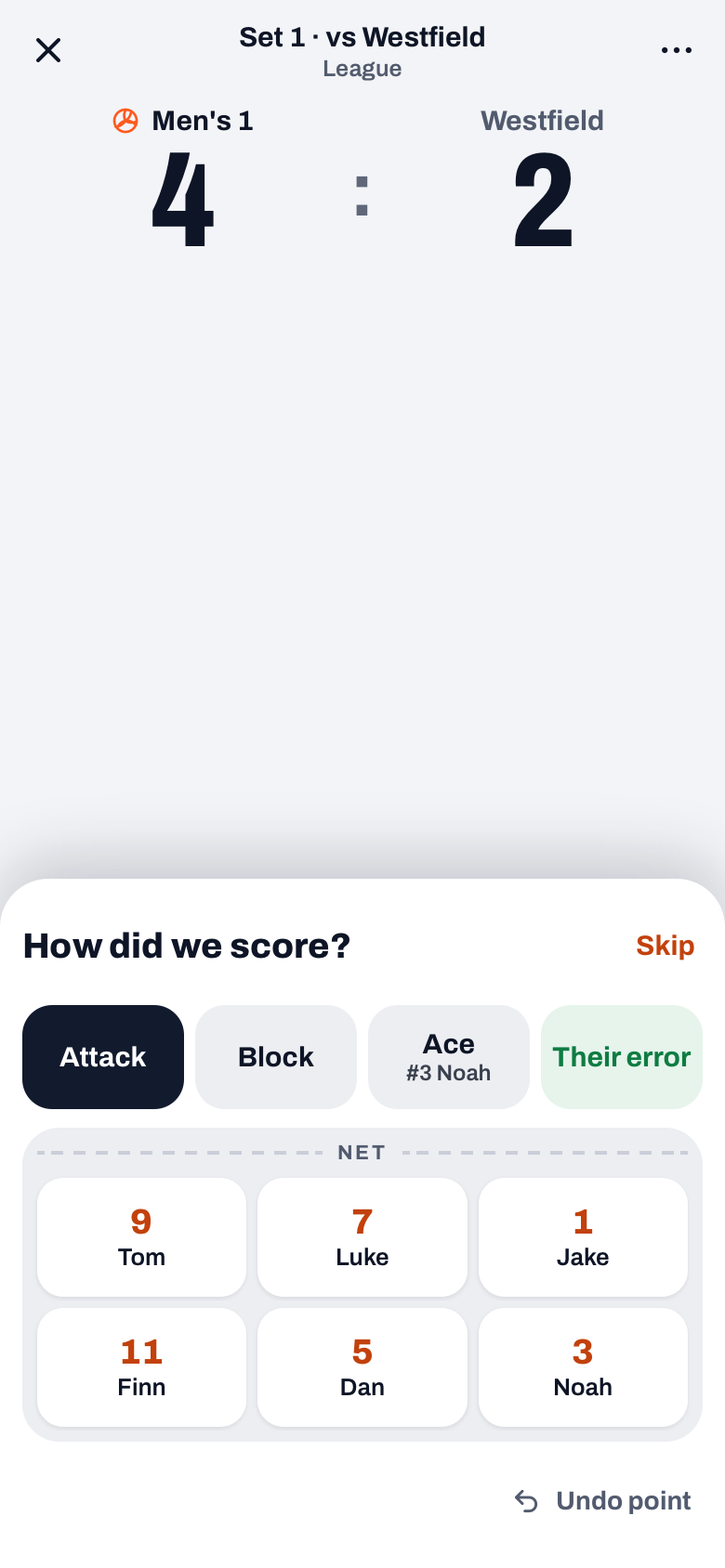
Tap the button with your team name and the point is on the board straight away, while the How did we score? drawer slides up. Attack is preselected, and below it you only see the six players currently on the court: no bench, no search list. One tap on the jersey number and you are back in the match. For a block point you tap Block first; an ace you record with Ace for the server. If it was not a scoring action of your own but an opponent error, you tap Their error. Why that matters is covered in tracking errors separately.
The speed is the design
Tracking only works if it is faster than the pause between rallies. That is why everything is reduced to two taps: the point, then the player. The most common point type, Attack, is already selected, and the drawer shows big buttons with jersey numbers: you recognise the number faster than the name. No time for the player? With Skip the point simply stays. Anyone who gets it after one set does it blind for the rest of the season; that also makes it perfectly delegable.
In doubt? Pick the finisher. On a block that goes through two pairs of hands or a tip in the chaos: record the player who actually finished the point and move on. Consistency across the season outweighs the perfect call on any single rally.
Frequently asked questions
Does not tracking per player cost attention I need as a coach?
Two taps per point is doable alongside coaching, but you can also hand it off: a substitute or parent learns it in one set. The coach decides what to delegate.
What do I record on a point without a clear scorer, like an opponent net fault?
That is an opponent error: for that you tap Their error in the drawer. It keeps the personal columns clean: they only count genuine scoring actions.
Can I correct a wrong entry afterwards?
A single mistap in the middle of a set is usually best left alone — one point across ten matches changes no picture. If it is a structural error (wrong player after a substitution), correct it as soon as you notice. If you spot it right away, tap Undo in the notification after the point and record it again.

Try it yourself in Koach
Less admin, more coaching — starting at your next practice.
Get started with KoachOr read first what the volleyball coaching app does.