
Linking your team to the right club: club name, city and club code
Two volleyball clubs with the same name is hardly an exception. In Koach the club name is the key to a club, so whoever typed “VC Smash” ended up at the first club that happened to be called that. Two things now stand against that: a city behind the club name, and a club code that points at exactly one club.
Who this is for
Filling in a club name and city, and with that creating or renaming a club, belongs to the Club subscription; on a Coach subscription you won't see those two fields. Joining a club that is already in Koach works on any subscription: the Join a club row is in your team's screen then too. Your team stays on your own account afterwards, and so on your own subscription; what else separates the two subscriptions is in what Koach costs. On top of that you only see this block on a team you own yourself — a second coach on that same team doesn't get it.
Filling in the club name and city
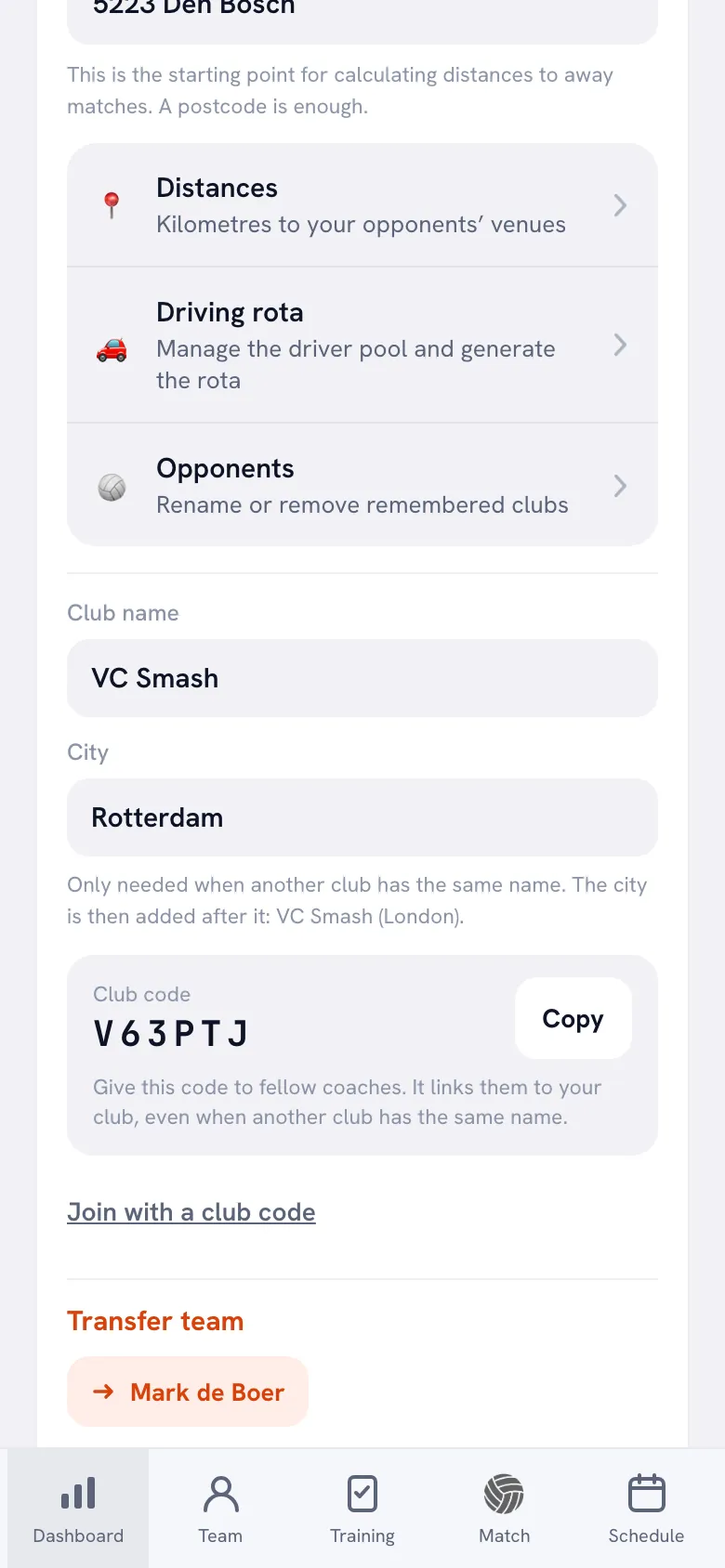
Go to Profile → My teams and tap your team. In the Club block two fields sit one under the other: Club name and below it City. That city is only needed when another club has the same name; the app then adds it behind the name: VC Smash (Rosmalen). If you're the only one with that name, you simply leave the field empty.
The Save club name button only appears once you change something. That is deliberate: saving doesn't happen the moment you tap out of the field, because the name would then be fixed while the city was still empty. If the name already belongs to another club, the app reports: “This club name already belongs to another club. Add your city, or join the right club with its club code.”
Joining with the club code
If your club is already in Koach, typing the name over is the long way round. Every club has a club code of six characters — letters and digits, but without the I, the O, the 0 and the 1, so there is nothing to mix up when somebody types it over. That code sits in the same Club block with a Copy button next to it; you see it as the owner of a team on a Club subscription.
Ask your club manager for it, tap Join a club, enter the code and tap Join. Your team then lands under exactly that club, even if three clubs share the same name. If the app doesn't know the code, it says: “We do not know this club code. Check it with your club administrator.” Who handles that code and the other club settings on the club's side is covered separately.
If you change the club name later
Rename the club while you manage it yourself and the whole club moves along — the managers, the club announcements and the other teams under that label — and the app reports “Club name updated for the whole club”. If you don't manage the club, only your own team moves to the new name and the club you came from stays exactly as it was.
If the new name already belongs to another club, nothing moves and you get the same message as when saving: add your city, or join the right club with the code.
You can do it while creating the team
You don't have to come here afterwards. On a Club subscription the New team sheet already has two fields under the team name: Club and City. If you already have a club of your own, you pick it there. Fill them in there and the team sits under the right club from the start. That saves work later: the club name decides which club announcements your team receives and across which teams the bar duties are shared out. If Koach grows from one team to the whole club at your place, the foundation is already there. What the club gains at that point is on the page about Koach for volleyball clubs.
Not to be confused with your remembered opponents
Koach also remembers the club names of the teams you play against, so you don't have to type the same name over every time you plan a match. That is a list belonging to your own team and has nothing to do with this screen. The club name here is about your own club: it decides which club your team falls under, who your club managers are and who gets your club announcements.
Pass on the code, don't dictate a name. A colleague wanting to hang their team under the same club types the name slightly differently — with or without 'VC', with or without a hyphen. The club code has no such doubt: six characters and you're guaranteed to be at the same club.
Frequently asked questions
There is another club with the same name. What do I do?
Fill in the City field; the app then makes it “VC Smash (Rosmalen)”, so the two clubs stay apart. If your team actually belongs to that other club, ask for its club code and join with that.
Where do I find my club's club code?
In your team's screen under Profile → My teams, in the Club block below the Club name and City fields. There's a Copy button next to it. The code is six characters long; you see it as the owner of a team on a Club subscription.
Can anyone join with a club code?
Every team owner, also on a Coach subscription or during the trial: the Join a club row sits in the screen of every team you own yourself. A second coach on that team doesn't see it. After joining, your team stays on your own account, so your own subscription is still needed, and the club's leadership can read your training reports and player notes.
Do I lose my club managers if I change the club name?
No, not if you manage that club yourself: the whole club moves along, managers and club announcements included, and the app reports that the club name has been updated for the whole club. If you don't manage the club, only your own team moves to the new name.

Try it yourself in Koach
Less admin, more coaching.
Get started with KoachOr read first what the volleyball coaching app does.