
Volleyball score graphics: Canva template or made automatically
The short answer
You make volleyball score graphics with a template, for example in Canva, where you retype the final score and the set scores after every match. Or you let the match make them: score a volleyball match in Koach and a portrait result image is ready afterwards, plus a second one with the star of the match.
If you run your team's social media, you make volleyball score graphics after every match, often the same night and on your phone. Here is what belongs on one, how much work a template or a designer costs you per post, and when Koach makes that image for your volleyball team automatically.
What goes on a volleyball score graphic?
A score graphic gets viewed on a phone, often for just a few seconds. So at a glance it has to tell people who played and how it ended. Volleyball adds one thing: a 3-1 says little about a match in which two sets were only decided after 24-all. These are the parts that come back on a good final score graphic:
- The final score in sets, big enough to read on a small screen, with whether you won or lost.
- The set scores. A 3-1 with 25-23, 22-25, 26-24 and 27-25 is a different story from a 3-1 with comfortable sets. And a set taken off a stronger team is worth showing, even in a loss.
- Your team name, the opponent and the date, so the image still makes sense later when someone forwards it.
- The star of the match. One player in the spotlight, ideally with a number that shows why.
- How the match went, in a line in your caption: a deficit you turned around, or a deciding set that only tipped at the very end.
- A recognizable style. The same layout every week, so followers recognize your team before they read the name.
14 days free, no credit card. Score your next match in Koach and share the result after the last point, without retyping a single number.
Try Koach at your next matchThree ways to make a final score graphic after every match
We make Koach, so read this as the maker's view, and we also say when another route fits better. Broadly there are three ways, and the difference is mostly in what you still have to do yourself after every match.
1. A designer or a handy volunteer at the club
The best-looking result comes from someone who can design: your own branding, the club logo, the sponsors in the picture. The downside is the dependency. After every match someone has to pass on the result, and that one volunteer has to have time for it that evening. For one team that works fine; for a club with many teams it becomes a big job, and the lower teams risk never getting a post.
2. A template in Canva or another design app
The do-it-yourself route is your own template. Canva is free to download, with in-app purchases, and according to its App Store page offers thousands of customizable templates for social media posts (checked in October 2026). You build one score template in your team colors and with your logo, and after the match whoever has access fills it in. The strength: you decide everything yourself, including the size, and with the same app you make a game day announcement before the match or a video. What remains is the retyping: the final score, every set score, the opponent, the date and the name of the standout player. Every match again, and without a typo.
3. A game day graphics app or service that makes them for you
If someone is tracking the match in an app anyway, that app can also give the numbers back as an image. That is what Koach does: whoever scores live has a result image and a star of the match image ready after the last point. There are also services that focus entirely on sports graphics in your own branding. Box Out Sports, for example, has a final score template for volleyball with the set-by-set results, where you customize team colors, logos and text and stream live data into the graphic. Signing up and demoing all the templates is free; what a plan costs after that is not on that page (checked in October 2026). A service like that is built for graphics, and for a club or school program that wants everything in its own branding, it is the stronger choice. Koach is a coaching app that the graphics come out of.
Checked in October 2026 on Canva's App Store page and in the Koach app.
| What you want | Canva template | Koach |
|---|---|---|
| Club logo and your own colors | Yes | No, fixed Koach style |
| Your own team photo as the background | Yes | Yes, on the Result |
| Final score and set scores without retyping | No | Yes, from the match |
| Star of the match with numbers per player | Look it up and type it in yourself | Yes, from the stats |
| Game day announcement before the match | Yes | No |
| Video | Yes | No |
| Size | Any size you choose | Portrait 9:16 (1080 x 1920) |
| Sports other than volleyball | Yes | No |
| Who makes the graphic | Whoever has the template | The coach; players and parents via Share match report |
What Koach makes automatically after the match
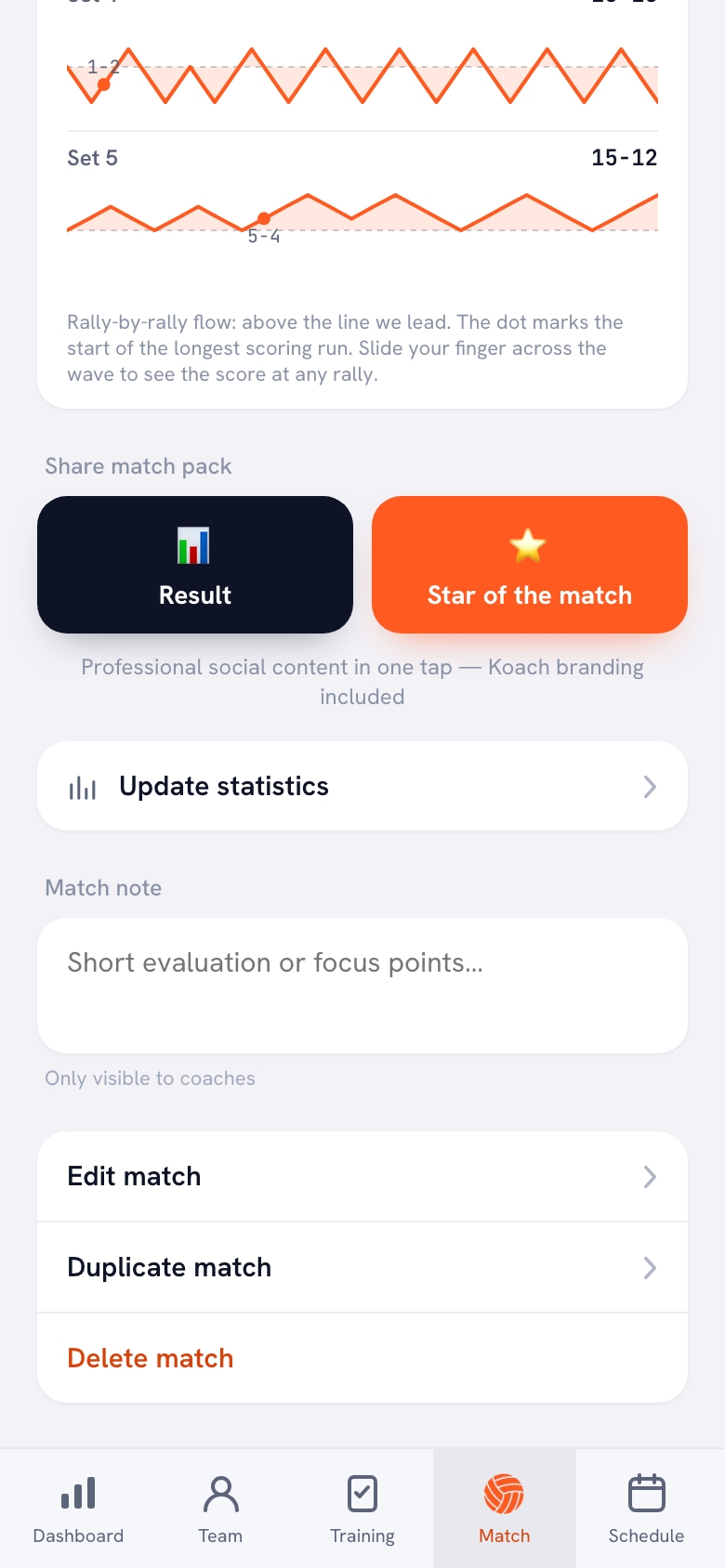
In Koach the graphic comes out of the match you are tracking anyway. You score the match live, point by point and per player, and as soon as you finish it, the match detail shows the Share match pack section with two buttons:
- Result is the team story: your team name, the two teams with the date, the final score large in the frame, whether you won or lost, and the set scores below it. Players are deliberately left off. With Your own photo as background you lay the result over your team photo; without a photo you get the dark Koach background.
- Star of the match is the player story: one player large in the frame, with jersey number, points total, opponent and date. If the Player of the Match vote has closed and votes were cast, the winner is on it with a crown; otherwise the top scorer with a star. The vote only closes two days after match day, so if you share the card right after the match, the top scorer is on it. Below that come up to three lines: Most attack points, Longest serve run and Most blocks, each with one player and their number. At the bottom are the final score and the set scores. This card has no photo option.
Both images are portrait, 1080 by 1920 pixels: the size of an Instagram Story or Reel, or a WhatsApp status, where they fill the whole screen. You share them through your phone's share menu; Koach does not post anything itself. How that works step by step, and what to look for when you pick your team photo, is in sharing your match result on social media. Everything about the two cards together is in the share pack.
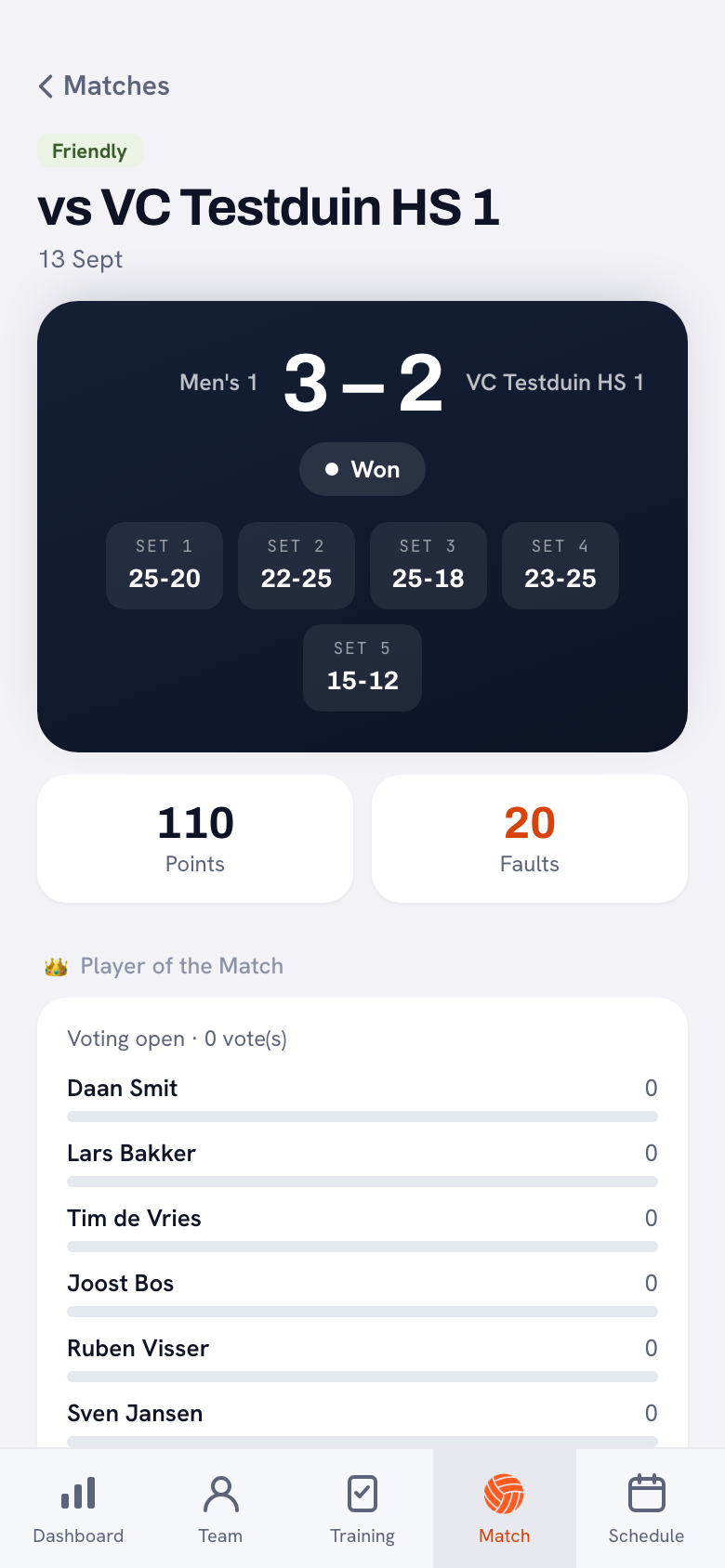
Where the numbers come from
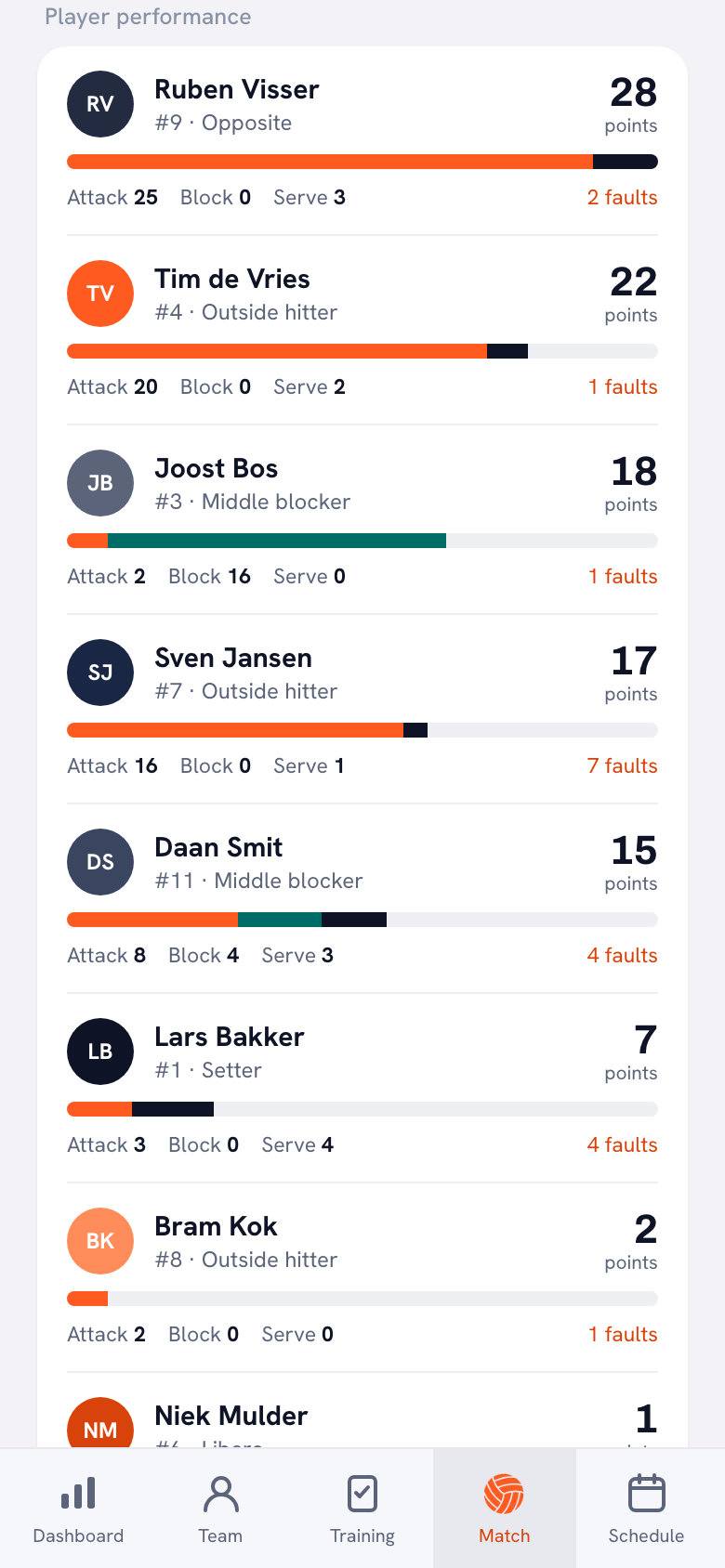
The Star of the match card takes its lines from the player performance: per player, the points from attack, block and serve. A category without numbers drops off, so a card can also have two lines. If you did not score a match live, you add the result afterwards with Enter the result manually. That is enough for the result image. For the star of the match you need points per player, through Enter stats afterwards, or a closed vote in which votes were cast. Instead of the serve run, the card then shows Most service points. What else you can take from those numbers as a coach is covered in understanding volleyball statistics.
Players and parents with their own account can share a played match too. In the same place they see the Share match report button, which makes the same result image, with the same photo option. That way the parent who runs the team's account anyway can post the result, without the coach having to forward anything first.
What Koach does not make
- No game day announcement before the match. A poster with start time, gym and opponent is something you make in a template.
- No video. The images are still images. If you want a Reel with footage from the gym, you edit it in another app.
- No club logo and no custom colors. Every card shows the Koach logo and koachvolleyball.com. What you choose yourself is the photo behind the result.
- No image of how the match went. You see the rally-by-rally flow in the app as the Momentum chart, but Koach does not make a share image of it. If you want to tell that story, put it in your caption.
- No size other than portrait. Koach does not make a square post for your feed or a landscape banner for the club website.
- Volleyball only. Koach is made for indoor volleyball. If you coach another sport, a template is the better choice.
At the end of the season there is one more share image, per player: the season card. It is separate from the result after a match.
Who an automatic score graphic suits, and who it does not
It suits you if you or your team manager track the match anyway and want to post the result yourself, without waiting for a volunteer. It also suits clubs with many teams: every team shares its own result in the same style, without one person having to make everything. And it suits coaches who mainly want to serve their own group: players and parents see the set scores and who stood out the same evening.
It does not suit you if your club or school sticks closely to its own branding with logo and sponsors; then a template or a designer is better. If you mostly post videos or game day announcements, a design app will do more for you. And if you only want a graphic and not a coaching app, do not choose Koach: the images are a by-product of scoring, not a separate product.
You can also combine the two. Share the result from Koach right away in the team chat and as a Story, and once a week make an overview of all teams in your club template for the main account.
What do volleyball score graphics cost?
Canva is free to download, with in-app purchases. At Box Out Sports you sign up and demo the templates for free; the template page does not give the price of a plan. With your own template the real cost is time: if you retype the numbers after every match, you pay again after every match.
You can try Koach free for 14 days with one team, with no credit card and with every feature. After that you choose Coach for €2.99 per month (one team, two coaches) or Club for €9.99 per month (unlimited teams and coaches). With a yearly plan you pay €2.49 or €8.33 per month. Players and parents pay nothing. You are not paying for the graphics alone: the same app holds your lineup, live scoring and stats per player. The amounts are on the pricing page; in the App Store and on Google Play you see the price in your own currency.
Youth team? Share the star of the match in the team chat. The Star of the match card names a player, with name and jersey number. In your own group that is a nice pat on the back, but on a public club account it is better to post only the Result for youth teams: no players appear on it.
Sources: Canva in the App Store and Box Out Sports, checked in October 2026. Prices and features can change; check them yourself before you choose.
Frequently asked questions
How do I make a score graphic quickly after a game?
It is quickest when you do not have to retype the result. With a template in a design app you build the layout once, and after every match you fill in the final score, the set scores, the opponent and the date. If you track the volleyball match in Koach, a result image is ready under Share match pack once you finish the match, and you send it to the team chat or Instagram with Share.
Can I put my club logo and team colors on the score graphic?
Not in Koach. The images have a fixed Koach style, with the Koach logo and koachvolleyball.com on them. What you do choose yourself is a photo behind the result, for example this season's team photo. If you really want your logo, your team colors or your sponsors in the picture, your own template in a design app or a designer from the club is the better route.
Is there a free app to make sports graphics?
Yes: a template you build yourself in a design app that is free to download, such as Canva. You pay with your time instead, because you retype every result yourself. You can try Koach free for 14 days, with no credit card. After that Coach costs €2.99 per month for one team, and you get the images on top of live scoring, the lineup and the stats.
What size is a score graphic for an Instagram Story?
For a Story or a Reel, a portrait image of 1080 by 1920 pixels (9:16) fills the whole screen. That is exactly the size of the graphics Koach makes, and they work just as well as a WhatsApp status or in the group chat, because a portrait image fits a phone screen exactly. Koach does not make a square or landscape image, for example for a banner on the club website; for that, use a template in the size you need.
Can I use Koach score graphics for other sports?
No. Koach is made for volleyball coaches: the result is built from sets, and the star of the match comes from points per player in attack, block and serve. If you coach another sport, a template in a design app is the better choice. For volleyball you get the images automatically, as soon as you track the match in the app.

Share your next result without retyping
14 days free, no credit card. After your first match you know whether the image saves you work.
Get started with KoachOr read first what the volleyball coaching app does.