
Volleyball stats app for Windows and Mac: program or web app?
The short answer
For volleyball stats on a Windows laptop or a Mac there are two kinds of software: a program you install, such as Data Volley 4 (Windows only, from $299 a year), or a web app in the browser. Koach is a web app: you open it on Windows or Mac with nothing to install, using the same account as on your phone.
Looking for a volleyball stats app for Windows? Then you want the numbers on a big screen: going through them calmly at home, or entering them on a laptop courtside. You choose between a program you install and a web app in the browser. Here they are side by side, plus what a laptop in the gym needs.
What should a volleyball stats app for Windows do?
If you are looking for a volleyball stats app for Windows, you usually want two things: to enter match stats on a laptop, and then to go through them calmly on a big screen. Whether that works depends less on the screen than on the software. Look at these six points:
- Where it runs. Only on Windows, on a Mac too, or in the browser? And does the program make demands on your laptop, such as a certain Windows version, a minimum amount of memory or a USB port?
- Installing and updating. A program goes on one computer and you update it yourself. A web app opens from a web address and is always the latest version.
- Entry per rally. How many clicks does one point take? At 23-23 in the third set you do not want to be searching.
- What gets measured. Points and errors per player, serve receive and rotations, or also every action by the opponent, and video?
- Where the numbers can go. An export to a spreadsheet, and whether you see the same data on your phone, and your co-coach on theirs.
- Price and license. Per year, per month or free with limits, and what exactly is in which plan.
14 days free, no credit card. Open Koach on your laptop tonight, add your team and track your next match.
Open Koach in your browserInstalled stat software or a web app: what is the difference?
A program is installed on the laptop itself. The advantage is that everything runs on that one machine, so you usually do not need internet to enter data. The downside is that same machine. The data usually stays on that laptop until you copy it yourself, you update the program yourself, and if it only exists for Windows, you are out of luck with a Mac.
A web app, sometimes called an online volleyball stat tracker, opens in the browser. There is nothing to install, it works on Windows and Mac, and you always have the latest version. Your data is stored on a server, so what you enter on the laptop also shows up on your phone and for your co-coach. On the other hand, you need a connection to open it.
There is a third way: your own spreadsheet in Excel or Google Sheets. It costs nothing extra and you choose the columns yourself. Where such a file falls short is covered in tracking volleyball stats in Excel.
A laptop in the gym: power, internet and one device
At home a laptop is the easiest place to look at your stats. In the gym there is more to think about, whatever software you use:
- Power. Start with a full battery and bring the charger. Not every gym has a power outlet near the court.
- Internet. Gym wifi is not always reliable; the hotspot on your phone is often a better choice. We have not tested whether Koach keeps working in the browser without a connection, so we do not promise that here. The Koach app on your phone or iPad has an Offline mode: changes are stored on the device and synced once you are back online. See live scoring without wifi in the gym.
- The screen. During live scoring, Koach asks the browser to keep the screen on. Not every browser can do that, so give your laptop a longer sleep timer before the match.
- One device per match. If Koach is open on the laptop and on your phone, score on only one of them. If the same account is also scoring on a second device, Koach warns you: "Careful: this match is also being scored on another device." That way you do not overwrite each other's points.
Whether you would rather use a laptop or a phone on the sideline is a question of its own; that one is answered in volleyball coaching software.
Koach in the browser on Windows and Mac
Koach is a web app and an app for iPhone, iPad and Android, with one account for everything. On a laptop you go to koachvolleyball.com/app and log in with a code sent by email, or with Google or Apple. Nothing gets installed: all you need is an up-to-date browser. As long as that runs on your laptop, it does not matter which Windows version or processor is inside, and on a Mac it works just the same.
In a wide window the Dashboard, Team, Training, Match and Schedule tabs move to a sidebar on the left, and on a large screen the Dashboard places its blocks in two columns side by side. Otherwise it is the same app: what you prepare on the laptop at home is on your phone in the gym, and what you score on your phone, you go through on the big screen in the evening.
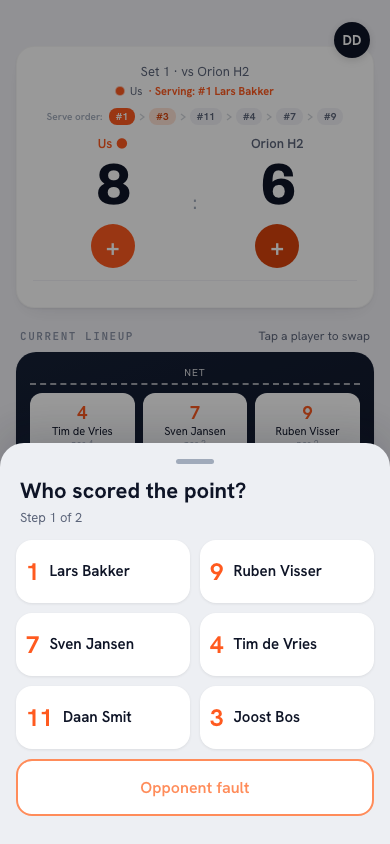
Live scoring on a laptop works just like in the app. When your team wins the rally, you pick one of the six players on court under Who scored the point?, or Opponent error; for a player you then choose how the point was won. When the opponent wins the point, you record what went wrong. The app keeps track of the serve order and the rotation itself. How scoring works in detail is explained in tracking volleyball stats with an app.
Didn't score live? With Enter the result manually you add the set scores, and right after that the sheet opens where you fill in points and faults per player, even days later. That is work that goes nicely at a desk.
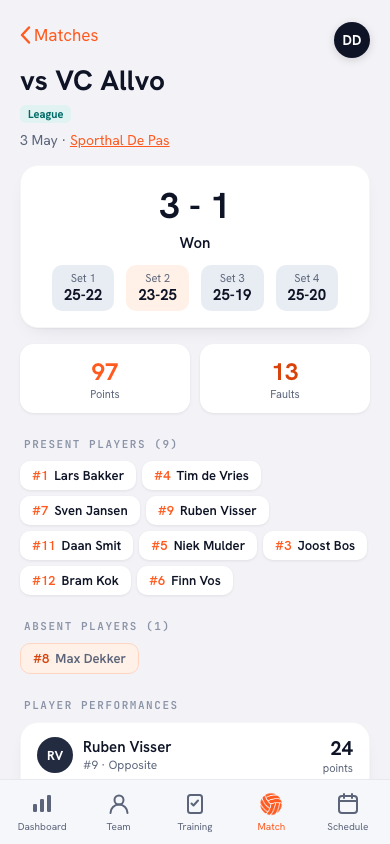
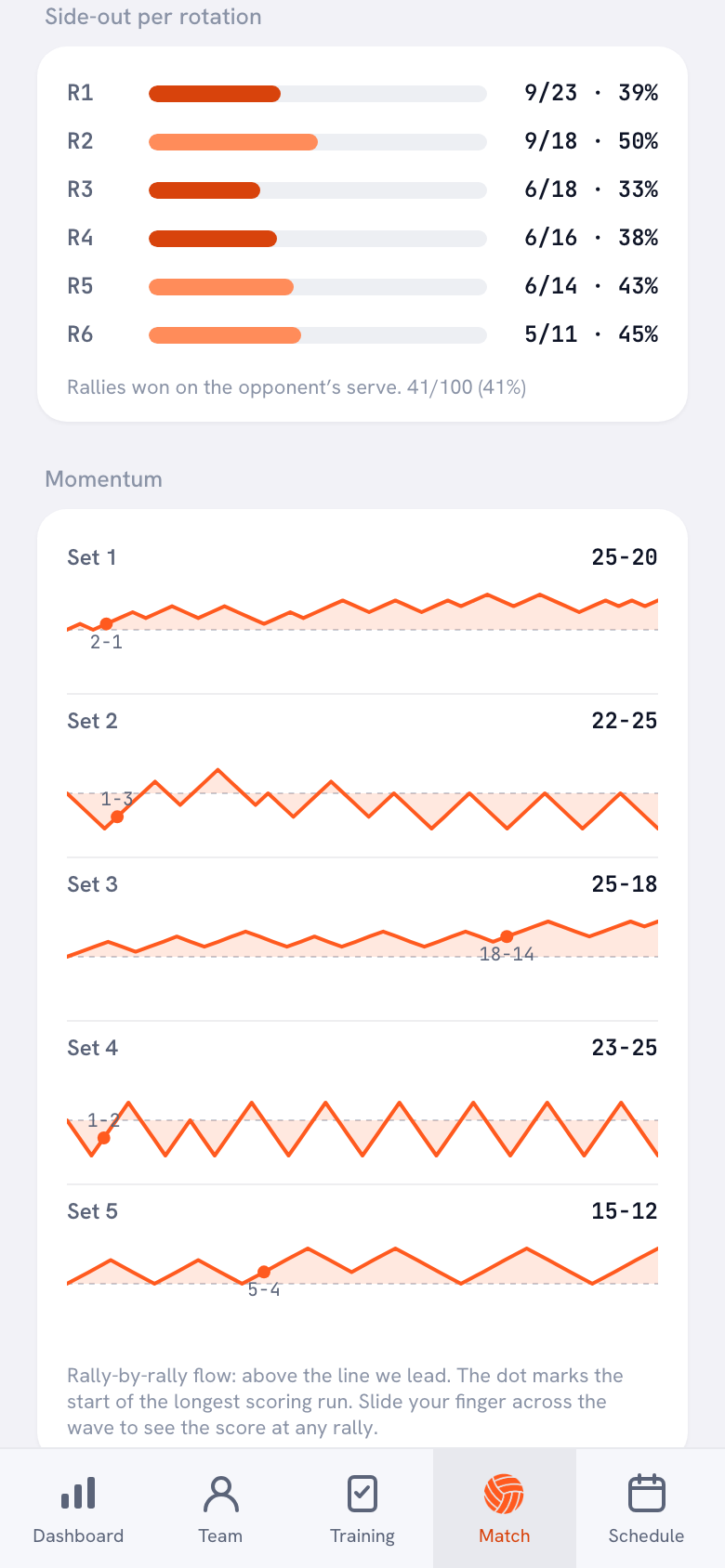
After the match the numbers are ready: points per player from attack, block and serve, the fault distribution, Side-out per rotation and the Momentum of each set. Want to run your own numbers? Then export them. On the Dashboard, under Season, you will find the Export season (CSV) button: per player the attendance, points and faults, plus the matches with their set scores and the practices. On a player's page there is Export player (CSV). You open a CSV file in Excel, Google Sheets or any other spreadsheet program.
Volleyball statistics software compared: Data Volley 4, Volleyball Scout and Koach
We make Koach. So read this as a comparison by the maker of one of the three; that is why we also say where the other two are stronger. Checked in October 2026 on the makers' websites and on Google Play.
| What you want to know | Data Volley 4 | Volleyball Scout | Koach |
|---|---|---|---|
| On a Windows laptop | Yes, the program | Video app, with Premium + Video | Yes, in the browser |
| On a Mac | Only the Player app | Video app, with Premium + Video | Yes, in the browser |
| On a phone or tablet | Player app | Yes, the scouting app | Yes, same account |
| Video with the stats | Yes | With Premium + Video | No |
| Export to a spreadsheet | Not listed | PDF, XLSX and CSV, with Premium | CSV |
| Price | $299 or $799 per year | Base free, Premium €29.99 per year | 14 days free, then €2.99 per month |
| Practices and attendance included | Not listed | Not listed | Yes |
Data Volley 4 from Genius Sports describes itself as statistics and analysis software, with video built in: importing and syncing footage, and finding rallies again. An annual license costs $799 for Professional, aimed at pro teams, or $299 for Lite, aimed at mid-level clubs. The program runs only on Windows 8.1 or later, with at least 4 GB of RAM and a USB-A port, and not on a laptop with an ARM processor. Professional comes with extra apps, including a Web Client; a Player app is available for Android, iOS, Windows and macOS. It is strong for a team with a dedicated statistician on a Windows laptop that wants to scout in detail and work with video. If you only want to track your own team's points and errors, something lighter will do; that trade-off is covered in more depth in the Data Volley alternative for club coaches.
You can start Volleyball Scout for free: the Base plan gives you unlimited matches, teams and actions, and basic stats. Premium costs €29.99 a year on its website and adds, among other things, a match export to PDF, XLSX and CSV. Premium + Video costs €16.99 per month; both are annual subscriptions. Premium + Video includes the desktop app Volleyball Scout Video for Windows and macOS, which links your scouting to video. The app covers indoor volleyball with rotations and beach volleyball with a simpler screen. The website mentions more than 100,000 coaches, and on Google Play the app has been downloaded at least 100,000 times; there it contains ads. It is strong if you want to start for free, also play beach, or want to link your stats to video.
Koach is not a scouting package. You track your own team; for the opponent you only record whether your point came from their error, and whether their point was a good ball. What sets Koach apart: the stats live in the same app as your lineup, your practices and attendance, on the laptop and on your phone.
What Koach does not do on a PC
- No program to install. There is no desktop app for Windows or Mac; Koach on a PC is the browser.
- No notifications in the browser. Push notifications, such as the reminder the day before, only arrive in the app.
- No video and no per-player scouting of the opponent. Koach does not link footage to the numbers and has no heatmaps or attack directions.
- No scoreboard for spectators. The live screen is for the coach and an authorized scorer, not for a big screen in the gym.
- No beach volleyball. Everything in Koach assumes indoor volleyball, six against six.
Which volleyball stats software fits you?
- Data Volley 4 fits a team with a dedicated statistician and a Windows laptop that wants to scout at the level of a pro team or an ambitious club and works with video.
- Volleyball Scout fits if you want to start for free on your phone, also play beach, or want to link video on your computer to your stats.
- Koach fits the coach who wants the whole team in one place: lineup, practices, attendance and stats, on the laptop at home and on the laptop or phone in the gym. It does not fit if you are looking for video or deep scouting of the opponent.
Still not sure which app fits your team? Go through the checklist in choosing the best volleyball app for coaches.
What does Koach cost on a PC?
You can try Koach free for 14 days, with no credit card and with every feature. After that you choose Coach for €2.99 per month (one team, two coaches) or Club for €9.99 per month (unlimited teams and coaches). With a yearly plan you pay €2.49 or €8.33 per month. In the browser you pay through the website, in euros; in the App Store and on Google Play you pay the store price in your own currency. Players and parents use Koach for free. All amounts are on the pricing page.
Test your gym on a practice night. Take the laptop to practice once, open Koach on the gym wifi or your phone's hotspot and enter a few rallies with Start a friendly match. Then you know before the first match whether power and internet hold up.
Sources: Data Project, Data Volley 4, volleyball-scout.com and Google Play, checked in October 2026. Prices and features can change; check them yourself before you choose.
Frequently asked questions
Is there a volleyball stats app for Windows and Mac?
Yes. Koach runs in the browser: you go to koachvolleyball.com/app and log in with a code sent by email, or with Google or Apple. Nothing is installed, so it works the same way on a Windows laptop and on a Mac. There is no separate desktop app. With the same account you also use Koach in the app on iPhone, iPad and Android, with the same data.
Do you need internet for volleyball stat software on a laptop?
It depends on the kind of software. A program you install runs on the laptop itself, so you usually do not need internet to enter data. A web app like Koach opens in the browser, so you need a connection. In the gym, the hotspot on your phone is often a better choice than the gym wifi. We do not promise that the browser keeps working without a connection; the Koach app on your phone does have an Offline mode.
Is there free volleyball stats software for PC?
Your own spreadsheet costs nothing extra and is enough for simple numbers. Volleyball Scout has a free Base plan for its mobile app; the desktop app for video comes with a paid subscription. You can try Koach free for 14 days with every feature and no credit card. After that, Coach costs €2.99 per month for one team; players and parents always use Koach for free.
Can I track a volleyball match live on a laptop?
Yes. In Koach in the browser you choose after every point your team wins who scored and how, just like in the app; Koach keeps track of the serve order and the rotation itself. Bring a full battery and the charger, and give your laptop a longer sleep timer. Score on one device at a time: Koach warns you if the same match is also being scored on another device.
Can I export volleyball stats to Excel?
Yes. On the Dashboard, under Season, you will find the Export season (CSV) button, with per player the attendance, the points from attack, block and serve and the faults, plus the season's matches and practices. On a player's page you export just that player's numbers. You open a CSV file in Excel, Google Sheets or any other spreadsheet program and work with the numbers however you like.



Open Koach on your laptop tonight
14 days free, no credit card. After one match you know whether it works.
Get started with KoachOr read first what the volleyball coaching app does.