
AI volleyball stats app: the options, and stats without a camera
The short answer
An AI volleyball stats app pulls numbers or technique feedback out of video, and Koach does not do that. Balltime and Hudl turn recordings into stats, and VolleyVision rates the technique in your own clips. In Koach you tap in live who scored and how, so your numbers are there by the first time-out.
You're looking for an AI volleyball stats app to keep your numbers for you, so let's be upfront: Koach has no AI. There are apps that get stats or feedback out of video, though. Below you'll find which ones, what they need from you, and what you can track when nobody films your matches.
Checked in October 2026 on Hudl's volleyball page, on the product pages for Balltime, Hudl Assist and Volleymetrics, and in the App Store.
Full disclosure: we make Koach, an app that doesn't look at any footage itself. So read this as an overview written by the maker of one of the apps. That's also why we spell out below when one of the other apps is the better choice.
Which volleyball apps get stats or feedback from video right now?
Search for an AI volleyball stats app and these three names come up, among others; Koach is not one of them. All three start with a recording: first someone films, then software or an analyst works through the footage.
- Balltime. You upload a volleyball video, and the software tags every ball contact and every player, cuts out the dead time and turns it into highlights. Balltime is now a Hudl product, and Hudl positions it as a volleyball tool with stats for individual players. The Player plan costs $20 a month with 15 hours of video per month, and you can try it free for 14 days without a credit card. For the team plan you have to request a price. The app runs on iPhone and iPad and, according to the App Store, is English only; we couldn't find a separate Balltime app on Google Play. Prices and a comparison are in our Balltime alternative guide.
- VolleyVision: Volleyball Coach. This app from OmnivexLabs has been in the App Store since February 2026. It watches your own videos, recognizes the technique of your serve, pass, set, spike and defense, and gives you a score and feedback on it. The focus is the technique of the player on screen. The app is free to download, works with in-app subscriptions and is available for iPhone and iPad, in English.
- Hudl. Hudl works with video for volleyball and offers Hudl Assist, Volleymetrics, Focus cameras and Balltime, among other things. Hudl Assist delivers team and player stats linked to the video, with reports. According to the product page, a Hudl team tags the matches you submit, around the clock. No price is listed; you sign up through a form. With Volleymetrics, analysts track every ball contact on both sides of the net within 12 hours, for pro teams and US college teams. So for those two, Hudl describes people doing the work, not software watching on its own. What Hudl means for an everyday club coach is covered in our Hudl alternative guide.
What the three have in common: without footage, nothing happens. How well software reads a rally and where it still goes wrong is explained in our guide to stats from video. Here the question comes one step earlier: does your team actually have that footage?
What an app that reads video asks of you
An app that gets stats out of video moves the work around. You don't have to tap anything during the match, but something else has to happen every week:
- Someone to film. A phone or camera on a tripod that covers the whole court, and someone who starts it, keeps an eye on the battery and takes it home afterwards. Where to put it is explained in filming volleyball and camera position.
- Uploading and waiting. The recording has to go to the app or platform first. So whatever comes out of it, you get after the match.
- A subscription for the footage. Balltime Player costs $20 a month and has a limit of 15 hours of video per month. For Hudl Assist and Volleymetrics you request a price or a demo first.
- English. According to the App Store, Balltime and VolleyVision are English only. The Hudl app is available in English, French, Japanese and Portuguese, according to the App Store.
- Agreements about filming. If you coach a youth team, you'll want to know in advance whether players and parents are fine with weekly filming, and where that footage ends up.
For a team that already films every match, none of this is a drawback: the footage is there anyway, and getting more out of it makes sense. If nobody brings a camera to your matches, an app that waits for a recording won't do much for you.
AI volleyball stats app or Koach without a camera: which fits your team?
The honest answer depends on two things: what you want to do with the numbers, and whether there's footage.
- You already film every match and want to review it with your team. Pick an app that works with video, like Balltime or Hudl. You get footage to watch back and, with Balltime, highlights too; Koach doesn't do that.
- You're a player and want your own technique assessed. That's what VolleyVision is built for. Koach doesn't assess technique from footage.
- You coach a college or pro team and want analysts to do the work. Then Volleymetrics or Hudl Assist is worth a conversation.
- You don't film, but you want to know who scores, where the errors are and which rotation is costing you points, ideally during the match. Then you need an app where you track what happens live. That's what Koach is built for.
Checked in October 2026 on hudl.com and in the App Store. Hudl Assist and Volleymetrics aren't in the table: they're services for teams with pricing on request, and Balltime itself belongs to Hudl.
| What you want | Balltime | VolleyVision | Koach |
|---|---|---|---|
| A camera or phone filming | Required | Required | Not needed |
| Software that watches your footage | Yes | Yes | No |
| Stats per player | Yes | Not listed | Yes |
| Stats during a time-out | Not listed | Not listed | Yes |
| Highlights from your footage | Yes | Not listed | No |
| Feedback on your own technique | Not listed | Yes | No |
| Lineup, practices and attendance | Not listed | Not listed | Yes |
| Where it runs | App for iPhone and iPad | App for iPhone and iPad | iPhone, iPad, Android and browser |
| App language | English | English | Six languages |
| Price | Player $20 per month | In-app subscriptions | Coach €2.99 per month |
What you track in Koach without a camera
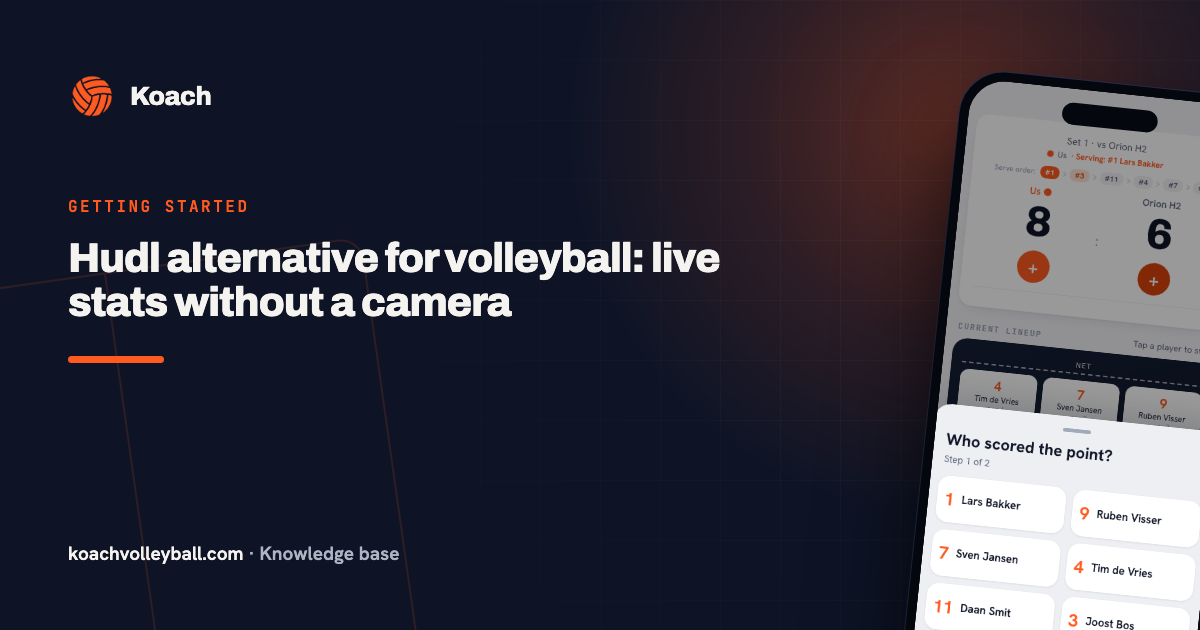
In Koach you start the match with your lineup, and after every point you tap in what happened. If your team wins the rally, you pick one of the six players on court under Who scored the point?, or Opponent error. In the second step, under How was the point scored?, you choose from options like Attack, Block and, if that player was serving, Serve / Ace. If the point goes to the other side, you tap Good ball by opponent, or you choose who made the error and then, under What went wrong?, pick Service fault, Attack fault, Bad pass, Too late, Net fault or Other. When the opponent serves, you can rate the serve receive from 0 to 3.
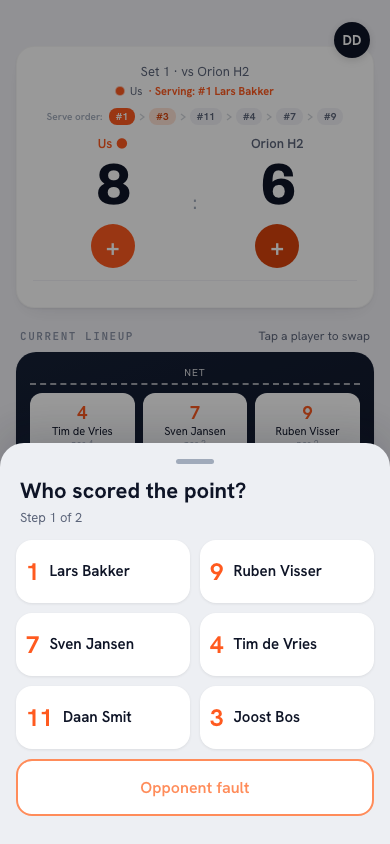
That's work, and we'll say so: an app with video recognition takes that tapping off your hands, and Koach doesn't. Two things make it lighter. If you're coaching and can't tap at the same time, use Authorize a player to keep score to hand scoring to a team member with a linked account, who tracks the match on their own phone. And if it didn't happen at all, Enter stats afterwards lets you fill in points and errors per player, even days later. How tracking works step by step is explained in keeping volleyball stats with an app.
14 days free, no credit card. Track your next match without a camera and see at the first time-out which rotation is costing you points.
Start your first match in KoachStats during the time-out, not after the match
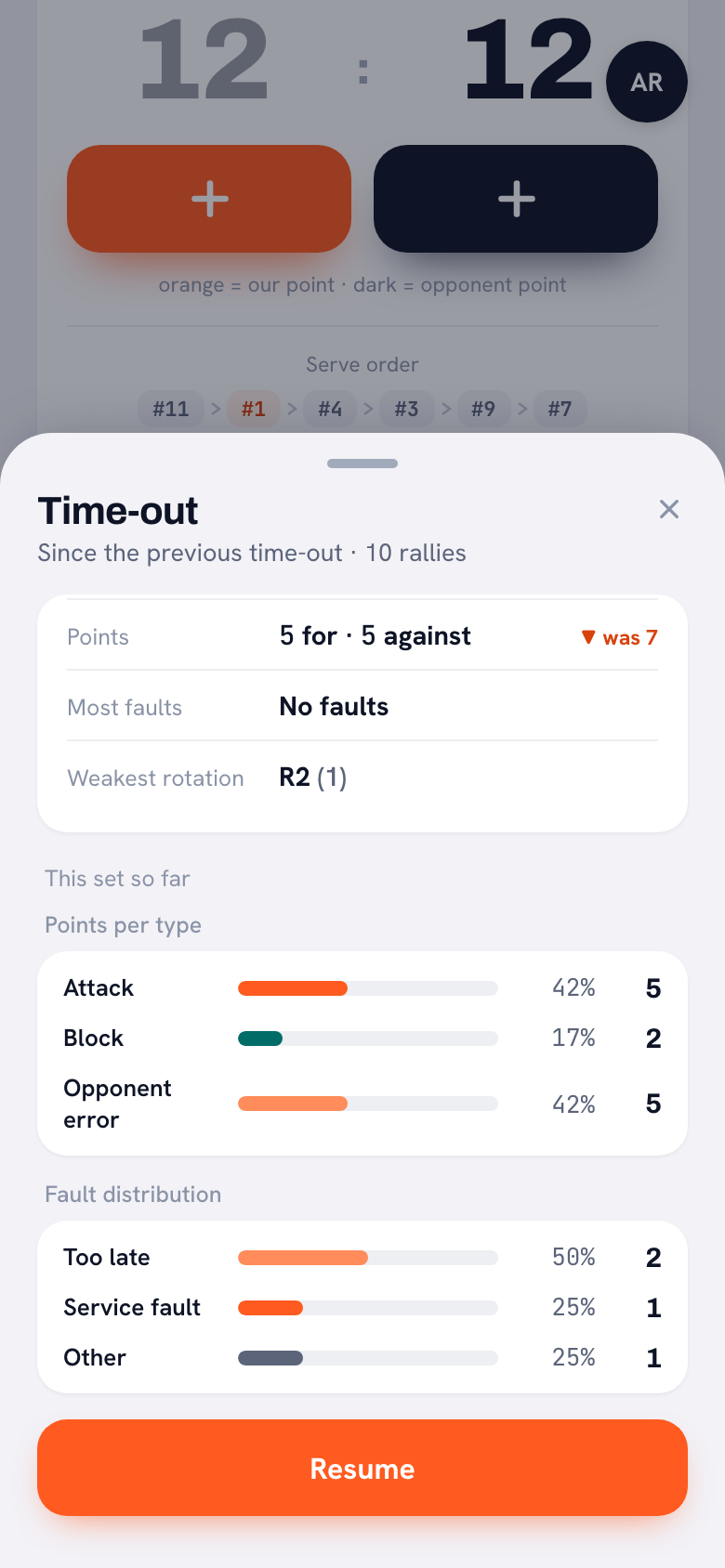
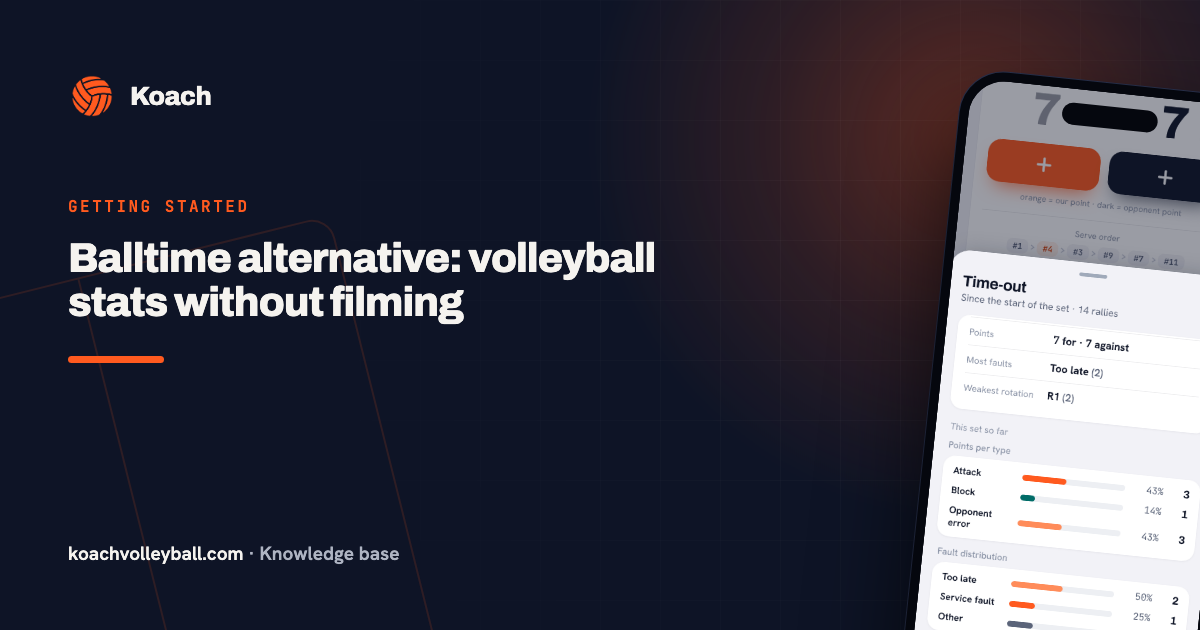
The biggest difference from an app that waits for a recording is timing. Tap Time-out and you see what happened since the start of the set or since the previous time-out: points for and against, Most faults and Weakest rotation. Below that, under This set so far, you get the points by type and the error breakdown. So you see which rotation is leaking points while your players are still standing in front of you, and Resume takes you back to the match.
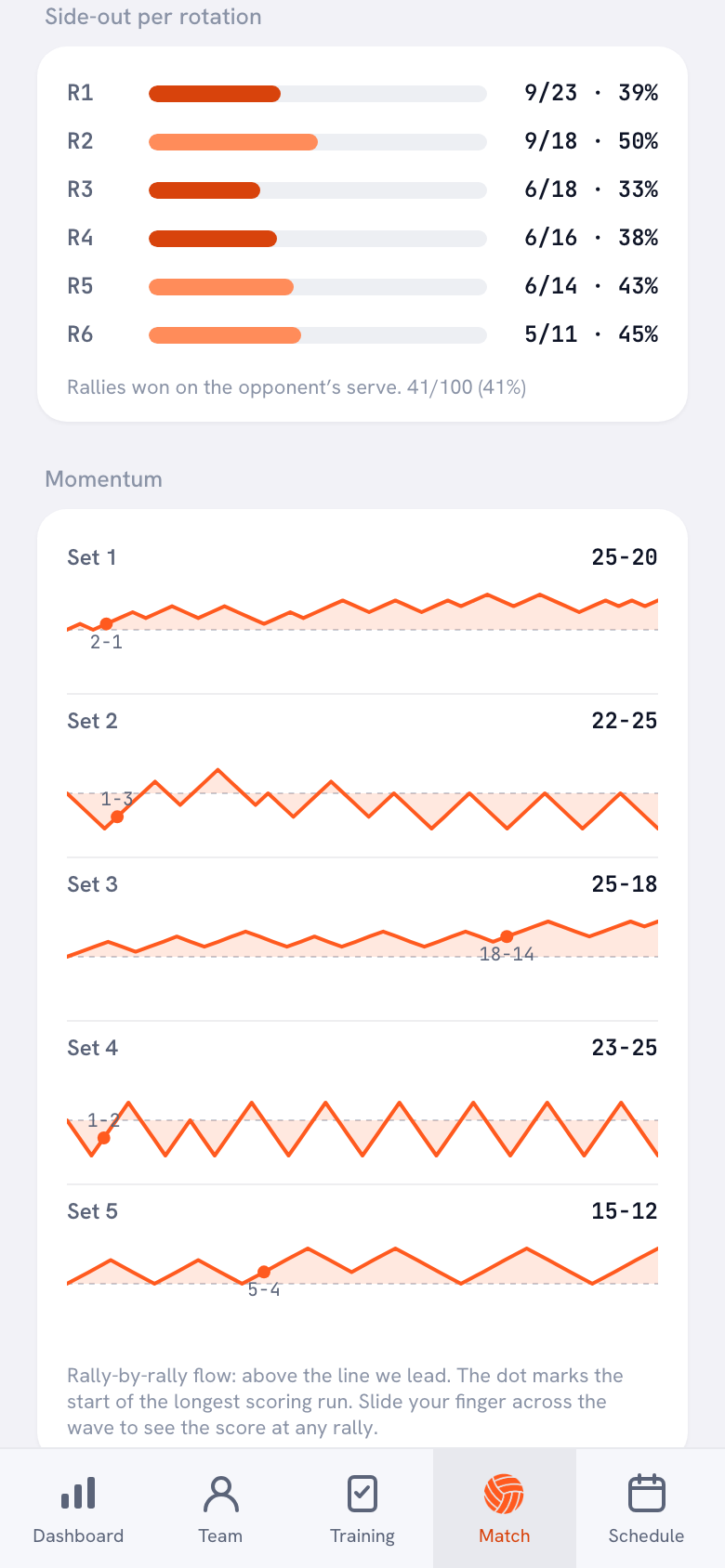
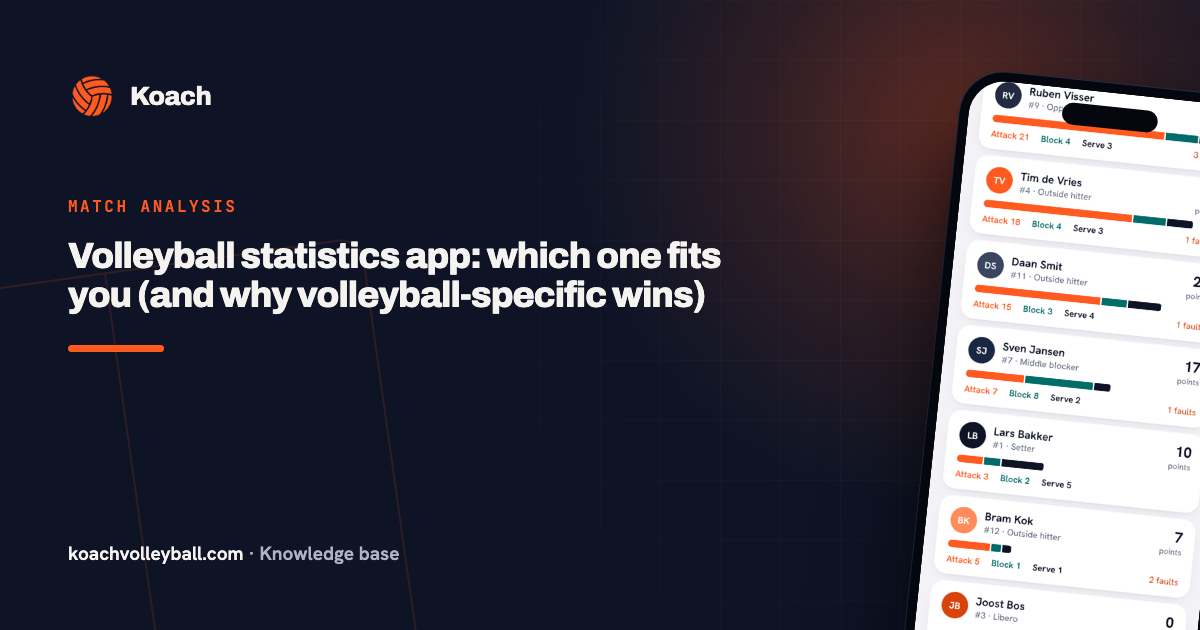
After the last point, Player performance is ready on the match, with each player's points from attack, block and serve, plus their errors. Under Side-out per rotation you see how many rallies you won on the opponent's serve in each rotation, and Momentum shows how each set unfolded rally by rally, with a dot where the longest scoring run began. That way you can see in which rotation and at which stage of a set you gave points away, without rewatching a single minute of footage.
What Koach doesn't do
Koach has no AI and doesn't look at footage: there's no video in the app, it doesn't make highlights and it doesn't assess technique. Koach also doesn't count attack attempts, so you won't get a hitting percentage; you do get attack points, attack errors and side-out per rotation. For the other side of the net, you only note whether a point came from an opponent error or from a good ball by them, not which opposing player did what. If you want footage, highlights or technique feedback, one of the apps above is a better fit. If you're after hitting percentages or stats per opposing player, you need a more detailed stats app. What to look for when choosing is in the checklist for the best volleyball app for coaches.
You can also do both. If someone films on a phone anyway, you watch that footage back yourself and keep the numbers in Koach, live or afterwards. The numbers show you in which rotation things go wrong, the footage shows you how, and you don't need a subscription for the recording to do that.
What does Koach cost next to a video app?
You can try Koach free for 14 days, with no credit card and every feature. After that you choose Coach for €2.99 per month (one team, two coaches) or Club for €9.99 per month (unlimited teams and coaches); with a yearly plan you pay €2.49 or €8.33 per month. Players and parents get their own free account. The amounts are on the pricing page; in the App Store and on Google Play you see the price in your own currency. For comparison: Balltime Player costs $20 a month, and Hudl Assist and Volleymetrics don't list a price online (checked in October 2026).
Not sure whether you need footage? Track one match without a camera first and look at Weakest rotation during the first time-out. If you know afterwards what you want to change, you didn't need a recording for that question. If what you really want is to see how it went wrong, filming is the next step.
Sources: Balltime's pricing page at Hudl, Balltime in the App Store, a search for balltime on Google Play, VolleyVision in the App Store and Hudl in the App Store, checked in October 2026. Prices and features can change; check them yourself before you choose.
Frequently asked questions
Which app analyzes my volleyball technique from video?
According to the App Store, VolleyVision: Volleyball Coach does. It recognizes the technique of your serve, pass, set, spike and defense in your own videos and gives you a score and feedback on it. It's free to download, works with in-app subscriptions and is English only, for iPhone and iPad (checked in October 2026). Koach doesn't assess technique from footage.
Is there a volleyball app that tracks stats automatically?
The apps we found all need a recording for that. Balltime gets stats from a video you upload, and with Hudl Assist and Volleymetrics, people at Hudl do the work using your footage. Koach has no AI and doesn't look at footage: after every point you tap in who scored and how. If you're busy coaching, let a team member with a linked account do that on their own phone.
How long does it take to get volleyball stats from video?
That depends on the service. Volleymetrics says within 12 hours, for pro teams and US college teams. With Balltime the work only starts once the recording is uploaded, so the stats come after the match (checked in October 2026). If you want numbers during a time-out, you have to enter them during the match: in Koach they're there after every point.
Can I try Koach for free?
Yes. You can try Koach free for 14 days, with no credit card and every feature. After that you choose Coach for €2.99 per month for one team with two coaches, or Club for €9.99 per month for unlimited teams. There's no free version of Koach for coaches, but players and parents use their own account for free.
Track your stats without a camera
14 days free, no credit card. After your first match you'll know which rotation is leaking points.
Get started with KoachOr read first what the volleyball coaching app does.