
Creating player profiles with position and jersey number
Everything you want to know about a player as a coach starts with a good profile: name, jersey number, position and role. Sounds simple — but set it up properly and you reap the rewards all season long.
Why the profile is the foundation
Every feature in a coaching app hangs off the player: attendance, statistics, notes, goals. If the profile is wrong — wrong jersey number, outdated position — everything else is wrong too. Investing fifteen minutes at the start of the season saves you months of small annoyances.
What do you record per player?
- Name and jersey number — the number that lets you recognise them in a match with a single tap.
- Position — setter, outside hitter, middle blocker, opposite or libero. See also all positions explained.
- Second position — can they also play opposite? You want to know that on the day your opposite calls in sick (more about second positions).
- Age and status — active, injured or temporarily unavailable.
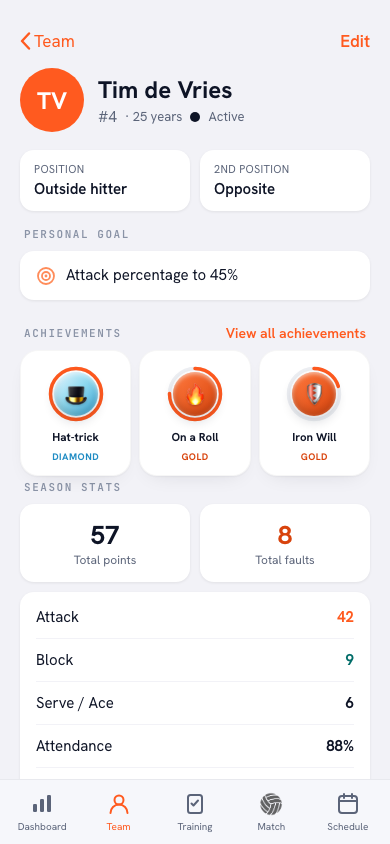
How to create a profile in Koach
- Open Team → Players and tap Add player.
- Enter name, jersey number and date of birth.
- Choose the main position and, if applicable, a second position.
- Done — from now on the profile fills itself with attendance, statistics and achievements.
Tip: let players check their own details via an invite. Nothing is as stubborn as a misspelled jersey number in the match statistics.
Frequently asked questions
Which position do I pick for a youth player who plays everywhere?
Pick the position where they currently play most as the main position and set the rest as a second position. Adjust it once their role becomes clearer — a profile is not a contract.
Can a player be on two teams at once?
A player who also trains with another team gets added there separately. That keeps statistics clean per team — a third-division match tells a different story than a cup match with the second team.
What happens to the profile when a player quits?
Set their status to inactive instead of deleting them. Their history stays intact for the team statistics — and for the day they come back.
Try it yourself in Koach
Less admin, more coaching — starting at your next practice.
Get started with Koach