
Volleyball roster template (free PDF, Excel and Word)
The short answer
A volleyball roster template puts every player's jersey number, name, position and emergency contact on one page. You can download one free here as a PDF, Excel or Word file. In Koach the same roster lives in the app, and each player fills in their own phone number and emergency contact.
A volleyball roster template saves you retyping jersey numbers and phone numbers at the start of every season. Download the free volleyball roster below as a PDF, Excel or Word file, see how to fill it in, and find out where a paper list stops working and the roster in Koach takes over.
Download the volleyball roster template: PDF, Excel and Word
First, what you came for. The template is free: no account to create and no email address to leave. You are free to use, copy and adapt it. Pick the format that suits you:
- Download the volleyball roster (PDF): for printing. One landscape A4 sheet with 15 player rows and four fields at the top: Team, Season, Coach and Coach's phone.
- Download the volleyball roster (Excel): 25 player rows with drop-down lists for position and captain. The file works out each player's age, checks for duplicate jersey numbers and counts your players per position on its own.
- Download the volleyball roster (Word): for editing. 15 player rows plus a table for your team staff, also on landscape A4.
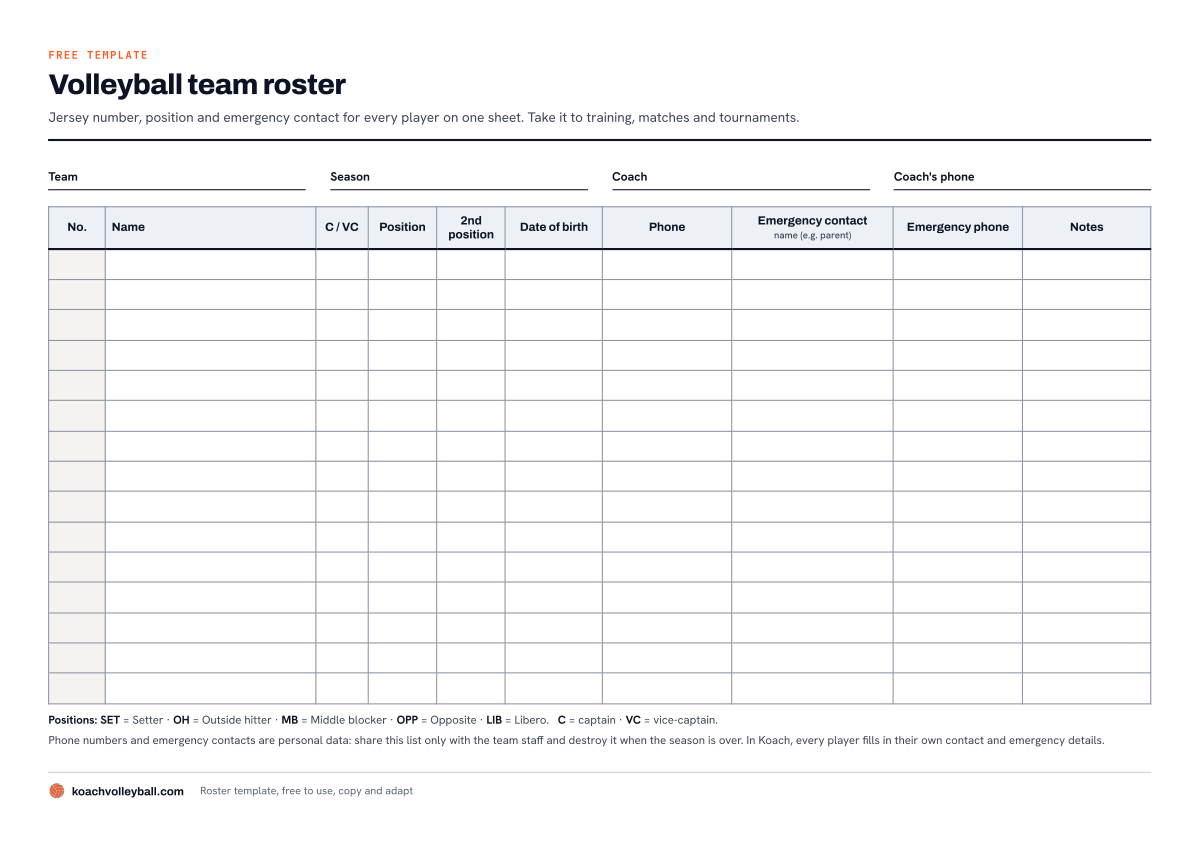
The PDF on a single sheet: team details at the top, 15 rows below, and the position abbreviations and a privacy note at the bottom.
What goes on a good volleyball team roster?
A basic contact list has a name and a phone number. For a volleyball team you need more than that, and above all different information. These are the columns in the template, and why each one is there:
- Jersey number. The number you use to point out a player for a substitution or a timeout. Which numbers are allowed and how to number your squad sensibly is covered in assigning and managing jersey numbers.
- Name and C / VC. C stands for captain, VC for vice-captain. A substitute coach can see straight away who the go-to player on court is.
- Position and 2nd position. Setter (SET), outside hitter (OH), middle blocker (MB), opposite (OPP) or libero (LIB). The second position is the column you only miss when your opposite pulls out: then you can see at a glance who else can play that spot.
- Date of birth. This gives you each player's age in years, which you often need for a youth team with age limits.
- Phone, emergency contact and emergency phone. The player's own number, and who to call if something happens. For youth players that is usually a parent. Ideally the emergency phone is a different number from the player's own.
- Notes. For arrangements you don't want to forget, such as who can never make a particular weeknight.
More columns don't make a roster better, just longer. Which details you really need, how long to keep them and what to leave out is explained in what player information a coach really needs.
How to fill in the roster template
On paper it's simple: team, season and your own number at the top, then one row per player. Have every player fill in or check their own row at the first practice. They know their jersey number and their parents' phone number; you don't always know their date of birth.
In Excel, the file does part of the work for you:
- Team details. At the top of the Roster sheet, enter the team name and the season.
- Players. On each row, enter the jersey number (a number from 0 to 99), the first name and the last name. Position, Second position and Captain are picked from a drop-down list, so you never end up with three different spellings of middle blocker.
- Age. Enter the date of birth and the Age column works out the age in years. At the top is the Age on box: leave it blank and the file uses today's date. If your league or federation uses a fixed cut-off date for age groups, enter that date in the box.
- Phone numbers. Phone, Emergency contact and Emergency phone are text cells, so a leading 0 or + stays put.
- Check. The last column flags a duplicate jersey number, a missing jersey number or a missing emergency phone. The Summary sheet counts how many players you have per position, how many can cover that position as their second position, and how many players still have no emergency phone.
- Staff. On the last sheet, add the head coach, the assistant coach and the team manager with their phone number and email address.
It's a plain .xlsx file with standard formulas and no macros. The summary per position is also a good starting point for a volleyball depth chart: who replaces whom when your setter or your libero can't make it.
Paper, Excel or an app: which roster suits your team?
A roster is correct on the day you make it. After that it goes wrong in three places. A player gets a new phone number and you never hear about it. Your assistant coach carries an older version in their bag than you do. And the list of emergency numbers is sitting on your kitchen table when someone rolls an ankle at an away game. A printed roster also has one big advantage: it always works, even in a gym with no signal.
We make Koach, so read this table as the maker's comparison. What each format does and doesn't do for you:
| What you want | Excel | Koach | |
|---|---|---|---|
| Free | Yes | Yes | 14-day trial |
| No account needed | Yes | Yes | No |
| Age in years | No | Yes | Yes |
| Warns about a duplicate jersey number | No | Yes | Yes |
| Player fills in their own emergency contact | No | No | Yes |
| Status, such as injured | No | Note it yourself | Yes |
| Tap a number to call | No | No | Yes |
The paper template is enough if you need one list per season, for example for a tournament, a substitute coach or the match bag. Excel suits you if you manage the list yourself and want ages and duplicate numbers to take care of themselves. Koach suits you if you want your squad in an app anyway for your lineup, attendance and matches: then the roster is no longer a separate job, and your players keep their own numbers up to date. If you coach beach volleyball, Koach is not the right choice: the app is built for indoor volleyball, six against six.
What Koach does with your roster
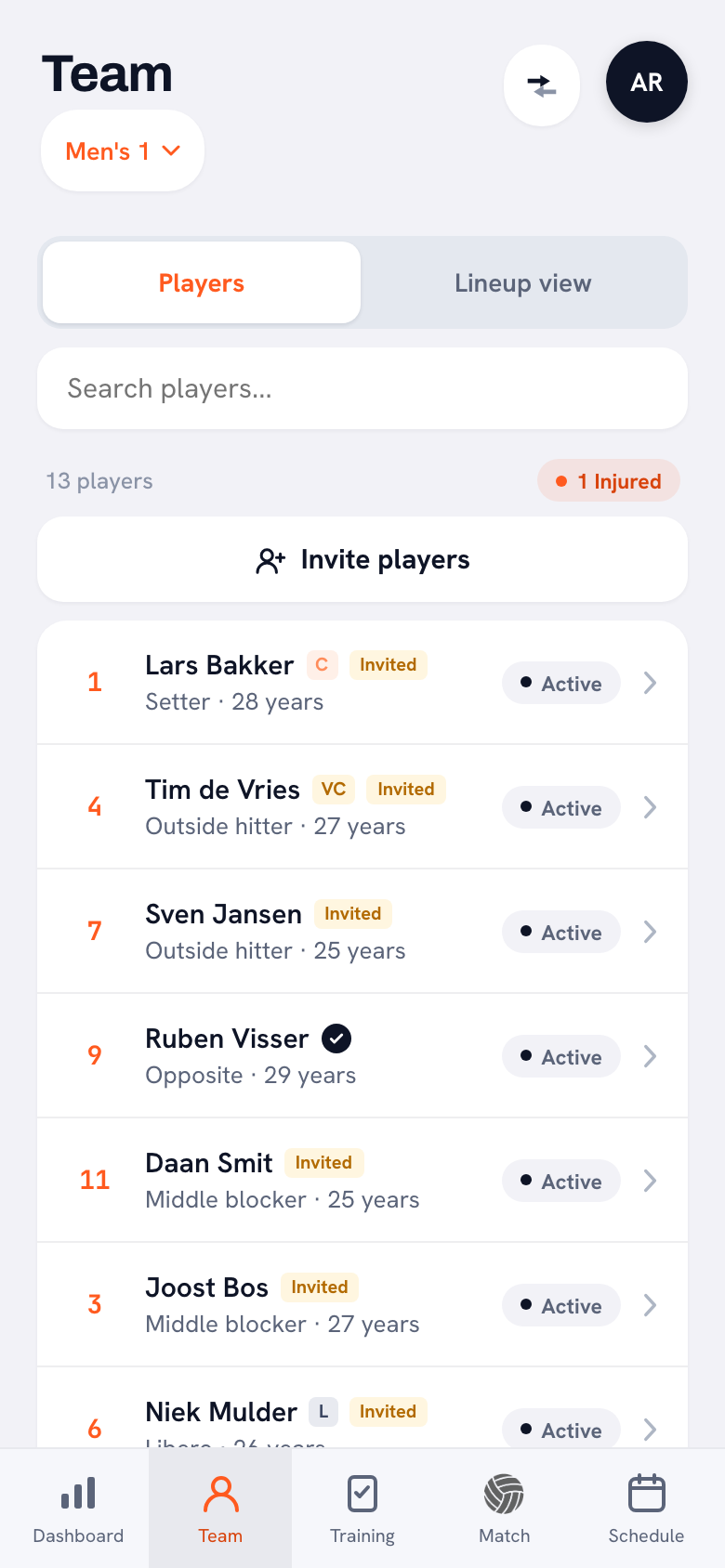
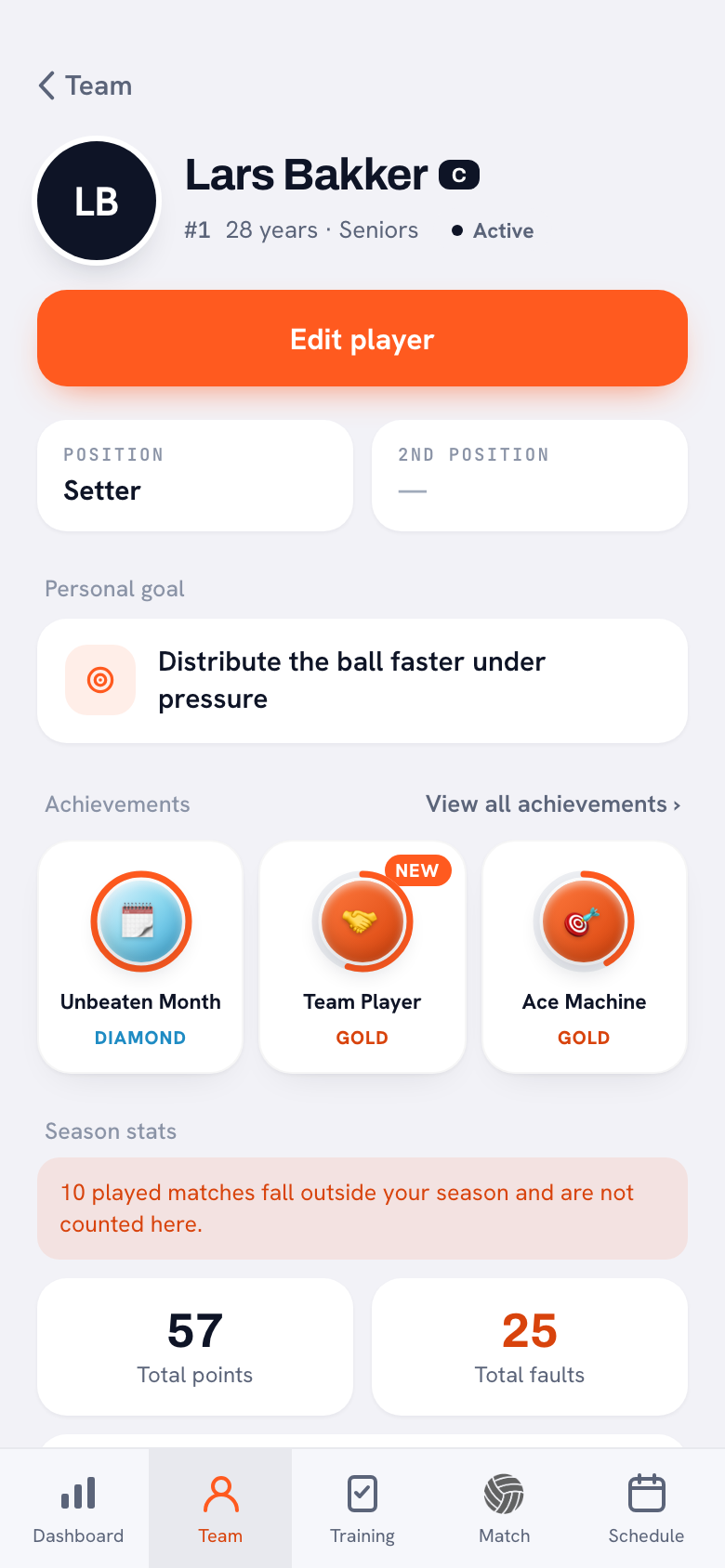
In Koach your roster isn't a separate file but your squad on the Team tab. For each player you see the jersey number, position and age, with C or VC next to your captains. You set the status yourself: Active, Injured, Absent or Inactive. When someone is set to Injured, you see it at the top of the list. The big difference from paper is who keeps the list up to date.
14 days free, no credit card. Add your squad tonight and let your players fill in their own emergency contacts.
Build your roster in KoachYou enter jersey number, position, second position and date of birth under Edit player. A player with an account can also fill in those four under Edit profile. Phone, Emergency contact and Emergency phone are filled in by the player alone. You then see them in their player profile under Contact & emergency, and tap a number to call. Players can't see each other's details in the app. Status and captaincy stay with you, because those are team decisions.
If you pick a jersey number that already belongs to someone else, the app asks whether you want to use it anyway. How to set up a profile for each player, and what else you can keep in it, is covered in creating player profiles with position and jersey number.
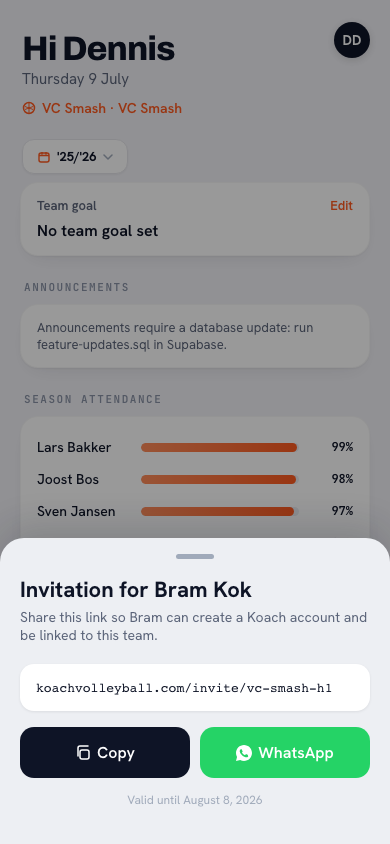
Contact details are only in Koach once a player has an account. That's why you invite your players. With Invite players, Koach creates a personal link for each player, and you send all those links in one message to your team group chat. Each link belongs to one name, works once and is valid for 30 days. The player account is free. How inviting works step by step is explained in inviting players with a link.
What Koach doesn't do
- No import. You can't import your Excel roster into Koach. When you create your team you only type the names; jersey numbers and positions are added later, by you or by your players after their invitation.
- No printable roster. The app doesn't make a PDF of your squad. Export season (CSV) gives you each player's name, jersey number, position, status and season stats, but no phone numbers or emergency contacts. If you want a list on paper, use the template above.
- No contact details without an account. A player who never logs in has no phone number in Koach. Keep their emergency number on paper instead.
- No membership management. Koach doesn't replace your club's membership records: there is no connection to membership software and no import of members.
From roster template to Koach: how to get started
Keep your completed roster next to you, create your team and type in the names. Add jersey numbers and positions, choose your captains and then send the invitations to your team group chat. What else is involved in running a team, from attendance to communication, is covered in managing a volleyball team as a coach.
The template is free. You can try Koach free for 14 days, no credit card needed. After that you choose Coach for €2.99 per month (one team, two coaches) or Club for €9.99 per month (unlimited teams and coaches). On a yearly plan you pay €2.49 or €8.33 per month. In the App Store and on Google Play you pay the store price in your own currency. Players and parents use the app for free. The prices are on the pricing page.
Print it anyway, at least once. Even if you keep everything in an app, a printed roster with emergency numbers in the match bag works without signal and without battery. Have every player check their own row at the first practice, and you know it's right.
Frequently asked questions
How do I make a team roster in Excel?
Give each player one row with jersey number, first name, last name, position, second position, date of birth, phone, emergency contact and emergency phone. Turn the position column into a drop-down list and format the phone columns as text, otherwise a leading 0 or + can disappear. If you'd rather not build it yourself, download the free Excel roster template on this page: it works out ages, checks for duplicate jersey numbers and counts your players per position.
Can I put players' phone numbers on a team roster?
For most teams you simply need them: you want to be able to reach players and call someone if there's an accident. Phone numbers and emergency contacts are personal data, though. Ask the player for them, or a parent for youth players, and say what you'll use them for. Share the roster only with the coaches and team staff, and destroy it when the season is over.
Can I import my Excel roster into Koach?
Not with an import: Koach doesn't read Excel or CSV files. When you create your team you type your players' names, and you add jersey numbers and positions afterwards. Once you invite your players, they fill in their own phone number and emergency contact and can add their jersey number and position. Your Excel roster is then mainly handy to have next to you while you type.
Who can see players' contact details in Koach?
The team's coaches. A player fills in their phone number, emergency contact and emergency phone themselves under Edit profile, and those details then appear in their player profile. Players can't see each other's details in the app. If a player doesn't have an account yet, Koach has no contact details for them either; keep their emergency number on paper.
Is the volleyball roster template free, and what does Koach cost?
The template is free as a PDF, Excel and Word file, with no account and no email address. You can try Koach free for 14 days, no credit card needed. After that Coach costs €2.99 per month for one team with two coaches, or Club €9.99 per month for unlimited teams. A yearly plan costs less. Players and parents use the app for free.



Put your roster in Koach tonight
14 days free, no credit card. Your players fill in their own emergency contacts.
Get started with KoachOr read first what the volleyball coaching app does.