
Volleyball depth chart template: who covers every position
The short answer
A volleyball depth chart lists, position by position, who is your first, second and third choice, so you know right away who plays when someone drops out. Koach has no separate depth chart screen, but it stores a position and a second position for every player and shows who is injured or unavailable.
A volleyball depth chart answers one question before match day asks it for you: who steps in when your setter, a middle or your libero can't make it? Below you'll find a template you can copy, how to fill it in and keep it current, and which part of the job Koach takes off your hands.
What is a depth chart in volleyball?
A depth chart is an overview by position: who is your first choice, who is your second choice, and what you do when neither of them is available. You may know the term from American football; it works exactly the same way on a volleyball roster. With ten to twelve players, someone is regularly injured, stuck at work or home sick. A depth chart lets you solve that puzzle at home, calmly and with the full picture, instead of in the locker room with the clock running.
Two other lists look similar but do a different job:
- Your lineup. It shows who stands where at the first serve and how your team rotates. The depth chart tells you who goes into that lineup when a regular starter is missing.
- Your roster. That's about how many players you need at each position, which is covered in building your roster by position. The depth chart puts the names you already have in order.
Volleyball depth chart template: what it looks like
Here's a filled-in example for a team running a 5-1, with eleven rostered players and one training-only player. The number in parentheses is how many starters you have at that position: six on the court plus the libero, who takes a middle's place in the back row. Copy the layout onto paper or into a spreadsheet and drop in your own names.
| Position | 1st choice | 2nd choice | 3rd choice |
|---|---|---|---|
| Setter (1) | Jake | Max | Ryan (2nd position) |
| Outside hitter (2) | Tyler, Sean | Ben | Sam (2nd position) |
| Middle blocker (2) | Dan, Josh | Tom | Finn (training-only) |
| Opposite (1) | Ryan | Ben (2nd position) | Tom (2nd position) |
| Libero (1) | Nick | Sam | Tyler (2nd position) |
Read it row by row first. If Jake is out, Max sets. If neither of them is there, Ryan moves to setter. Then check the Opposite row, because that's where a gap just opened up: Ben takes that spot. An absence at one position can leave a hole at another, and you only see that when the whole chart fits on one page.
Three columns are enough. List five backups per position and you've made a roster sheet, not a depth chart: the value is in the order, not the length.
How to fill in your depth chart
- Start with your starters. In the first column, put who starts when everyone is available, spread across the positions. That's your starting lineup, only organized by position instead of by spot on the court.
- Put backups at their own position. The second column is for players whose main position this is: a second setter, a third middle, a second libero. If you don't have one, like the opposite in this example, the best player with this as a second position moves up.
- Fill the third column with second positions. This is where players with a different main position who can also handle this spot go. Which combinations work and how to train them is covered in second positions: using players flexibly.
- Finish with who comes in from outside. A training-only player or a guest player from another team can fill the last gap, if your league rules allow it. What a training-only player is exactly is explained in training-only players: practicing without being on the roster.
- Check it row by row. If a position has nobody in the second or third column, you know where your roster is thin. That's something to fix before the season, not on the day it goes wrong.
The depth chart isn't a decision for the whole season. Update it after an injury, when a player starts learning a new position, or when a backup earns a spot. How to handle those changes on match day falls under flexible lineups; this article is about the list you need for that.
What should an app track behind your depth chart?
The depth chart itself is one page. The real question is what needs to sit underneath it so you can use it every week. Four things:
- A position and a second position for every player. Then you don't have to remember who can play what, and neither does your assistant coach.
- Who's out this week. An injury, a player who can't make the match, someone who's away for a while.
- Who's on the regular roster and who isn't. You want to be able to play a training-only player, but not ahead of your own backup by accident.
- An emergency lineup that's ready to go. When your second choice plays, you don't want to shuffle six names around on match day.
14 days free, no credit card. Add your roster with positions and second positions to Koach tonight, then fill in your depth chart from what you see.
Set up your positions in KoachWhat Koach does behind your depth chart, and what it doesn't
The honest part first: Koach has no separate depth chart screen. The app doesn't build a table with a first, second and third choice per position for you; that stays your template. Koach also doesn't look at the second position when you set a lineup: who comes into your match lineup is your call. What the app does is keep track of the four things above, so you read your depth chart with up-to-date information every week.
A position and a second position for every player
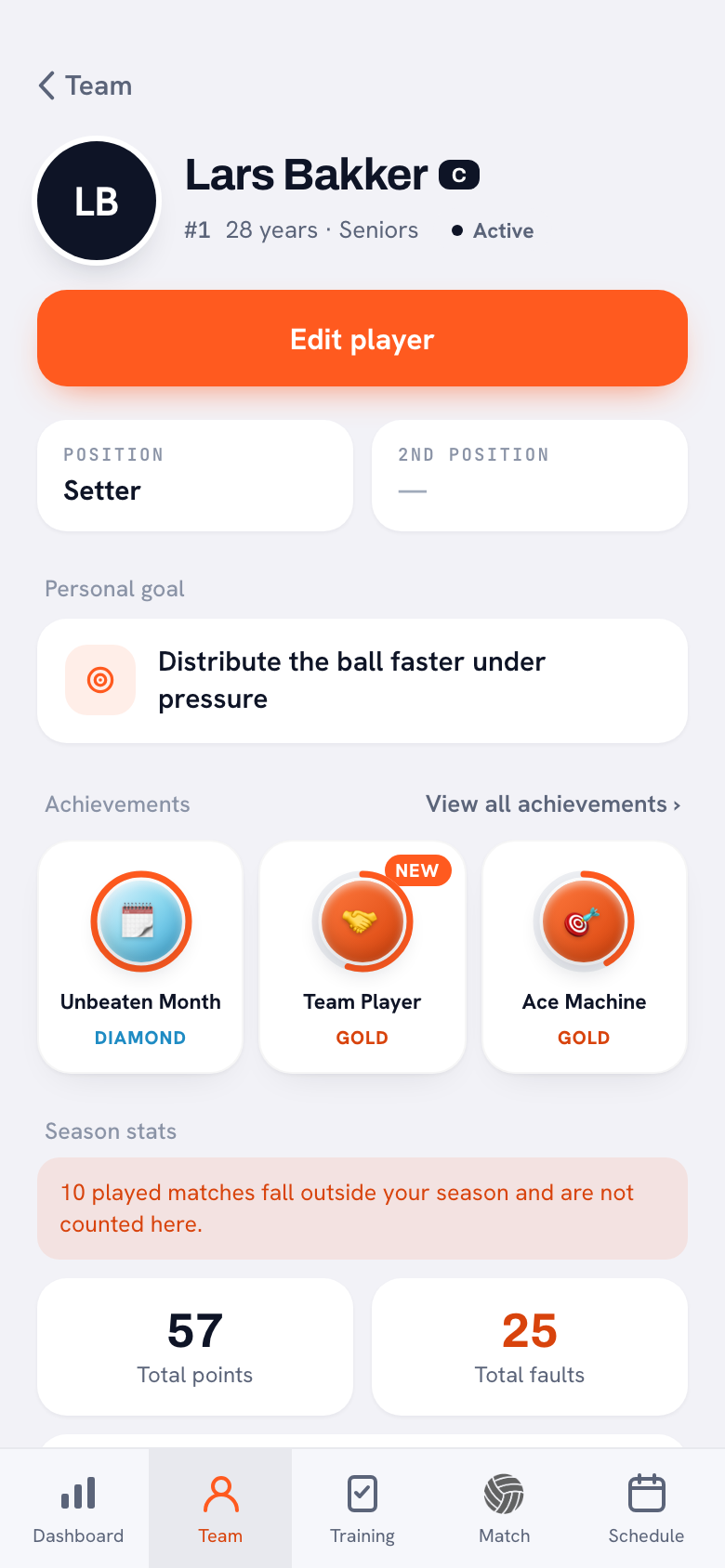
On the Team tab, open a player and tap Edit player. There you choose the Position and the Second position: setter, outside hitter, middle blocker, libero or opposite. The profile then shows them side by side. The player list only shows each player's main position; the second position is in the profile.
Players with their own account can also fill in their position and second position themselves: in their profile under Edit profile, in My player details. Status and captaincy stay with you. So take a quick look at any second positions players entered themselves before you copy them into your depth chart.
Who's out this week
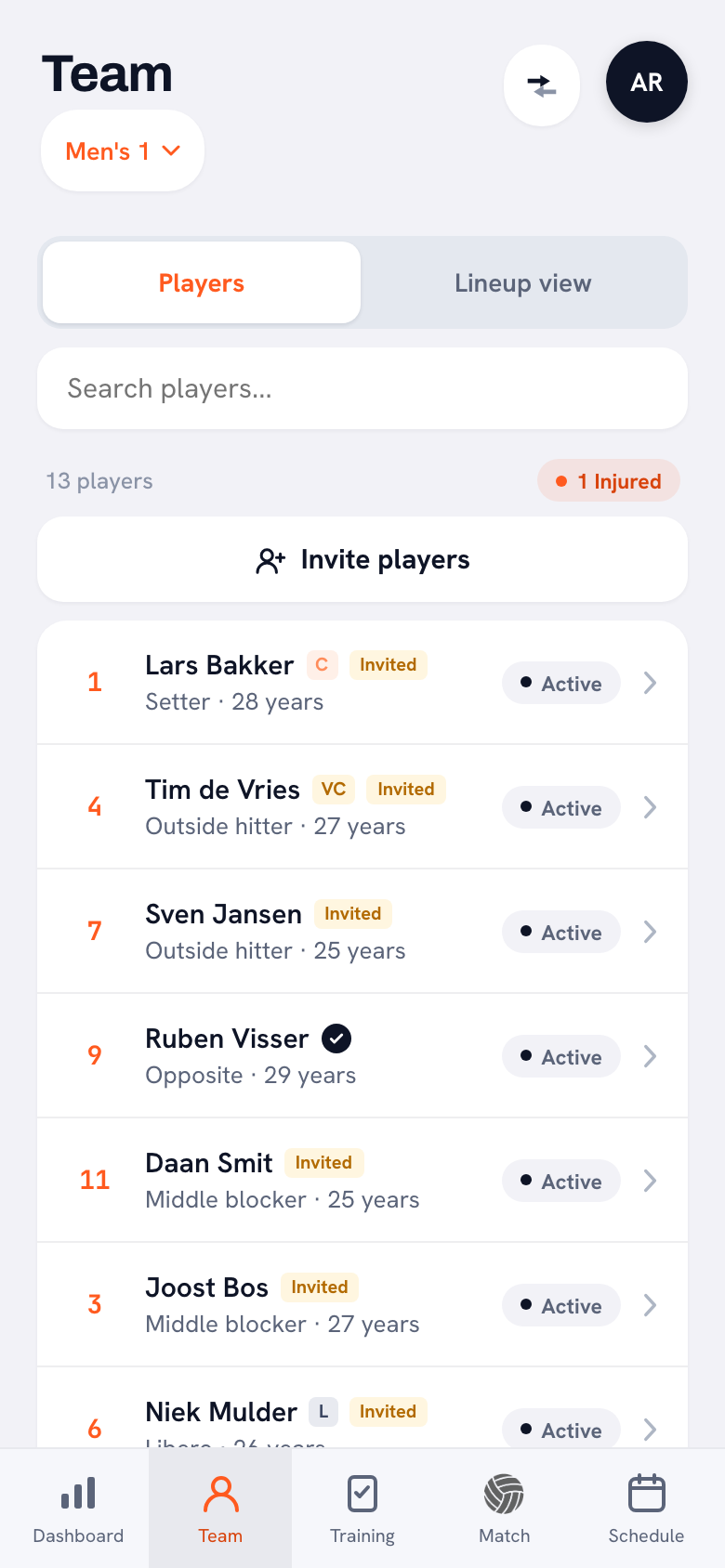
You set each player's status yourself: Active, Injured, Absent or Inactive. Above the player list, the app counts how many players are injured. For matches, players respond with I'm coming or Can't make it, with a reason if they like, and under Sign-ups you see who's coming and who hasn't replied yet.
When you set up the starting lineup for a match, players marked Injured or Absent appear at the end of Available players, dimmed and with their status shown. That way you don't put someone on the court who isn't there, and you see at a glance which row of your depth chart you need.
Training-only players come last
A player who practices with you but isn't on your regular roster gets the Training-only player label in Koach. The app explains it right there: Trains along but is not part of the regular squad. Only picked for a formation when no regular player is available. That's also where they belong on your depth chart: the last column.
An emergency lineup that's ready to go
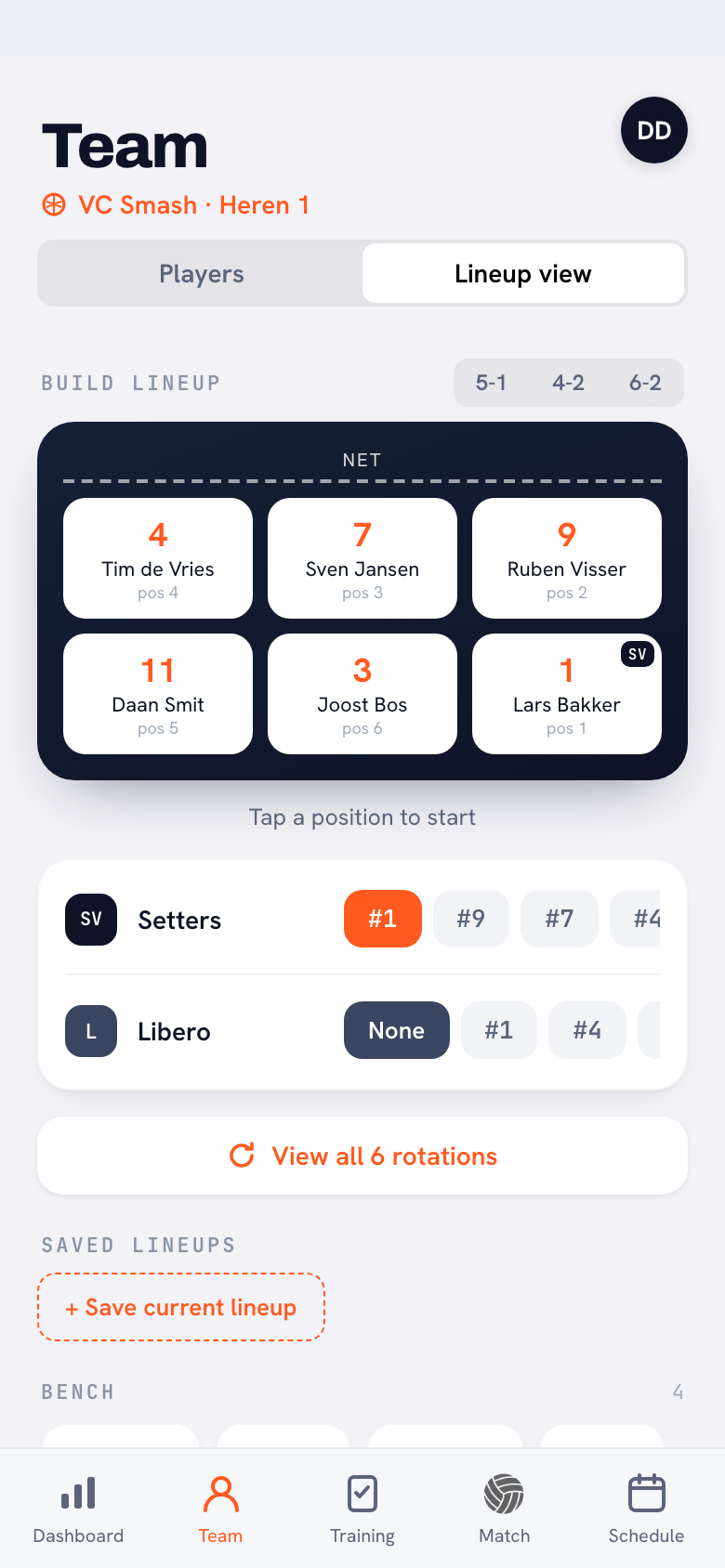
In the Lineup view, set up a lineup with your second choice in it and save it with Save current lineup, under a name that says what it's for, such as "Without Jake". It's then waiting for you under Saved lineups. Whatever you set up in the Lineup view is also your team's default lineup, so save your regular lineup first, for example as "Starters", and you can restore it with one tap. When you set up the starting lineup for a match, you pick the saved lineup there with one tap too. More on saving and reloading is in saving and reusing a lineup.
Depth chart on paper or in Koach?
We make Koach, so read this as the maker's comparison. For the depth chart itself, paper or a spreadsheet works fine, and on one point it's even better: you see every position in order on a single page.
| What you want | Paper or spreadsheet | Koach |
|---|---|---|
| Every position with 1st, 2nd and 3rd choice on one page | Yes | No, no separate depth chart |
| A position and second position for every player | If you write them down yourself | Yes, in the player profile |
| Who's injured or absent | If you keep it updated yourself | Yes, the status you set, also visible when you set the lineup |
| Who can't make the match | Through a group chat, separate from your chart | Yes, under Sign-ups |
| Training-only players kept apart from the regular roster | If you mark them yourself | Yes, with the Training-only player label |
| Emergency lineup ready for the match | On a second sheet | Yes, as a saved lineup |
| Cost | Free | 14 days free, then €2.99 per month (Coach) |
Our honest advice: keep the depth chart itself on paper or in a spreadsheet, and let Koach track what sits underneath it. Then your chart is accurate on the day you actually need it.
Who is this for? A coach with more players than spots, who has to work out every week who's available, or who works with an assistant coach who needs to see the same thing. How positions, status and sign-ups together cover your whole team management is explained in managing a volleyball team as a coach.
Who isn't it for? If you play with a fixed group of seven who always show up, or you only want a printed overview, the template above is all you need. Beach volleyball is out of scope: Koach is built for indoor volleyball with six players on the court. And if you just want the six rotations of your lineup on paper, use the free rotation generator, no account needed.
How much does Koach cost?
You can try Koach free for 14 days, with no credit card and every feature included. After that you choose Coach for €2.99 per month (one team, two coaches) or Club for €9.99 per month (unlimited teams and coaches). On a yearly plan you pay €2.49 or €8.33 per month. Players and parents use the app for free. The prices are on the pricing page; in the App Store and Google Play you see the price in your own currency.
Read your depth chart by name, too. In the example, Ben is the first backup at outside hitter and at opposite. If Sean and Ryan are both out on the same day, he can only fill one spot and you need the third column. If someone is the first backup on two rows, make sure both rows still have a third name.
Frequently asked questions
What's the difference between a depth chart and a lineup in volleyball?
A lineup shows who stands where on the court at the first serve and how your team rotates. A depth chart lists, position by position, who is your first, second and third choice: setter, outside hitter, middle blocker, opposite and libero. So the depth chart decides who goes into the lineup when a regular starter is missing. You make it once and update it after an injury or when someone learns a new position.
How many players should you list per position on a volleyball depth chart?
List at least one more name than you have starters at each position: two names for one setter, three for two middles. Where you can, add someone who has that position as a second position. A position with no backup is the biggest risk on your chart. How many players you need per position on your roster is covered in building your roster by position.
Can I make a depth chart in Koach?
Not as a separate screen: Koach doesn't build a table with a first, second and third choice per position. The app does track what sits underneath a depth chart: a position and a second position for every player, the status you set (such as Injured or Absent), who's coming to each match, and saved lineups for when your second choice plays. You keep the depth chart itself on paper or in a spreadsheet.
What do you do if you have no backup at a position?
First look within your own team for a player with a different main position who can learn this spot as a second position, and train it before you need it. If that doesn't work, ask a training-only player or a guest player from another team, if your league rules allow it. If only your libero is missing, you can also play without one: your middles then stay on the court in the back row. Put the solution on your depth chart right away, so you don't have to come up with it on match day.
Can I try Koach for free?
Yes. You can try Koach free for 14 days, with no credit card and every feature. After that you choose Coach for €2.99 per month (one team, two coaches) or Club for €9.99 per month (unlimited teams and coaches); on a yearly plan you pay €2.49 or €8.33 per month. Players and parents use Koach for free with their own account. The depth chart itself costs nothing: you keep it on paper or in a spreadsheet.



Set up your positions in Koach tonight
14 days free, no credit card. Within a week you'll see, match by match, who's out and who's ready to step in.
Get started with KoachOr read first what the volleyball coaching app does.