
Team poll: how to see who voted, what they picked and who hasn't
The short answer
Whether you can see who voted in a poll depends on the app. Since version 3.1, the coach in Koach sees for each option who picked it, and who hasn't voted yet. Players and parents only see the totals, and under every poll it says that the coach sees the names.
Want to see who voted in your poll, and who hasn't yet? After three days there are eight votes on the question about the team outing, while your squad has twelve players. Here is when to keep a vote open, where you see the names in Koach and what players and parents notice of it.
Open or anonymous: which poll do you actually want?
Before you look at who voted, it helps to know what kind of vote you are holding. In an open poll everyone knows the coach sees the names. In an anonymous poll nobody knows who picked what, not even you. Both have their place.
- Open works for practical questions. Which day suits the team outing, who wants a new practice shirt, which Saturday do we move practice to. There you actually want to know who picked what, because you act on it: you call whoever hasn't voted, or you notice that the two players who can't make Saturday are both your setters.
- Anonymous works for sensitive questions. How is the atmosphere in the team, what do players think of the practices, who should be captain. Anyone who knows their name is attached is more likely to give the socially acceptable answer. So you don't ask that kind of question in a poll where the names are visible, but on paper in a box or with an anonymous form outside the team app.
The most important thing is to say it up front. Nothing costs as much trust as a vote that seemed anonymous and wasn't. That is why Koach states it itself; see below.
Where do you see who voted in Koach?
Polls sit on the dashboard under Announcements, together with messages and tasks. How to post and edit a poll is in team communication with announcements, polls and tasks. Since version 3.1, as a coach you also see the names:
- Tap the three dots at the top right of the poll card.
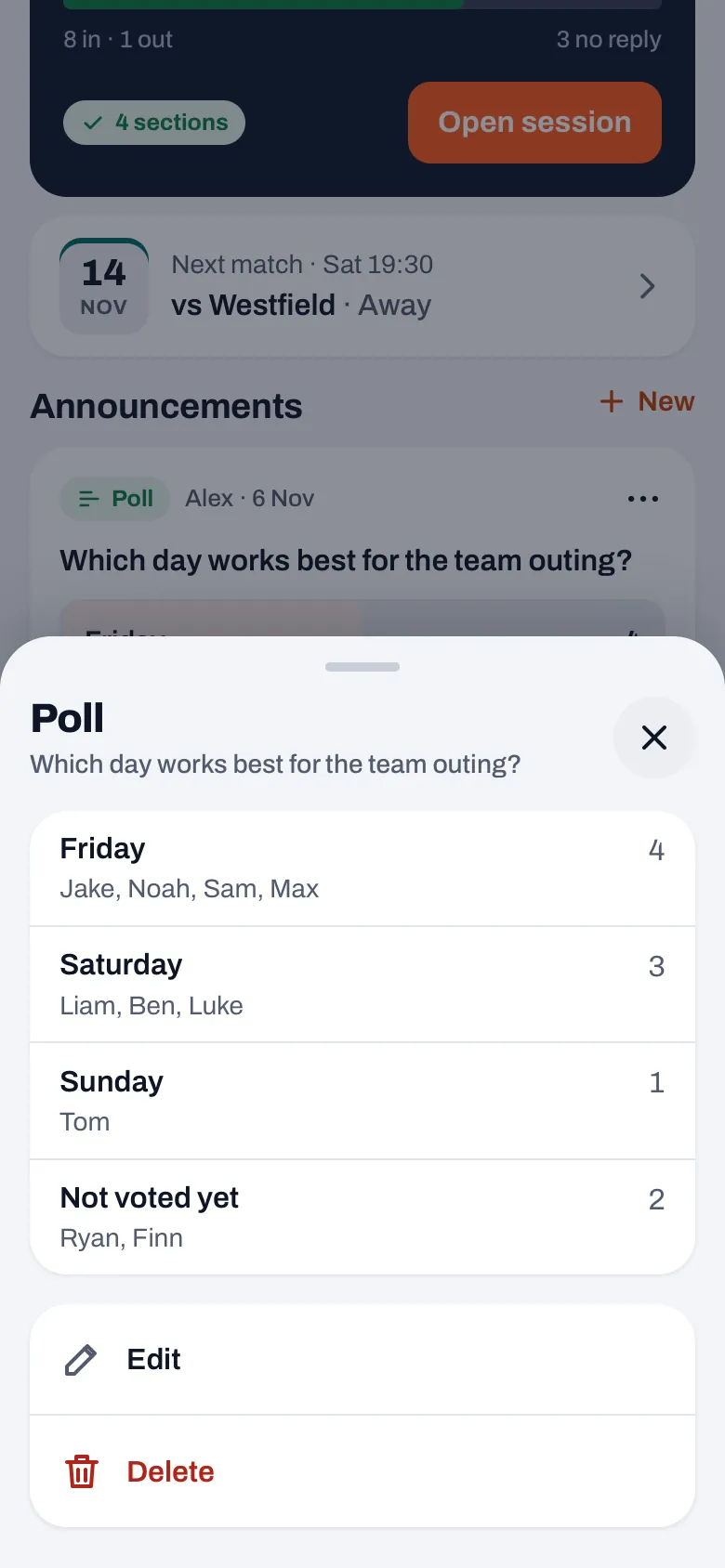
- Read the Poll sheet. The question is at the top. Below it, for each option, you see who picked it, with the count on the right. If an option has no votes, it says No votes yet.
- Look at the last line. Under Not voted yet are the names of those who haven't picked anything, with the count. If everyone has chosen, it says Everyone has voted.
Below the names are Edit and Delete, as before. You always see everyone's current choice: anyone who changes their mind moves along to their new choice in the sheet.
14 days free, no credit card. Add your team tonight and put the next team question on the dashboard as a poll.
Try Koach with your teamWho is listed under Not voted yet?
The list counts who can vote, and that is not the same as your whole squad:
- Players in this team with their own account. Including those marked injured or absent, because they can still have a say about the team outing.
- Parents of an active player. A parent appears with their name followed by "(parent)", or as "Parent of" with the child's name.
- Not: guest players from another team, training-only players, players set to inactive, and you yourself.
- Not: players without an account. Anyone without an account can't vote and so isn't in this list either. If you want everyone to be able to take part, invite your players first.
Watch out with youth teams: parent and child each vote with their own account. So a family can cast two votes, and a child can pick something different from their parent. Next to an option you see the name someone voted with, so you recognize a parent there by their own name, not the child's. If you want one vote per family, say so in the question. How parents get linked to your team is in adding parents to your team.
What do players and parents see of the vote?
Players and parents see the number of votes for each option with a bar, the total number of votes and their own choice with a tick. They don't see names: the three dots with the sheet are only there for the coach. Anyone who changes their mind taps a different option; anyone who wants to withdraw their vote taps the same option again.
Under every poll, for everyone, there is a line with an eye icon in front of it: The coach sees who picks what. That way a player knows where they stand before voting, and you don't have to explain it with every poll. If you want to ask a question that players should be able to answer freely, this line is the signal not to put that question in the app as a poll.
That also applies to polls that were already there. Koach has always stored the name with every vote, so for a poll from before version 3.1 you now also see who picked what, while those who voted back then didn't see the line yet. If you previously asked a question that players took to be anonymous, tell your team that you now see the names, or delete that poll without looking at the names.
What do you do with those who haven't voted?
A poll in Koach has no closing time and no automatic reminder. The nudge for people who don't respond belongs to sign-ups for a practice, match or tournament, not to a poll; how that works is in players not responding to sign-ups. For a poll you do it yourself, and with the names in front of you that is quickly done:
- Put a deadline in the question itself, for example "please vote by Friday".
- Mention it at the end of practice: "Ryan and Finn, the poll is still open."
- Send the last few names a short personal message instead of a call-out to the whole group. Why a group call-out often gets lost is in why the WhatsApp group gets stuck.
Once the decision is made, post the outcome as a regular message on the dashboard. Then the decision stands apart from the vote and nobody needs to read the interim results. Polls are part of Koach's team features; the whole picture is in managing your volleyball team, and what it costs after the 14 free days on the pricing page.
Two options is often enough. A poll with six options splits the votes, and then you end up deciding yourself anyway. Put the two real candidates in it, and only add a third option if it is genuinely on the table.
Frequently asked questions
Can players see who voted for what?
No. Players and parents only see the number of votes for each option and their own choice. The names are in the sheet behind the poll's three dots, and that sheet only opens for the coach. Under every poll there is a line for everyone, The coach sees who picks what, so nobody thinks the vote is anonymous.
Is a poll in Koach anonymous?
For teammates yes, for the coach no: since version 3.1 the coach sees for each option who picked it and who hasn't voted yet, also for older polls, because the name was always stored with the vote. If you want to ask a question players should be able to answer freely, such as about the team atmosphere, use something outside the app, for example notes in a box or an anonymous form.
Do parents and children vote separately?
Yes. Parent and child each vote with their own account, so a family can cast two votes. In the coach's sheet, next to an option, you see the name someone voted with. Under Not voted yet a parent appears with their name followed by (parent), or as Parent of with the child's name. If you want one vote per family, say so in the question.
Why isn't a player listed under Not voted yet?
That list only counts those who can vote: players in this team with their own account and parents of an active player. Players without an account, training-only players, guest players from another team and players set to inactive are therefore missing. You aren't in it yourself either.
Can a player still change their vote?
Yes. If they tap a different option, their vote moves there; if they tap the same option again, they withdraw their vote. The coach's sheet always shows the current choice. A poll has no closing time, so put a deadline in the question if you want to decide at a certain moment.
Put your next team question in a poll
14 days free, no credit card. You see straight away who still has to choose.
Get started with KoachOr read first what the volleyball coaching app does.