
Team communication in your volleyball app: announcements, polls & tasks
Important team info disappears in a busy WhatsApp group between memes and three arguments at once. In Koach you simply post announcements, polls and tasks on the dashboard — right next to the rest of your team info, where everyone finds them.
Three kinds of team messages on the dashboard
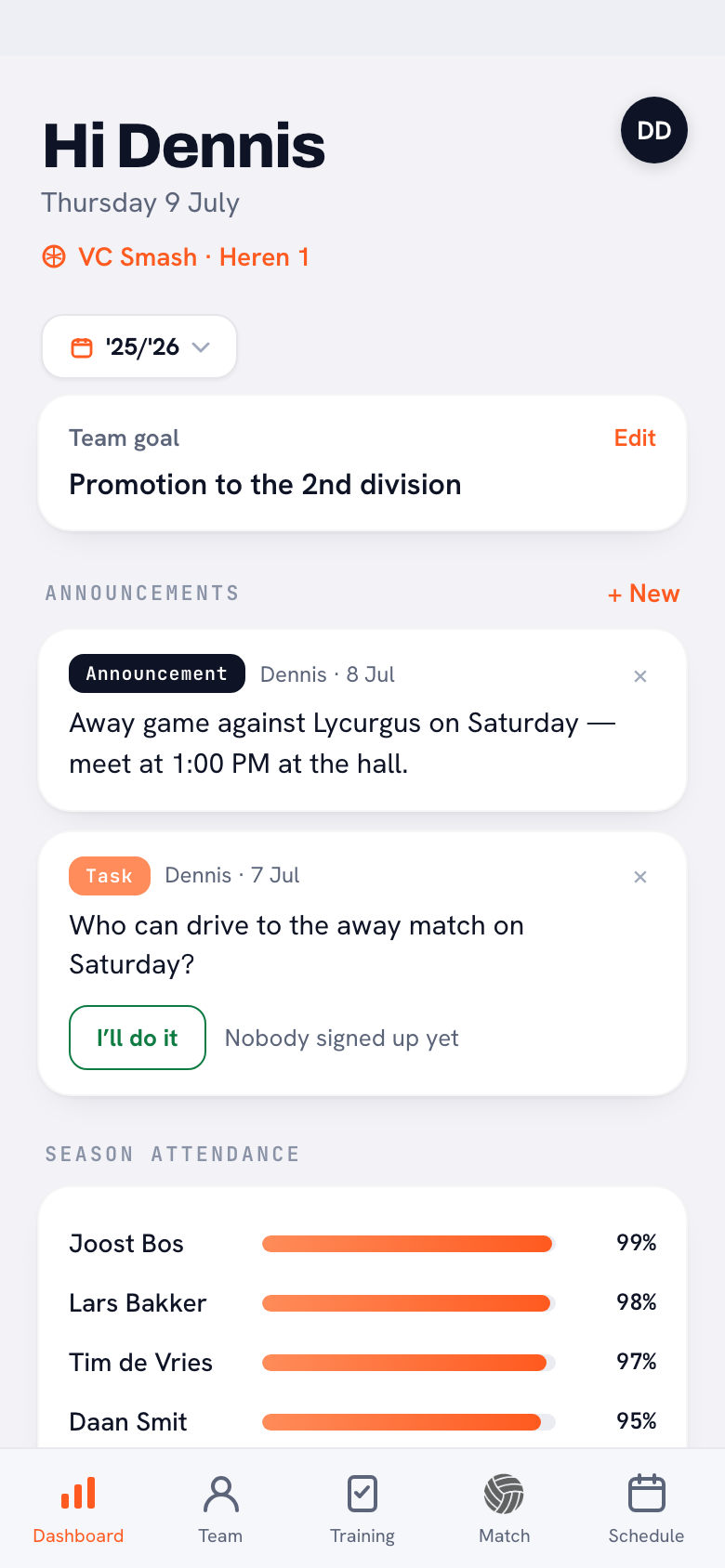
The coach posts messages in a feed on the dashboard, and both the coach and the players see that feed when they open the app. There are three kinds, each for a different purpose:
- Message — a plain announcement. "Practice is on tonight", "bring your water bottle", "meet at 12:00 on Saturday". Short, clear and impossible to scroll away.
- Poll — a question with two or more choices that team members vote on. You watch the number of votes per option climb live, so you immediately know where the team lands.
- Task — a chore someone can sign up for. "Who is driving to Sliedrecht on Saturday?" or "Who takes the shirts home after the match?" Team members tap "I'll do it" and it is sorted.
Why not just use the group chat?
The group chat is fine for banter, but poor for decisions. A poll about the team photo drowns in replies, the question of who is driving gets asked three times because nobody scrolls back, and half the team saw the cancelled-practice message too late. The problem is not the chatting itself, but that important messages share the same space as all the noise. In Koach they stand apart, next to the rest of your team info — alongside attendance, the team goal and the calendar.
How voting and signing up works
For players it is a single tap. On a poll they pick an option and see the running tally; on a task they sign up with "I'll do it". Change of mind? A vote or sign-up can simply be withdrawn — handy when driving no longer works out. That keeps the feed an up-to-date picture of who is doing what, instead of a string of separate "never mind, I can't after all" messages.
Typo, or a time that shifts after all? Every message carries a button with three dots for the coach; under it, Edit lets you put the text right instead of deleting the message and posting it again. On a poll you can change the answer options too. If nobody has voted yet, that is simply a correction. Once votes have been cast, the edit screen shows an orange warning with the number of votes, and the app asks for confirmation when you save: change the options and those votes are cleared, because afterwards they would belong to a choice that no longer exists. Adjust only the text and the votes stay where they are.
What is fixed when you edit is the kind of message: a message stays a message, a poll stays a poll. And if a message has to go entirely, you choose Delete under the same button; there too the app asks for confirmation first. That editing afterwards now covers just about everything you plan in Koach.
Because everything is attached to the team, it dovetails with the rest of your digital team management. The poll about the date of the team dinner can go straight into an entry in the team calendar, and a match-day task sits in the same place as your lineup and attendance.
Tip: use a poll not only for the practical stuff, but also to involve the team. Let them choose between two drills or vote on the season goal — people who get a say get moving more easily. See also setting a team goal.
From one-off message to steady rhythm
The real gain is in the habit. Post the important things every week as an announcement, poll or task, and your team learns on its own: if it is not on the dashboard, it is not official. That saves endless follow-up calls and "did I miss that?" messages. Combine it with clear team agreements about how you communicate, and the dashboard becomes the beating heart of your team — not just another channel on the pile.
Frequently asked questions
Does this replace our WhatsApp group?
Partly. For the casual banter, WhatsApp stays fine. But everything official — announcements, votes and chores — goes into Koach, where it does not sink beneath the noise. Many teams keep the group chat for fun and the dashboard for the arrangements.
Can players post messages themselves or only respond?
Only the coach posts announcements, polls and tasks. Players respond to them: they vote on a poll or sign up for a task. That keeps the feed clear and stops it from turning into another busy group chat.
Do players see the poll results?
Yes. Both the coach and the players watch the number of votes per option climb live. Everyone immediately knows where the team lands, without anyone having to count votes.
Can I still change the answer options of a poll?
Yes, but it comes at a price. As long as nobody has voted, you change the options freely. Once the team has voted, the app warns you and asks for confirmation when you save: change the options and the votes cast are cleared. Adjusting only the question text is always possible — the votes stay put.
What if a player changes their mind about a task?
No problem: a sign-up or vote can simply be withdrawn. If driving no longer works out, the player removes their 'I'll do it' and the task is free again for someone else.
 Managing a volleyball team as a coach: the complete overview
 Setting a team goal for the season
 Team snack schedule template: snacks, jerseys and the ball bag
 Best sports team communication apps: six compared honestly
 Volleyball coach introduction letter to parents: 5 free templates
 Volleyball training camp plan: schedule and checklist
Put your team communication in one place
Announcements, polls and tasks on the dashboard — so no important message disappears in the group chat again.
Get started with KoachOr read first what the volleyball coaching app does.