
See your child's volleyball stats: what parents can and can't see
The short answer
You cannot see your child's volleyball stats with a regular parent account in Koach: you only have Dashboard and Schedule and see no match stats. A team parent also has the Match tab and sees their own child's numbers for played matches. All of your child's own numbers are in their player account.
If you want to see your child's volleyball stats, in Koach it depends on your role in the team. A regular parent handles sign-ups and duties and sees no numbers; a team parent also sees their own child's match stats. Here you read what you see, what you don't, and where the numbers are.
What does a regular parent see in Koach?
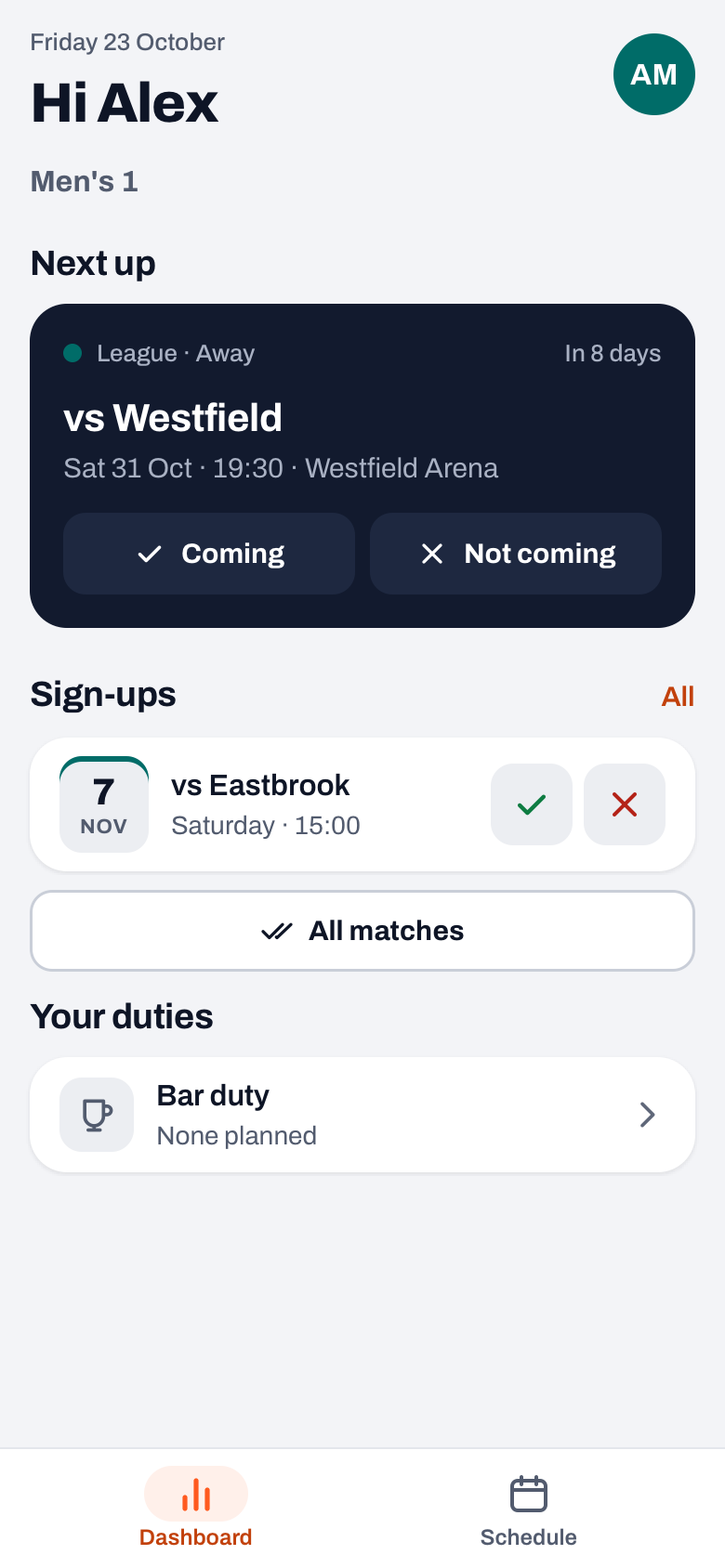
A regular parent account has two tabs: Dashboard and Schedule. A regular parent does not have the Team, Training and Match tabs. The dashboard holds everything you handle for your child:
- Next up: the next practice, match or tournament, with the Coming and Not coming buttons for your child.
- Sign-ups: the events after that, each with a tick and a cross, and the buttons to sign your child up for all practices or all matches at once.
- Your duties: your bar duty and your ride to an away match.
- The latest result: if there was a match yesterday or today, the result is under Next up. Only the result: a regular parent cannot tap through to the match.
If you have two or more children in the same team, you choose at the top which child you are looking at. How that works is in one parent account for several children.
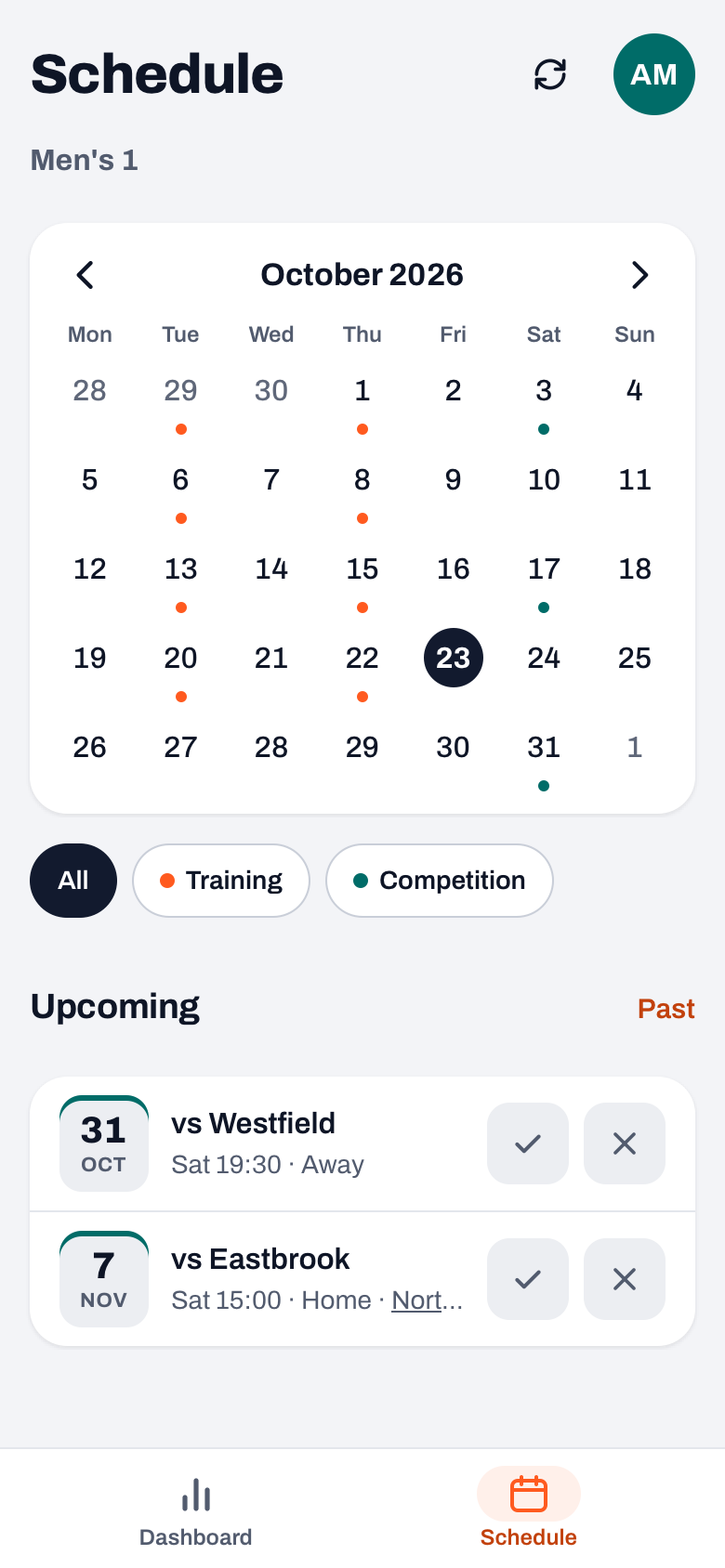
A regular parent does not see numbers per player anywhere: not on the dashboard, and not in the schedule either. If you tap a practice, a home match or a tournament in the schedule, you only see your child's sign-up history: who signed up or declined, and when. An away match opens the ride sheet with the drivers. A regular parent cannot open a match screen with stats.
Where are your child's stats, then?
There are two places.
1. In your child's player account. If your child has their own account, they see Your season and Your stats on their dashboard, and the Overview, Stats and History tabs in their profile. For every played match they see their own points, rallies and sets in the Match tab. Look at it together, on your child's phone. Note: the coach can set per team or per player that a player does not see their own errors. In that case you will not see them there together either. Why a coach does that is in should young players see their stats.
2. As a team parent. A team parent is a parent the coach has appointed to organise transport: they see who is coming to matches and tournaments and make the driving rota. For that they get the Match tab, which also holds the played matches. If you open one, you see:
- under Summary the Your child block (or Your children) with your own child's points and errors;
- a segment with your child's first name, with their points by type (attack, ace, block), errors, rallies and sets played;
- for a match scored live, also the rotations with plus-minus, and a line saying what share of the rallies the team won with your child on court;
- for a match scored in Expert mode, also the ratings from 0 to 5, with your child's strongest skill.
With the chips at the top you view that per set. A team parent always sees errors, even if the coach has hidden them from the players.
Are you a coach? 14 days free, no credit card. Add your team, invite the parents and see after a week whether people still send their apologies through the group chat.
Try Koach with your teamWhat does a parent not see?
- Other children's numbers. Even a team parent only sees their own child; the team stats and the other players' performances stay with the coach.
- The player profile with the season stats. Your child sees that, and so does the coach.
- The coach's notes and the effort ratings from practice.
That keeps the parent account a place to organise things, and keeps the conversation about performance between player and coach. If you want to know more about what you handle as a parent in the app, read Koach for parents.
How do you become a parent or team parent of your child in the app?
- Ask the coach for a parent link. The coach creates it in the Team tab via Invite parents, or on your child's page via Invite parent. Each link belongs to one parent, works once and is valid for 30 days. The second parent gets their own link. More on that is in adding parents to your team.
- Use the parent link, not the player link. The player link is for your child. If you are already linked as a parent and open the player link anyway, the app tells you that this is your own child's player link, and nothing changes.
- You become a team parent through the coach. The coach turns it on under Profile > My teams > the team > Parents > your name, with the Team parent switch. What else a team parent does is in team parent duties.
Are you a coach yourself and looking for an app that also works for parents? Have a look at choosing the best volleyball app for coaches. What Koach costs is on the pricing page.
Look together, and start with what went well. After the match, open your child's own numbers with them and first ask about the point they are proud of. The coach talks about the errors at practice.
Frequently asked questions
Can I see my child's stats in the app as a parent?
That depends on your role. A regular parent sees the dashboard and the schedule in Koach, without numbers per player. A team parent has the Match tab and sees their own child's numbers for every played match. If your child has their own player account, you can look at all their numbers together in that account.
Do I also see other children's stats as a parent?
No. Even a team parent only sees their own child's segment for a played match, next to the result, the starting lineup and the attendance. Other players' points and errors, the team stats and the player profiles stay with the coach. Players themselves also only see their own numbers.
Does a parent see the errors if the coach hides them from players?
Yes, as far as they see match stats. The Players see own errors switch only hides errors from the player. So a team parent always sees their child's errors for a played match. If you look together with your child in their player account, you will not see them there if the coach has hidden them from your child.
Is Koach free for parents?
Yes. A parent account is free, just like the player account; only the coach or the club pays. A coach can try Koach free for 14 days, with no credit card, and then chooses Coach (one team, two coaches) or Club (unlimited teams); the amounts are on the pricing page. As a parent you install the app or use the browser.

Bring your team and the parents into one app
14 days free, no credit card. Parents handle sign-ups themselves.
Get started with KoachOr read first what the volleyball coaching app does.