
Tournament live scoring: the next match is ready straight away
The short answer
Tournament live scoring goes smoothest when every match starts where the previous one started: the same six, the same captain and the same fill-ins. In Koach the tournament opens after you finish a match, with the Next button at the top, and the next match copies that lineup by itself.
Tournament live scoring means several matches in one day, sometimes with only a few minutes in between. If you fill in your lineup and fill-ins again every time, you miss the warm-up. Here is how to set up the day so every match is ready, and what Koach does for you since November 2026.
What do you need to sort out between two tournament matches?
On a regular match day you have a week to think about your lineup. At a tournament you have the time between the last point and the next toss, and that goes on a quick talk, a drink and warming up. What helps then, in any app and on paper too:
- Put all matches under one tournament beforehand, with their start times. How to create such a tournament and edit it afterwards is explained in planning a tournament and tracking every match.
- Start every match with the six from the previous one and only change what you deliberately want to change. A fixed starting point saves puzzling, and you see right away what is different.
- Record your fill-ins once for the whole day, not again for every match.
- Do one check between two matches: who is no longer available (injury, leaving early), is the libero set correctly, and who is captain.
How to organize the rest of the day, from sharing out playing time to what goes in your bag, is covered in the packing list and day plan for a volleyball tournament.
What Koach has ready after every tournament match
Since version 3.1, a tournament day in Koach runs as one sequence. Update the app through the App Store or Google Play if you don't see it like this yet.
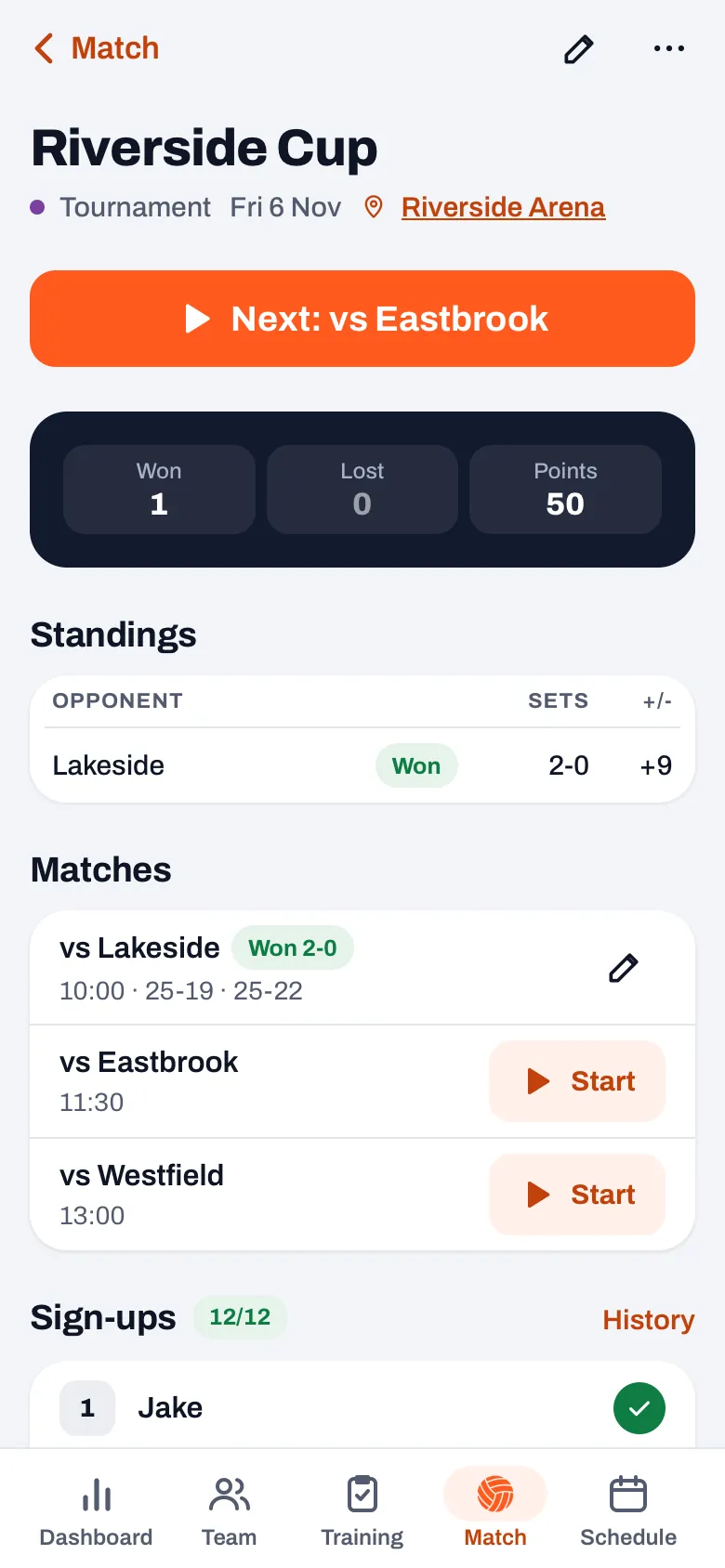
- Finish the match with End match. You go straight to the tournament, with the message Match finished, instead of to the overview of that one match.
- At the top is the orange Next button, with the opponent after it, for example Next: vs and the name. That is the next match not yet played, by start time. Matches without a time come last, and a cancelled match is skipped.
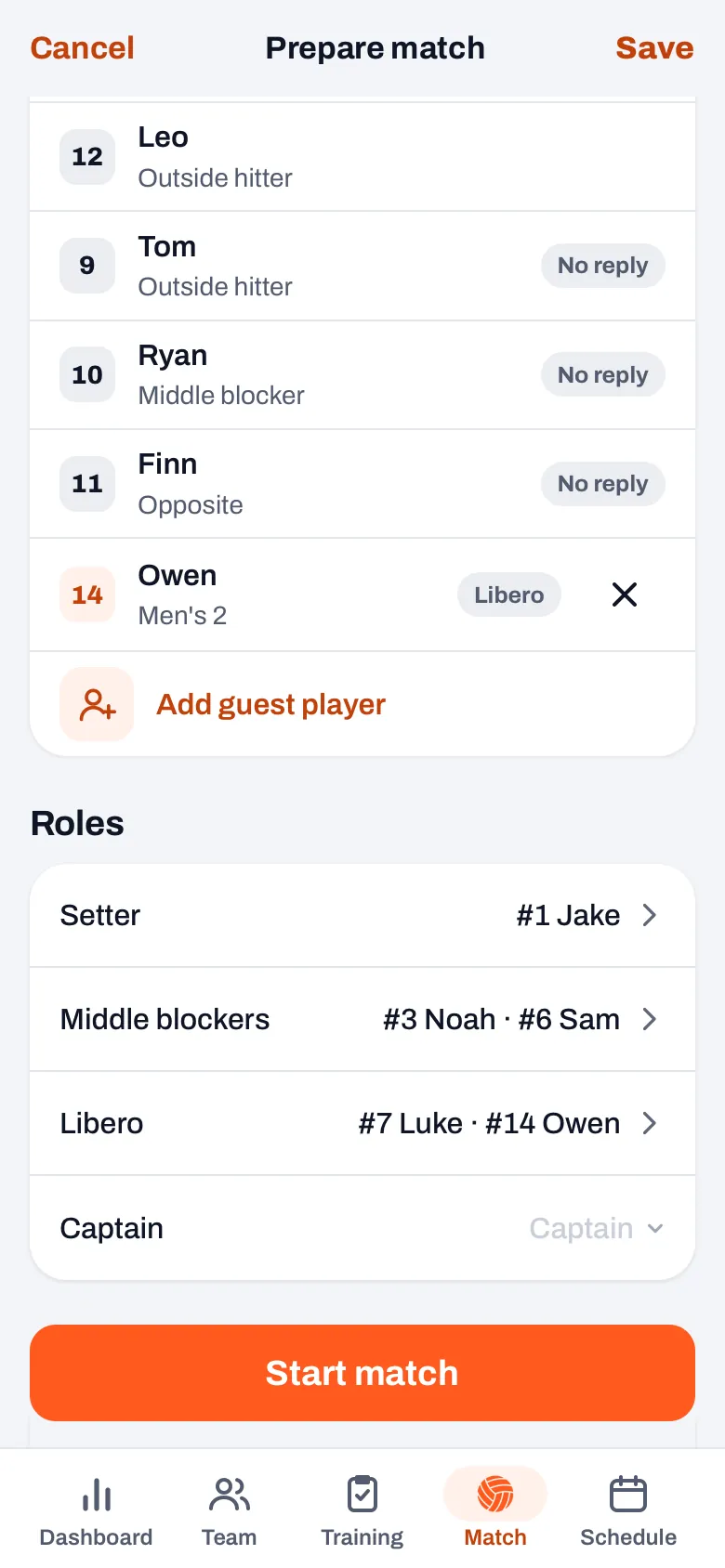
- Tap Next. The Prepare match start screen of that match opens, with the lineup already filled in. If you want to play a different match first, tap Start next to that match in the list; it works the same way. Cancel takes you back to the tournament.
- Check and tap Start match. You are on the live screen and score as always; how that works is explained in tracking a volleyball match live.
Only the coach sees the Next button, from the day of the tournament, or earlier as soon as a match of the tournament has been played. So on a tournament that is still weeks away, it isn't there. Once all matches have been played, you are simply left with the tournament, with the standings and the matches.
If a match is added on the day itself, such as a crossover or a final that wasn't fixed beforehand, add it with the pencil at the top right of the tournament and fill in the start time. Next then includes it in the order by itself.
14 days free, no credit card. Add your next tournament now, and on the day itself every match is ready.
Try Koach with your teamWhich lineup does the next match start with?
Koach picks the starting lineup in this order:
- A planned lineup always comes first. If you planned a lineup for this match in advance, it starts with that one.
- Otherwise the six from the last match played in this tournament, with the captain of that match. Note: it is the six who started set 1 of that match, not who was on court after substitutions or a new lineup in the set break. Say you started the first match with Emma in position 4 and had her start set 2 on the bench: the second match then starts with Emma in position 4 again.
- If nothing has been played yet, as with the first match of the day, it starts with your team's default lineup. If you want the six from your last match anyway, use the Previous match chip on the start screen; see copying the lineup from the previous match.
Only a match you tracked live counts as the previous match. If you entered a result by hand, the app doesn't know a lineup for it and looks at the live match before that. A player who is no longer in your team becomes an empty spot. The app doesn't copy the roles from the previous match: take a quick look under Roles to check that setter and libero are right. If a fill-in played libero in the previous match, assign them again.
Fill-ins and sign-ups come along
On a tournament day you often play with a fill-in from another team. Koach puts the guest players of the tournament, of this match and of the previous match together on the bench, and someone who is on two of those lists appears only once. So you don't have to add a fill-in again for every match. How to add a guest player is explained in a fill-in from another team.
The sign-ups for the tournament count too. If a player in your lineup has said they can't make the tournament, the start screen says they are not available, and you replace them with someone from the bench before you start. How the app warns you about a starter who has cancelled is explained in a starter who can't make it.
After the tournament you can read back the standings, the results per match and the points per player over the whole day in the tournament. You can try Koach free for 14 days; what it costs after that is on the pricing page.
Set the start time for every tournament match. Next picks the next match by time. Matches without a time come last, in the order of the list, and then the wrong opponent is at the top.
Frequently asked questions
Why don't I see the Next button?
The button is only there for the coach, from the day of the tournament, or earlier as soon as a match of the tournament has been played. It also disappears when there is no match left that still has to be played, for example because the rest has been cancelled. You can always start a match with the Start button next to that match.
Does the next match start with the lineup we finished with?
No. The app copies the six who started set 1 of the previous match of the tournament, with the captain of that match. Substitutions and a different lineup in the set break don't count. If you want to start with other players, change the lineup on the start screen before you tap Start match.
Do I have to score every tournament match live?
No. For a match you can also just fill in the set scores, with the pencil at the top right of the tournament; that match then counts as played and the Next button moves on to the match after it. The app just doesn't know a lineup for such a match. The next match then starts with the six from the last match you did track live, or with your team's default lineup.
Can I try it out first?
Yes. You can try Koach free for 14 days, with no credit card and with every feature. Create a tournament with two or three matches, score the first one as practice and see how the second one is ready. After the trial you choose a plan; the prices are on the pricing page.

Get your next tournament ready
14 days free, no credit card. On the day itself every match is ready.
Get started with KoachOr read first what the volleyball coaching app does.