
Starter can't make it? How to adjust your lineup in time
The short answer
If a starter can't make it, fill their spot so your rotation stays intact, ideally with a player for the same position in the same spot. Do it before you hand in the line-up sheet: after that every change costs a substitution. Koach warns you at Start live if a player who cancelled is in your six.
A starter can't make it, and you hear it the evening before the match or only in the locker room: every coach knows the feeling. The choice you make then decides how your first set goes. Here is how to fill the spot, what changes if your setter or libero is missing, and how Koach stops you from starting with the wrong six.
A starter can't make it: who takes their spot?
Start with the solution that changes the least. A substitute for the same position in exactly the same spot keeps the rotation intact: serve receive stays as you practiced it and one name changes. If you don't have one, look at which player has to move the least. An outside hitter who can also play opposite is often a better fill than three players who all shift one spot. The positions and systems themselves are in making a volleyball lineup.
Two questions help with the choice:
- Who passes now? If a passer drops out, someone else has to cover their part of the court. Put the replacement where they also pass in practice.
- Who serves first? The serving order follows the rotation. If a shaky server now starts, consider a different starting rotation, but then don't also change the players around them.
Your setter is missing
That is the hardest cancellation, because the setter touches almost every second ball. If you don't have a second setter, choose someone who can set calmly and high with their hands, and ask for nothing more than a high ball to the outside. If you have two players who both set reasonably well, you can also play a 4-2: the setter in the front row sets the second ball. How to set that up in the app is explained in two setters.
Your libero or a middle is missing
Without a libero you just play on: your middles then stay in the back row, or you put another player on the scoresheet as libero for this match. What changes then is explained in volleyball without a libero; if you want someone from another team to fill in as libero, see a fill-in as libero. If you are missing a middle, an outside hitter or opposite often moves to the middle. Keep in mind that the libero normally replaces the middles in the back row: whoever you play as a middle this time should be set up that way in your roles too.
When does your lineup have to be fixed?
Under the FIVB rules, the coach hands in the lineup for every set on a line-up sheet or via the electronic device (rule 7.3.2). Once the sheet is with the second referee or the scorer, the lineup can only change through a regular substitution (rule 7.3.4). So a cancellation you discover during the warm-up doesn't cost you a substitution as long as the sheet hasn't been handed in. After that it does.
Only players recorded on the scoresheet may play, and once the coach and the captain have signed the scoresheet, that list can't change anymore (rule 4.1.3). So a fill-in from another team has to be on it before you sign. How to add such a player in the app is explained in a fill-in from another team; whether it is allowed in your competition is up to your own federation, and that differs per country. If you are left with fewer than six players, it's a different story: see playing volleyball with five players.
What Koach does when a player who cancelled is in your six
The Prepare match start screen already showed it: if there is a player on court who is not available, a red message appears below the court with their name and Tap the spot and pick someone from the bench. But on match day there is a faster route. The Match tab shows the Today card with the Start live button, and that one skips the start screen. Anyone who tapped it in a hurry started with a player who had cancelled on court without noticing. (The Start live button inside the match itself does open the start screen first.)
Since version 3.1 (November 2026), Koach asks a question at that moment. If one player who cancelled is in the six, you read for example #6 Sam is not coming, with This player is in your starting lineup. below it. If there are more, you see how many starters are not coming, with their names. Don't see the question yet? Update the app through the App Store or Google Play.
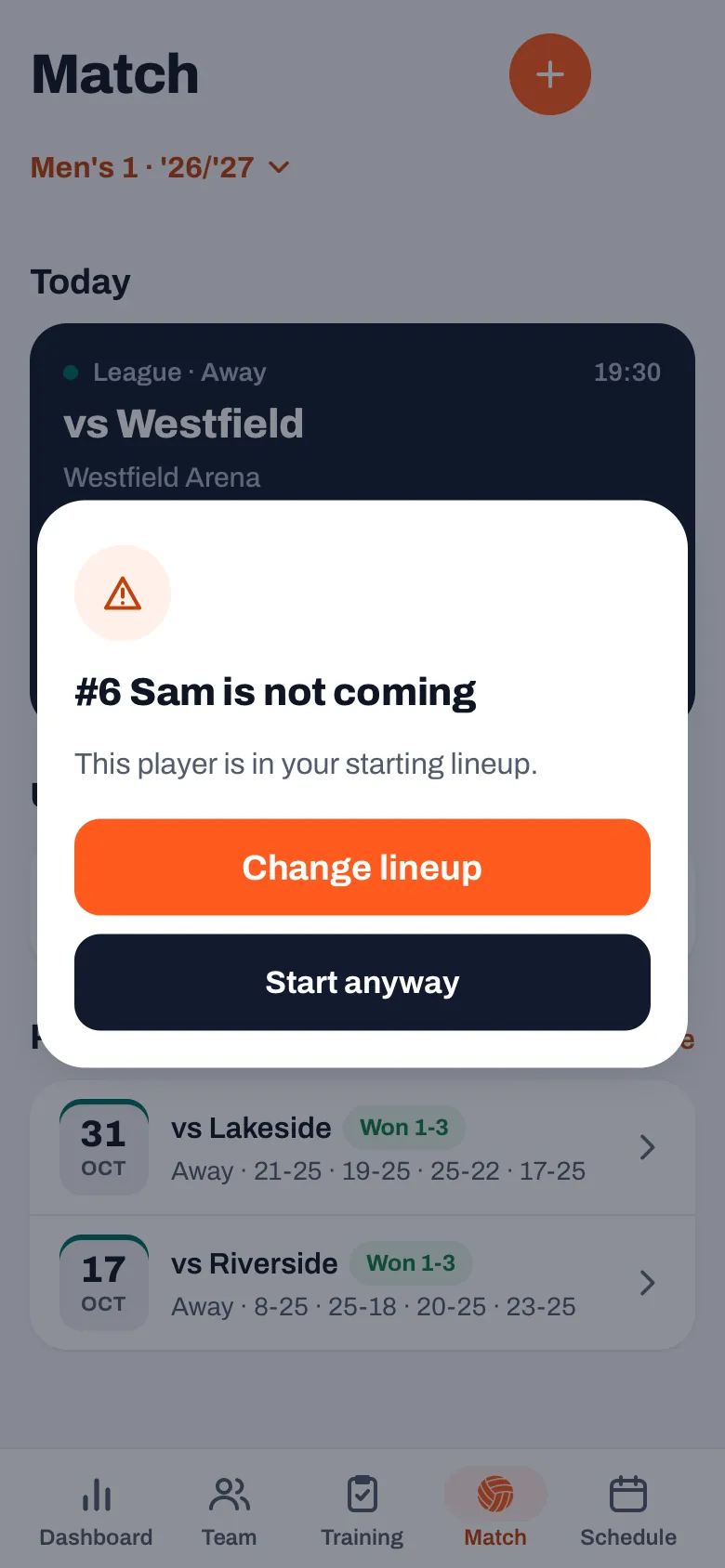
What counts as not available:
- Cancelled: the player has said they can't make this match, or a parent did that for them.
- Injured, Absent or Inactive as player status, and Coming to watch. The question then says they are not available, with the reason after it.
- No reply doesn't count. Anyone who hasn't said anything yet may simply turn up; the app doesn't ask about them.
- At a tournament the sign-up for the tournament counts, even if nothing is entered for the individual match. You always start a tournament match via the start screen, and the red message there looks at that sign-up.
If you planned the lineup in advance and your players have already seen it, change it there too with Edit next to Lineup. How that sharing works is explained in sharing the lineup with players. The question is part of every Koach plan; what it costs after the 14-day trial is on the pricing page.
14 days free, no credit card. Let your players sign up, and see on Saturday before the start who is missing.
Try Koach with your teamChange lineup or Start anyway?
- Change lineup opens the Prepare match start screen. Tap the spot of the player who cancelled and pick someone from the bench. The bench is in order: first who signed up, then who hasn't replied yet, and behind them, in grey with a label, who cancelled, is injured or is only coming to watch. Then tap Start match.
- Start anyway starts with the lineup as it is; the app then still asks who serves first. That is the button for when the player is there after all, for example because their appointment fell through and they forgot to update their sign-up.
- Tapping outside the question starts nothing. You stay in the Match tab.
If you tapped Start anyway by accident, you don't have to take the player out with an official substitution. On the live screen, tap ⋯ at the top right and choose Undo start in the Match sheet. The match goes back to planned. If you have already counted points, they are lost, and the app tells you so.
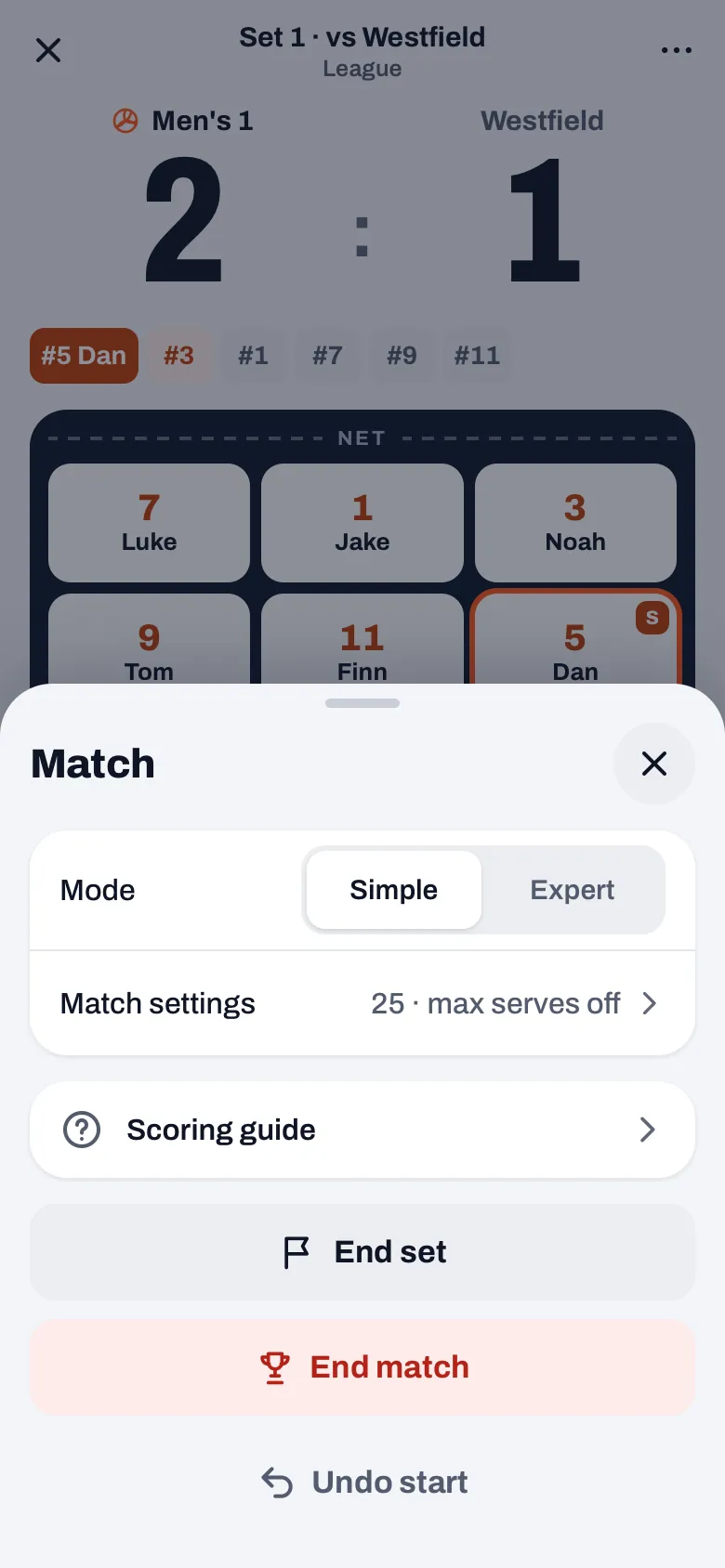
Check your libero too. The question at Start live is about the six on court. The libero is not among them: they only come in at the start for a middle, and you don't see them on the bench either. If your regular libero has cancelled, open the start screen and untick them under Roles, otherwise the app still puts them on court at the start.
Frequently asked questions
Does a player who didn't reply count as cancelled?
No. No reply is not a cancellation: anyone who hasn't said anything yet may simply be in the gym. So Koach only asks about players who cancelled, who are listed as injured, absent or inactive, or who are only coming to watch. On the start screen you do see a label below the court such as 2 no reply: that many players from your six haven't said anything yet, so check with them.
Do I also get a warning if my libero has cancelled?
No, the question at Start live only looks at the six on court, and the libero only comes in at the start. If your regular libero has cancelled, open the Prepare match start screen and look under Roles. Untick them there, and if needed tick another player who is libero for this match.
Can I still change the lineup after handing in the line-up sheet?
Under the FIVB rules, not without a regular substitution: once the line-up sheet is with the second referee or the scorer, the lineup can only change through a regular substitution (rule 7.3.4). So adjust your lineup before you hand in the sheet, even if the cancellation only reaches you in the gym.
Does the authorized scorer see this question too?
No. The question belongs to Start live, and only the coach has that button. An authorized scorer sees the Keep score button in that place. If you want to be sure the right six start, set up the lineup correctly yourself before the scorer starts counting.

Never start with a missing player again
14 days free, no credit card. Your first match day shows whether it works.
Get started with KoachOr read first what the volleyball coaching app does.