
Fill-in as libero or setter: how to give them their role
The short answer
A fill-in as libero must be listed among the liberos on the scoresheet and wear a shirt in a different color. Give them the role they can handle: libero if they pass well, setter if they know your system. In Koach you give a guest player their role under Roles, and the libero swap then knows them.
You need a fill-in as libero or setter when exactly those two are missing, and those are the positions where a team often has no regular backup. It can be done, but it takes more than a name on the scoresheet. Here is what the rules require, which role you give the fill-in and how to record that role in Koach.
Can a fill-in be libero or setter?
First the question of whether they may play at all. That isn't set by the rules of the game but by your federation or competition: how often a player from another team may fill in, and in which team, differs per country. Check it before you ask anyone; the questions to ask are in filling in for another team.
If they may play, the FIVB rules say little about a fill-in setter or middle: those are regular players. For the libero, three things apply:
- They are on the scoresheet, among the liberos. Only players recorded on the scoresheet may play (rule 4.1.3), and from those players a team designates up to two liberos (rule 19.1.1). Liberos go on the lines on the scoresheet reserved for them.
- They wear a different shirt. The libero's uniform has a different dominant color from the rest of the team and has a number, just like the other players' (rule 19.2).
- They play with a libero's restrictions. Back row only, no serving, no blocking and no attacking when the ball is entirely above the top of the net. The full list is in the libero rules.
If your only libero drops out during the match, for example through injury, the coach may designate another player who is not on court at that moment as the new libero, except the player the libero replaced. The libero who dropped out may not play again in that match (rules 19.4.2.1 and 19.4.2.2).
Which role do you give the fill-in?
The temptation is to have the fill-in plug exactly the gap. Look first at what they can do, and only then at the spot that is open. How the positions in a lineup fit together is explained in making a volleyball lineup.
- As libero: only if they pass and defend well. If they are mainly an attacker, it is often better to make one of your own good passers libero and put the fill-in in that player's position. You can also play without a libero; what that changes in a 5-1 is explained in volleyball without a libero.
- As setter: only if they set regularly and know a bit about how your hitters like the ball. Otherwise a 4-2 with two of your own players who set reasonably well often works better than an unfamiliar setter in a 5-1; see two setters.
- As middle: often a manageable role for a fill-in. A middle usually doesn't pass, and if you play with a libero, the libero takes their place in the back row, except when they serve themselves. Do agree on the quick attack: the timing with your setter is new to them, so start with a higher ball.
Take five minutes with them before the warm-up: which spot they start in, which serve receive formation you play, who takes the second ball when the setter plays the first, and which signals you use. If they become libero, tell them who they replace and that they only enter and leave the court through the Libero Replacement Zone (rule 19.3.2.7).
Keep a spare shirt in the libero color in the team bag. A fill-in who becomes libero beforehand then has a shirt that stands out from the rest straight away; put the number on that shirt on the scoresheet. If you designate a new libero during the match, they keep their own number and a bib in a different color will do (rule 19.2).
How to give a guest player their role in Koach
In Koach a fill-in who joins for one match is called a guest player. How to add them, via the club search or by name, is explained in a fill-in from another team. Since version 3.0.1 (October 2026), such a guest player can also be setter, middle or libero in the match.
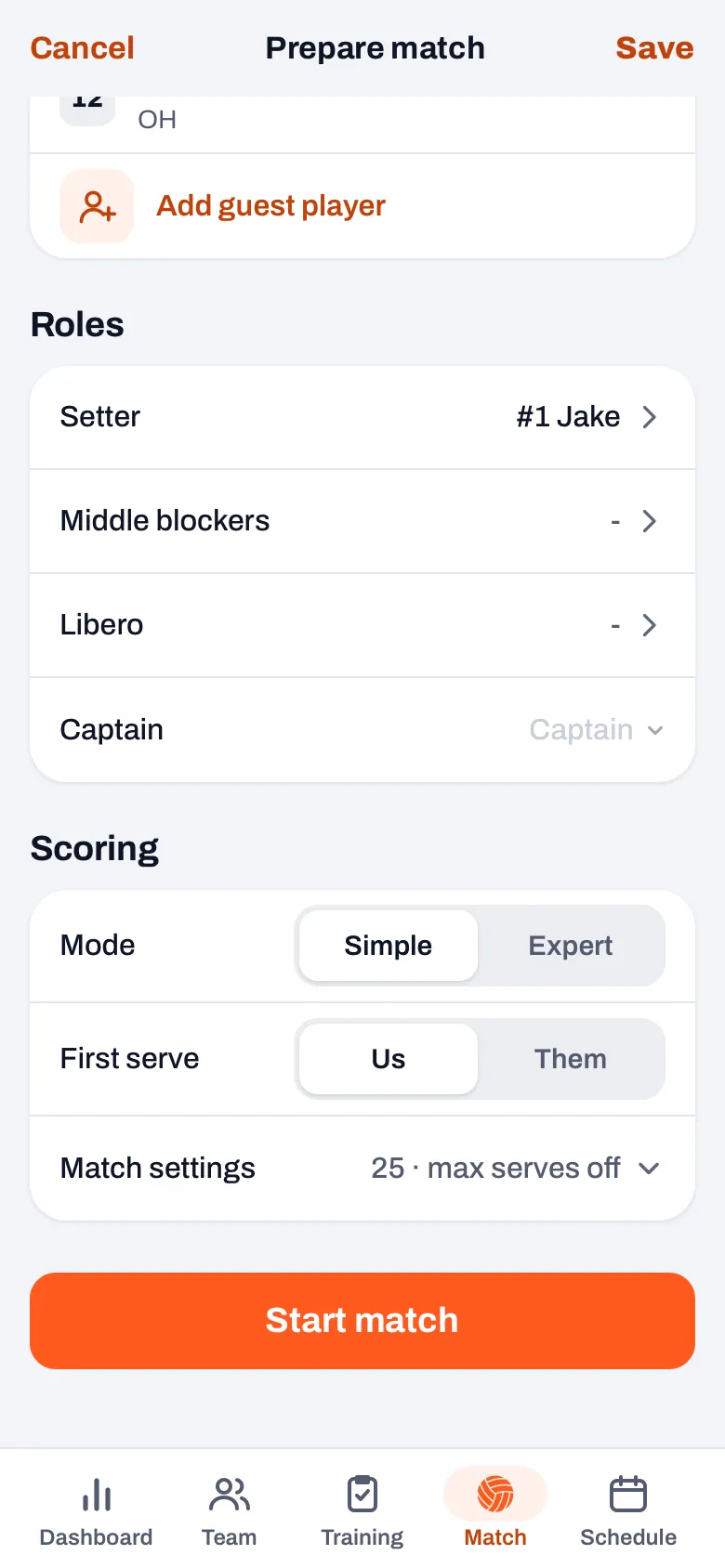
- Open the start screen. Tap Plan lineup on the match, or on match day Start live inside the match itself. The Start live button on the Today card skips this screen. Your guest player is listed under Bench; if they came via the club search, their own team is shown below their name.
- Setter or middle? Put them on court first. Tap a spot and pick them. Then tap Setter or Middle blockers under Roles. In the Roles in this match sheet you tick them; the lists for setter and middles only show who is in the six.
- Libero? Leave them on the bench. Tick them in the same sheet under Liberos. If your own libero is missing, untick them, otherwise they remain the libero of the match: for the libero, the app doesn't look at cancellations. At most two liberos can be ticked; with two, you see starts as libero next to one of them.
- Tap Done, and then Save or Start match. The bench now shows the Libero label next to their name, and under Roles they are listed with the right role.
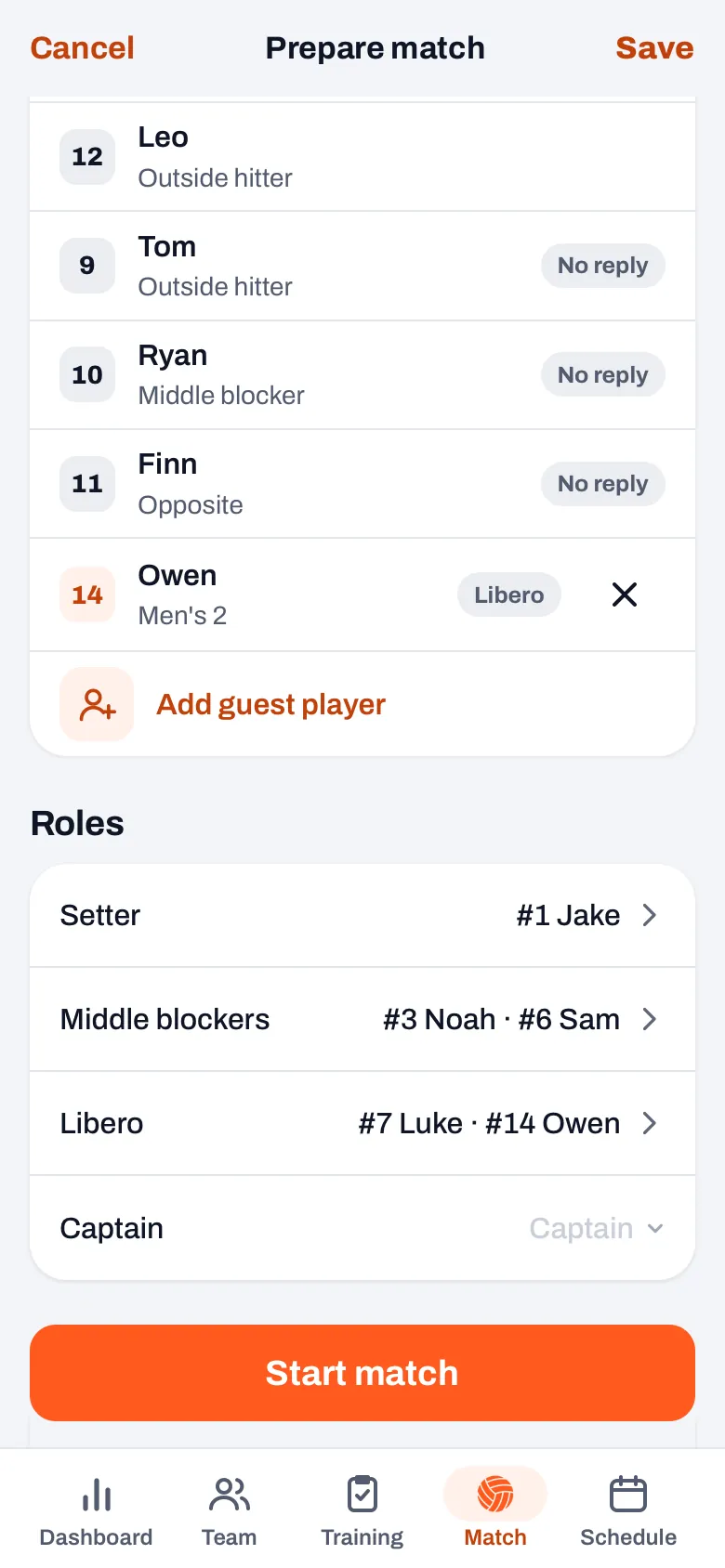
If you plan the lineup in advance with Plan lineup, Koach saves the guest player's role along with it. If you remove them later with the cross, their role goes too, so the app never subs in a libero who is no longer there. A guest player can't be captain: that choice only shows your own players in the six.
14 days free, no credit card. Put your fill-in in the lineup with their role on Saturday and let the app handle the libero swap.
Try Koach with your teamWhat does the libero swap do with a fill-in?
With Libero auto swap on, Koach treats a guest player libero just like your own libero. They come in at the start for the middle in the back row in position 5 or 6, and also in position 1 when the opponent serves. When that spot rotates to the front, or the middle has to serve, the libero goes off and the middle comes back. That also applies if the middle is a guest player you ticked under Middle blockers.
Since version 3.1 (November 2026), the automatic libero swap always leaves one completed rally between two libero replacements, as rule 19.3.2.1 requires. If one middle rotates to the front while the other comes into the back row, that other middle plays a rally first. If you have an older version, update the app through the App Store or Google Play. A libero replacement doesn't count as a substitution, so your substitution counter stays where it is. How it works with two liberos is explained in two liberos in the app.
If you let an authorized scorer keep score, it works the same way: the libero swap knows the guest players there too. In the set break you change the roles for the next set, in the Roles in set 2 sheet (or whichever set comes next). A guest player doesn't appear in the stats per player, because they don't belong to your team; what the plan costs is on the pricing page.
Frequently asked questions
Can a fill-in from another team be libero?
The FIVB rules don't forbid it: a team designates up to two liberos from the players on the scoresheet, and the libero wears a shirt with a different dominant color. Whether a player from another team may fill in for your match is decided by your federation or competition. That differs per country, so check the rules of your own competition before you ask them.
Can a guest player also be captain in Koach?
No. The Captain choice on the start screen only shows your own players who are in the six. A guest player can be setter, middle or libero. If you still want a fill-in as captain, note that on the scoresheet; in the app you then pick one of your own players or leave the choice empty.
Does a fill-in as libero count in the stats?
Their points count for the score and the course of the match, but they don't appear in the overview of points per player or in your season stats. That is intentional: a player who joins for one match would otherwise skew your season picture. They don't count in your team's attendance either.
What if I forget to untick my own libero who cancelled?
Then they remain the libero of the match, and the automatic libero swap puts them on court at the start. So check under Roles before you start: if a player who isn't there is listed under Libero, open the sheet and untick them. If you only notice during the set, switch off Libero auto swap on the live screen and bring the middle back on court; in the set break you adjust the roles for the next set.

Give your fill-in their role on Saturday
14 days free, no credit card. The app handles the libero swap.
Get started with KoachOr read first what the volleyball coaching app does.