
Share your volleyball lineup with players before the match
The short answer
The best time to share your volleyball lineup with players is after the last absences, usually the evening before the match, and bench players are best told by you in person. In Koach you plan it at the match with Plan lineup; after Save, your players see the six who start on the match screen, in their starting positions.
When you share your volleyball lineup with players before the match starts, you save yourself hassle in the changing room. Everyone knows where they stand, and whoever starts on the bench doesn't find out during warm-up. Here's how to set up the lineup in Koach, and what your players see.
Why share the lineup in advance?
A player who knows they start at left front is already thinking about their first pass in the car. A player who knows they start on the bench can prepare for the moment they come in. Whoever only hears it during warm-up has no time left for that, and the disappointment comes at the worst moment.
So share the starting lineup in advance, and tell bench players in person what their role is. When to fix the lineup and how to have the conversation with the bench is in preparing your lineup before match day. Below, it's about sharing in the app.
How to plan the lineup for a match
- Open the match. Go to the Match tab and tap the planned match. If there's no lineup yet and it isn't match day yet, the Plan lineup button is at the bottom.
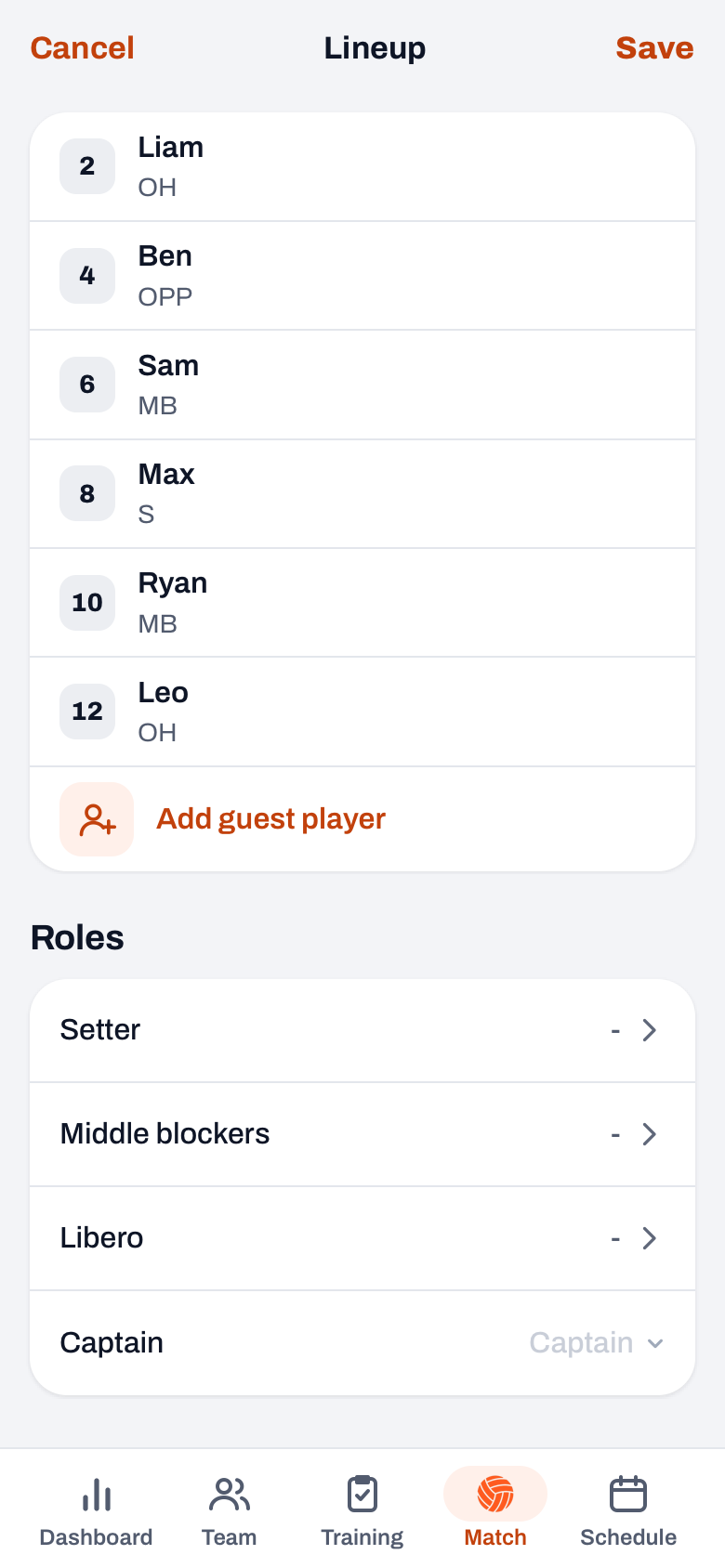
- Place your six. Every position on the court is a button. Tap it and, in the sheet that opens, choose someone from the bench, or swap with Swap places. You load a saved lineup with one tap from the buttons above the court; how to save one is in saving and reusing a lineup.
- Look at the bench. The bench is right below the court, sorted by sign-up: first who's coming, then who hasn't responded yet, and after that, with a label, who is Coming to watch, Not coming or Injured. If someone on court hasn't responded yet, a badge such as 2 no reply tells you.
- Assign the roles. Under Roles you choose Setter, Middle blockers, Libero and Captain. You don't put the libero on court: they come in by themselves for a back-row middle at the start.
- Tap Save. You see the notification Lineup saved and go back to the match.
What do your players see?
The planned match screen now shows the Lineup block, for you and for your players:
- the court with the net at the top: 4, 3 and 2 in the front row, 5, 6 and 1 in the back row, with jersey number and name;
- a ball on position 1, the serving position;
- a C for the captain and an S for the setter (with a 4-2 or 6-2, the setter of that rotation, see two setters);
- a clock for anyone who hasn't signed up yet.
Whoever isn't on court starts on the bench. There's no separate bench list, but under Sign-ups everyone sees who's coming. You don't see the libero on court either, because they only come in at the start: so tell your libero yourself that they're playing. Only the coach sees the Edit button.
The team parent, the parent who arranges transport for example, also sees the lineup. Regular parents don't have a Match tab and don't see it. No push notification goes out when you save the lineup, so mention it at practice or in the group chat. Planning a lineup already existed; since Koach 3.0 the planned lineup also shows up on your players' match screen.
14 days free, no credit card. Plan your lineup for Saturday and let your players see it on Friday.
Try Koach with your teamWhat if someone drops out?
If a player in your lineup says they can't come, they appear dimmed on the planning screen, and you see the message is in the lineup but is not available. Tap the spot and pick someone from the bench. At the match, tap Edit next to Lineup, put someone else in and save again. Your players then see the new lineup. How players sign up and drop out is in signing up for a match.
From a shared lineup to live
On match day, tap Start live at the match. The Prepare match start screen opens with the lineup and the roles you planned; you still pick the mode and who serves first, and tap Start match. If you start from the Today card in the Match tab, the app takes over the planned lineup directly and only asks who serves first. So what your players saw in advance is also what you start with. How to plan the subs for the rest of the match is in making a substitution chart.
Plan after the last round of absences. Set up the lineup once the sign-ups are in, usually the evening before. Then call or message the players who start on the bench and tell them when they'll come in. That way they don't see it on the screen first.
Frequently asked questions
Do players get a notification when I save the lineup?
No, no push notification goes out. Your players see the lineup as soon as they open the match in the Match tab: the six who start in their positions, with the captain, the serving position and the setter. So mention it at practice or in the group chat when the lineup is ready, and preferably tell bench players in person.
Can parents see the lineup?
Only the team parent, because they have the Match tab. Regular parents only have the dashboard and the schedule in Koach and don't see the lineup. If a child has their own player account, they do see the lineup there. If you want to keep parents informed, tell them yourself or let your player show it at home.
Can I still change the lineup after players have seen it?
Yes. At the match, tap Edit next to Lineup, change the positions or roles and save again; your players then see the new version. You can still change everything when you start live, too, and between sets you set up a new lineup in the set break.
Do my players have to pay to see the lineup?
No. The player account is free. As the coach, you can try Koach free for 14 days, with no credit card and every feature; after that, Coach costs €2.99 per month for one team with two coaches. All prices are on the pricing page.

Let your players see who starts on Friday
14 days free, no credit card. After one match you'll know whether it brings calm.
Get started with KoachOr read first what the volleyball coaching app does.