
Volleyball apps for iPhone: alerts, widget, live scoring
The short answer
Koach is a volleyball coaching app you download from the App Store on your iPhone. Alongside lineups, live scoring and attendance, it gives you push notifications, a Home Screen widget with your next practice and match, and a subscription through your Apple account. You can try it free for 14 days, no credit card needed.
If you're comparing volleyball apps for iPhone, you want to know what the app does on your phone that a website can't, and whether it holds up in a gym with poor signal. Here's what Koach gives you on iPhone, how it works on the sideline and who it's right for.
What to look for in volleyball apps for iPhone
As a coach, you use your iPhone where you'd never open a laptop: in the gym, on the bench during a match, in the parking lot before an away game. That calls for something different from a program on your desk. Check these five things:
- It knows volleyball. Rotations, the libero, the serve order and the number of substitutions per set. Check whether the app really understands those concepts or just shows a court with dots. The full checklist is in choosing the best volleyball app for coaches.
- It works with one thumb. On the sideline there's no time for menus: a point should be logged in a couple of taps.
- It speaks up. A rescheduled match or a player dropping out should reach your phone, not wait until you happen to open the app.
- It survives the gym. Poor signal and a screen that locks itself shouldn't cost you points.
- It fits your iPhone. Sign in with your Apple account, pay through the App Store and keep a widget on your Home Screen.
14 days free, no credit card. Create your account tonight, sign in on your iPhone and track your first match on Saturday.
Start your 14-day free trialWhat the app adds on your iPhone
The core of Koach also works in the browser: your lineup, live scoring, attendance, practices and stats. The App Store app adds two things the browser doesn't have, push notifications and a widget, and it lets you pay through your Apple account. Signing in with Apple and syncing your calendar work in the browser too; below you'll see how they work on your iPhone.
Push notifications
Notifications only come through in the app. When you move a match with Reschedule, your team is notified automatically, and Notify the team sends an alert when you schedule something new. Players and parents who haven't said yet whether they're coming get one reminder two days ahead, and the Day-before reminder goes out the evening before. As the coach, you hear about it when someone drops out, when someone can make it after all, or when the list is complete.
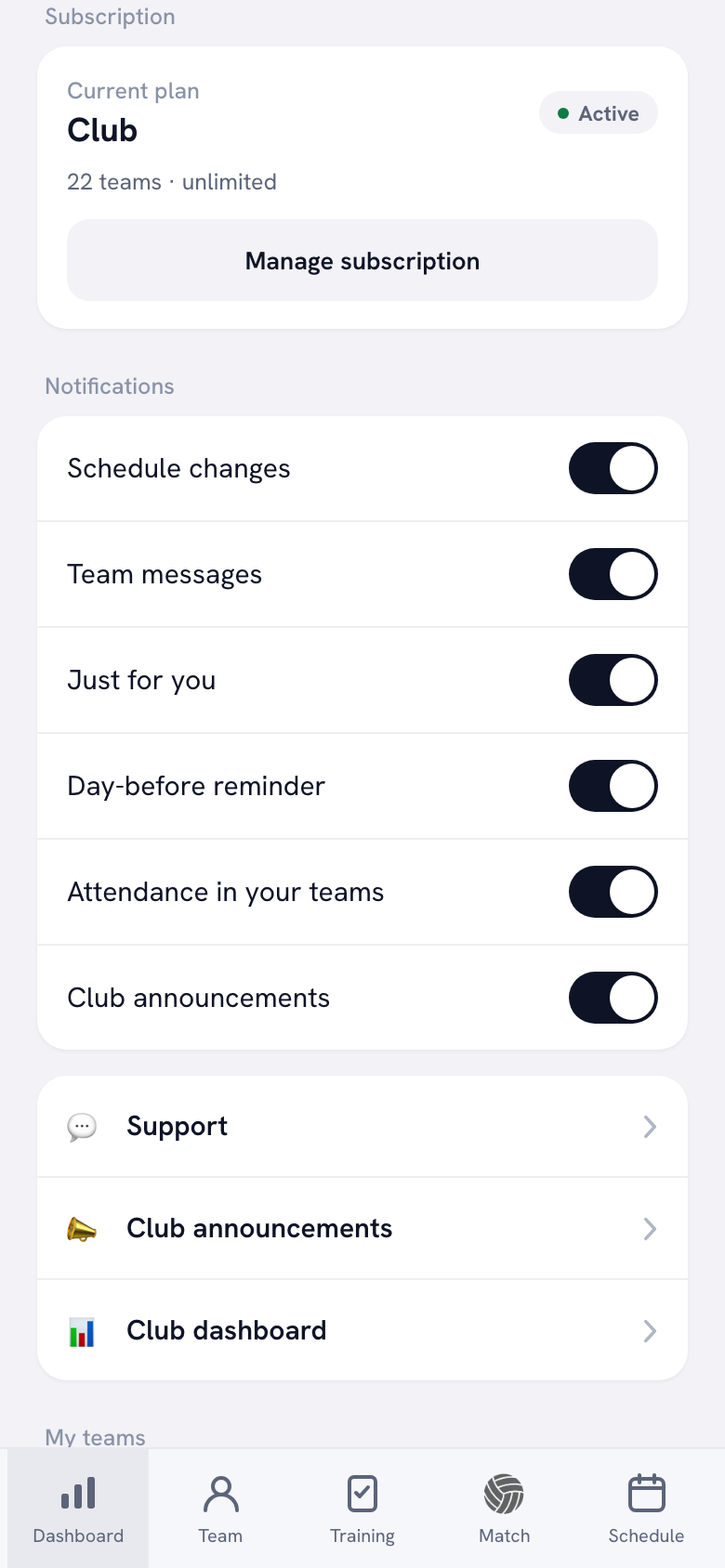
In your profile, under Notifications, you switch each type on or off: Schedule changes, Team messages, Just for you, Day-before reminder, Attendance in your teams and, in a club, Club announcements. If you dismissed the notification prompt the first time you opened the app, your profile shows the card Notifications are off on this device with the button Open settings. On your iPhone, you then turn them on under Settings › Koach › Notifications.
A widget and your calendar on iPhone
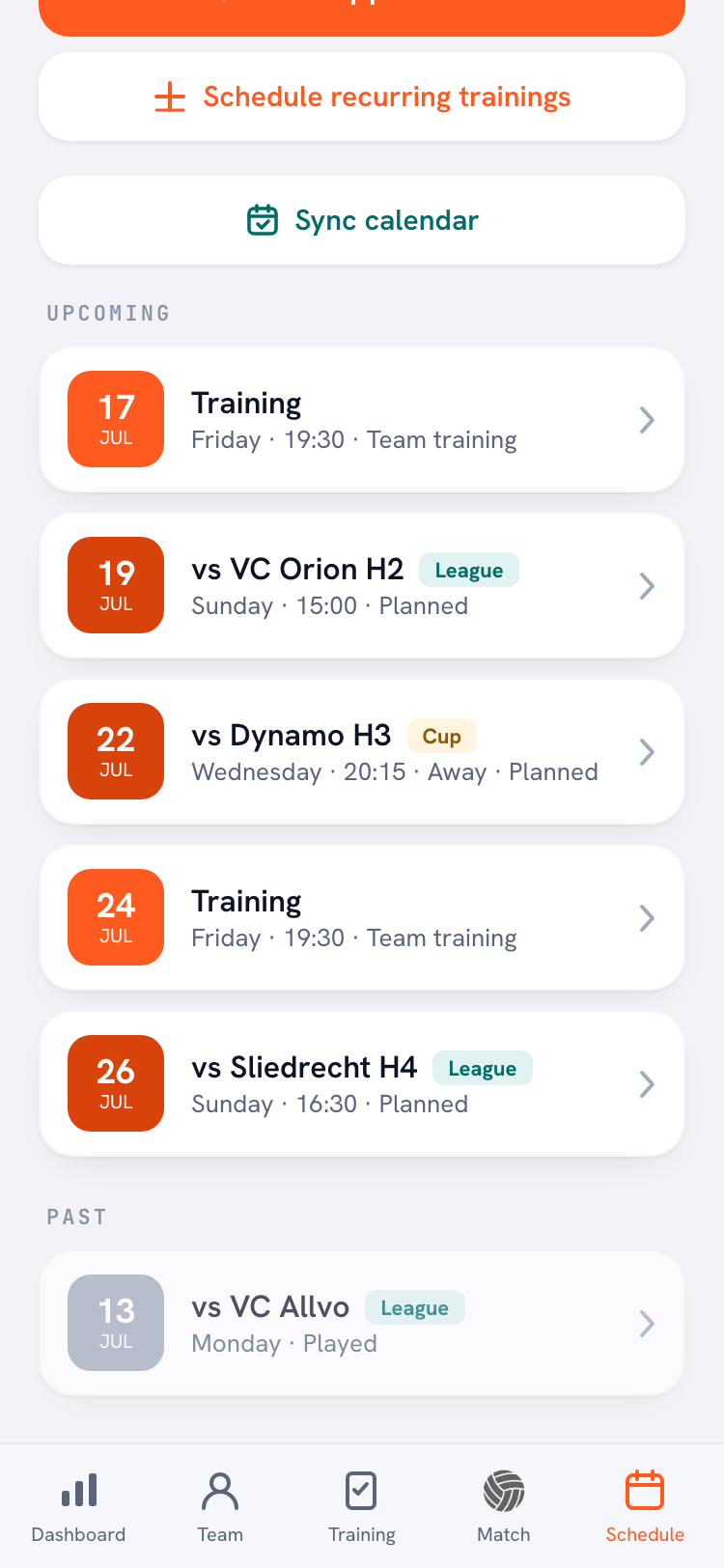
The Koach widget puts your next practice and match on your iPhone's Home Screen, for the team you have open in the app. A canceled event doesn't count, and tapping the widget opens the app. On iPhone you choose a small widget with one event or a medium one with both. How to add it, step by step, is in the volleyball widget on your Home Screen.
Want your practices and matches in your iPhone's Calendar app as well? Use Sync calendar. Your phone's calendar then subscribes to a feed with your practices, matches and events, and you can share that link with your team.
Continue with Apple
Koach works without a password: you get a sign-in code by email. On the sign-in screen you can also use Continue with Apple, in the app and in the browser, so you don't have to open an email at all. If you already have an account with the same email address, your Apple sign-in lands in that account and your team is right there. How the code, Google and Apple work side by side is explained in signing in without a password.
Your subscription through the App Store
If you subscribe in the app after the trial, you pay through your Apple account and see the price in your country's currency. Managing, canceling and upgrading then happen on your phone too. To move to Club, tap Upgrade to Club in the Koach app. Manage subscription takes you to your subscriptions at Apple, which is also where you cancel. If a purchase is missing after you sign in, get it back with Restore purchases. Exactly where to stop or switch plans is in canceling or changing your subscription through the App Store.
On the sideline: how the app works in the gym
On match day your iPhone is in your hand or on the bench next to you. Three things make the difference.
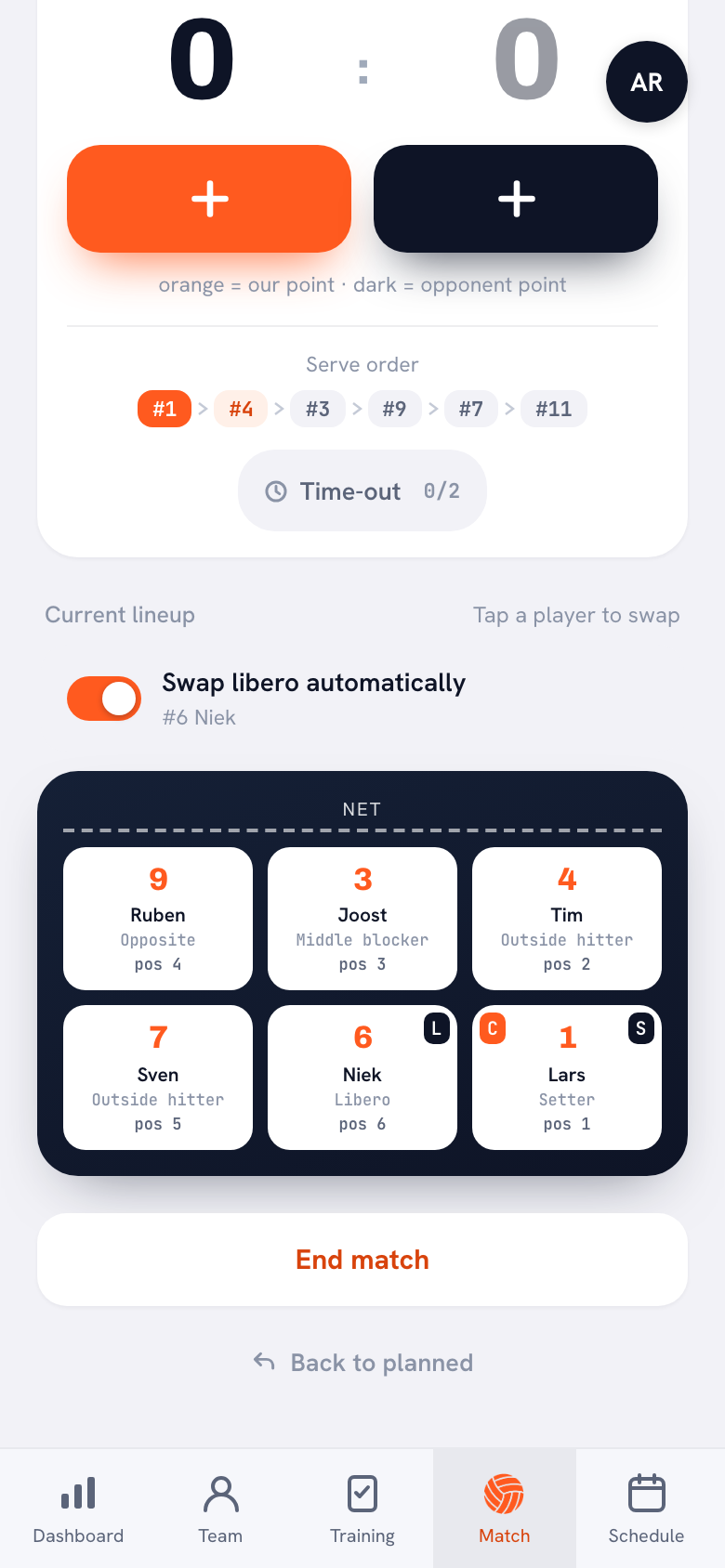
- The screen stays on. While you're scoring live, Koach asks your iPhone not to lock the screen, so you don't have to unlock it after every rally. An older version of iOS doesn't support that request; in that case, set Auto-Lock to a longer time in your iPhone's settings before the match.
- Poor signal won't cost you points. If the connection drops, Offline mode appears at the top and you just keep scoring. Everything you tap is saved on your iPhone and syncs automatically once you're back online; while that's happening, you'll see Syncing… with the number of changes still waiting. What to set up beforehand for a gym with bad signal is in live scoring without Wi-Fi in the gym.
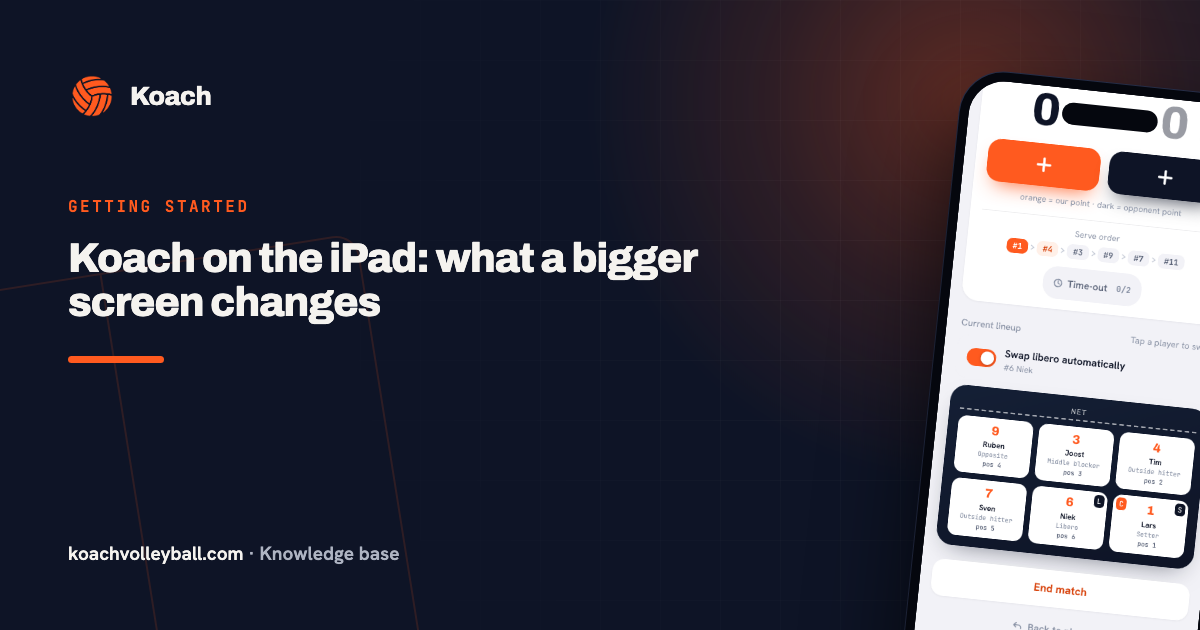
- One thumb is enough. Below the score are two big buttons, with orange = our point · dark = opponent point underneath. After orange you pick who scored and how; after dark, what went wrong. Below that you'll find the Serve order and the timeout counter, and the lineup tells you: Tap a player to swap.
If you're busy coaching, you don't have to keep score as well. With Authorize a player to keep score you pick a team member with a linked account, who then tracks the score and stats for that match on their own phone. A match is tracked on one device at a time: if someone opens it with the same account on a second device, the app warns them.
App or browser, iPhone or iPad?
The app is free in the App Store. You can also use Koach in Safari on your iPhone, at koachvolleyball.com/app. Everything you do yourself works there; the things that come to you on their own, notifications and the widget, you only get in the app.
| What you want | Koach app on iPhone | Koach in the browser |
|---|---|---|
| Push notifications for a rescheduled match or a player dropping out | Yes | No |
| Widget with your next practice and match | Yes | No |
| Sign in with Continue with Apple | Yes | Yes |
| Taking out a subscription | In the App Store, in your country's currency | On the website, in euros |
| Lineup, live scoring, attendance and stats | Yes | Yes |
| Same account and same data | Yes | Yes |
The App Store app is the same on iPhone and iPad: there's no separate iPad app and you never pay twice. You sign in with the same account and your team is there. That way you use your iPhone on the go and set the iPad down by the court. What a bigger screen changes for scoring and explaining is in Koach on iPad.
Your whole team doesn't need iPhones. Players and parents with an Android phone get the same app from Google Play, with the same notifications; see the volleyball app for Android. Anyone who'd rather not install an app uses the browser. Installing the app and setting it up for the first time is covered in Koach on iPhone: installing and setting up the app.
Other ways to coach your team from your iPhone
We make Koach, so read this as the maker's view. A volleyball app isn't the best choice for everyone:
- A team app for every sport works well if your club already uses one for all its teams: one calendar and one place where players say they can't make it. If that app doesn't know rotations and the libero, you'll track those somewhere else.
- A standalone scoreboard app is quick and simple if all you want is the score, say for a rec team. If you want to know who won the point, you need more.
- A whiteboard app is great for showing something during a timeout. It isn't built for attendance or stats.
- A group chat and a notebook cost nothing and everyone already has them. But a "can't make it" gets lost between messages, and at the end of the season you're counting by hand.
Where Koach is different: the lineup you set up on your iPhone is the same one you score and sub with live, and the attendance players report themselves sits in the same place as your match stats.
Who the iPhone app is for, and who it isn't
Koach fits if you coach a 6v6 indoor volleyball team and want your lineup, matches, practices and attendance in one place, with your iPhone as your remote on the sideline. It doesn't matter whether you coach youth or adults, or whether your players have iPhones or Android phones.
It's less of a fit if you coach beach volleyball or 4v4 youth volleyball: lineup, rotation and scoring all assume six players. If you're after video analysis, look elsewhere: Koach does not record video. If you want players and parents to follow the score live on their own phones, you'll be disappointed: the live screen is only for coaches and the scorer you authorize. There's no chat either; you reach your team with announcements, polls and tasks.
What does the Koach iPhone app cost?
Downloading the app is free, and you can try Koach free for 14 days with one team, no credit card. After that you choose Coach for €2.99 per month (one team, two coaches) or Club for €9.99 per month (unlimited teams and coaches). Billed yearly, that's €2.49 or €8.33 per month. Those are the euro prices on our website; in the App Store you pay whatever the store charges in your country, in your own currency. Players and parents use the app for free. All prices are on the pricing page.
Already have an account with your email address? When you use Continue with Apple, don't choose Hide My Email. If you do, Apple gives Koach a forwarding address, which the app doesn't recognize as your account: you'd start with an empty second account instead of landing in your own team.
Frequently asked questions
Is there a free volleyball app for iPhone?
Koach is free to download from the App Store, and you can try it free for 14 days with every feature, no credit card. After that, Coach costs €2.99 per month for one team and two coaches, or Club €9.99 per month for unlimited teams. If you subscribe in the App Store, you pay the store price in your own currency. Players and parents pay nothing.
Does Koach work on iPad?
Yes. It's the same app from the App Store, so there's nothing else to search for and nothing to buy twice. You sign in with the same account and see the same teams and data as on your iPhone. What a bigger screen changes for live scoring and explaining is in Koach on iPad.
Can I keep score live on my iPhone in a gym with bad signal?
Yes. If the connection drops while you're scoring live, the app shows Offline mode: your changes are saved on your iPhone and sync automatically as soon as you're back online. Ideally, open the match before you walk into the gym so the screen is ready. More precautions are in live scoring without Wi-Fi.
Do my players get notifications on their iPhones too?
Yes, if they have the app. Players and parents create their own free account through their coach's invite. In the app they get notifications for schedule changes, team messages and a reminder the day before, and anyone who hasn't said yet whether they're coming gets one nudge two days ahead. No notifications come through in the browser.
Can I use an App Store subscription in the browser?
Yes. Your subscription belongs to your Koach account, so you can keep working in the browser and on your iPad. Only the management stays with Apple: you upgrade to Club in the Koach app on your phone, and you cancel through Manage subscription, which takes you to your subscriptions at Apple. The website won't show you any buy buttons, so you can't accidentally pay twice.

Get Koach on your iPhone tonight
14 days free, no credit card. After your first match, you'll know if it works.
Get started with KoachOr read first what the volleyball coaching app does.