
Accidentally closed it? How to get back what you just typed
The short answer
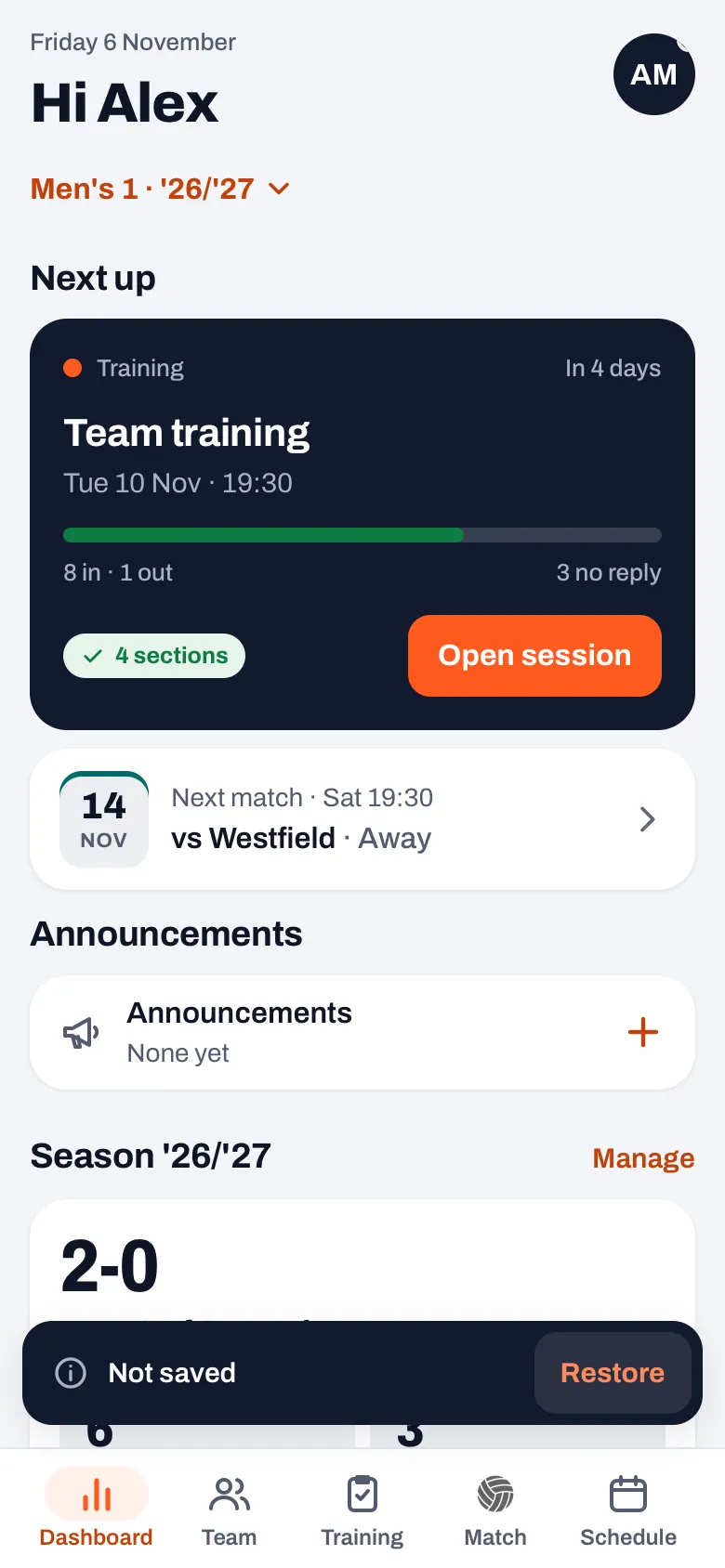
Accidentally closed something? Look at the bottom of your screen straight away: some apps briefly show a message or keep a draft. In Koach, since version 3.1, that is the Not saved message with a Restore button, for six seconds. One tap opens the sheet again with everything you had filled in.
Accidentally closed it while you were typing a long announcement or a new event? It happens to everyone: a tap next to the sheet, a swipe or the back button. Here is how to get it back in Koach, which sheets it works for and when it is no longer possible.
What happens when you close a sheet by accident?
A sheet is the window that slides up from the bottom, for example when you write an announcement or create an event. You close it with the X, with a tap next to the sheet, with a swipe down, or by going back: with your Android phone's back button or with a swipe from the left edge in the app on iPhone and iPad. That is quick, and that is why it often happens by accident: a tap just next to the keyboard, or a swipe that was meant to be a scroll.
Some apps then ask whether you want to stop without saving. After a few times you tap that question away without reading, and then it no longer helps. Since November 2026, from version 3.1, Koach does it the other way round: the sheet closes straight away, without a question, and what you had filled in can still be brought back for a moment.
How to get back what you just typed
- Look at the bottom of your screen. If you close a sheet in which you changed something, the Not saved message appears at the bottom with a Restore button.
- Tap Restore within six seconds. The sheet opens again with everything you had filled in: the text, the choices and the date.
- Finish and save. If you close the sheet again without saving, you get Not saved again, even if you haven't changed anything since. The sheet knows it was never saved.
Two sheets take you back to where they belong. A match note belongs to the Match tab: if you have moved to another tab in the meantime, Restore opens that tab again. An email to your club's members opens the club section again on the Email section.
Which sheets does Restore work for?
Restore works on the sheets where you type the most:
- Announcements: New announcement, with a message, a poll or a task, and Edit message. How to use announcements, polls and tasks is in team communication in your volleyball app.
- Schedule: New event and Edit event, and also Edit bar duty.
- Tournament: Plan tournament and Edit tournament.
- Match: Edit match, Enter result, Enter stats and Edit stats, and the Match note.
- Players: New player, Edit player and Add myself.
- Club: under Club announcements a New announcement and Edit announcement, and under Email a New email to your members. The club section is part of the Club plan; see Koach for clubs.
Sheets and screens not on this list don't get Not saved. If you close New section in your practice plan, for example, or Add drill while you had already tapped some drills, that input is gone straight away. The practice report and Prepare match have Cancel at the top left: there, Cancel deliberately means your changes are discarded, so tap Save first.
14 days free, no credit card. Write your first announcement to your team, and lose nothing if you tap next to the sheet by accident.
Try Koach with your teamWhen don't you get Not saved?
- You didn't change anything. A sheet you open and close unchanged closes quietly. Just tapping Add details to see more fields doesn't count as a change.
- You saved. After Save, Post or Send the message never appears: everything is already in place.
- The message is being sent. An announcement or club email that is being sent at that moment can't be closed halfway.
When does Restore no longer do anything?
- The six seconds are up, or another message appeared in the meantime. Then the input really is gone.
- You switched team or logged out. Then the message disappears and the button no longer does anything. That way a half-written message never ends up in the wrong team.
How do you lose things less often?
Restore catches most mistakes, but six seconds is short when someone on the sideline asks you something. Three habits help:
- Scroll back to the top calmly. A sheet that is scrolled right to the top closes with a swipe down. If you swipe down once more after scrolling back up, you close the sheet by accident. A swipe doesn't start in a text field you are typing in: as long as you stay in the text, you are safe.
- Save in between for longer items. You can save an event or a player and complete it later with Edit event or Edit player. An announcement is only posted when it is finished; so write a long text in one go, or draft it in your phone's notes first.
- Know what counts as a change. Koach compares what is in the sheet when you close it with what was there when you opened it. If you type something and delete it again, the sheet closes quietly, without a message.
With Edit message, Edit player or Edit match, the original always stays as it was. If you close such a sheet without saving, nothing changes in the message, the player or the match; Restore only puts your unsaved changes back in the sheet.
Restore is for sheets. A point you recorded wrongly in a live match is reversed with Undo in the message after the point or with the Undo button on the live screen: that is covered in fixing a wrong point. How going back and swiping work in Koach is in back to the previous screen.
Still wondering whether Koach suits your team? Read the checklist for a volleyball app for coaches. What Koach costs after the 14 free days is on the pricing page. Don't see Not saved yet? Update the app through the App Store or Google Play.
Did you mean to stop? If you see Not saved while you closed the sheet on purpose, do nothing. After six seconds the message disappears, and nothing has been saved or sent.
Frequently asked questions
How long can I tap Restore?
Six seconds. As long as the Not saved message is at the bottom, a tap on Restore brings the sheet back with everything you had filled in. If another message appears in the meantime, or you switch team or log out, the message is gone and the input can't be brought back.
Why doesn't Koach ask first whether I'm sure I want to close?
A question on every sheet gets tapped away without reading after a few times, and then it protects nothing. That is why a sheet in Koach closes straight away, and you then get the chance to bring it back. If you really want to stop, that costs no extra tap; if it was a mistake, it costs one.
Has my announcement already been sent when I see Not saved?
No. Not saved means nothing has been saved or sent. Your team only sees the announcement once you post it. If you bring the sheet back with Restore, your text is there again and you tap Post when it is finished.
Does Restore work for the practice report?
No. The practice report has Cancel at the top left and Save at the top right. Cancel resets the text to the last saved version, and that is deliberate there. So tap Save before you close the report, even if you want to add to it later.
Try Koach with your team
14 days free, no credit card. A tap next to the sheet no longer costs you anything.
Get started with KoachOr read first what the volleyball coaching app does.