
Entering a substitution during the match
The referee beckons, the substitute peels off his warm-up jacket — and in those same ten seconds you have to keep your records straight. Here is how to enter a substitution without breaking anything.
The substitution in two taps
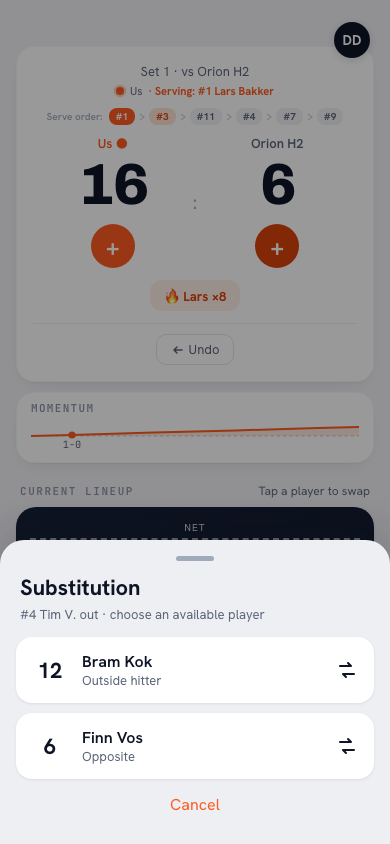
- In the live screen, tap the player going off on the court. A sheet Sub for that player opens, showing how many subs you have used this set. You can also tap Sub below the court and pick the player there.
- Under Bench, choose who comes in. Each player shows their position, so you pick the right one even in the heat of the moment; anyone who said they are not coming or has not replied yet carries a label.
That is all it is. A notice tells you who came in for whom, with Undo in case you tapped wrong. From now on the rotation turns with the substitute, and the app remembers the pair: if a later return sub does not match it, the app first asks Is this substitution allowed?
Why the statistics stay intact
The sting of substitutions is in the bookkeeping afterwards: points landing on the wrong name. Because after the sub the app only shows the six players actually on the court in the point tracking, you can no longer accidentally tap the substituted player. The substitute builds his own numbers from his first rally — important for the honest story afterwards.
The return substitution
When the original player comes back, you perform exactly the same action: tap the substitute, choose the original player. If you pick a player who does not belong to the pair, the app warns you with Is this substitution allowed?; only for an injury (exceptional substitution) do you then choose Substitute anyway. That way the formal substitution count (two per pair) also stays in line with what the scorer at the officials' table is keeping.
Enter the substitution before the rally resumes. You can always correct afterwards, but one forgotten sub means a few rallies with points on the wrong name — and nobody wants that conversation in the locker room.
Frequently asked questions
What if I forget to enter a substitution in the heat of the moment?
Enter it as soon as you notice; a handful of points may be on the wrong name. Real statistical damage only happens when it is structural — so make it a fixed ritual: first the scorer, then the app.
Can a parent or team manager track the substitutions?
Yes — whoever operates the live screen handles the subs too. The input is deliberately simple enough for anyone on the sideline; see also delegating live scoring.
Does the app also track the maximum of six substitutions?
Yes. The app counts the substitutions per set and does not accept a seventh substitution in the same set; you get a message instead. At the top of the substitution sheet you always see how many you have used, for example 4/6. Libero replacements do not count. The app only counts what you enter, so the count at the officials' table remains authoritative.



Try it yourself in Koach
Less admin, more coaching — starting at your next practice.
Get started with KoachOr read first what the volleyball coaching app does.