
Marking your own attendance for volleyball practice
Your coach never has to text "who's in on Thursday?" again. With a player account you handle practice sign-ups yourself, right in the app: one tap on the green ✓ or red ✗, and your coach knows exactly what to expect.
Why your sign-up is worth gold to your coach
Your coach prepares every session: which drills, which groups, which lineup in the closing scrimmage. That plan stands or falls with the number of players — anyone running a volleyball practice builds a different programme for ten players than for six, and wants to know the count in the afternoon rather than at 7:55pm in the gym. By marking yourself in or out on time, you give your coach exactly that: certainty. And when the whole team does it, nobody has to chase loose text messages anymore — which is precisely what teams with high turnout run on.
How does signing out of practice work in the app?
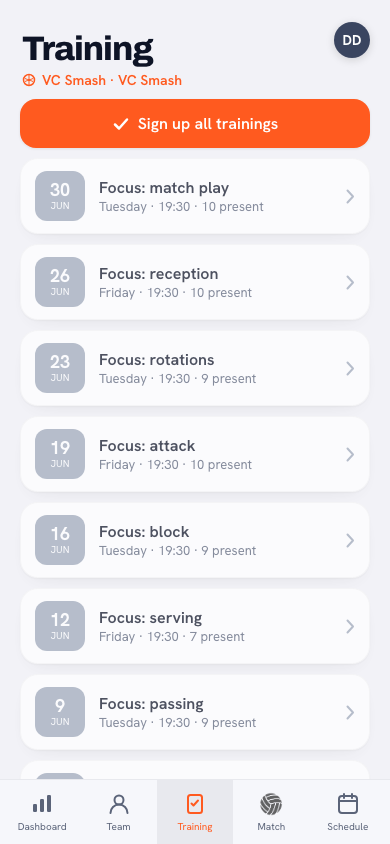
With your player account, open the Training tab and you see all upcoming practices listed one below the other. The list itself has no buttons: you tap a practice, and at the top of the practice screen sit two buttons — a green ✓ (I'll be there) and a red ✗ (I can't make it). One tap and it's set; your coach sees it right away. You can only sign in or out for upcoming practices, and signing out is possible up to the day of practice itself. Plans changed? Just tap again.
Underneath those two buttons your answer is spelled out in words: No reply yet as long as you haven't chosen anything, and after that You are signed up or You are marked absent. You don't have to open the practice, by the way: in the calendar the same two buttons sit with every upcoming practice, and on your dashboard with the next one coming up. There you read your answer off whichever button is coloured in.
If a practice is cancelled, your sign-ups and sign-outs simply stay put; the practice only stops counting towards the attendance figures — see cancelling a match or practice. In the calendar and on your dashboard the quick buttons disappear for a cancelled practice.
Matches work the same way, with one extra button: I'm coming to watch, for when you are there but not playing.
What does the 'Sign up for all practices' button do?
Already know you'll be there for the rest of the season? Then there's no need to tap every week. The Sign up for all practices button marks you as attending every upcoming practice in one go. If an evening falls through later, you switch just that one practice to the red ✗. Your default becomes "I'm coming" — you only report the exception.
Tip: sign out the moment you know, not on the day itself. Signing out on Monday for Thursday's practice is gold for your coach: the programme adapts in advance instead of the plan changing in the gym.
Who marks 'late', and where do you see your percentage?
You only choose between present and absent yourself; late is recorded by the coach alone, in the gym. Everything that gets ticked off counts automatically: your attendance percentage for the season updates instantly on your own player profile and on your dashboard under Your attendance. No paper lists, no arguments afterwards — the counter keeps itself up to date.
What's in it for you?
Let's be honest: you mostly do this for your team. But you get something back too. Players who show up consistently earn badges like Iron Will (high attendance, bronze from 80%) and On a Roll (five or more consecutive practices). And because your attendance is on record, it automatically counts in the conversation about fair playing time — whoever is always there never has to argue about it again.
Frequently asked questions
Until when can I sign out of a volleyball practice?
You can sign out up to the day of practice itself: open the practice in the Training tab and tap the red ✗. The earlier you do it, the better your coach can tailor the programme to the right number of players.
Can I sign up for all practices at once?
Yes — the 'Sign up for all practices' button marks you as attending every upcoming practice in one go. If you can't make one after all, you simply switch that single practice to absent.
Can I mark myself as late in the app?
No, as a player you only choose between present and absent; 'late' is recorded by the coach alone. Late does count as present in your attendance percentage, by the way.


No player login for your team yet?
Point your coach to Koach — player accounts cost nothing extra and signing up takes one tap.
Get started with Koach