
A camp, a meeting or a parents evening in the calendar
You have put it in the group chat three times already: 14 November, parents evening, half past seven, in the clubhouse. And still, on 13 November, somebody asks whether that was the Thursday or the Tuesday. A team calendar that only knows trainings and matches leaves out exactly the events that cause the most confusion — the evenings that come round once a season and that nobody remembers out of habit.
Not everything in a season is a training or a match
Count up what comes along in a season besides the regular work. A parents evening at the start. A coaches meeting you have to attend yourself. A team weekend or a camp in the spring. The club's new-year reception. A meeting about the hall schedule. A team outing after the last match. Together that is easily six to ten moments, and they are exactly the moments people have to ask about, because they do not come round every week.
Those evenings usually end up in the group chat, and that is where they disappear. You do not scroll back to a message from six weeks ago; you simply ask again. Meanwhile the calendar — which everyone does open every week, because the training is in it — stayed empty on that date. And so the place people look does not have the information, while the place that has the information is no longer opened by anyone.
In Koach you therefore put an evening like that straight into the team calendar, next to the trainings and the matches. How the calendar works as a whole — what is in it, how you move through the months and who sees what — is covered in the team calendar in Koach. This article is about the one type that has no fixed shape there: the one-off event.
Other: the third choice in the form
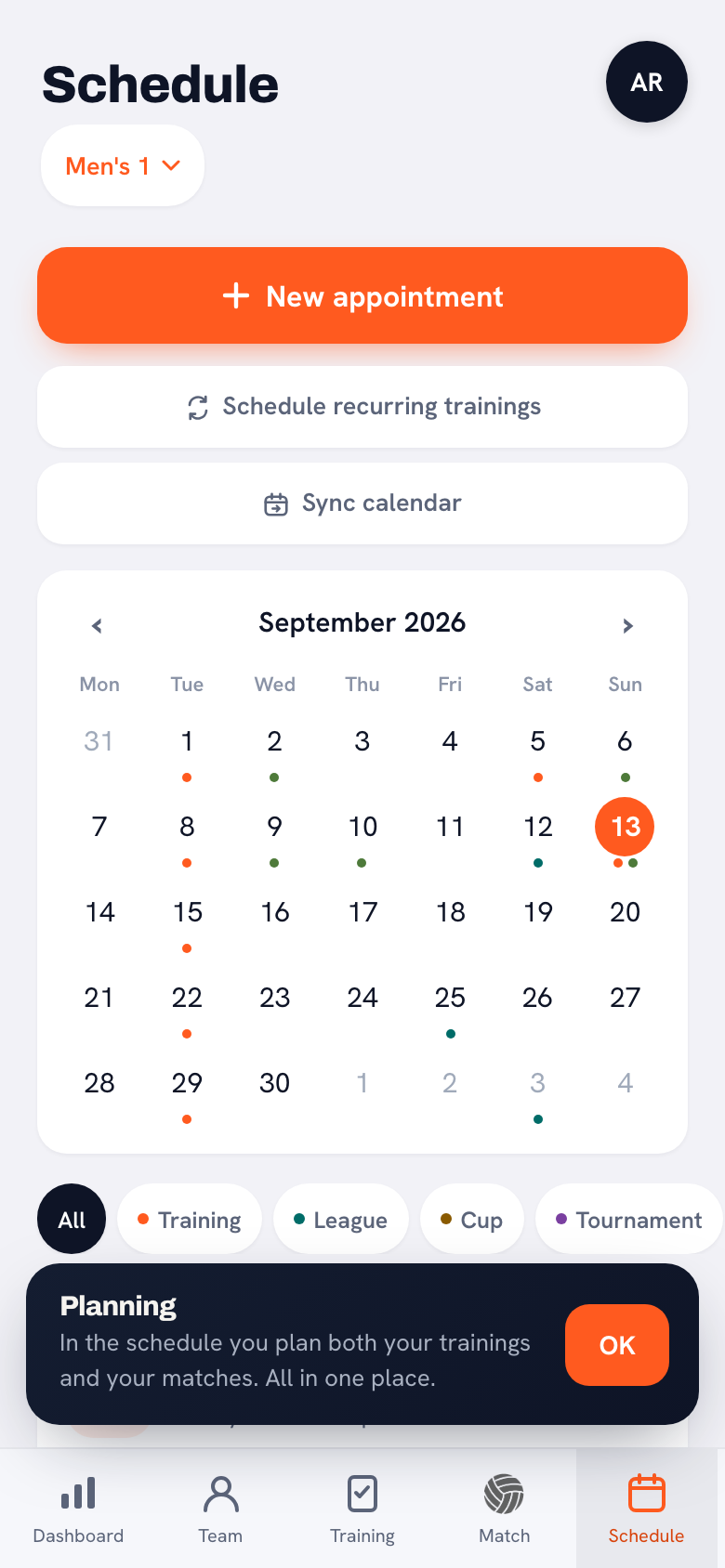
At the top of the calendar sits the button New appointment. Tap it and the first question is which type it will be, and there are three answers: Training, Match or Other.
The first two lead to their own form, with the fields that belong there — an opponent for a match, a programme for a training. Choose Other and you get the form for a one-off event, and that one is deliberately a good deal shorter. There is no programme attached, no opponent and no result; it is a moment with a date, a name and, if you want one, a place.
That also makes it the type you are through in no time. Putting a parents evening in the calendar takes three fields and is done in twenty seconds, and that matters more than it sounds: something that takes a minute, you do at the start of the season for all ten moments at once. Something that takes five minutes, you do for the first two and then never again.
Six kinds, and deliberately not six colours
A one-off event is given a kind. There are six of them: Other, Camp, Meeting, Coaches meeting, Parents evening and Club event.
That list is kept short because a longer one helps nobody. Six choices you take in at a glance; twenty choices turn into a search, and after a while everybody simply picks the top one again. The six that are there cover between them what actually comes along in a volleyball season, and whatever does not fit falls under Other.
Other is a real choice here, not an empty slot. A team outing, a sponsors evening, a photo session for the team picture — those are all simply Other, and the label is shown just as it is for the other five. It is also the setting of every event you created before the end of September 2026: existing items in your calendar have not quietly changed kind and all sit as Other until you change them yourself.
What the kind gets you in the calendar is a grey-blue label with the name in it. No colour of its own per kind — a camp is not green and a meeting is not purple. That is a deliberate limit. The calendar already uses colour to keep the big things apart, and if six more shades are added for events that happen a few times a season, the whole thing becomes a colour chart in which you can no longer find Saturday's match. Which colours the calendar does use, and what for, is in editing a match or an event in the calendar.
In the calendar row itself the kind sits under the title, and behind it who the event is meant for. That is enough to see in one line what is on that evening and whether it concerns you.
What you fill in: two fields are required, the rest may stay empty
The form asks seven things, two of which are required.
- Date — required. Without a date nothing is saved; an event without a day has nowhere to stand in a calendar.
- Time — optional, and removable again with a clear button. An event is allowed to sit in the calendar without a time.
- Title — required. Leave it empty and the app says Enter a title first and the form stays open.
- Kind — optional. Leave it blank and it is Other.
- Location — optional. In the calendar row it becomes a map link, so somebody who does not know the hall can tap straight through to it.
- Description — optional, a three-line text box asking which information or instructions belong with it.
- For whom — set to Whole team by default.
That the time is optional and can be cleared again is the field that makes the most difference in practice. A camp that runs across a whole weekend has no starting time that is true. A parents evening whose room is not yet booked has a date but no hour yet. In both cases you still want it in the calendar, because then everybody can start working around it. Saturday 7 March, time to follow is a usable message; an invented nine o'clock start is not — somebody is going to believe that one.
The three-line description is there for what people would otherwise get in a separate message. What to bring to the camp, where to park, whether the clubhouse is open. Three lines is enough for those practical things and too little for a letter, and that is exactly right: nobody reads a letter on their phone on the way to the hall.
Who it is for, and who can change it
The For whom field is set to Whole team by default, and for by far the most events that is the right setting too. But you can pick a team member there, and then something fundamental changes: only that person sees the event, plus the coaches. The rest of the team does not see it at all — not as a greyed-out line, not as something they cannot tap. For them it simply is not there.
That is more useful than it looks at first sight. A player who has to referee once, a parent on duty, one person expected at a screening on Wednesday: that does not need to be in the calendars of the other thirteen. Put it there for everybody and within a month the team learns that the calendar is full of things that do not concern them, and then they stop looking at it.
The flip side is that you have to remember such an event exists yourself. Because it is invisible to the rest, nobody else can remind you of it. As a coach you do see it — you see everything in the team calendar, including the personal events — but a fellow coach scrolling quickly through the calendar can easily miss it if the name is not there. So put the person's name in the title as well if it is something that matters.
Creating, editing and deleting are done by the coaches of the team. Players and parents do see the event sitting in their calendar, but cannot open it: tapping does nothing. That saves you the question of whether somebody could have changed something by accident — they could not.
Deleting asks for a confirmation first, and the message that appears afterwards has a button to undo it. That is there for the tap you did not really mean to make: as long as that message is on screen, nothing is gone for good. Editing works the same as for the other calendar types and is described step by step in editing a match or an event in the calendar.
There is no sign-up attached, and that is on purpose
A one-off event is informative. There are no sign-up buttons on it, nobody can put themselves down for it or cancel, and it counts for nothing in the team's attendance. Whoever knows, knows; whoever comes, comes.
That is different from a bar duty, where the sign-up is the whole point, and different from a training or a match, where you do want to know who is there. The difference is not arbitrary: at a parents evening or a club event, a sign-up list in the app is usually the wrong tool. Half the parents do not respond, you then do not know whether that means no or not read yet, and you end up phoning anyway. An event that honestly says it only informs produces less false certainty than a list that is half filled in.
If you do want to know who is coming, the way there is a conversation and not a button. For a parents evening that works differently than for a team evening; what you discuss on an evening like that and how you make sure parents actually turn up is in parents on the sideline. If it is about agreements within the team itself, making team agreements is where that is worked out. In both cases the calendar event is only the date on which it happens.
A one-off event is not a sign-up. There are no sign-up buttons on it and it counts for nothing in your team's attendance. If you want to know who is coming, you arrange that outside the calendar — for example as described in parents on the sideline.
In your own calendar app the kind comes before the title
Many coaches link the team calendar to the calendar on their phone, so that the trainings sit next to their work appointments. How to make that link is described in linking the team calendar to your phone. For one-off events there are three things that work differently there than in the app itself.
The first: only the team-wide events travel. An event you have assigned to one person does not end up in the linked calendar. That is the logical side of the same choice — an event like that is invisible to the rest of the team, and a calendar file has no people to match that against.
The second: the kind is put into the title, in front of it, with a colon in between. So Ardennes Weekend becomes Kamp: Ardennes Weekend there. That is needed because the app's grey-blue label does not exist in a calendar file; your calendar app only shows a title, and without that addition you would no longer see in a row of appointments what sort of moment it is.
The third is worth knowing before you go looking for it: in that linked calendar the kind is always in Dutch, even if you use the app itself in another language. That really is Kamp and not Camp. A calendar file has no language setting — it does not know who opens it — so one language had to be chosen. For a Dutch coach it does not stand out; if you work with a German or a Polish coach in the same team, it is handy to have said it out loud.
The location and the description do travel, into the fields where they belong in your calendar app. So a camp with an address attached also gives you an address in your own calendar that you can tap. That makes filling in those two optional fields worth the trouble more often than you think while you are creating the event.
Frequently asked questions
Can players sign up for a one-off event?
No. A one-off event is informative: there are no sign-up buttons on it and it counts for nothing in the team's attendance. That is different from a bar duty, where the sign-up is exactly the point. If you want to know who is coming to a parents evening or a camp, you arrange that outside the calendar. The event only makes sure everybody has the date.
Why does every kind have the same grey-blue label?
Because six extra colours would make the calendar unreadable. Colour is already used to keep the big things apart, and if shades are added for events that happen a few times a season, you can no longer find Saturday's match. The kind is therefore shown as text in the label, and once more under the title.
Can I put an event in the calendar without a time?
Yes. The date is required, the time is not, and a time you have filled in can be removed again with the clear button. That is meant precisely for a camp that runs across a weekend, or an evening whose room is not yet booked. Better an event without a time than an invented start that people will believe.
What happens to a personal event in my linked calendar?
It does not go in. Only the events for the whole team travel to your own calendar app; an event you have assigned to one team member stays in Koach. In the linked calendar the kind is put in front of the title, in the form Kamp: Ardennes Weekend, and always in Dutch — a calendar file has no language setting.
Try it yourself in Koach
Less admin, more coaching.
Get started with KoachOr read first what the volleyball coaching app does.