
Volleyball rotation wheel: free printable and an app that rotates
The short answer
A volleyball rotation wheel is a court with a turning disc on top: at every side-out you turn the disc one slot clockwise, and whoever lands in position I serves. You can download a free printable one below as a PDF. In the Koach app the lineup rotates by itself during live scoring, and the libero swaps automatically.
A volleyball rotation wheel is a piece of card on the sideline that tells you at a glance who is serving and who is in the front row. Here you can download one to print, learn how to turn it at every side-out, and see when an app that rotates for you is worth it.
Volleyball rotation wheel: download the free PDF
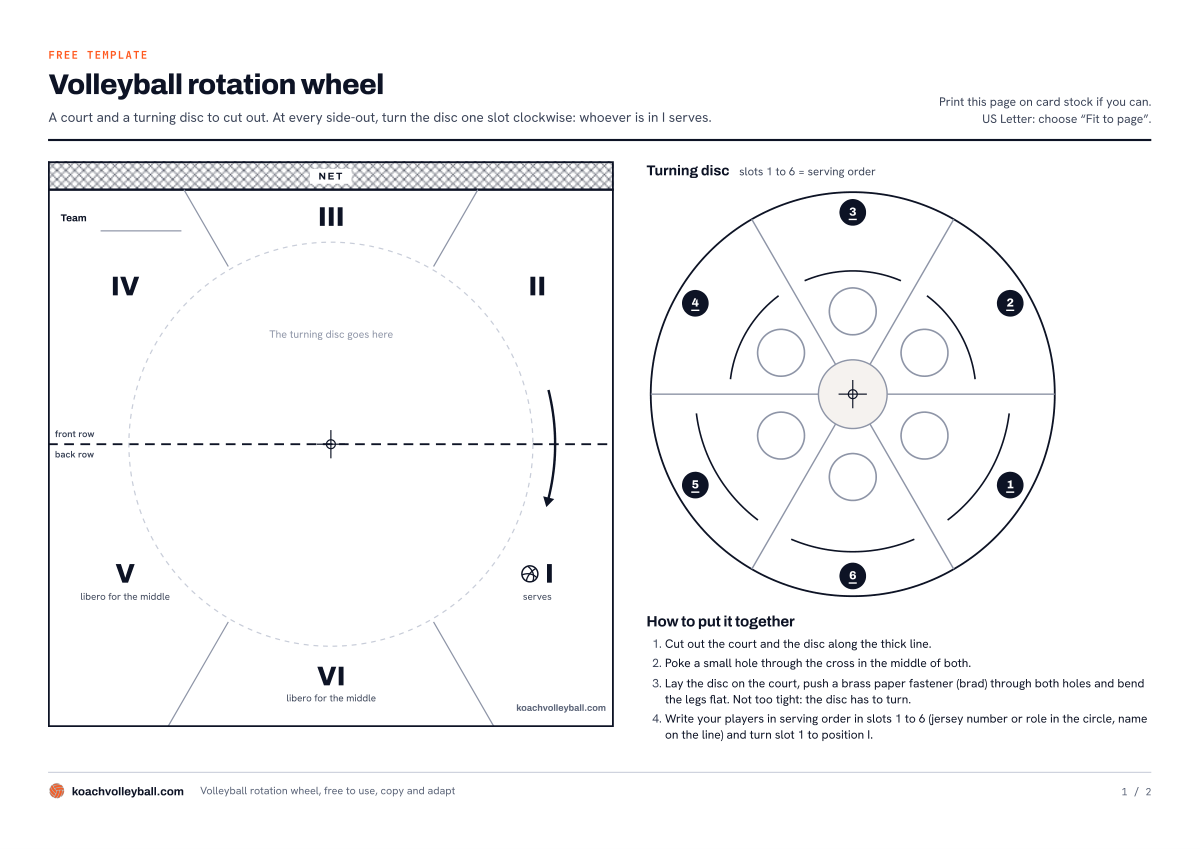
This printable volleyball rotation wheel is a two-page PDF in A4 landscape. Print it, cut out two pieces and join them with a brass paper fastener. On US Letter paper, choose "Fit to page" in the print dialog. You do not need an account, and you are free to use, copy and adapt the template for your own team.
- Download the rotation wheel (PDF): page 1 is the cut-out sheet with the court and the turning disc, page 2 the instructions with a worked example.
What is on the template
Page 1 is the cut-out sheet. On the left is the court: a square card with the net at the top and positions I to VI, the way you see them when you face the net from your own side. A dotted line separates the front row from the back row, and an arrow shows the direction of rotation: clockwise, from II to I. Position I is marked "serves", V and VI "libero for the middle". On the right is the turning disc with six slots in serving order. Each slot has a circle for a jersey number or a role and a line for the name.
Page 2 holds the instructions: what to do before the set, what to do during the set and how to handle the libero. At the bottom is an example of a 5-1 with a libero in three rotations, using the abbreviations S (setter), OH (outside hitter), MB (middle blocker), OPP (opposite) and L (libero).
How to put the wheel together
- Print page 1, ideally on card stock.
- Cut out the court and the disc along the thick line.
- Poke a small hole through the cross in the middle of both.
- Lay the disc on the court, push a brass paper fastener (also called a brad or split pin) through both holes and bend the legs flat. Not too tight: the disc has to turn.
Write in pencil, or laminate the disc and use a dry-erase marker. That way you can fill it in again for every match.
How to use a volleyball rotation wheel during a set
The wheel has just one rule: the order is fixed, only the spot changes. Why that is, and exactly when a team rotates, is explained in volleyball rotation order. For the wheel, this is all you need:
- Before the set. In slot 1, write the player who starts in position I and serves first, in slot 2 the player who starts in II, and so on up to slot 6 in VI. Turn slot 1 to I. The wheel now shows your starting lineup.
- Side-out. If your team wins the rally while the opponent was serving, turn the disc one slot clockwise: II to I, III to II, and so on. Whoever is now in I serves.
- Point on your own serve. Do not turn. The same player serves again.
- Substitution. The sub takes the place of the player going out, including in the serving order. Write them in the same slot.
- New set. You can hand in a new starting lineup. If the order stays the same, just turn the wheel to the player who now starts in I.
The libero on the wheel
The libero does not get a slot, because the libero is not part of the serving order. The libero only plays in the back row and usually replaces a middle blocker. That is why V and VI say "libero for the middle": when a middle is there, the libero plays in their place. When a middle rotates from the net to I, they serve themselves, because under FIVB rules the libero may not serve. Some leagues differ: in the US, for example, high school and college rules let the libero serve in one spot of the rotation, so check your own rulebook. When a middle moves on from V to IV, they are back at the net and the libero comes off. All the rules are in the libero replacement rules.
The example on page 2 shows this in three rotations. At the start the setter is in I and serves, and the libero plays for MB2 in VI. After one side-out OH1 serves and MB2 is in V, so the libero stays on the court. After another side-out MB1 is in I and serves; MB2 is now in the front row in IV and the libero is off.
Where a paper rotation wheel falls short
A wheel is cheap, never runs out of battery and works in any gym. For a youth team that is still learning its rotations it is a great tool: players on the bench can see where they need to stand next. How to teach those rotations in practice is covered in teaching volleyball rotations.
On the sideline, in a tight set, its weak spots do show:
- You have to turn it. After a long rally, a timeout or an argument about a call, you are no longer sure whether you already turned it. Forget once and the wheel is one spot behind for the rest of the set.
- The libero lives in your head. The wheel reminds you, but which middle is in the back row right now, and whether the libero should be in or out, you work out yourself.
- Subs mean pencil and eraser. After a few substitutions a slot has a crossed-out name with a new one written above it.
- You only see one rotation. Want to know in which rotation you have two hitters in the front row? Then you turn the disc all the way round and back again.
Rotation wheel, rotation sheet or app: which one fits you?
We make Koach, so keep that in mind as you read this comparison. The wheel and the rotation sheet come from us too, and both are free.
Besides the wheel there are two other options. The free rotation generator makes a sheet with all six rotations side by side, no account needed: you choose 5-1, 4-2 or 6-2, enter names or jersey numbers and print the rotations together with a blank lineup sheet. And an app keeps track of the rotation for you while you score the match.
| What you want | Rotation wheel | Rotation sheet | Koach |
|---|---|---|---|
| Cost | Free | Free | 14 days free, then €2.99 per month |
| See the current rotation | Yes | No, all six side by side | Yes |
| Turns by itself at a side-out | No, you turn it | No | Yes |
| Libero | Reminder at V and VI | Shown for each rotation | Swaps automatically, if you want |
| Handling substitutions | In pencil | No | Yes, counted per set |
| Works without a phone on the sideline | Yes | Yes | No |
| Score and stats | No | No | Yes |
In short: the sheet is for preparation, the wheel for the sideline without a phone, and the app for coaches who keep score anyway. Other apps track rotations too; you will find them in our comparison of volleyball apps.
The wheel that turns itself: how Koach does it
In Koach you set up your lineup once. On the Team tab you open the Lineup view, choose 5-1, 4-2 or 6-2 and tap the player who starts in each position. Then you pick the setter and the libero. View all 6 rotations shows all six in one overview: above each rotation is the jersey number of the server, and the setter is highlighted. That is the wheel turned all the way round in one go. How to build a lineup is explained in how to make a volleyball lineup.

14 days free, no credit card. Set up your lineup in Koach tonight and see on Saturday whether the wheel can stay in your bag.
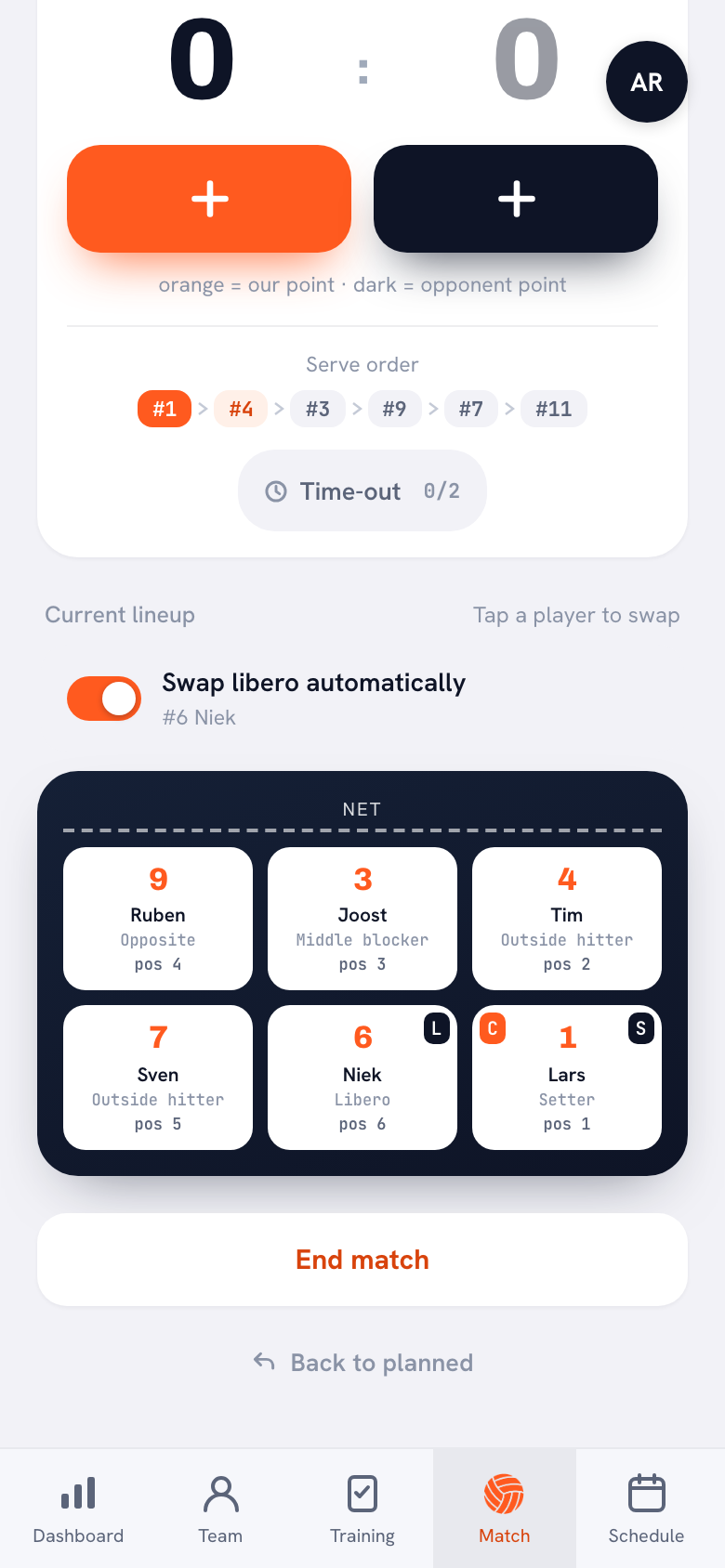
Set up your lineup in KoachOn match day you check the lineup when you start the match. Under the court you will see the same rule as on the wheel: "Place the players in rotation order: position 1 is the serving spot." Then you score point by point. Under the score is the Serve order, a row of jersey numbers that highlights who is serving and who is up next. When your team wins a rally while the opponent was serving, the lineup on screen rotates one spot and the serve order moves with it. On the wheel that is a step you can forget; here it happens through the point you enter anyway. How live scoring works in more detail is on the page about the volleyball rotation app.
- Swap libero automatically. With that switch on, the libero automatically comes in for the back-row middle and goes out as soon as that middle rotates to the front row or to serve. A short message shows who is coming in for whom. Prefer to do it yourself? Turn the switch off.
- Undo. Entered a point by mistake? The rotation turns back with it, and so does the libero swap.
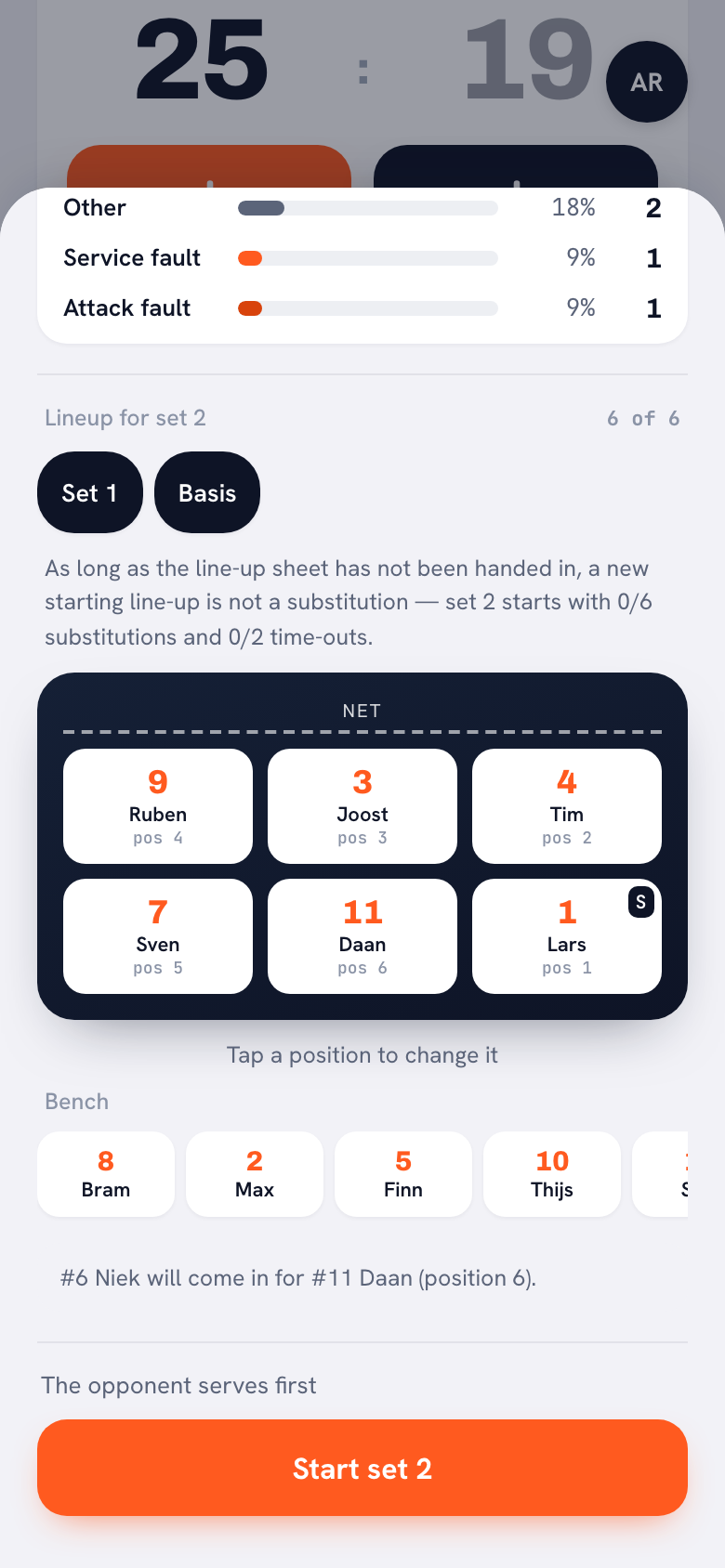
- Substitutions. Tap a player to sub them. The sub takes over their spot in the rotation, and the app counts your subs per set.
- New set. During the set break you get the lineup for the next set ready. With One place on or One place back you rotate all six at once, just like the disc.
Who the wheel is enough for, and who the app suits
The wheel is enough if you want to stand on the sideline without a phone, if a sub or a parent tracks the rotation, or if you are teaching a youth team its rotations. It costs a sheet of card and a paper fastener.
The app fits better if you keep score anyway, play with a libero or want to see after the match in which rotation things went wrong. Then the rotation sits on the same screen as the score and turns without you having to think about it. After the match you will find Side-out per rotation on the match: the rotation in which your team wins the serve back least often.
Neither fits beach volleyball or 4 on 4. The wheel and Koach both assume six players indoors.
The wheel and the rotation generator are free, with no account. You can try Koach free for 14 days, with no credit card and every feature. After that you choose Coach for €2.99 per month (one team, two coaches) or Club for €9.99 per month (unlimited teams). With a yearly plan you pay €2.49 or €8.33 per month. In the App Store and Google Play you see the price in your own currency. Everything is on the pricing page.
Hand the wheel to your bench. Have a sub turn it at every side-out and call out who is serving. Your bench stays in the game and you do not have to count. If you score in Koach, the app does that job and the wheel goes to practice instead.
Frequently asked questions
Where can I get a free printable volleyball rotation wheel?
At the top of this article you can download the rotation wheel as a free PDF: A4 landscape, two pages, no account needed. Page 1 is the cut-out sheet with the court and the turning disc, page 2 the instructions with an example of a 5-1 with a libero. Would you rather have all six rotations on one sheet? Then use the free Koach rotation generator.
When do you turn a volleyball rotation wheel?
Only at a side-out: your team wins the rally while the opponent was serving. Then you turn the disc one slot clockwise, and whoever is in position I serves. If your team scores on its own serve, you do not turn and the same player serves again. After a substitution, write the sub in the slot of the player who went out.
Where does the libero go on a rotation wheel?
The libero has no slot of their own, because the libero is not part of the serving order. The libero plays in the back row for a middle blocker: when that middle is in V or VI, the libero plays in their place. When a middle reaches I, they serve themselves under FIVB rules, and in IV they are back at the net. Some leagues, such as US high school and college, let the libero serve in one rotation, so check your own rulebook.
Does a rotation wheel work for a 4-2 or a 6-2?
Yes. The wheel only knows the serving order, and every system with six players has one. Write the roles or jersey numbers in the slots in the order of your lineup sheet. In a 4-2 and a 6-2 the two setters are opposite each other, so three slots apart. The free rotation generator shows which order most teams use for each system.
Is there a volleyball rotation wheel app?
Yes. In Koach the lineup rotates by itself at every side-out during live scoring, with the serve order above it, and with Swap libero automatically the libero goes in and out for the back-row middle. You can try Koach free for 14 days, with no credit card. After that Coach costs €2.99 per month for one team; the paper rotation wheel is free.


Let your rotation turn itself this Saturday
14 days free, no credit card. After one match you will know whether the wheel can stay in your bag.
Get started with KoachOr read first what the volleyball coaching app does.