
Koach for parents: following your child's development
Your child plays volleyball; you drive, wash and cheer — but what actually happens at all those practices? Koach is not a separate volleyball app for parents, but through your child's player account you get the full picture: attendance, statistics, badges and the team calendar.
Is there a separate volleyball app for parents?
No — and that is deliberately kept simple. For youth players, parent and child share the child's player account; the coach sends a personal invitation to set it up. How that account works and what is in it is covered in everything about the player account. With young children you will run the account yourself in practice; with teenagers you look over their shoulder — whatever fits the age. There are no extra costs either: player accounts are free, and the coach or club pays for the subscription. And if your child moves on to another team, the same account can simply be linked there again.
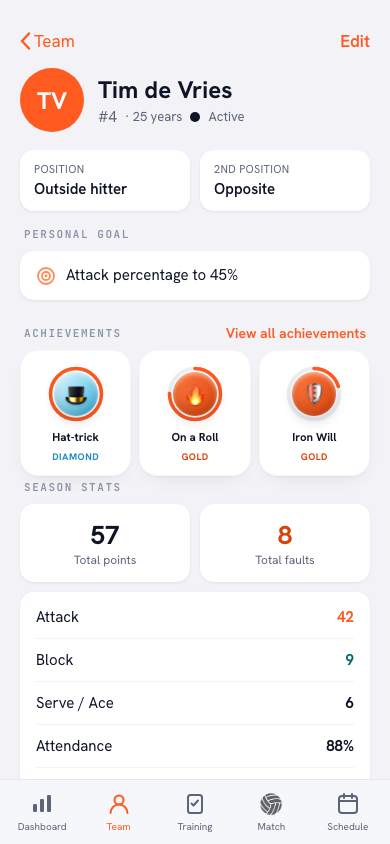
What do you see in your child's account?
- Attendance: the season attendance percentage and the history per practice.
- Statistics: points (attack, block, serve) and errors, per match and across the season — straight from the coach's live scoring.
- Badges: automatically earned milestones for attendance, performance and effort.
- Calendar: the full team calendar with practices, matches and other events.
- Practice program: the focus and the block-by-block plan for each session, so you know what the team is working on.
What is in it for you as a parent?
Three things. First, a better conversation: "how was it?" gets you "fine", but "I saw you had two block points!" opens a story — you are responding to something concrete instead of the summary, and the drive home becomes a conversation instead of an interrogation. Second, the practical side: if your child is ill or there is a school party, you sign them out of practice together — a small courtesy the coach will appreciate. And third, the calendar: what time Saturday's match starts is right there in the app, not buried in a group chat from three months ago.
What about privacy?
You only see your own child's data. Of teammates, only names, jersey numbers and positions are visible — no numbers, no ratings. Coach notes are visible exclusively to the coaching staff, never to players or parents. That makes the player account a safe place for youth teams too: everyone sees their own story, and nothing more. How Koach handles data more broadly is covered in privacy and data.
One more thing: read the numbers with soft eyes. Youth players develop in fits and starts — growth spurts and dips are part of it — and the coach follows those same lines with more context through player development tracking.
Important: the numbers are a tool, not a report card. A dip in the statistics is an opener for a conversation about how things are going — not something to discuss at the kitchen table as if it were a failing grade.
Frequently asked questions
Can I follow along as a parent in the Koach app?
Yes, through your child's player account — there is no separate parent account. The coach sends a personal invitation; after that you can see the attendance, statistics, badges and team calendar together.
Can other parents or players see my child's data?
No. Each player account only shows its own detailed numbers; teammates and their parents only see names, jersey numbers and positions in the roster. Coach notes are visible exclusively to the coaching staff.
How do I sign my child out of a practice?
Open the practice tab in the player account and set a red ✗ next to your child's name for that session. You can sign out up to the day of practice itself — a courtesy the coach preparing the session will appreciate.

Is your child already playing with Koach?
Ask the coach for a player account invitation — following along costs nothing extra.
Get started with Koach