
Practice plan on your phone: drill after drill in the gym
The short answer
A practice plan on your phone works in the gym if it is finished at home and every next drill is one tap away. Put your phone in a fixed spot, pick it up only between drills and show the drill instead of explaining it at length.
A practice plan on your phone is handy as long as you don't have to search for anything in the gym. Here is how to use the plan during practice without your players standing around waiting, and how Koach, since version 3.1, takes you to the next drill in one tap.
Does a practice plan on your phone work in the gym?
Yes, if the plan is finished before you walk into the gym. On a phone you have the order, the times and the diagram or animation of every drill in one place, and you can adjust on the spot if fewer players turn up. The downside is just as clear: every screen you have to search for costs time in which your group stands still. A card on paper doesn't have that problem, but it can't show movement and is out of date after the first change.
| What you need in the gym | Paper | Phone |
|---|---|---|
| Order and times at a glance | Yes | Yes |
| Showing a drill in motion | No | Yes |
| Changing the order on the spot | Cross out | Drag |
| Works without a battery | Yes | No |
How to use your plan during practice
- Finish the plan at home. Order, drills and minutes per block. Anything you still have to think up in the gym comes out of playing time. How to choose the drills is in choosing drills for practice.
- Put your phone in a fixed spot. On the bench or by the net post, out of the way of the balls. Pick it up between drills, not during play: then you are watching your players.
- Show the drill instead of explaining it. Gather your group in a half circle, play the animation once and point out who starts where. Whatever is still unclear after that, you will see in the first repetitions and correct then.
- Watch the time. At every change, check how much time is left. If a drill is going well, let it run longer and cut a smaller part at the end, not the game.
- Silence notifications. A message about something else in the middle of your explanation throws you off, and your players too.
More on the whole line from preparation to evaluation is in running a volleyball practice.
From drill to drill in Koach
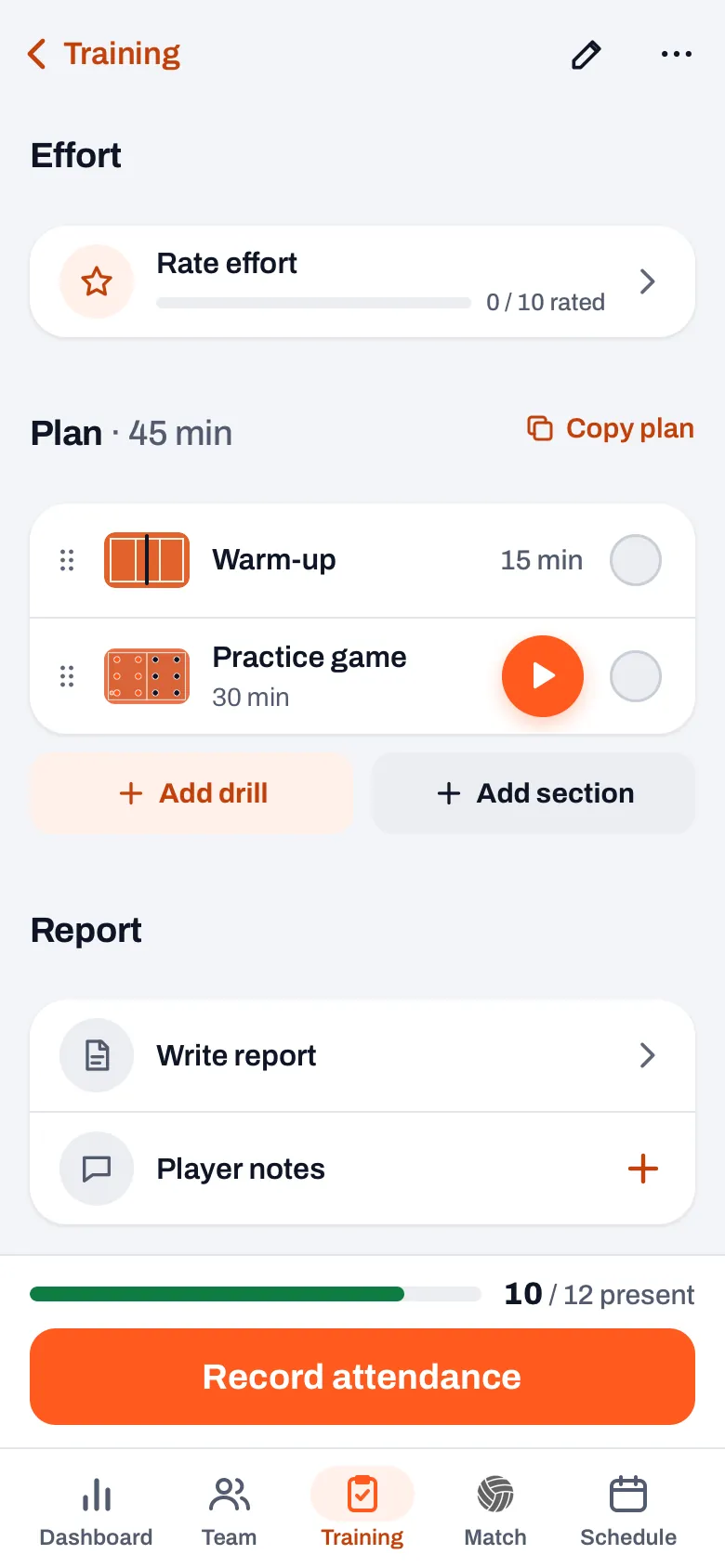
In Koach your plan sits on the practice screen under Plan, with the total time next to it, for example Plan · 45 min. Since November 2026, from version 3.1, this is how you go through it in the gym:
- Tap a drill's small court. As a coach, on a row with a drill from the library you see the diagram of that drill in a small court on the left. A tap on that court opens the drill straight away. Tap the rest of the row and you edit that section, as before. A section without a drill shows an empty court.
- Show the drill. The drill opens on Phase 1, with the court, the phase text and the description. The play button runs the animation through all phases; the arrows next to it take you phase by phase.
- Carry on with Next. At the bottom are Previous and Next, with the name and length of the next drill on the button, for example Next: Dead fish · 15 min. Every switch starts at phase 1 again and doesn't play by itself: you tap play when your group is ready.
- Back to your plan. Back at the top left takes you to your plan again, at the same spot in the list.
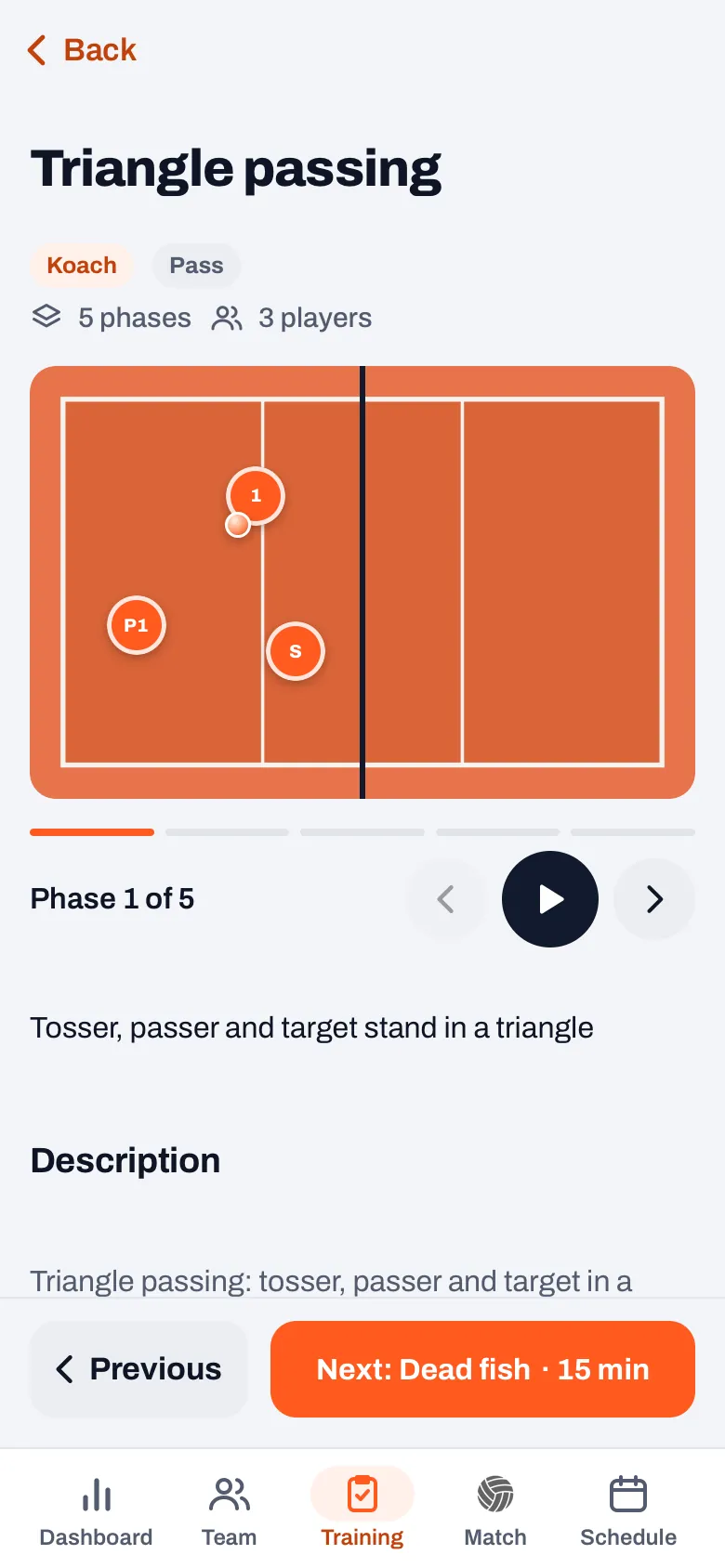
Sections without a drill, such as a warm-up you only gave a name and a time, are skipped by Next. On the first drill of your plan Previous is switched off, on the last one Next. If there is only one drill in your plan, the bar doesn't appear. If you open a drill from the library instead of from your plan, you see the usual buttons at the bottom, such as Homework. Which drills are in that library is in the ready-made drills in the app. Don't see the small court or the Next button? Update the app through the App Store or Google Play.
14 days free, no credit card. Put your next practice in Koach and go through it in the gym with Next.
Try your plan in the gymWhat else you see in the rows of your plan
Each row shows the name and the minutes of the section. On the left is a handle with dots: use it to drag a section to another place, and Next follows that new order straight away. If there is a practice game in your plan, its orange start button sits right in the row; how that works is in the practice game.
From the day of the practice, each row has a circle on the right. Every tap moves it one step: Done, Partly done, Not done and back to empty. That way you see afterwards what actually came of your plan, and you take that into the practice report.
Phone or tablet on the sideline?
A phone fits in your pocket and is enough to show a drill to a small group. If your whole team is standing around you, a bigger screen is nicer. Koach is the same app on the iPad, full screen, with the same account; what to weigh up when choosing a tablet is in a tablet for the coach. What Koach costs after the 14 free days is on the pricing page.
Keep your screen on. Koach only keeps your screen on during live scoring, if your device allows it. During practice it turns off as your phone is set up, so set the auto-lock a bit longer before practice; then you don't have to unlock for every drill.
Frequently asked questions
Does my screen turn off during practice?
Yes, as your phone is set up. Koach only keeps the screen on while you score a match live, if your device allows it. If you don't want to keep unlocking during practice, set your phone's auto-lock to a longer time before practice.
Can I still change the order of my plan in the gym?
Yes. Drag a section by the handle with the dots on the left of the row to another place. If you then open a drill from the plan, Previous and Next follow the new order straight away. To edit a section or change the minutes, tap the row itself.
Why does Next skip my warm-up?
Next only jumps between sections with a drill from the library. A section you gave just a name and a time, without a drill behind it, has no court and no phases to show. If you want Next to stop there, add a drill from the library to your plan with + Add drill.
Can my assistant coach use the same plan?
Yes. The plan belongs to the team's practice, so every coach of that team sees the same plan and can go through it in the gym with Next. With the Coach plan you work with two coaches in one team; more is on the pricing page.
Take your plan into the gym
14 days free, no credit card. One tap to the next drill.
Get started with KoachOr read first what the volleyball coaching app does.