
The practice report: what you record after a session
Tuesday, half past ten, the hall is empty and you walk to the car with three things in your head: the passing finally held up, you skipped the blocking block because the warm-up overran, and one player's mind was somewhere else entirely. On Thursday there is a match in between, the weekend is busy, and the following Tuesday you are standing in the hall with the vague feeling that there was something. What exactly, you no longer know.
Two weeks later you no longer know what happened that evening
This is not a memory problem of yours personally. A session is two hours in which a hundred small things go by, and most of them are rightly forgotten. The problem sits in the three or four things you did want to remember, and which fade exactly as fast as the rest. Which block you did not run. Why the serving drill did not work. What you had promised yourself you would pick up first.
Coaches solve that in different ways. A note in the phone, a message to themselves, a little notebook in the bag that does not get opened again after November. All of it works for a few weeks and then stops, always for the same reason: it sits apart from the session itself. You have to make a separate action for it, at a separate moment, in a separate file — and that moment is exactly the moment you are locking up the hall and want to go home.
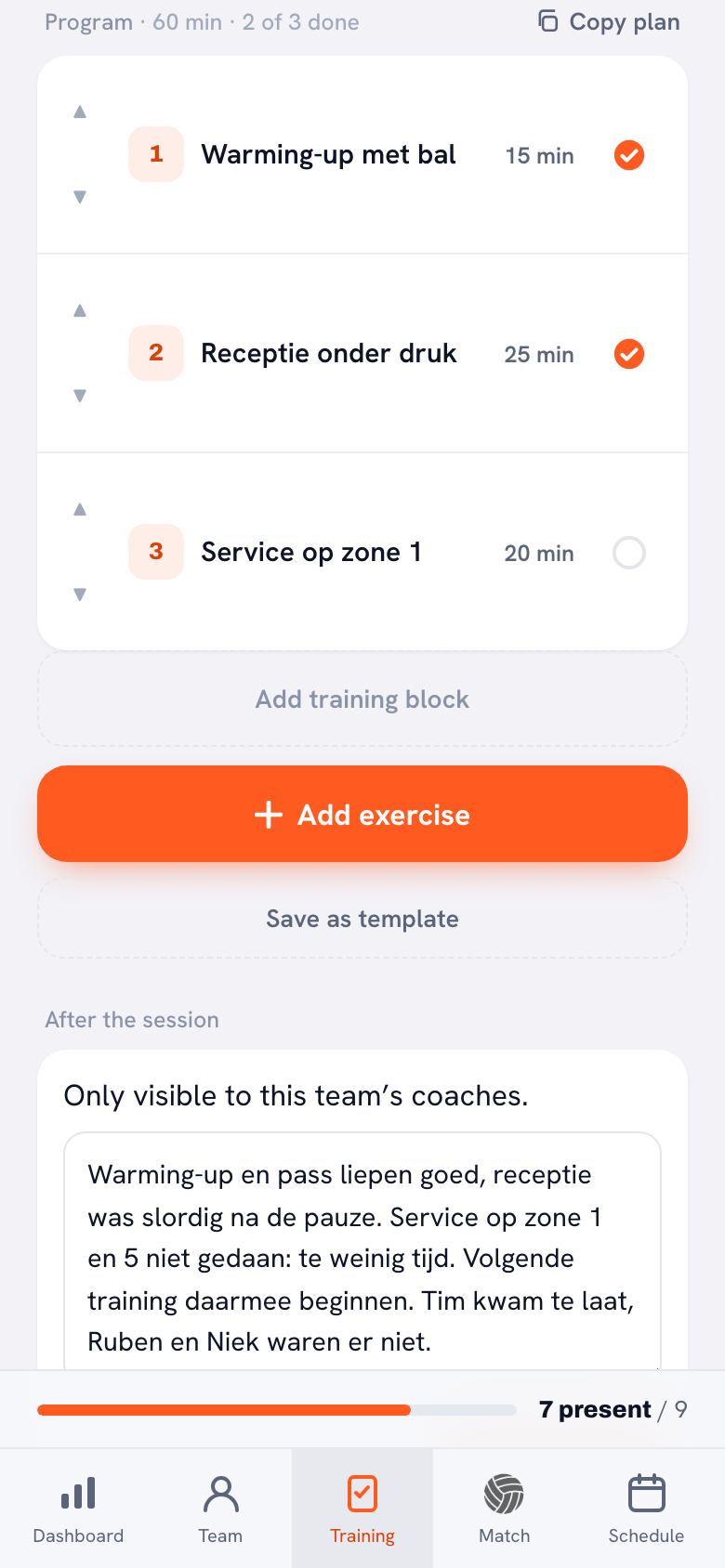
That is why the report in Koach does not sit in a separate screen, but directly under the programme of that same evening. The block is called After the session and you find it in the session detail, under the list of blocks you have just worked through. You are there anyway: you run down the blocks, you tick off what you did, and the text box is already sitting underneath waiting. It does not save you time, it saves you a decision.
This article is about that one block: what goes in it, what the app does with it and — the question most coaches ask first — who will be able to read it. How a session works as a whole, from preparation to wrapping up, is covered in running a volleyball practice. That is the overview article; this is the recording part of it.
You record three things, and no more
The block is deliberately kept small. There are no scores, no stars, no scale of one to five and no required fields. There are three things, and two of them are text.
The first is a large text box of five lines, holding the question you are already asking yourself as you walk to the car: what went well, what was left, and what will you pick up next time? That is the whole instruction. Five lines is enough for a paragraph and too little for an essay, and that is on purpose — a field that looks big invites you to put it off until you have time, and that time never comes.
The second is a separate, smaller field underneath: Focus for the next session, asking what you will start with next time. That it is a field of its own rather than simply the last sentence of the report is the most important choice in this whole block. The report is about the evening that has been; the focus is about the evening still to come. Those are two different things, and in practice they are useful in different ways.
You notice the difference only the week after. When you open the session detail from last time, the focus line is the only thing you need in order to start. The rest of the report is context, nice to read back, but the focus is an instruction to yourself that is a week old. That is also exactly where it links to your planning: how you turn such a line into a real goal for the next evening is covered in setting a practice goal.
The third is not a text field but a set of buttons, and that is the done status per block. It sits a little higher up, in the programme itself.
The done status: which blocks you actually ran
On the right of every row in the programme there is a round button. Tap it and it runs through four states: empty, done, partly done, not done, and then empty again. You can tell by the icon — a filled circle with a tick, a half-filled circle, a grey circle with a cross, and an empty circle when you have said nothing yet.
Those four states exist because three would be one too few. A block you half ran because the time was gone is not a not done and not a done either; that is precisely the case you want to be able to find again in a month. And “empty” has to stay a real state, because a block you have said nothing about is something other than a block that did not happen.
The button only appears for a session of today or earlier. For a session still to come it is not there, because there is nothing to tick off yet. Players do not see the button at all: reading the programme is allowed, ticking it off is coaching work.
As soon as you have set one, a line appears above the programme saying how many of the blocks are done — three of five, for example. That same line appears on the “Previous session” card in your session list. That is the part that yields the most for the least effort: you open the app, see at a glance that you got through three of the five blocks last time, and know immediately that your programme for that evening was too full.
The report belongs to the coaches, and to nobody else
This is the question asked most often, and the answer is also written literally under the block in the app: only visible to this team's coaches. A player does not see it. A parent does not see it. A team parent does not see it. The report does not end up in the player account, not in a notification and not in an overview you share by accident.
That is not a small thing, because it determines how you write. A report a player could read becomes a careful report, and a careful report is worthless three months later. Because you know that only you and your co-coach are looking, you can write down that the drill did not work, that you explained it badly yourself, or that it is the third week running that the hall came free too late.
Your co-coach is included, though. There is one report per session, not one per coach, and that is deliberate. Two coaches at the same evening write on the same piece of text; no second report can spring up beside it, not even if you both press save at the same time. In a team with two coaches who alternate, that is the point straight away: one writes down what they did, the other reads it before going into the hall.
As soon as something has been filled in, it shows underneath the block who last updated it. That name is stored as text, not as a reference to an account. That sounds like a technical detail but it has a practical reason: if that coach stops next season and their account disappears, their name is still there, readable, three years on. In a team with changing coaches a report without an author is worth half as much.
One more small thing that saves confusion: the save button is grey and does not work as long as you have changed nothing. If you do not see it light up, there is nothing to save. As soon as you type one letter, it comes on.
A note that stays attached to this evening
Under the report sits a second block: Notes from this session. You pick a player there from a row of names — no drop-down, just the names side by side, so that you are at the right player in one tap — and type a note.
What makes that note special is that it has two places at once. It appears on that player's card, where all their other notes sit, and it also stays attached to this session. Open the detail of this session in two months' time and the notes from that evening are still there. The reverse does not apply: notes you make somewhere else, without a session attached, do not appear here. Those simply sit with the player.
That link to the evening is where the report and the note help each other. “Serving block stalled” in the report and “could not get his run-up right” on one player, both on the same date, together tell a different story than each does on its own. What exactly you put in such a note and how you phrase it so that it is still useful in a month is a subject in itself; that is worked out fully in keeping notes on players.
When you save, you can set one tick box: Needs follow-up. The explanation underneath says what it does — mark this when something needs to happen, and the club sees that mark in the team log. So it is not only a reminder for yourself, but a signal that can leave the team. That makes it a conscious choice rather than a default tick: you set it for an injury that is going to last, for a player who has been missing for weeks, for something somebody else has to look at. You can remove the mark again later; it is not a one-way button.
What the club leadership reads through the team log
If your team trains on its own, without a club behind it, the above is the whole story: the report stays with the coaches and nothing further happens to it. If your team belongs to a club with a Koach club account, there is one extra route, and it runs through the team log.
Three roles can get there: the club manager, the board member and the technical manager. They see four things per session — the attendance as a number, what of the programme was done, the report and the notes. No more than that, and not by a detour either: the rest of the club, other coaches and all players and parents do not get in. How the club account works otherwise is covered in the club dashboard for a club.
What they pointedly do not see is at least as important to know:
- Sign-off messages and the reasons players give with them. They see only the number present.
- Assessments of players.
- Email addresses of players and parents.
- The content of sessions still to come. For a planned session they see only how many blocks it contains — not which ones.
That last point is the boundary that makes the whole log liveable. What is in a planned session is the coach's work, and that work should not be read half-finished over a shoulder. The club sees what has been, not what you are planning.
For you as a coach, club leadership reading along mostly means one thing in practice: the report is no longer only a memory aid for yourself. It is also the place where it becomes visible that something happens at this team every week. That works both ways — it is also the one spot where you can put on record that the hall came free too late three weeks running.
The report does not go to players or parents. Only the team's coaches read it, plus — if you play at a club — the club manager, the board member and the technical manager through the team log. Exactly what those three get to see is covered in the club dashboard for a club.
Two lines is a report too
The most common mistake with a report field is waiting until you have something worth writing down. Such an evening rarely comes. Most sessions are simply sessions: something nearly worked, something just did, and in two weeks it is all gone.
That is why a report with only the focus line filled in counts as a report. Not as half work, not as something the app will ask you again to finish. That single line of handover — where do you start next time — is precisely what a co-coach opens before going into the hall, and what the club leadership comes to read when they want to know whether there is a line running through this team.
A practical order that works: as you lock up, run down the programme and tick off the blocks, type one sentence in the text box, type one sentence in the focus, and save. That costs less than a minute and it happens while you are still in the screen anyway. What you should not do is save it for the sofa at home — then it becomes a task, and tasks lose out to the laundry basket.
And if an evening does slip by, you are not skipping anything. A session without a report is simply a session without a report; nothing breaks, no red cross appears and the done counter stays empty. The only thing you miss is the Tuesday after, when you are standing in the hall with the vague feeling that there was something.
Frequently asked questions
Can players or parents read my practice report?
No. Underneath the block the app says it is only visible to this team's coaches, and that is literally true: players, parents and team parents see it nowhere, not in a notification and not in an overview. Only if your team belongs to a club does the club leadership read along through the team log — that is the club manager, the board member and the technical manager, and nobody else.
What happens if my co-coach and I both write a report?
There is one report per session, not one per coach, so you are both writing on the same piece of text. No second report can spring up beside it, not even if you press save at the same time. Underneath the block it shows who updated it last. That name is stored as text, so it stays readable if the account disappears later.
Why is the focus for the next session a separate field?
Because it is about something else. The report describes the evening that has been; the focus is an instruction to yourself for the evening still to come. Because it stands apart, it is the only thing you have to read a week later in order to start. A report with only the focus filled in therefore counts as a report.
Does the club also see why a player signed off?
No. In the team log the attendance appears only as a number — ten of fourteen, for example. Sign-off messages and the reasons given do not go in, any more than assessments or email addresses do. For sessions still to come the club sees only how many blocks they contain, not which ones: the content of a planned session stays the coach's work.

Try it yourself in Koach
Less admin, more coaching.
Get started with KoachOr read first what the volleyball coaching app does.