
Volleyball coach binder: what to keep, on paper or in an app
The short answer
In a volleyball coach binder you keep your season: schedule, roster, practice plans, what happened at each practice, notes per player, lineups and numbers. Paper works fine if you coach alone. In Koach, the report, notes and attendance sit with the practice or the player, and your assistant coach sees them too.
A volleyball coach binder is the ring binder, notebook or planner where you keep track of your season as a coach. Below: what goes in it, where paper is strong and where it falls short, and where each tab ends up when you move to an app.
What goes in a volleyball coach binder?
Most coaches start the season with a binder, or a folder as many UK coaches call it. A few weeks in, it is full: a schedule, a printed roster, loose practice plans and notes in the margins. What goes into a volleyball coach binder differs less from coach to coach than you might think. Seven tabs cover the whole season:
- Schedule. Practice times, matches, tournaments and everything planned in between.
- Roster and contacts. Names, jersey numbers and positions, plus the emergency contacts you need if something happens in the gym.
- Practice plans. For each practice the blocks and drills, with the time per block.
- The coaching journal. For each practice who was there, what you actually did, what stood out and where you start next time.
- Notes per player. Observations and agreements, always with a date.
- Lineups. Your starting lineup and the variations you keep in reserve.
- Numbers. Attendance, and whatever you track after matches.
Some coaches mean something else by a coach binder: a folder or clipboard with a magnetic court, to show a situation during a timeout. This article is not about that. Whether to buy a board like that or use your phone is covered in volleyball coaching board: buy one, or use your phone.
The coaching journal: six lines per practice
The tab that runs dry first is the journal. In the first weeks you write half a page after every practice, after a month one line, and after that nothing. Coaches who use a fixed format keep it up longer. These six lines are enough, in a notebook or in an app:
- The date, and who was there (and who came late).
- The plan: which blocks, and how many minutes per block.
- For each block: done, partly done or not done.
- What went well and what was left undone, in two or three sentences.
- What stood out about a player, only if it matters.
- One sentence: where do you start next time?
That last line is the most important one: right before the next practice, it is the only sentence you really read back. What else belongs in a report, and why the focus deserves a line of its own, is covered in the session report after practice. How a practice fits together as a whole, from preparation to evaluation, is in running a volleyball practice.
14 days free, no credit card. Log your next practice in the app and see after a week whether you still open the binder.
Start your coaching journal in KoachPaper, a notes app or a coaching app: what works for what?
We make Koach, so read this comparison as coming from someone with a preference, and weigh it yourself. Paper has real advantages. A notebook costs next to nothing, has no battery to run flat, and an arrow or half a court is quicker to draw with a pen than on a screen. Many coaches simply think better with a pen in hand. A notes app or a spreadsheet on your phone is usually free, always with you, and set up however you like.
The snag is in the same place for both: the note is separate from the practice and the player it is about. You have to find it again yourself, you add up attendance yourself, and a second coach only sees it if you lend out the binder or send the file. A coaching app files the note with the practice or the player itself.
| What you want | Binder or notebook | Notes app or spreadsheet | Koach |
|---|---|---|---|
| Works without a battery | Yes | No | No |
| Drawing freely by hand | Yes | Sometimes | On the tactics board |
| Note is tied to the practice or the player | No | No | Yes |
| Attendance adds itself up | No | With formulas | Yes |
| Assistant coach can read and add to it | No | If you share it | Yes |
| Cost | Next to nothing | Usually free | €2.99 a month after 14 days |
Where your coach binder goes in Koach
Koach has no separate journal screen for the coach. Every tab from the binder sits with the part of the app it is about. Tab by tab, here is where you find it:
- Schedule. Practices, matches and other appointments are on the Schedule tab. You set up a regular practice night in one go with Schedule recurring trainings, and with Sync calendar everything also shows up in the calendar on your phone.
- Roster and contacts. The Team tab shows each player's jersey number, position and status. Players fill in their own contact and emergency details, under Contact & emergency.
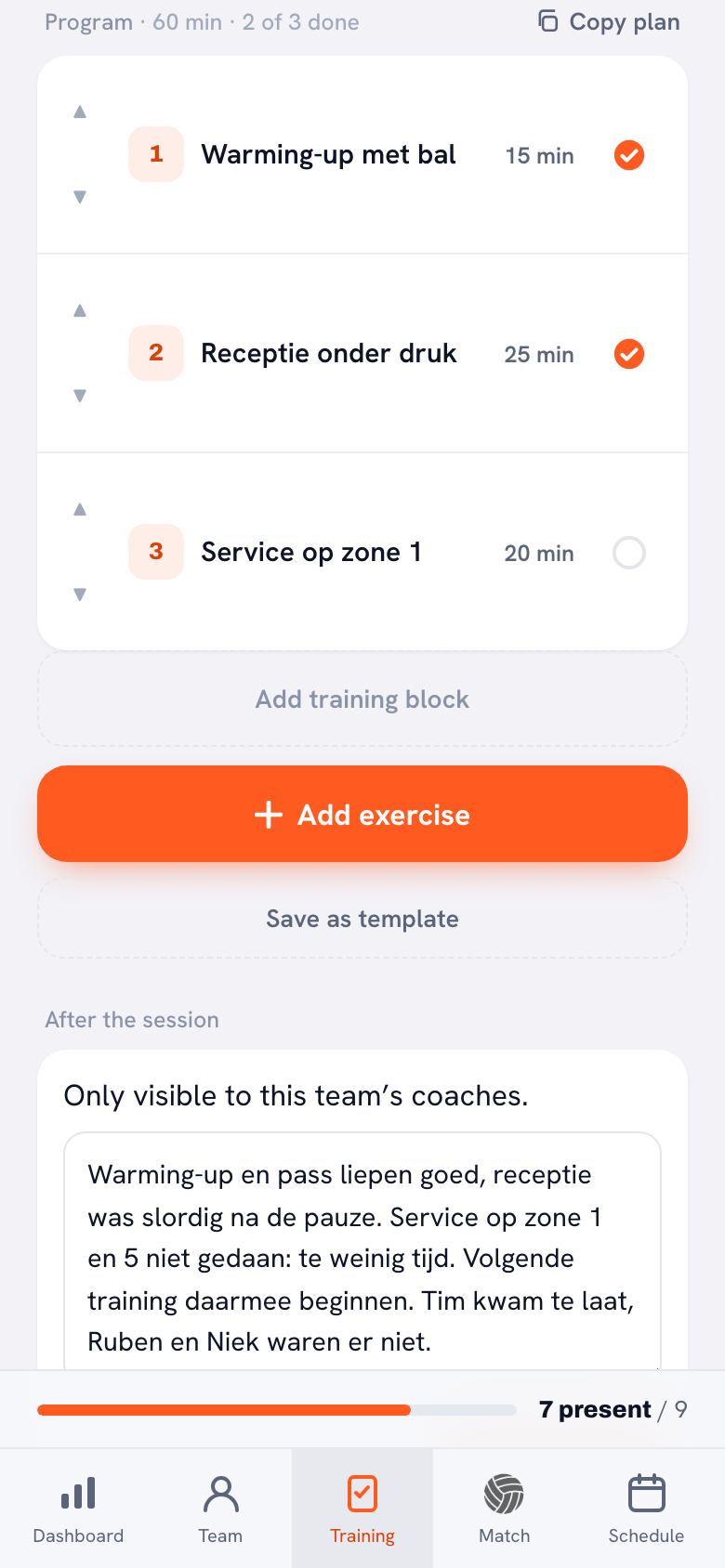
- Practice plan. For each practice you add blocks with a duration and pick drills from the library. A practice that worked you keep with Save as template, and Copy plan puts the blocks of a template or an earlier practice on a new date.
- Journal. Next to each block is a circle: one tap is Done, two taps Partly done, three taps Not done. Below the program is After the session: a free text box and the Focus for the next session field.
- Notes per player. At a practice you write a note about a player under Notes from this session; it also appears on that player's card. Needs follow-up marks that something still has to happen. How to keep that up for a whole season is covered in keeping notes on each player.
- Matches and lineups. In the details of a played match, below the stats for that match, there is a Match note that only coaches see. Your starting lineup and its variations go under Saved lineups.
- Numbers. At each practice you mark Present, Late or Absent, and attendance per player adds itself up. After the season you use those numbers to evaluate your training season, and Start a new season gives you a clean slate while the old season is kept.
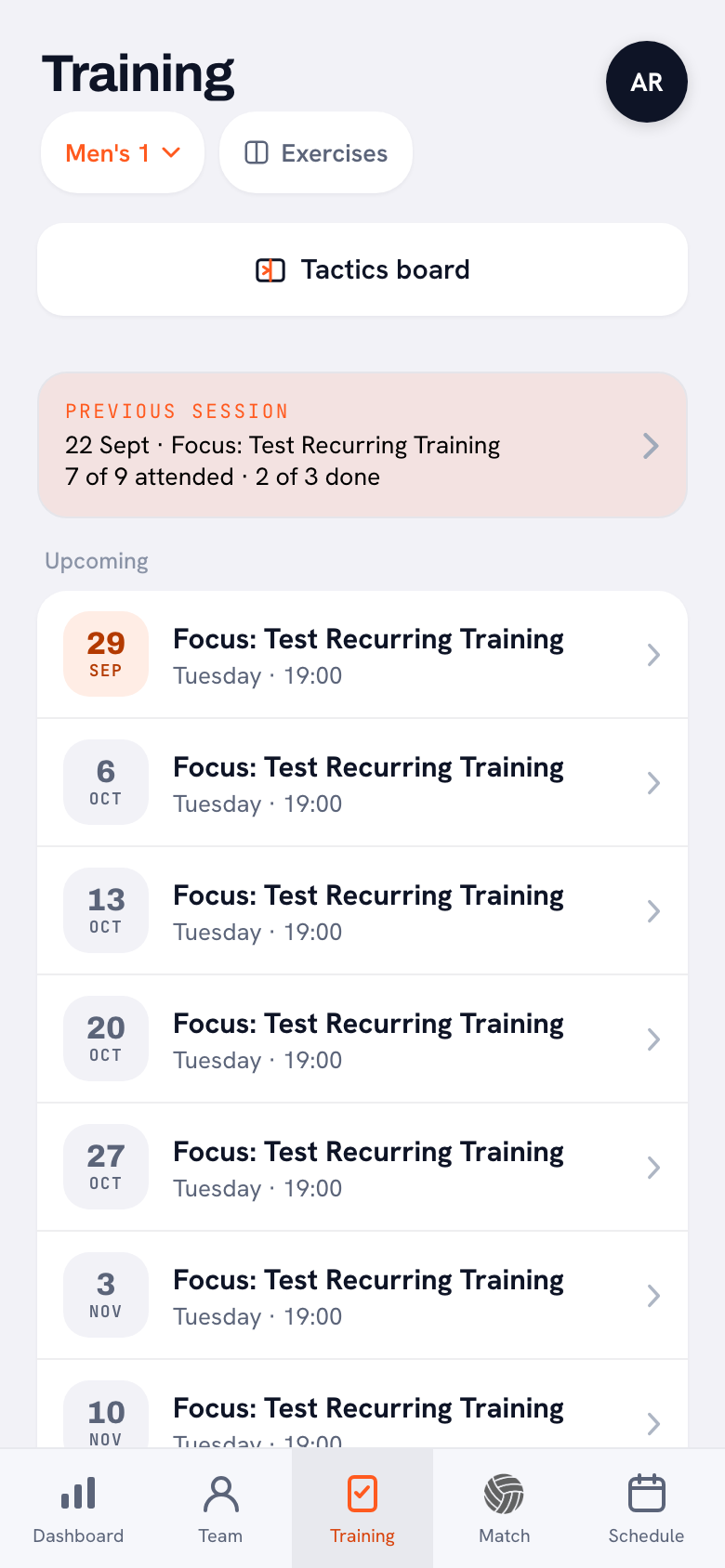
The biggest difference from a binder shows when you look back. In a binder you flip back to last week. In Koach, the Previous session card sits at the top of the Training tab, with the date, that night's focus, how many players attended and how many blocks you got through. One tap and you reread the report and your own focus line.
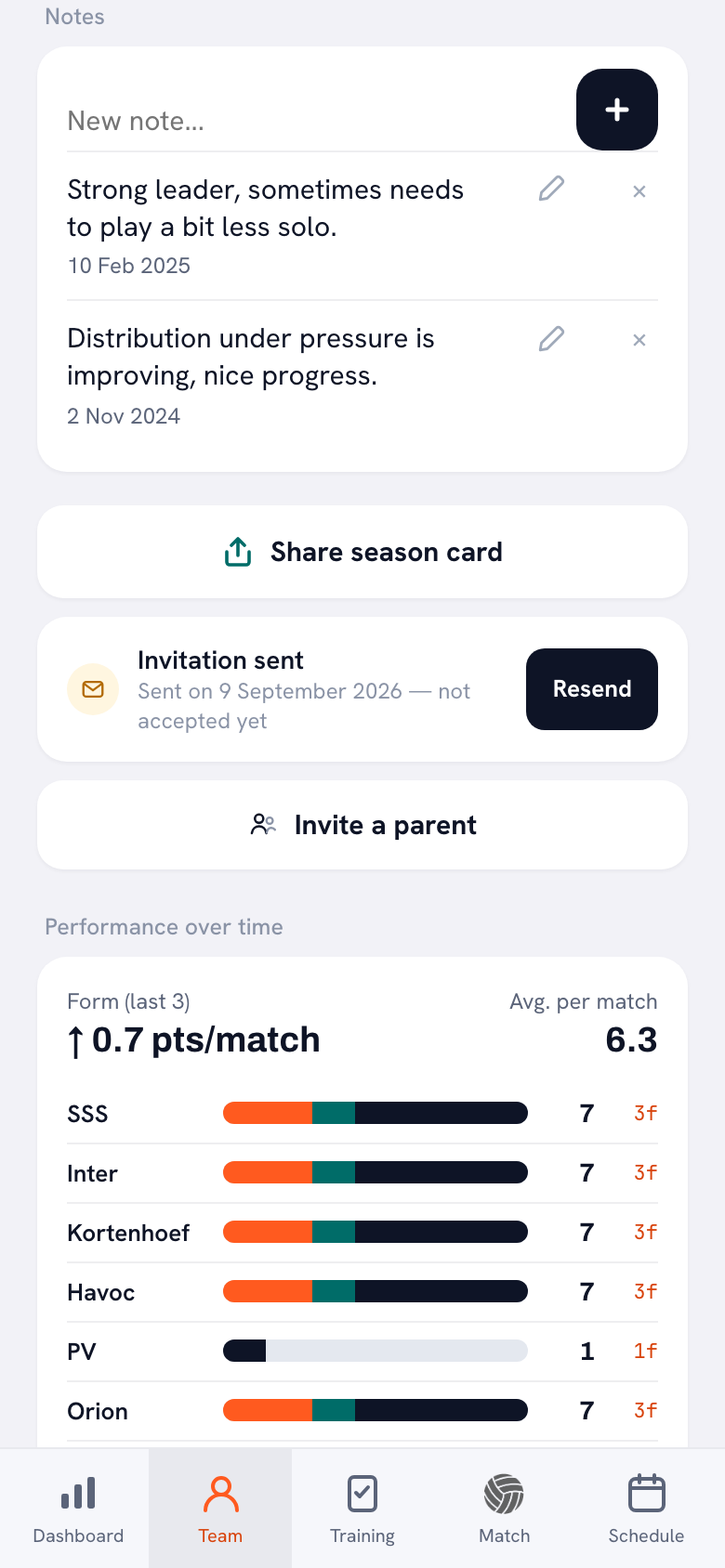
Players work the same way. A note sits in the player's profile with its date, and further down the same screen are their numbers. If their points per match slip for a few weeks, what you wrote about them in those weeks is on the same screen. In a paper binder those two things sit on different tabs, if you have both at all.
Working with an assistant coach, and who else can read it
A paper binder has one owner. When two of you coach a team, one often does not know what the other wrote down, and the coach who missed a practice misses exactly the part they needed. In Koach you and your fellow coach write in the same report: there is one report per practice, and the bottom of the block shows who last updated it.
The report and the notes are visible to the team's coaches. Players and parents do not see them, not even in their own account. If your team belongs to a club in Koach, the club's leadership (club manager, board and technical manager) can read them too, in the Team log of the club area. It shows the last twelve practices per team with attendance, the program, the report and the notes. What a technical manager at the club does with it is covered in that article. How a coach fills in the report is explained by Dennis Boekhout, volleyball coach and maker of Koach, in the interview about the session report.
What Koach does not do, and who is better off with paper
- No PDF of your journal. Koach has no PDF export. You export the season and the player list as a CSV file for a spreadsheet. The season export lists the date, the focus and the attendance for each practice, but not the text of your reports. In a club, the club manager and the board use Export everything to create one file that does include the reports and notes.
- No import of your old binder. There is no import of files or spreadsheets. You retype what you still need; the rest stays in the binder as an archive.
- Typed text, not handwriting. You type notes and reports. To draw a situation you use the tactics board, but a sketch in the margin of your report is not an option.
- Indoor volleyball only. Koach assumes six against six. For beach volleyball it is of little use.
If you coach alone, one team, and like writing by hand, a good notebook with the six lines above makes a perfectly fine coach binder. An app becomes the better choice once you work with an assistant coach, once players and parents need to see the schedule on their own phones, or once you want to look back after a season at who was there and what you did without counting it up yourself.
What does a digital coach binder cost?
You can try Koach free for 14 days, with no credit card and every feature. After that you choose Coach for €2.99 per month (one team, two coaches) or Club for €9.99 per month (unlimited teams and coaches, with the club area and the Team log). With a yearly plan you pay €2.49 or €8.33 per month. In the App Store and on Google Play you see the price in your own currency. Players and parents use the app for free. All amounts are on the pricing page.
Right before practice, read only your focus line. Open the previous session and read that one sentence under Focus for the next session. That is the part of your journal that changes your practice; the rest is reference for later.
Frequently asked questions
Is a coach binder the same as a coaching board?
No. A coach binder, or coaching journal, is where you keep track of your season: schedule, roster, practices, notes per player and numbers. A coaching board is a folder or clipboard with a magnetic court that you use to show players a situation during a timeout. Koach mainly replaces the first. For explaining things on the sideline, the app has a tactics board: a full or half court where you draw a situation with Pen, Arrow and Dashed and share the result as an image.
Can I import my old coaching notes into Koach?
There is no import of files or spreadsheets, so you retype what you still need. Start with the roster: names are enough, and jersey numbers and positions can come later. Then add, for each player, the agreements that are still running. You do not need to move old reports over. Keep the binder as an archive and start the journal in the app at your next practice.
Can players see my coaching notes in the app?
No. The report after practice, the notes per player and the match note are only for the team's coaches. Players and parents see the schedule and who has signed up, and players see their own stats, but none of them see what you wrote about the practice or about a player. If your team belongs to a club in Koach, the club's leadership can read the report and the notes too.
Is there a free coaching journal app?
A notes app on your phone is usually free and works fine for loose notes; they just are not tied to anything. You can try Koach free for 14 days, with no credit card and every feature. After that Coach costs €2.99 per month for one team and two coaches; in the App Store and on Google Play you see the price in your own currency. Players and parents have a free account of their own.
Can I print my coaching notes from Koach?
Not as a PDF: Koach has no PDF export. You can export the season and the player list as a CSV file and open or print it in a spreadsheet. The season export lists the date, the focus and the attendance for each practice, not the text of your reports. When you wrap up the season with Start a new season, you can also download a season report as a CSV file. The results of the old season are kept.



Log your next practice in Koach
14 days free, no credit card. After a week you know whether you still open the binder.
Get started with KoachOr read first what the volleyball coaching app does.