
Practice reminders: the nudge your sports app sends two days ahead
Your team plays away on Saturday. You open the sign-ups and see eight times Coming, one Can't make it and four players who have said nothing at all. Do you ring those four? Do you wait? Most coaches do the third thing: they pick up their phone and repeat the whole round in the group chat. That round is exactly what a reminder two days ahead makes unnecessary.
The problem is not turnout, it is the question marks
A coach who complains about sign-ups is rarely complaining about players who pull out. A cancellation is information: you know you are one short and you can arrange something. It is the third category, the one with no word for it, that shows up on every screen as a grey dot: no reply yet. There is nothing you can do with it. You do not know whether you will have eight players or twelve, so you cannot put a lineup together, cannot sort out who is driving and cannot pick a drill that fits the numbers.
The annoying part is that those question marks are almost never unwillingness. A seventeen-year-old who saw a notification three days ago and meant to answer later has forgotten. A parent who is in the car on Thursday when the question comes in does not reply and never thinks about it again. Anyone who solves that with stricter rules is solving the wrong problem. Most silent players do not need a second rule, they need a second tap on their screen at a moment that suits them. That is something different from the broader question of how you increase practice attendance: this is purely about the answer, not about the attendance itself.
What happens two days ahead
Koach runs a check every hour. Outside the early evening it does nothing; from around six o'clock it looks at which practices, matches and tournaments are two days away, and works out per event who has not filled in an answer. Only those people get one notification. Nobody else notices a thing.
The message is short and says exactly what it is about. The heading carries your team name, so a player who is in two teams knows straight away which commitment it concerns. Underneath it says: you have not let us know yet whether you are at practice the day after tomorrow, please say. For a match the opponent is in there, for a tournament the name of the tournament. Tap it and the app opens the screen for that particular practice or match, with the buttons to mark yourself available or unavailable right underneath. There is no hunting through tabs.
Three things matter about the way this works:
- Once per event, never more. The app records per recipient which notification has already gone out. Whoever has had their nudge does not get it again just because the check runs an hour later.
- Replying takes you off the list. The moment you tap available or unavailable, you are no longer in the selection of silent players on the next round. Not even if you pull out again a day later: what counts is that there is an answer, not which answer.
- A missed round is caught up. If something goes wrong with the first round, the app tries again in the hours that follow, until the end of the evening, and only for the people who have not had it yet.
Why the night before is too late
Most sports apps send a reminder the evening before. Koach does that too: around seven in the evening everyone in the team gets a message with what is on tomorrow. That is a memory jog, not a question, and it goes to everyone — including the player who signed up neatly two weeks ago.
For you as a coach it comes too late. Finding out on Friday evening that you will have six players means being able to do nothing about it on Friday evening. You cannot ask a player from another team, cannot ring a parent who could drive, cannot turn your session into something that does work with six. Two days ahead all of that is still possible. That is the whole difference between the two messages: one tells you what is on tomorrow, the other asks for an answer at a moment when the answer is still worth something to you.
In short: a notification that arrives between 21:30 and 07:30 still comes in, but silently. It is on the screen the next morning without a phone going off late at night.
The parent gets it about their child
In youth teams the diary does not sit with the player but with the parent. An eleven-year-old does not manage his own Saturday, and a notification to him alone often lands nowhere. So the nudge goes to the linked parent as well, and in different words: nobody has said yet whether Sanne is at practice the day after tomorrow. The child's name is in it, so a parent with two children in different teams does not have to guess who it is about — they simply get two, one per child.
For the parent the notification opens the dashboard, where their child's next event is shown with the state of the sign-up underneath. If someone is a player and a parent in the same team at once, the player role wins: they get the text about themselves, not about their child. How parent accounts work beyond that is in Koach for parents.
Who does not get it
The nudge is deliberately narrow. That is why nobody gets tired of it, but it also means question marks can still be sitting on your screen afterwards. These people get nothing:
- Players without an account of their own and without a linked parent. No account means no device to send anything to. They stay on no reply yet until you fill it in yourself, or until you invite them.
- Guest players, and training players at a match or tournament. A guest player joins once and is not on your player list, so they get nothing. A training player does get the nudge for a practice, and counts there towards the message that the list is complete, but not for a match or tournament. How that works is in training-only players.
- Players set to inactive. Anyone injured or temporarily out does not get a weekly request to sign up.
- Everyone at a cancelled practice or a match taken off the calendar. If the evening is not happening, the nudge does not go out either.
For a tournament one nudge goes out for the tournament as a whole, not for every pool match separately. That is also exactly how you sign up for it: once for the whole day. Otherwise a player would get six buzzes in one evening for what is a single question.
What you do with the remainder
Do not assume the list fills up completely by itself after the notification. There are usually a few names left who do not respond to a second tap either. But that is a list you can work through: a handful of targeted messages instead of a round past the whole team, and you know exactly who to approach.
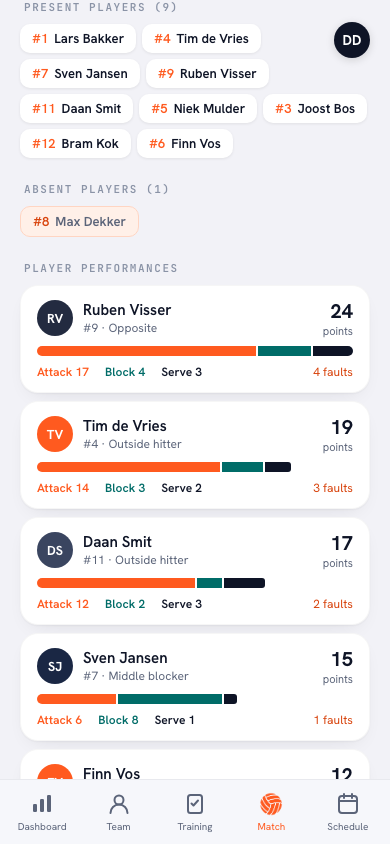
On the practice screen every player sits in one of three columns (present, late or absent), with No reply under the name of anyone who has not answered yet, and at the bottom the number present against the size of your squad. For a match they are listed under Sign-ups in order: who is coming, who is watching, who is not coming and who has not replied. That last group is your phone round. You can also fill in an answer yourself — if a player told you at the last practice, that belongs in the app and not in your head. On the evening itself the All present button puts everyone without an answer down as present in one tap; anything already filled in stays as it is, so a cancellation does not get overwritten.
If the same names stay silent week after week, that is not a setting but a conversation. First check whether those players are receiving the notifications at all — push notifications are sometimes switched off on the device itself, and then you would be having a conversation about nothing.
What it gets you
It sounds like a small thing, and it is: one message, two days ahead, only to those who said nothing. But it does change who has the work. Without that nudge you are the one going through the list on Thursday evening, retyping names into a group chat and asking again the next morning. With it, the app does that round, in the recipient's own language, and you are left with the two names that genuinely need a phone call.
It also makes the list more honest. A sign-up screen with four question marks permanently in it teaches you to distrust the screen and ring round anyway. A screen that is right on the morning of the match is one you will use to build your lineup. That is ultimately the point of match availability: not that people press a button neatly, but that you know on Saturday morning who is there.
Frequently asked questions
Can I switch that nudge off if I would rather not have it?
Yes, but only for yourself: your own notification settings have a switch for reminders. Turn it off and you lose the reminder the evening before as well, because the two belong to the same category. A coach cannot flip the switch for their players; everyone decides that on their own device.
Do I get one of these notifications as a coach?
No. The nudge only goes to players without an answer and to the linked parents of those players. You simply see the result on the practice or match screen: the grey rows thin out over the two days that follow.
A player says he got nothing. How can that be?
Check four things. Does that player have an account of his own or a linked parent, is he not set to inactive (or, for a match or tournament, listed as a training player), had he already filled in an answer when the round ran, and are notifications switched on both on his device and in his settings. It is nearly always one of those four rather than the app.
If someone changes their mind after that message, can they still?
Yes. The nudge is not a deadline, only a request for an answer. Signing up or pulling out is still possible afterwards, right up to the event itself, and you see the change in the list immediately. No second notification follows, because the app only looks at whether there is an answer, not at which one.


Try it yourself in Koach
Less admin, more coaching.
Get started with KoachOr read first what the volleyball coaching app does.